Cyber security for a charity means keeping its money, data and accounts safe from online crime.
This guide is for trustees, staff and volunteers in small charities, mainly in the UK, with no IT background. You do not need an IT team to be affected: if your charity has an email address, a bank account or a list of supporters, it has something worth protecting.
In short
- Charities are targeted by the same online crime as businesses, and scam emails are the most common kind.
- Five basics cover most of the risk, and most cost little or nothing: backups, updates, phones, passwords and spotting scams.
- Give every volunteer their own login, and remove it when they leave.
- In England and Wales, trustees should report serious incidents, such as fraud or a big data loss, to the Charity Commission.
What you will learn
- Explain why a small charity is worth a criminal's time.
- Spot the warning signs in a fake payment request.
- Check the five low-cost basics in your own charity.
- Know who to tell if something goes wrong.
- Scam message (phishing)
- an email, text or call that pretends to be someone you trust to get money or logins.
- Second sign-in check (two-step verification)
- a code or tap on your phone as well as your password when you log in.
- Safety copy (backup)
- a copy of your files kept apart from the original, so you can get them back.
What is cyber security for a charity?
Think of locking up a community hall at the end of the evening. Someone checks the windows, turns off the urn, locks the cash tin and drops the keys back with the right person.
Cyber security is the same routine for your charity's online life. The windows are your email and online accounts. The cash tin is your bank login and donation platform. The keys are your passwords.
For a small charity, it mostly means a few simple habits. Keep a safety copy of important files. Keep laptops and phones up to date. Give each person their own login. Learn to spot scam messages.
Where the comparison stops working: a hall has one door and you can see who walks in. Online, a stranger can try your door from anywhere in the world, at any hour, and leave no footprints you can easily see.
Why does it matter?
Criminals do not skip charities because they do good work. In a UK government survey published in 2025, 30% of charities said they had a cyber breach or attack in the previous 12 months.[2] A loss hurts twice: the money is gone, and supporters may lose trust.
If you are a trustee
What could happen: a fake email from "the chair" asks the treasurer to pay an urgent invoice, and the money goes to a criminal.
Check this: ask whether your charity has a rule that bank detail changes are checked by phone.
If you volunteer
What could happen: you use a shared login on your own laptop, and nobody remembers to change it when you stop helping.
Check this: ask for your own login rather than a shared one.
If you run fundraising
What could happen: your supporter list leaks, and donors get scam calls that use your charity's name.
Check this: make sure only the people who need the supporter list can open it.
What does it look like?
A common trick is a fake message that seems to come from someone inside the charity. Here is a made-up one.
Example only. All values are made up.
From: Chair of Trustees <[email protected]>    (1)
To: [email protected]
Subject: Urgent - venue deposit today

Hi, I'm in meetings all day so can't talk.             (2)
The hall needs the deposit paid before 3pm or we lose
the booking. Please pay £1,800 to the new account:     (3)
Sort code 00-00-00, account 00000000 (EXAMPLE).
Thanks, sent from my phone
- The name looks right, but the address is a free email account, not the charity's own.
- The sender says they cannot talk, so you cannot easily check by phone.
- In a real message, this line would contain a criminal's bank details, sent as "new".
Why this is risky: it uses a real person's name, a real event and a deadline. Rushed people pay first and check later. Bank transfers can be hard to get back once they are sent.
The safer way: agree a rule for new or changed bank details. Always check them by phoning a number you already have, not one in the email. A second person approves any payment over a set amount.[1]
How does it work?
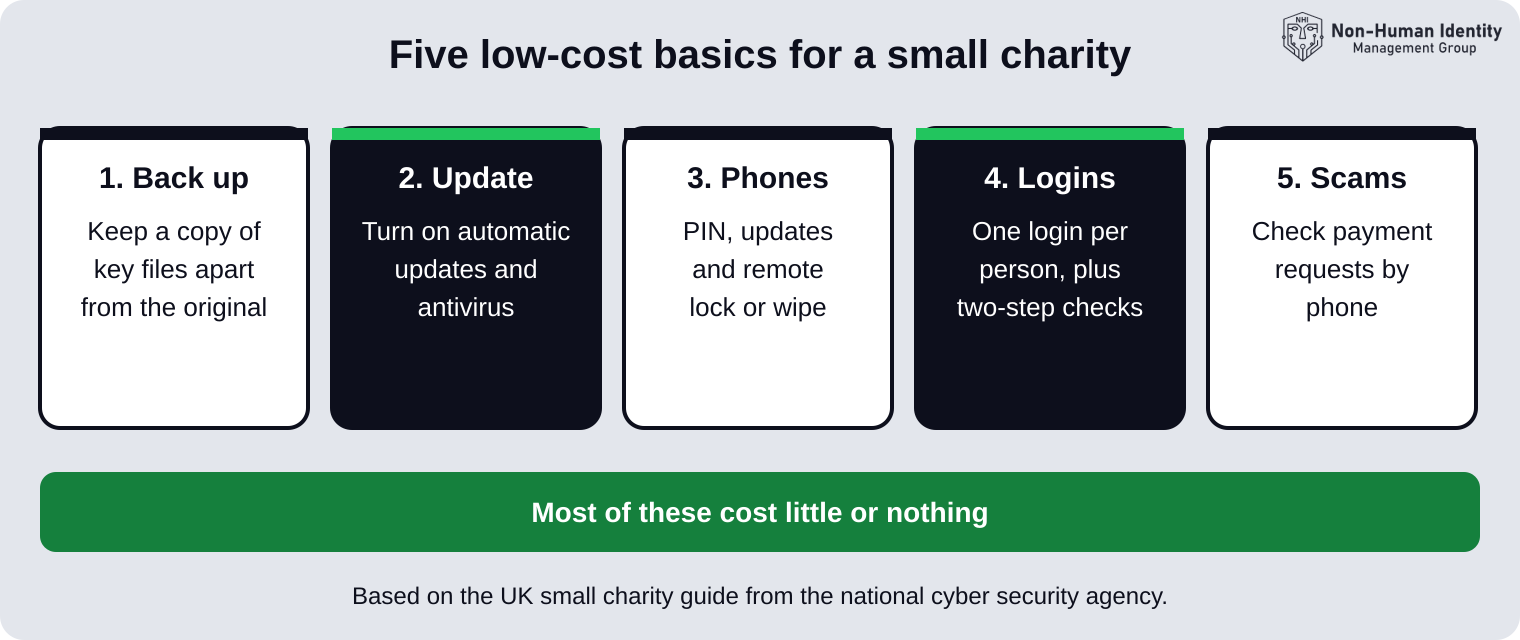
The UK's national cyber security agency wrote a guide for small charities. It picks five areas that are free or cost little to put in place.[1]
- Back up your data. Decide which files you could not lose, such as accounts and supporter records. Keep a copy apart from the original, and set it to happen on its own.[1]
- Protect against harmful software. Turn on the antivirus that comes with your computer, switch on updates and only install apps from official stores.[1]
- Keep phones and tablets safe. Use a PIN, keep them updated and turn on the setting that lets you lock or wipe a lost phone.[1]
- Use passwords well. Give each person their own login. Turn on two-step verification for email and banking. A password manager (an app that stores your passwords safely) helps people use different passwords everywhere.[1]
- Spot scam messages. Learn the signs, such as urgency, odd addresses and changed bank details. Check unusual requests another way, and make it easy to report a mistake without blame.[1]
Scam messages matter most. Among UK charities that had a breach or attack, 86% had faced phishing.[2]
If something does go wrong, it helps to know who to tell before you need to. In England and Wales, the Charity Commission says to report fraud and cyber crime to Report Fraud. That report does not replace a serious incident report to the Commission.[3] Sometimes personal data is lost and people are likely to be put at risk. Then the charity may also need to tell the UK data protection regulator, the Information Commissioner's Office (ICO). It should do this within 72 hours where it can.[4]
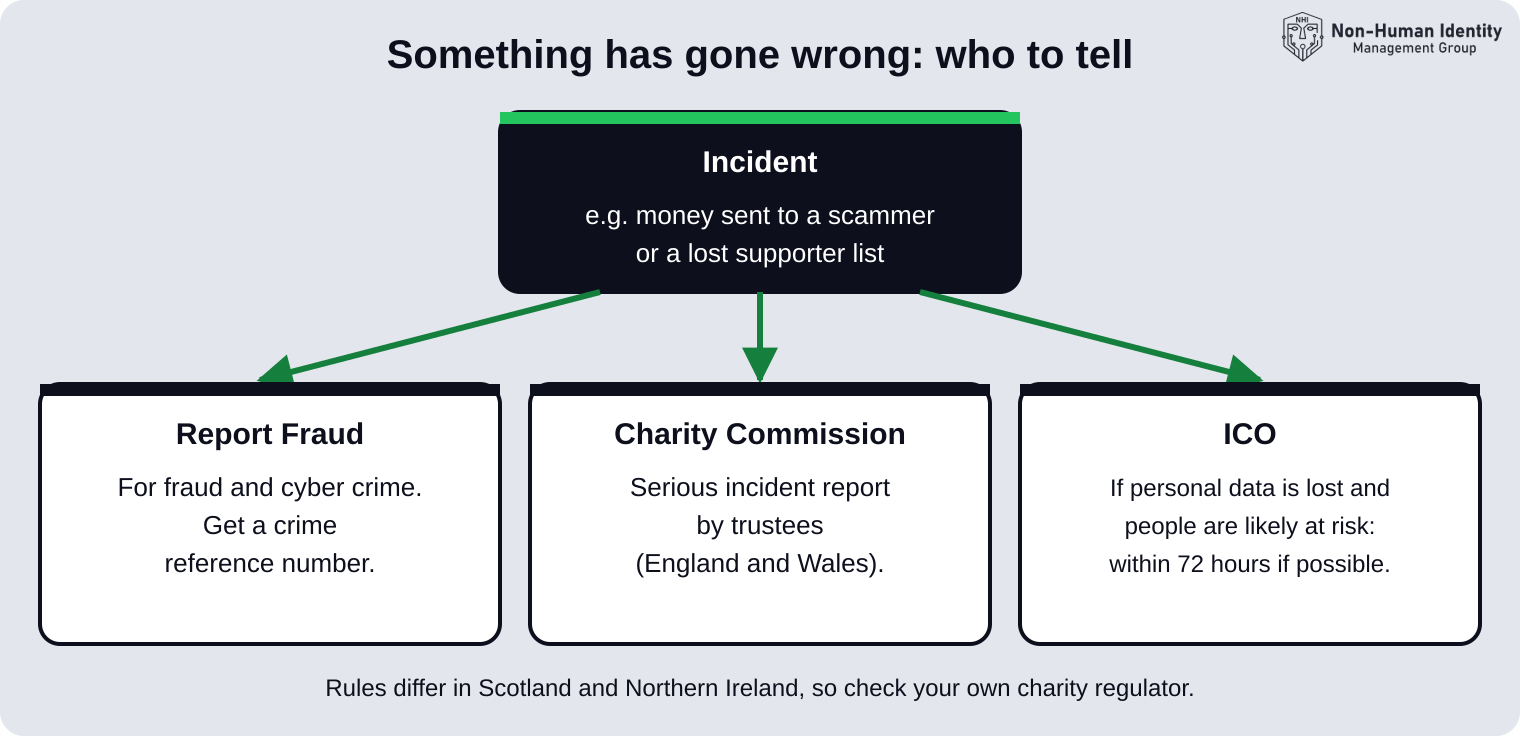
Reporting rules checked on 28 November 2026 against the Charity Commission and ICO websites. Charities in Scotland and Northern Ireland have their own regulators. This is general information, not legal advice.
A worked example
Hal Thorne is the volunteer treasurer of a small food bank, a fictional charity with two part-time staff and about thirty volunteers.
On a Friday afternoon, Hal gets an email that seems to come from the chair. It asks him to pay a supplier's invoice today, to "the new account". The chair is away, and the email says she cannot take calls.
Hal remembers locking up the hall. You check the door before you leave, not after. He looks closely at the sender address. The name is right, but the address is a free email account.
He does not reply to the email. Instead he phones the supplier on the number on last year's invoice. The supplier says its bank details have not changed. He also texts the chair on her usual number. She replies that she sent nothing.
No money has left the account, but Hal does not stop there. He tells the other trustees on Monday. He reports the attempt through Report Fraud's online tool and notes the reference number. The trustees agree it does not need a serious incident report, because nothing was lost, and they note why in the minutes.
Uma Haddad, a volunteer who helps with the computers, turns on two-step verification for the chair's email and the bank login. She also sets up a separate login for each volunteer who uses the shared laptop.
The trustees write a short rule. Bank detail changes are always checked by phone. Any large payment needs a second person to approve it.
Myths and mistakes
| What people think | What is true |
|---|---|
| We are too small and too kind to be a target. | Many attacks are sent to thousands of addresses at once. Small charities are hit too.[2] |
| Cyber security needs expensive tools. | The five basics in the national charity guide are free or cost little.[1] |
| One shared password is fine for volunteers. | Shared logins are hard to take back when people leave. Give each person their own login.[1] |
| We reported the fraud to the police, so we are done. | In England and Wales, a fraud report does not replace a serious incident report to the Charity Commission.[3] |
| Changing passwords every month keeps us safe. | The national guide says not to force regular changes unless you think a password is known to someone else.[1] |
What can I do this week?
- Turn on two-step verification for the charity's email and bank logins.
- Check that your most important files have a copy kept somewhere else.
- Write down who has a login to each account, and remove anyone who has left.
- Agree that bank detail changes are always checked by phone on a known number.
- Note where to report fraud and how to make a serious incident report.
Checklist
- Important files are backed up automatically and kept apart from the original.
- Laptops and phones get updates automatically.
- Every person has their own login, with no shared passwords.
- Email and banking use two-step verification.
- Leavers lose access on the day they leave.
- Payments to new or changed bank details are checked by phone and approved by a second person.
- Staff and volunteers know how to report a scam or mistake, with no blame.
- Trustees know when and how to report a serious incident.
Common questions
Do small charities really get attacked?
Yes. In the UK government's 2025 survey, 30% of charities reported a breach or attack in the previous year.[2] Most were scam messages. These are sent to huge numbers of addresses at once, so even a tiny charity can receive them.
Who is responsible for cyber security in a charity?
The trustees are, in the end. They can ask staff, volunteers or an IT supplier to do the work. But they stay responsible for how the charity protects its money and data. Every person with a login also has a part to play in following the basics.
Do we have to report a scam to the Charity Commission?
Often yes, if a crime was involved. In England and Wales, the Commission says incidents involving crime are usually reportable, and there is no minimum loss. A blocked attempt with no loss may not be. Check the Commission's serious incident guidance and record your decision either way.
What if a volunteer uses their own laptop or phone?
That is common and can work well. Ask them to keep the device updated, use a screen lock and sign in with their own login, not a shared one. When they stop volunteering, remove their access to charity accounts and files on the same day.
Is Cyber Essentials worth it for a charity?
It can be a good next step once the basics are in place. Cyber Essentials is a UK government-backed certificate for five basic protections, and some funders or partners ask for it. See Cyber Essentials for Beginners to decide if it fits your charity.
Where next?
Ready for the detail? Read the practitioner guide: Non-Profit Identity Security Guide. It goes further into free and low-cost login controls by platform, choosing sign-in checks on a charity budget and a phased plan for small teams.
Also useful:
- Cybersecurity for Charities and Non-Profits Guide
- Small Charity Cyber Security Checklist
- Charity Serious Incident Reporting for Cyber Incidents Guide
- Phishing for Beginners
- Small Business Cyber Security for Beginners
Related NHI Mgmt Group resources: Charity Trustee Cyber Oversight Guide · Multi-Factor Authentication for Beginners · The 3-2-1 Backup Rule for Beginners
Key terms
- Phishing
- A fake message or website that tricks people into handing over logins, money or information.
- Payment diversion fraud
- A scam that sends a real payment to a criminal's account, often by faking changed bank details.
- Two-factor authentication
- A login that needs two different proofs, such as a password and a code from your phone.
- One login used by several people, which makes it hard to know who did what or to remove one person.
- Password manager
- An app that creates, stores and fills in passwords, so each account can have its own.
- Data breach
- When personal information is lost, stolen, changed or seen by someone who should not see it.
Sources and further reading
- Cyber Security: Small Charity Guide. National Cyber Security Centre (NCSC), with the Charity Commission for England and Wales. https://www.ncsc.gov.uk/files/Charity-Guide-v3.pdf, accessed 28 Nov 2026.
- Cyber security breaches survey 2025. Department for Science, Innovation and Technology and Home Office, 10 April 2025. https://www.gov.uk/government/statistics/cyber-security-breaches-survey-2025/cyber-security-breaches-survey-2025, accessed 28 Nov 2026.
- How to report a serious incident in your charity. Charity Commission for England and Wales, GOV.UK. https://www.gov.uk/guidance/how-to-report-a-serious-incident-in-your-charity, accessed 28 Nov 2026.
- Personal data breaches: a guide. Information Commissioner's Office (ICO). https://ico.org.uk/for-organisations/report-a-breach/personal-data-breach/, accessed 28 Nov 2026.