Data extortion is when criminals steal your data and demand money not to publish it.
This guide is for anyone who works with customer, staff or patient records, and for students new to the topic. You do not need to be technical to be affected: if your organisation holds personal data, it could be a target.
In short
- Some criminal groups only steal data and threaten to leak it, without locking any files.[1]
- Backups help you recover locked files, but they do not stop stolen data being published.
- Paying does not prove the data is deleted, and it may not avoid a fine for the breach.[1][3]
- Spotting data leaving early, holding less data and planning your response matter most.
What you will learn
- Explain how data extortion differs from ransomware that locks files.
- Spot the pressure tricks in an extortion message.
- Check what your organisation would do in the first day.
- Ask who decides about reporting and telling the people affected.
- Demanding money with threats (extortion)
- forcing someone to pay by threatening to cause harm.
- Shaming website (leak site)
- a website where criminals list victims and publish stolen data.
- Data leaving without permission (exfiltration)
- copying data out of an organisation to somewhere the attacker controls.
What is data extortion?
Think of a blackmailer who has copied your private letters. You still have the letters, but the blackmailer says they will share the copies unless you pay.
Data extortion works the same way. Criminals break into a network and copy files out, which is called exfiltration. Then they demand money and threaten to publish the files or sell them.
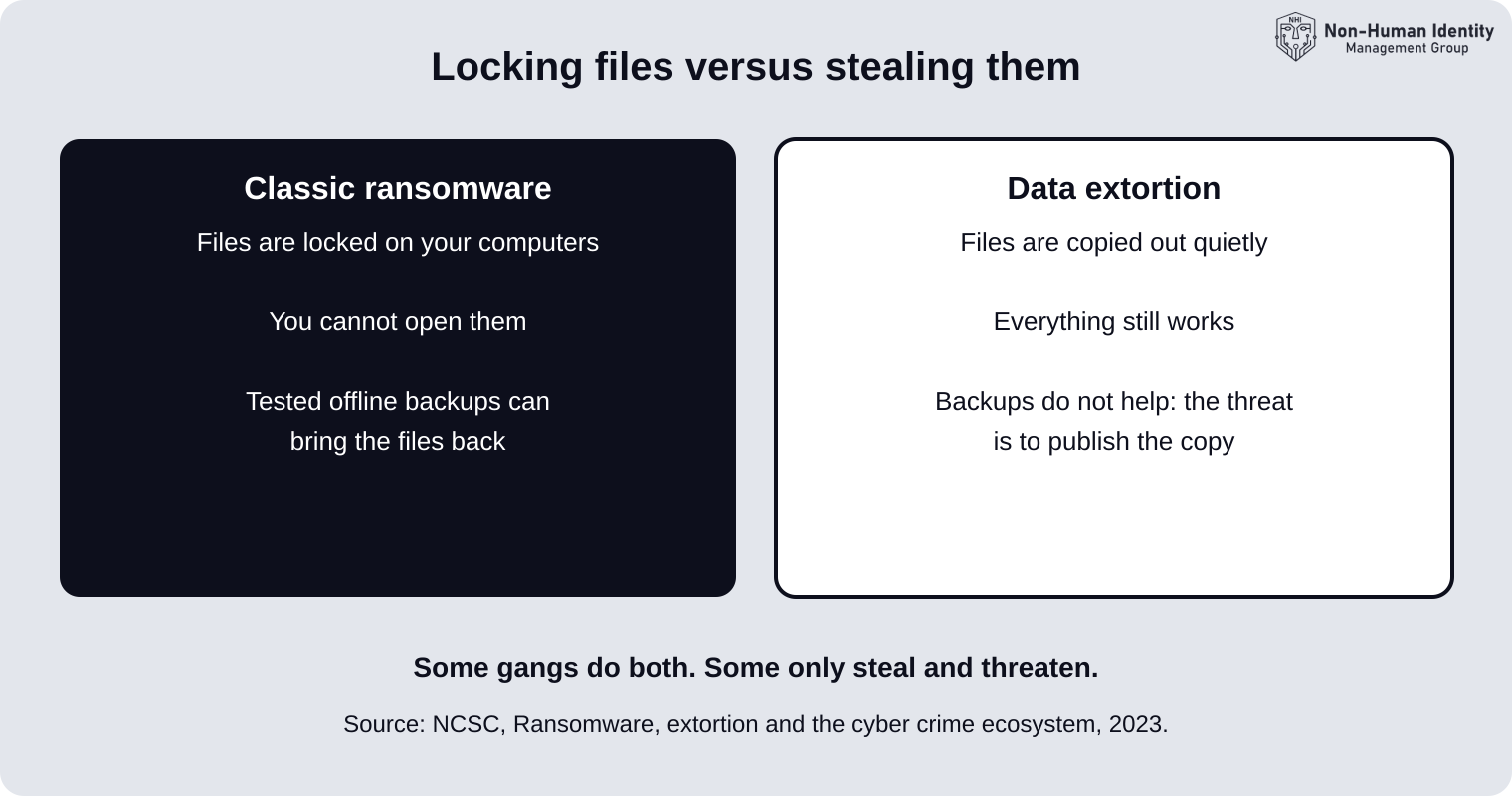
This is different from ransomware that locks files. In a data extortion attack, your computers may keep working as normal. The UK's National Cyber Security Centre says some groups steal and extort without using ransomware at all.[1]
Where the comparison stops working: a blackmailer usually has one secret about one person. A data theft can hold the records of thousands of people, and each of them may be harmed if it leaks.
Why does it matter?
Stolen data cannot be "restored" like locked files. Once it is out, the harm falls on the people in it, as well as on the organisation.
If you run a small business
What could happen: a criminal emails you a sample of your customer list and asks for payment.
Check this: know what personal data you hold, and delete what you no longer need.
If you handle customer or patient records
What could happen: records you look after appear on a leak site.
Check this: keep records only in approved systems, not in personal folders or email.
If you are new to IT work
What could happen: a large upload to an unknown storage site goes unnoticed for days.
Check this: learn who to tell when you see data leaving in unusual ways.
What does it look like?
Here is a made-up extortion email of the kind a business might receive.
Example only. All values are made up.
Subject: Your data is with us                  (1)
We have copied 0000 GB from your servers.
Sample attached: customers_EXAMPLE.csv         (2)
Pay within 5 days or we post it on our site.   (3)
Pay and we will delete everything.             (4)
Contact: chat.example.invalid/FAKE-0000
- A message that may arrive by email, phone or a note left on a server.
- In a real message, this line would point to a small piece of stolen data, sent to prove the claim.
- A deadline, so you act before you think.
- A promise that cannot be checked.
Why this is risky: the claim may be true, partly true or invented. Rushing to pay can waste money. US prosecutors say one gang kept copies of data from victims who had paid to have it deleted.[3]
The safer way: do not reply alone. Bring in your IT, legal and senior people, check what was really taken and report it.
How does it work?
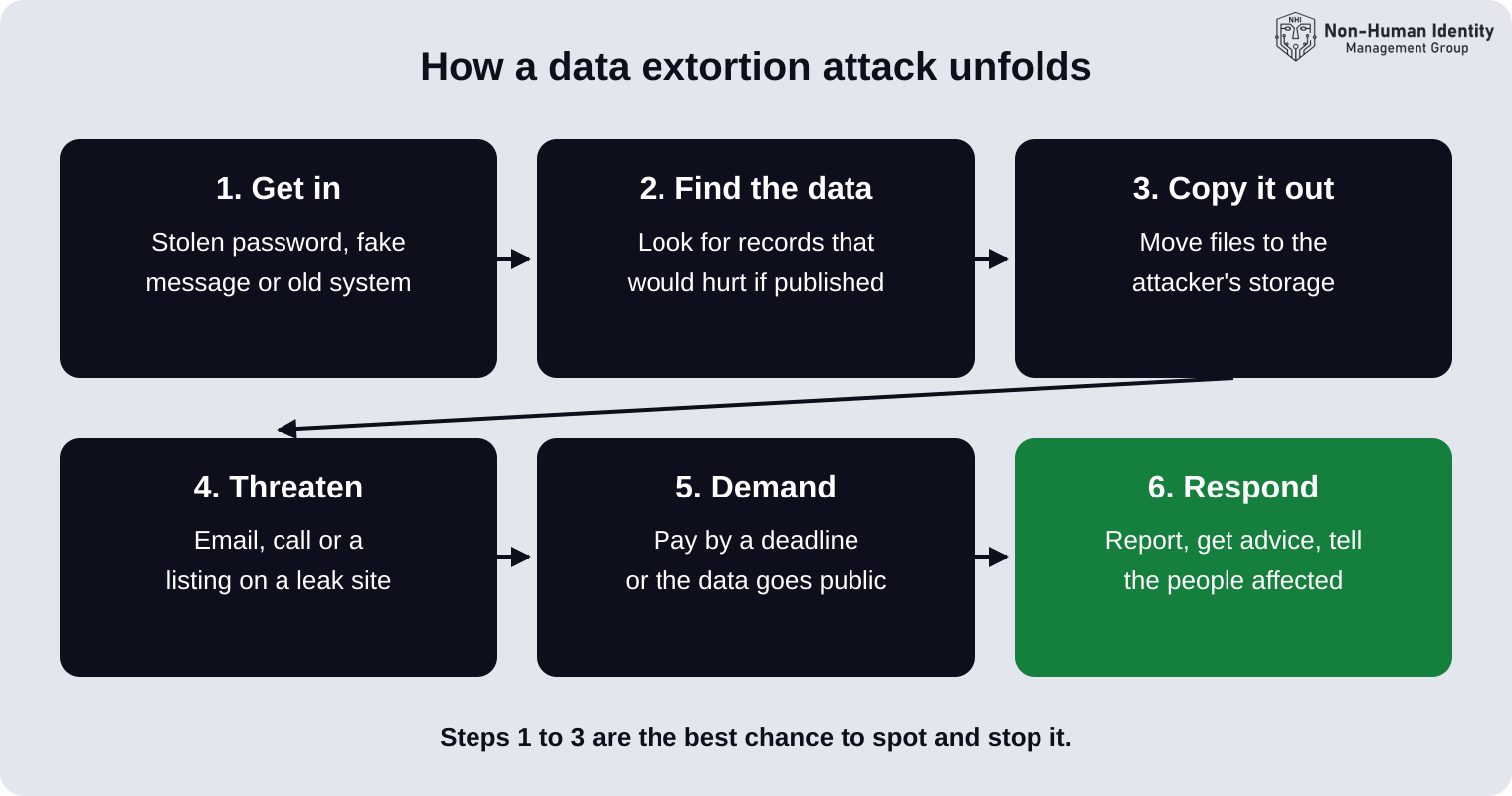
Attacks differ, but many follow a similar path.
- Get in. Common routes include poorly protected remote access and systems that were not updated.[4]
- Find the data. The attacker looks for records that would cause the most harm if published.
- Copy it out. Files are moved to storage the attacker controls.
- Threaten. The attacker gets in touch, or lists the victim on a leak site.[1]
- Demand. A price and a deadline are set, and some data may be leaked to add pressure.
Paying is not a clean way out. The NCSC notes that a victim can still be held responsible for failing to protect the data, and that paying may not avoid a fine.[1] In the UK, many personal data breaches must be reported to the data regulator within 72 hours of finding out.[2]
A worked example
Lina Jensen runs Northgate Physio, a fictional clinic with three sites and about two thousand patients. Lars Castell looks after its IT part time.
On Tuesday, Lina gets an email. It says criminals have copied the clinic's patient records. A small file is attached with ten patient names and dates of birth. The email asks for payment within five days, or the full list goes on a leak site.
The computers all work normally, so at first Lina wonders if it is a bluff. Then she thinks of the blackmailer picture. Her files are still there, but someone may hold a copy.
Lina does not reply. She calls Lars and the clinic's insurer, who puts her in touch with legal and incident experts.
Lars checks the records. A staff account with a reused password and no second check signed in from abroad last week. It downloaded a large export of patient data. The theft is real.
Lars resets the account, turns on a second check for all staff and keeps the logs as evidence. The legal adviser helps Lina report the breach to the data regulator within the deadline. She also reports the crime.
The clinic writes to affected patients. It tells them what was taken and what to watch for, such as fake calls that use their details.
Lina decides not to pay. Afterwards, the clinic deletes old records it no longer needs. It also sets an alert for large data exports.
Myths and mistakes
| What people think | What is true |
|---|---|
| Our systems still work, so it is not serious. | In data extortion, nothing may be locked. The harm is the stolen copy. |
| Good backups protect us from this. | Backups bring back lost files. They do nothing about a copy someone else holds. |
| Paying means the data is deleted. | Nobody can check that. One gang kept data from victims who paid.[3] |
| If we pay, we do not need to report it. | Paying does not change the duty to report a breach, and a fine may still follow.[1][2] |
| Every threat is real. | Some claims are exaggerated or false. Check your own records before deciding anything. |
What can I do this week?
- List the most sensitive data you hold, and where it lives.
- Delete old personal data that you no longer need.
- Turn on a second check at sign-in for email and remote access.
- Ask IT whether large downloads or uploads raise an alert.
- Write down who to call first if an extortion message arrives.
Checklist
- We know what sensitive data we hold and where.
- Data we no longer need is deleted on a schedule.
- Email and remote access use a second check at sign-in.
- Unusual large data transfers raise an alert.
- Staff know not to reply to an extortion message alone.
- There is a plan naming who handles legal advice, reporting and telling people.
- We know how to report a breach to the data regulator.
Common questions
How is data extortion different from ransomware?
Ransomware locks your files so you cannot use them. Data extortion steals a copy and threatens to publish it. Some gangs do both, which is called double extortion. Others only steal and threaten, so your systems may keep working while the threat goes on.
Should we pay to stop the leak?
UK law enforcement does not encourage paying.[4] You cannot check that the data is deleted, and a gang has been found keeping data from victims who paid.[3] Take legal and expert advice, report the crime and focus on protecting the people affected.
Do we have to report it?
Often, yes. In the UK, a personal data breach that is likely to put people at risk must usually be reported to the ICO within 72 hours.[2] You may also need to tell the people affected. Legal advice helps you decide quickly.
How can we tell if the threat is real?
Check your own records. Look at sign-in records and large downloads, and compare any sample with your real data. Experts can help with this. Treat the claim as possible until you know more, but do not let the deadline rush you.
What should staff do if they get an extortion email?
Do not reply, click links or forward it widely. Report it straight away to IT or a manager, using the usual reporting route. Keep the message, because investigators may need it. Then let the response team take over.
Where next?
Ready for the detail? Read the practitioner guide: Data Extortion Without Encryption Guide. It goes further into how these attacks work, how to detect data leaving and lessons from real incidents.
Also useful:
- Ransomware for Beginners
- Data Exfiltration for Beginners
- Data Breach Notification for Beginners
- Ransomware Data Leak Site Listing Playbook
- LockBit for Beginners
Related NHI Mgmt Group resources: BianLian Data Extortion Profile Guide · Ransomware Payments and Sanctions Guide · Cybercrime Ecosystem Guide
Key terms
- Data extortion
- Stealing information and then demanding money not to publish or misuse it.
- Double extortion
- Locking files and also threatening to publish stolen data.
- Ransomware leak pressure
- Using the threat of publishing stolen data to push a victim to pay.
- Exfiltration detection
- Watching for data leaving an organisation before it is leaked or misused.
- Multi-factor authentication
- Signing in with two or more separate checks, such as a password and a phone code.
- Ransomware
- Harmful software that blocks access to files or systems and then demands payment.
Sources and further reading
- Ransomware, extortion and the cyber crime ecosystem. National Cyber Security Centre (NCSC) white paper, 11 September 2023. https://www.ncsc.gov.uk/whitepaper/ransomware-extortion-and-the-cyber-crime-ecosystem, accessed 28 Nov 2026.
- Personal data breaches: a guide. Information Commissioner's Office (ICO). https://ico.org.uk/for-organisations/report-a-breach/personal-data-breach/personal-data-breaches-a-guide/, accessed 28 Nov 2026.
- U.S. Charges Russian National for Developing and Operating LockBit Ransomware. US Department of Justice, 7 May 2024. https://www.justice.gov/opa/pr/us-charges-russian-national-developing-and-operating-lockbit-ransomware, accessed 28 Nov 2026.
- Mitigating malware and ransomware attacks. National Cyber Security Centre (NCSC). https://www.ncsc.gov.uk/guidance/mitigating-malware-and-ransomware-attacks, accessed 28 Nov 2026.