Hacker group names are labels security companies give to attacker groups, so one group often has several names.
This guide is for anyone who has read about "Fancy Bear" in one article and "APT28" in another and wondered if they were the same. You do not need a technical job to use it: decoding the names stops you treating one threat as five.
In short
- Each big security company names attacker groups in its own way, so one group can collect many names.
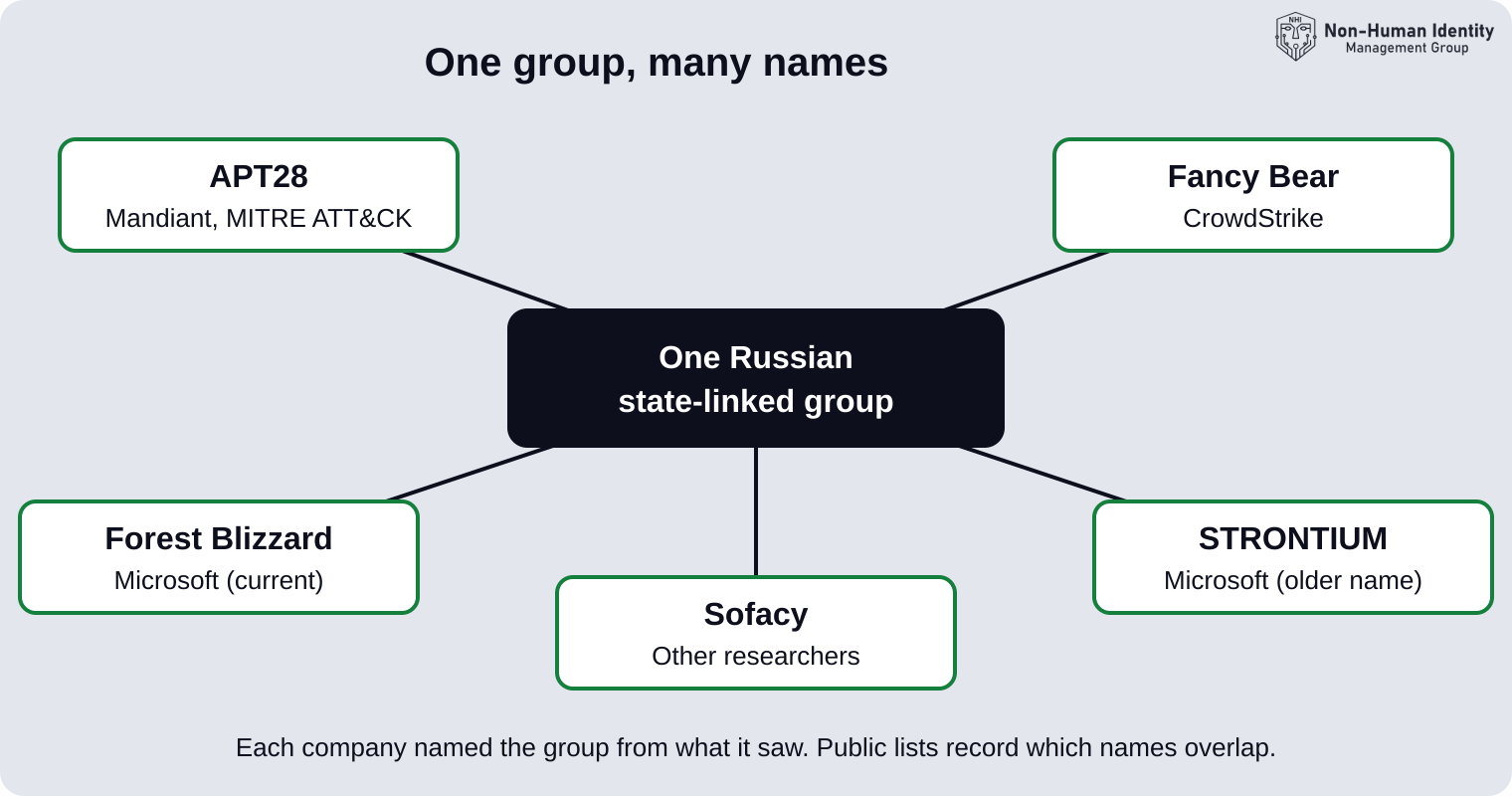
- Fancy Bear, APT28, Forest Blizzard, Sofacy and STRONTIUM are all names linked to the same Russian group.
- The name often hints at where a group is thought to be based, or whether it is after money.
- Free public lists, such as the MITRE ATT&CK groups pages, show which names have been linked together.
What you will learn
- Explain why one hacker group can have five or more names.
- Decode a name like "Forest Blizzard" or "Fancy Bear" into a rough meaning.
- Check whether two names in the news point to the same group.
- Spot temporary names that may change later.
- Attacker group (threat actor)
- a person or group that sets out to cause harm through computers.
- Other name (alias)
- a second name for the same group, given by a different company.
- Linking a group to someone (attribution)
- the careful work of deciding who is behind an attack.
What are hacker group names?
Think of a person with nicknames. Their family calls them one thing, their football team another, and their old school friends a third. It is the same person, but each group named them without asking the others.
Hacker group names work the same way. Several security companies watch attacks from their own customers. Each one spots a pattern, gives it a name, and starts writing reports.
Later, they compare notes and see they were watching the same group. By then, each name is already in the news. So a group such as the one called APT28 by one company is called Fancy Bear by another and Forest Blizzard by a third.[1]
Where the comparison stops working: you can ask a person their real name. Nobody can ask the attackers. Each name is a company's best judgement about a pattern of activity, so two names may overlap a lot without matching exactly.[2]
Why does it matter?
If you do not know the names are linked, you may read three reports and think there are three threats. Or you may miss a warning because it used a name you did not recognise.
If you are a student or new to security
What could happen: you write notes on "two groups" that are really one, and get confused in an interview or exam.
Check this: look up a new group name on a free public list before you treat it as new.
If you are a manager
What could happen: your team spends a week on a "new" group that it already defended against under another name.
Check this: ask your team to keep one list of the groups that matter to you, with all their known names.
If you read the news
What could happen: a headline about "Midnight Blizzard" and one about "Cozy Bear" seem unrelated, but both names are linked to the same group.[6]
Check this: see if the article lists "also known as" names, then look them up.
What does it look like?
Here is a made-up "name card" a small team might keep. Every name on it is invented.
Example only. All values are made up.
GROUP CARD: EXAMPLE-GROUP-0000 (FAKE)
Our main name:   Example Group                       (1)
Company A calls: Velvet Blizzard (FAKE)              (2)
Company B calls: Velvet Bear (FAKE)                  (3)
Company C calls: APT-0000 (FAKE)
Old name:        Storm-0000 (FAKE)                   (4)
How sure:        Medium, names linked in 2 reports   (5)
Last checked:    01 Jan 0000
- Pick one name your team always uses, so notes stay tidy.
- A weather word like Blizzard is the style one company uses for country-linked groups.
- An animal like Bear is the style another company uses.
- A temporary number name, which may be replaced once the company is more confident.
- In a real file, this line would say how strong the link between the names is, and who made it.
Why this is risky: without a card like this, each new name looks like a new threat, and old warnings get lost.
The safer way: keep one card per group that matters to you, list every known name, and note where each link came from.
How does it work?
Here is how one group ends up with many names.
- Spot a pattern. A security company sees attacks that share tools, websites or habits, and groups them together.
- Give it a temporary name. While it is still unsure, the company uses a holding name. Microsoft uses "Storm" plus four digits, such as Storm-0875.[1] Mandiant uses "UNC", short for uncategorised, plus a number.[3]
- Give it a full name. Once the company is more confident, the group gets a name in that company's style. Mandiant says this step often takes years of evidence.[3]
- Other companies do the same. Each company works from what its own customers see, so each one names the group separately.
- The names get linked. Companies and public lists record which names seem to overlap. MITRE ATT&CK, a free public knowledge base of attacker behaviour, lists these as "associated groups".[2][5]
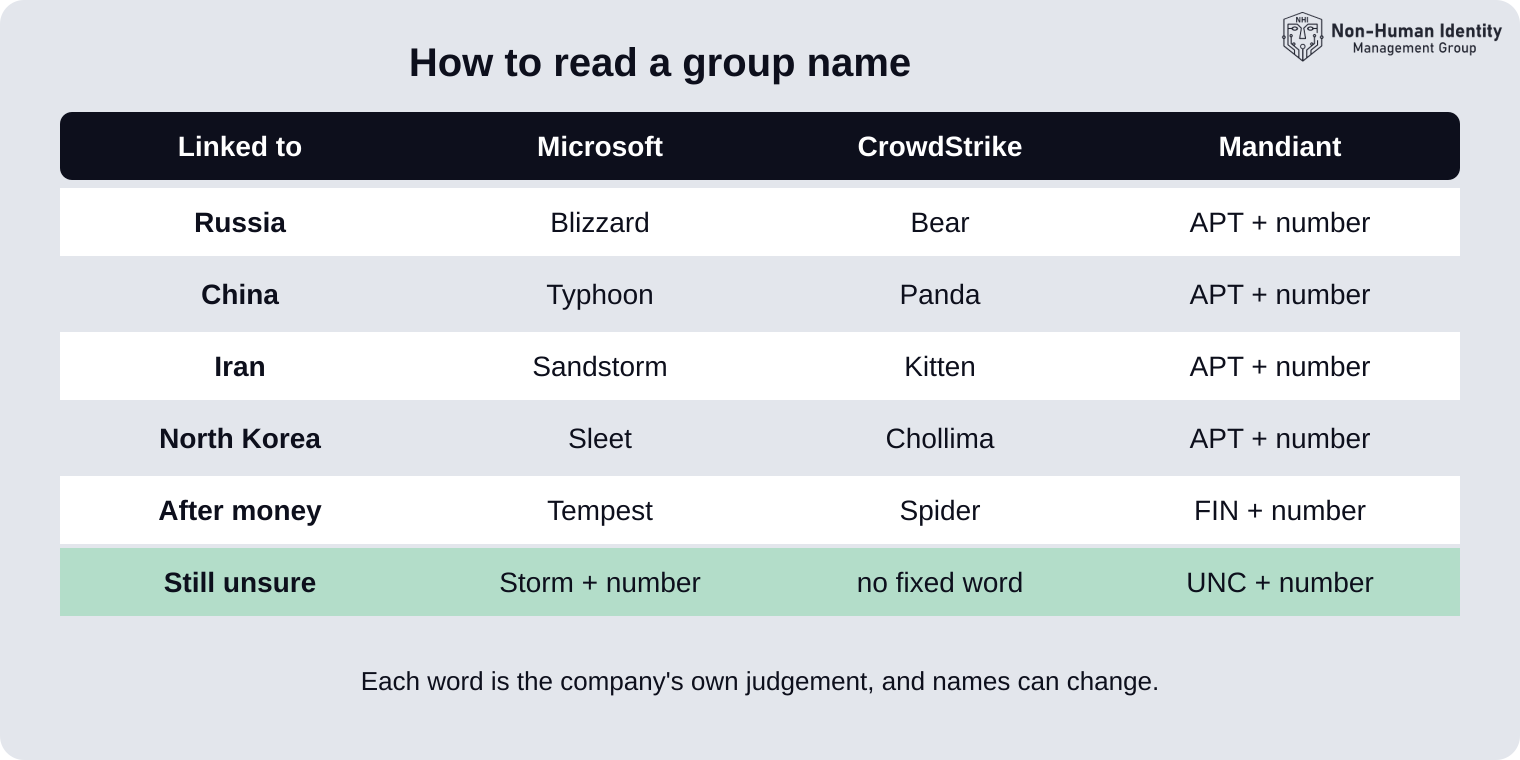
The style of a name often carries a clue. Microsoft uses weather words. Blizzard is for groups linked to Russia, Typhoon for China and Sandstorm for Iran. Sleet is for North Korea, and Tempest is for groups after money.[1] CrowdStrike uses animals. Bear is for Russia, Panda for China and Kitten for Iran. Chollima is for North Korea, and Spider is for criminal gangs.[4] Mandiant uses APT plus a number for state-backed groups and FIN plus a number for groups after money.[3]
A worked example
Hugo Rosen is in his first month as a junior analyst at Linden Freight, a fictional delivery firm. His manager forwards three news links. One warns about "Forest Blizzard". One is about "Fancy Bear". The third mentions "APT28". She asks Hugo for a short summary of the three groups by Friday.
Hugo remembers the nickname idea. He opens the MITRE ATT&CK groups pages and searches for APT28. The page lists Fancy Bear, Forest Blizzard, Sofacy and STRONTIUM as associated names.[2] He checks Microsoft's naming page too. It links Forest Blizzard to the same set of names.[1]
So Hugo writes back that the three articles are about one group, not three. He adds that the names come from different companies, and that each company saw slightly different activity.
He then reads the three articles side by side. Two describe the same campaign. The third adds a new trick the group has started to use. That is the useful part, so he puts it at the top of his summary.
Finally, Hugo starts a group card in the team's shared folder. It lists one main name, the other names, where each link came from and the date he checked. The next time a new name turns up, anyone in the team can look there first.
His manager now has one clear summary, not three overlapping ones, and the team spends its time on the new trick.
Myths and mistakes
| What people think | What is true |
|---|---|
| Different names mean different groups. | Many names are linked to the same group. Check a public list before treating a name as new. |
| Linked names mean exactly the same people. | Linked names usually overlap a lot, but each company sees different activity, so the match may not be exact.[2] |
| The hackers chose these names. | Security companies chose most of them. A few names come from personas the attackers used themselves. |
| A "Storm" or "UNC" name is a minor group. | It only means the company is still building its picture. The cluster may later merge or get a full name.[1][3] |
| The country word proves who did it. | It reflects the company's judgement. Working out who is behind an attack is hard, and views can change. |
What can I do this week?
- Look up one group from the news on the MITRE ATT&CK groups pages and read its associated names.
- Open Microsoft's naming page and find the weather word for two countries.
- Pick the two or three groups most relevant to your sector and write down all their names.
- Agree one main name per group that your team will use in notes.
Checklist
- We check a public groups list before treating a group name as new.
- We use one main name per group in our own notes.
- Each group card lists all known names and where each link came from.
- We note the date we last checked the names.
- We treat temporary names as likely to change.
- We treat country words in names as one company's judgement, not proof.
Common questions
Why do security companies not agree on one name?
Each company sees different attacks, through its own customers, and names a pattern before it knows if others are tracking it too. Their groups also rarely match exactly. So each keeps its own scheme and publishes lists linking its names to others.
What does APT mean in a name like APT28?
APT stands for advanced persistent threat: a highly skilled group that tries to stay hidden for a long time. Mandiant uses APT plus a number for groups it links to a government. The number is a label, not a ranking of danger.
Why did Microsoft change its names?
Microsoft used to name groups after chemical elements, such as STRONTIUM. It moved to weather words, so Forest Blizzard is now its name for the group it once called STRONTIUM.[1] Older reports still use the old names.
Where can I check which names belong together?
Two free places are a good start. MITRE ATT&CK has a page for each group with its associated names.[2] Microsoft publishes a table linking its names to other companies' names.[1] Treat both as a guide, and check the date.
Does the name tell me how dangerous a group is?
No. The name tells you which company named it and, often, the rough origin or motive that company believes. How much a group matters to you depends on what you hold and who that group usually targets.
Where next?
Ready for the detail? Read the practitioner guide: Threat Actor Naming Conventions Guide. It goes further into every major company's naming scheme, MITRE group IDs and how to run a name crosswalk in a security team.
Also useful:
- Threat Actors for Beginners
- MITRE ATT&CK for Beginners
- APT28 (Fancy Bear) Threat Actor Profile
- Threat Actor Groups Guide
Related NHI Mgmt Group resources: Lazarus Group for Beginners · Scattered Spider for Beginners · APT29 (Midnight Blizzard) Threat Actor Profile
Key terms
- Threat actor
- Any person or group that sets out on purpose to harm systems, data or trust.
- Intrusion set
- A linked collection of attack activity, such as shared tools and websites, thought to come from the same group.
- Attribution
- The careful, confidence-rated judgement of who is behind an attack.
- Advanced persistent threat (APT)
- A highly skilled attacker that tries to stay hidden for a long time while it steals data or builds access.
- Threat intelligence
- Useful, checked information about attackers and their methods that helps defenders decide what to do.
- Alias
- Another name for the same group, usually given by a different security company.
Sources and further reading
- How Microsoft names threat actors. Microsoft Learn, Microsoft, updated 12 November 2026. https://learn.microsoft.com/en-us/unified-secops/microsoft-threat-actor-naming, accessed 28 Nov 2026.
- APT28 (G0007). MITRE ATT&CK, version 20. https://attack.mitre.org/groups/G0007/, accessed 28 Nov 2026.
- How Mandiant tracks uncategorized threat actors. Mandiant (Google Cloud), 17 December 2020. https://cloud.google.com/blog/topics/threat-intelligence/how-mandiant-tracks-uncategorized-threat-actors, accessed 28 Nov 2026.
- Adversary universe. CrowdStrike. https://www.crowdstrike.com/en-us/adversaries/, accessed 28 Nov 2026.
- Groups. MITRE ATT&CK, version 20. https://attack.mitre.org/groups/, accessed 28 Nov 2026.
- APT29 (G0016). MITRE ATT&CK, version 20. https://attack.mitre.org/groups/G0016/, accessed 28 Nov 2026.