Scattered Spider is a name for young, English-speaking criminals who trick IT help desks into handing over access.
This guide is for anyone who has heard the name after a big company was hit and wants to know how a phone call can lead to a cyber attack. You do not need a technical job to be affected: anyone who answers calls for an IT help desk can be a target.
In short
- Scattered Spider is a loose criminal group, active since at least 2022, that is after money.[1]
- Its best-known trick is phoning a help desk while pretending to be a staff member who is locked out.[2]
- Once in, it has stolen data to demand payment and has used ransomware, software that locks files.[2]
- Strong checks before any password or sign-in reset are one of the best defences.
What you will learn
- Explain who Scattered Spider is and what it wants.
- Spot the signs of a fake "locked out" call to a help desk.
- Check how your own help desk confirms who is calling.
- Ask the right questions about resets for powerful accounts.
- Tricking people (social engineering)
- getting someone to help an attacker by lying to them, not by breaking technology.
- Phone scam (vishing)
- a voice call that pretends to be someone trusted, to get access or information.
- Second sign-in check (MFA)
- short for multi-factor authentication: a code or prompt on top of a password.
What is Scattered Spider?
Think of a confident stranger in a hi-vis jacket. He walks into an office and says, "I'm here to fix the lift." Nobody asks for proof, so he walks straight in. Scattered Spider does the same thing, but by phone.
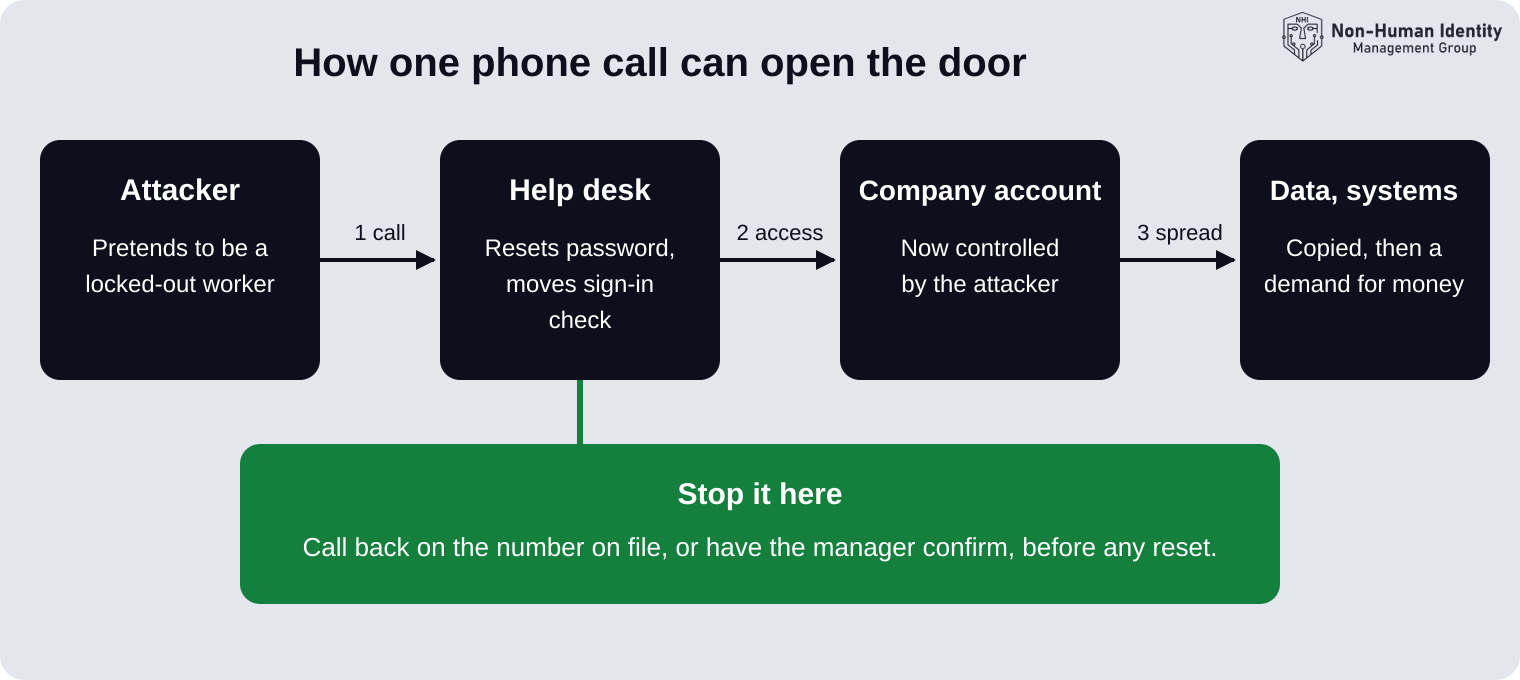
The group calls a company's IT help desk. It pretends to be a worker who has lost their phone or forgotten their password. If the help desk resets the account without strong checks, the caller now controls it.[2]
A free public knowledge base of attacker behaviour describes Scattered Spider as a native English-speaking criminal group, active since at least 2022.[1] The name comes from one security company. Others call it Octo Tempest, UNC3944 or Muddled Libra.[1][2] For why one group has many names, see Hacker Group Names for Beginners.
Where the comparison stops working: a stranger in a jacket has to turn up in person and can be seen. A caller can try many help desks in a day, from anywhere. They may also know a lot about the worker they pretend to be.
Why does it matter?
This group shows that a big attack can start with one polite phone call. No clever hacking is needed if a person can be talked into opening the door.
If you work on a help desk
What could happen: you reset a "manager's" password and second sign-in check, and the caller turns out to be an attacker.
Check this: follow your checks every time, even when the caller is upset or in a hurry.
If you are a manager or business owner
What could happen: one reset gives an attacker a way in, and the business ends up with stolen data and locked systems.
Check this: ask how your help desk, or your IT supplier, confirms who is calling before a reset.
If you are any member of staff
What could happen: someone phones or texts you as "IT" and asks you to approve a prompt or install a tool.
Check this: hang up and call IT back on the number you already know.
What does it look like?
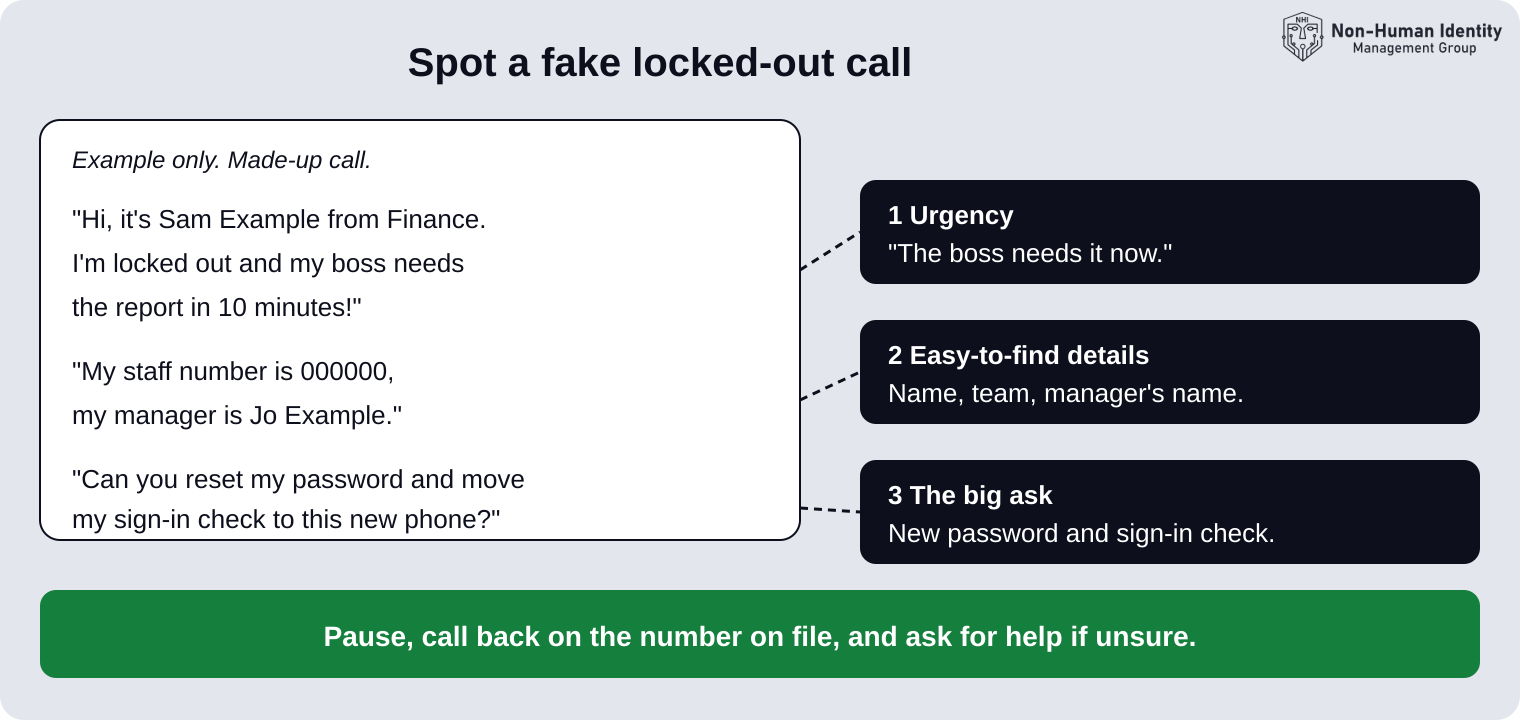
Here is a made-up call script showing the kind of call US agencies describe.[2] It is for spotting the signs only.
Example only. All values are made up.
CALLER: Hi, it's Sam Example from Finance.             (1)
        I've got a new phone and I'm locked out.
        My manager needs the payroll report in 10 mins! (2)
DESK:   Can I check your staff number?
CALLER: Sure, it's 000000. My boss is Jo Example.      (3)
        Can you just reset my password and
        move my sign-in check to this new phone?       (4)
- A believable name and team. Attackers may find these on social media.
- Pressure and urgency, so the desk skips steps.
- In a real message, this line would give details that are easy to find online, so they prove little.
- The big ask: a new password and the second sign-in check moved to the caller's phone.
Why this is risky: if the desk does both resets on the strength of this call, the caller controls the account.
The safer way: confirm the person through something an attacker is unlikely to have. For example, call them back on the number already on file, or get their manager to confirm. Take extra care with powerful accounts.
How does it work?
Here is the broad pattern a joint US government warning describes. It is a high-level view for defenders, not a how-to.[2]
- Research. The group finds names, roles and phone numbers of staff, often from public sources.
- Trick a person. It calls or texts the help desk or staff, pretending to be IT or a locked-out worker. It may also send fake sign-in pages or spam a worker with sign-in prompts until one is approved.
- Take the account. It gets a password reset or moves the second sign-in check to a device it controls.
- Spread and steal. It uses that account to reach more systems and copy data.
- Demand money. It threatens to leak the data, and sometimes locks files with ransomware.
The group has also been taken to court. In November 2024 the US Justice Department charged five men, aged 20 to 25, linked to the group. The charges say they sent fake texts to staff at many companies and stole about $11 million in crypto from individuals.[3] Charges are allegations, and anyone charged is presumed innocent unless proven guilty.
A worked example
Bea Whitlock works on the IT help desk at Ashgrove Outdoor, a fictional chain of camping shops. On a busy Monday, a caller says he is Gideon Castell, the head of finance. He sounds stressed. He has a new phone, he is locked out, and the payroll run is due at noon.
Bea knows the name. Gideon is real and does run finance. The caller gives his staff number and his manager's name without a pause.
Then he asks her to reset his password and move his second sign-in check to his new phone. Bea remembers the stranger in the hi-vis jacket. A smooth story is not the same as proof.
She follows the desk's rule for powerful accounts. She tells the caller she will ring him back on the mobile number already on file. The caller says that phone is broken, and asks her to use the new one. Bea politely says she cannot.
She calls the number on file. The real Gideon answers from a café. He has not lost his phone, and he has not called the help desk.
Bea reports the call to the security team straight away. They warn the other help desk staff and check for similar calls that morning.
No account was reset, and the team found no sign of a break-in in the records it checked. The security team then adds a reminder of this call to the help desk's training.
Myths and mistakes
| What people think | What is true |
|---|---|
| Big attacks need advanced hacking skills. | This group often starts with phone calls and texts that trick people.[2] |
| If the caller knows the staff number, they are genuine. | Staff numbers and managers' names can be found or guessed. Use checks that are harder to fake. |
| A second sign-in check makes us safe. | Not if the help desk moves it to the attacker's phone. Phishing-resistant checks, such as security keys, help.[2] |
| Only big companies get these calls. | Large firms and the outside companies that run their help desks have both been targets.[2] |
| Being polite and helpful is always right on the help desk. | Being helpful includes saying "I will call you back" when a reset is asked for. |
What can I do this week?
- Ask your help desk or IT supplier how it confirms a caller before a password or sign-in reset.
- Agree a call-back rule: resets go only to contact details already on file.
- List the most powerful accounts, such as IT admins, and add extra checks for them.
- Tell all staff that real IT will not mind if they hang up and call back.
- Ask whether security keys or app-based checks can replace text-message codes.
Checklist
- Our help desk confirms who is calling before any password reset.
- Moving a second sign-in check to a new device needs extra checks.
- Resets for admin accounts need a second person to approve.
- Call-backs use contact details already on file, never ones the caller gives.
- Staff know how to report a suspicious "IT" call or text.
- Our IT supplier follows the same checks as our own team.
- We watch for sign-ins from unusual places after a reset.
Common questions
Are Scattered Spider really teenagers?
Many are young, but not all are teenagers. The five men charged in the US in 2024 were aged 20 to 25 when charged.[3] The group is loose, so its members change over time. Its tricks matter more than its members' ages.
Was Scattered Spider behind the 2025 UK retail attacks?
Many news reports suggested so. The UK's National Cyber Security Centre said in May 2025 that it could not yet say whether the attacks were linked. It still urged firms to review their help desk reset checks.[4]
What is a SIM swap, and does this group use it?
Yes. A SIM swap is when an attacker gets a phone company to move your number to their SIM card. Your texts and calls, including sign-in codes, then go to them. US agencies say this group has used it.[2]
What is the single best defence?
There is no single fix, but strong caller checks at the help desk come close. Add second sign-in checks that resist phishing, such as security keys. US agencies recommend these because they hold up better against tricks like SIM swaps.[2]
What should I do if I think I took a fake call?
Tell your security team or IT manager straight away, even if you are not sure. The sooner they know, the sooner they can lock the account and check for misuse. Reporting quickly is the right thing to do, not something to be embarrassed about.
Where next?
Ready for the detail? Read the practitioner guide: Scattered Spider Threat Actor Profile. It goes further into the group's aliases, the techniques US advisories record and the identity controls that make help desk tricks harder.
Also useful:
- Help Desk Analyst for Beginners
- SIM Swap Fraud for Beginners
- MFA Fatigue Attacks for Beginners
- Help Desk Identity Verification Policy Template
- Account Recovery and Help Desk Security Guide
Related NHI Mgmt Group resources: Scattered LAPSUS$ Hunters Profile · Threat Actors for Beginners · Ransomware for Beginners
Key terms
- Tricking people into giving access or information, rather than breaking the technology.
- Vishing
- Phishing by voice call, where the caller pretends to be someone trusted.
- Tricking IT support staff into resetting passwords or sign-in checks for an attacker.
- SIM swap fraud
- Getting a phone company to move someone's number to a SIM card the attacker controls.
- MFA fatigue
- Sending many sign-in prompts in the hope the person approves one just to stop them.
- Phishing-resistant MFA
- A second sign-in check, such as a security key, built so it cannot easily be passed to a fake site.
- Ransomware
- Harmful software that locks files and demands payment to unlock them.
Sources and further reading
- Scattered Spider (G1015). MITRE ATT&CK, version 20. https://attack.mitre.org/groups/G1015/, accessed 28 Nov 2026.
- Scattered Spider, Cybersecurity Advisory AA23-320A. CISA and FBI, 16 November 2023, updated 21 November 2023. https://www.cisa.gov/news-events/cybersecurity-advisories/aa23-320a, accessed 28 Nov 2026.
- US charges five alleged Scattered Spider members (news report on the US Justice Department announcement). SecurityWeek, 21 November 2024. https://www.securityweek.com/us-charges-five-alleged-scattered-spider-members/, accessed 28 Nov 2026.
- Incidents impacting retailers: recommendations from the NCSC. National Cyber Security Centre (UK), 4 May 2025. https://www.ncsc.gov.uk/blog-post/incidents-impacting-retailers, accessed 28 Nov 2026.