A honeytoken is a fake password or key, planted on purpose, that raises an alert when someone uses it.
This guide is for anyone who wants to know how security teams set traps for intruders. You do not need a technical background. If your business keeps passwords or keys for its software, a few honeytokens can warn you when someone has found them.
In short
- A honeytoken looks like a real password or key, but it opens nothing and nobody needs it.
- Because nobody has a genuine reason to use it, any attempt to use it is a strong warning sign.
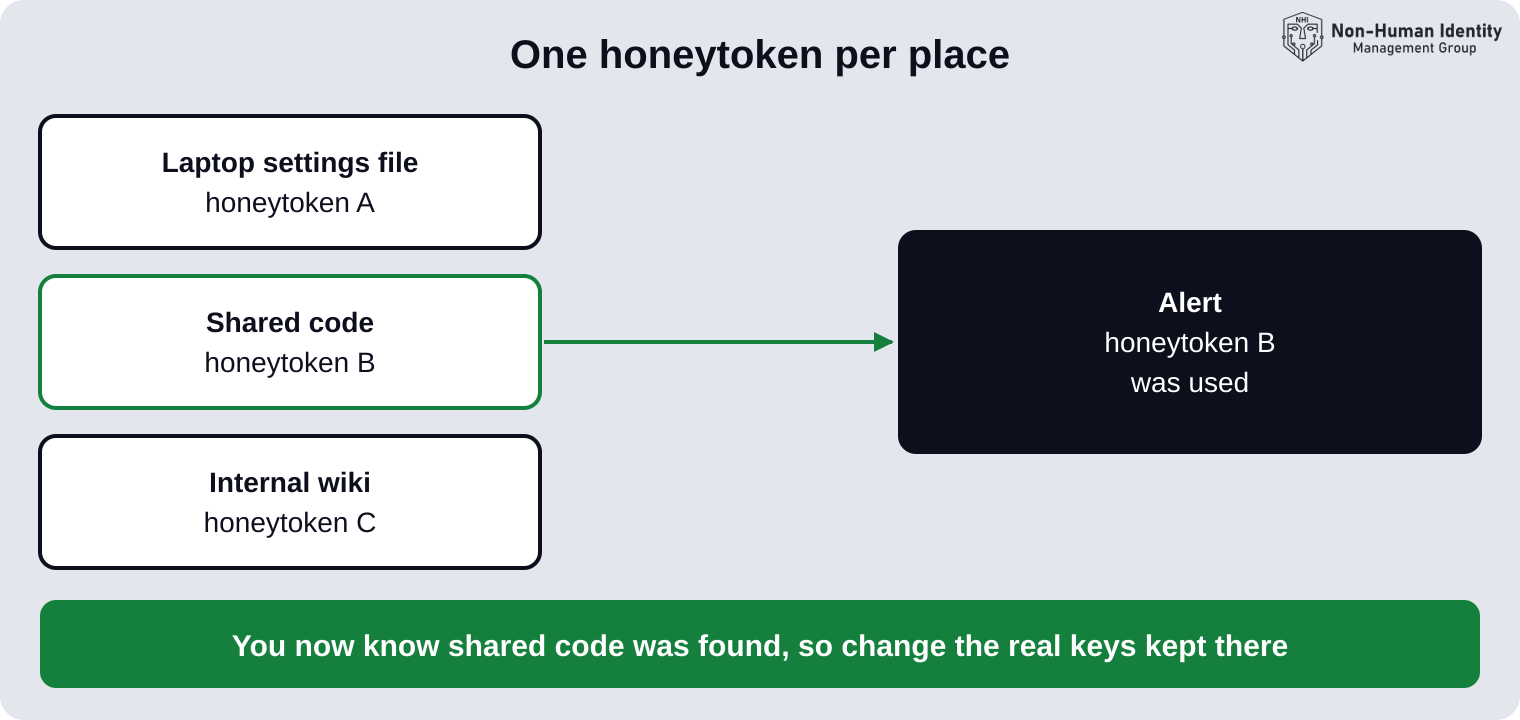
- Put a different one in each place an intruder might search, so an alert tells you which place was found.
- When one fires, treat the real secrets kept beside it as possibly stolen and change them.
What you will learn
- Explain what a honeytoken is in one sentence.
- Spot where a honeytoken would be most useful.
- Check that a honeytoken really sends an alert.
- Decide what to do first when one fires.
- Software password (secret)
- a password, key or token that one program uses to log in to another.
- Trap password (honeytoken)
- a fake secret with no real access, watched so that any use raises an alert.
What is a honeytoken?
Think of a spare key hung on a hook by the back door. It opens no lock at all. But it is wired to a bell, so if anyone lifts it, you hear about it.
A honeytoken works the same way. Programs log in to other services with a secret. This might be a password or an API key (a code one program sends to prove it may use a service). Intruders search for these, because a working key lets them act as a trusted program.
So you make a fake one. It has the right look and a sensible name, but it has no permission to do anything. You leave it where an intruder might search, and you watch for anyone trying it. A well-known US list of defensive techniques calls this a decoy credential. It is made to fool an attacker, and a check notices when it is used.[1]
Some teams call the same idea a canary token or canary credential, after the canaries once used to warn miners of danger.
Where the comparison stops working: a bell tells you someone is in the house right now. A honeytoken alert tells you someone tried the key, and often from where. You still have to find out how they got it.
Why does it matter?
When an intruder uses a stolen real key, the activity can look just like normal work. A honeytoken has no normal use, so there is very little noise. If it is used, something is wrong.
If you run a small business
What could happen: someone copies the keys from your shared files and you find out months later.
Check this: ask your IT supplier where your software keys are kept, and how you would know if they were copied.
If you work in a security team
What could happen: a honeytoken fires, but the alert goes to a mailbox nobody reads.
Check this: send honeytoken alerts to the people who already handle urgent security alerts.
If you are a developer
What could happen: you find an odd key in a settings file and use it, setting off an alarm.
Check this: never use a key you were not given. Report it instead.
What does it look like?
Here is a made-up settings file on a developer's laptop. One key is real in this story. The other is a honeytoken.
Example only. All values are made up.
# settings file on a developer laptop
STORAGE_KEY=EXAMPLE-KEY-0000-FAKE         (1)
BACKUP_ADMIN_KEY=EXAMPLE-KEY-1111-FAKE    (2)
# nobody uses BACKUP_ADMIN_KEY            (3)
- In a real file, this line would contain a working key the app needs.
- In a real file, this line would contain the honeytoken. Its name sounds valuable, but it has no access.
- Only the security team knows this. Any use of that key raises an alert.
Why this is risky: the working key on line 1 is still sitting in a file. If an intruder copies the file, they get both.
The safer way: keep working keys in a locked secrets store, not in files. Keep honeytokens in the places an intruder would look, so you get a warning if those places are found.
How does it work?
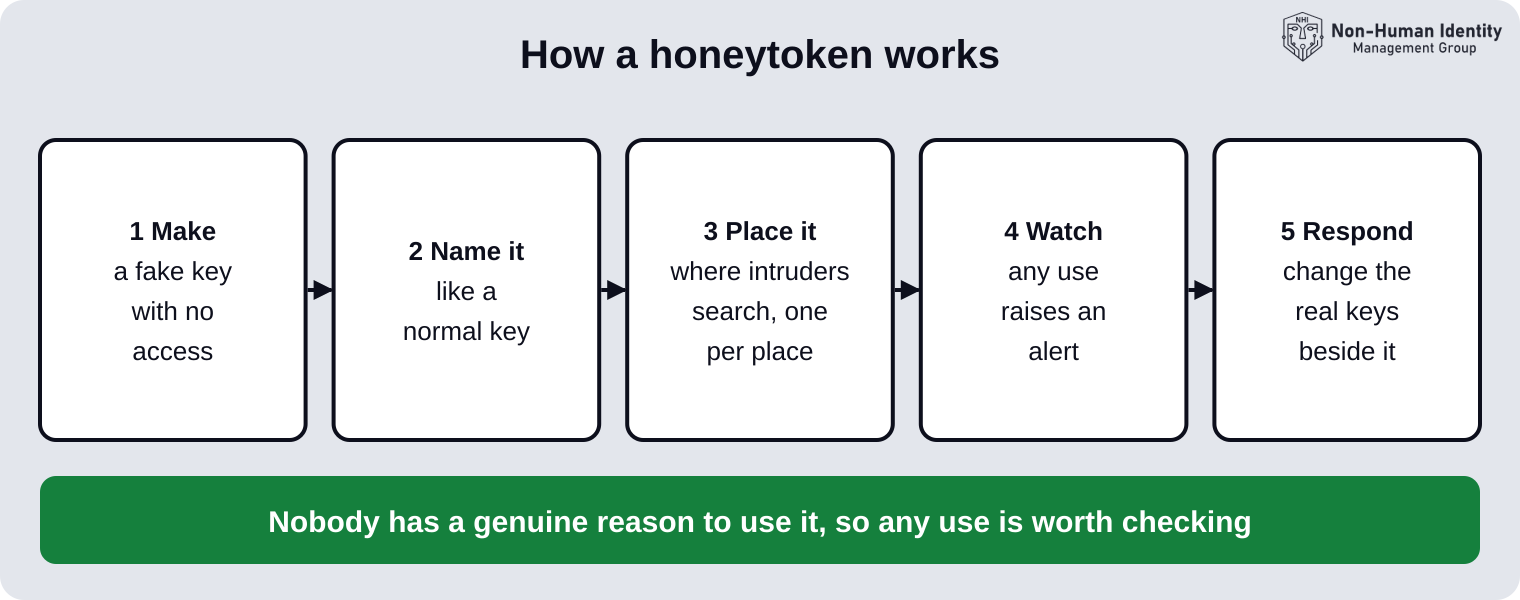
- Make the fake. Create the key or account in the real system, so that it looks genuine, and give it no permissions at all.
- Name it like the real thing. Follow the way you normally name keys, so that it does not stand out as a trap.
- Place it where intruders look. Good spots include settings files, shared code, build tools and internal wiki pages, with a different honeytoken in each place.
- Watch for any use. Make sure the system records every attempt, including failed ones, and that the records reach your alerts.
- Test it. Try each honeytoken once, so that you know the alert really arrives, and keep a private list of every one you place.
Products handle this in different ways. Microsoft's identity security tool lets administrators tag unused accounts as honeytoken accounts. Its documentation says any sign-in from one triggers an alert.[3] The free Canarytokens service offers fake cloud keys that alert when used. Its documentation notes that these alerts pass through Amazon's logging first, which may delay them by between 2 and 30 minutes.[4] A US government security checklist also lists decoys as a recognised safeguard.[2]
A worked example
Flora Mukherjee looks after IT for a fictional printing firm with 25 staff and two developers. The developers keep some cloud keys in settings files on their laptops, and the website code lives in a private shared project.
Flora creates three honeytokens. She puts one fake cloud key in a settings file on each laptop, and one in an old settings file in the shared code. Each key belongs to a cloud user with no permissions. She writes down where each one lives. Then she tries each key once, to check the alert email arrives.
Four months later, the honeytoken in the shared code fires. The alert shows an attempt from an unfamiliar internet address.
Flora thinks of the bell on the spare key. Someone has lifted it, so someone has been in that room. She does not yet know how, so she treats the shared code as exposed. She changes the real keys stored there and checks who has access.
She finds an old access token belonging to a former contractor that was never removed. She cancels it and places a fresh honeytoken. She also moves the real keys out of files and into a secrets store.
The honeytoken did not stop anyone getting in. It told Flora which place had been found, early enough to change the keys that mattered.
Myths and mistakes
| What people think | What to do instead |
|---|---|
| Give it real permissions to make it convincing. | Keep it at zero permissions. A convincing name and format are enough. |
| After it fires, just replace the honeytoken. | Treat the whole place as exposed and change the real secrets stored there too. |
| Name it "fake-key" so nobody uses it by mistake. | Match the naming of your real keys, and keep a private list instead. |
| Once it is placed, the job is done. | Test each honeytoken when you place it, and again on a schedule. |
| Honeytokens replace good secret storage. | They are an early warning, not a lock. Keep real keys in a secrets store. |
What can I do this week?
- List the places where your software keys live, such as laptops, shared code and wikis.
- Pick the riskiest place and plan one honeytoken with no permissions for it.
- Decide who gets the alert and what they do first.
- Test the honeytoken once and write it in a private list.
Checklist
- Every honeytoken has no permissions.
- Each honeytoken is used in one place only.
- Names and formats match real keys.
- Failed attempts are recorded as well as successful ones.
- Alerts go to someone who acts on them quickly.
- Every honeytoken has been tested from start to finish.
- A private list records every honeytoken and where it is.
Common questions
Is a honeytoken the same as a honeypot?
No, but they are related. A honeypot is a whole fake system, such as a decoy server, built to attract intruders. A honeytoken is a single fake item, such as a key, planted among real ones. See Honeypots for Beginners.
Can a honeytoken cause harm if someone uses it?
It should not, if it is set up well. A honeytoken has no permissions, so using it should not open anything. The risk comes from giving it real access to make it look convincing, which we suggest you never do.
Will secret scanners report my honeytokens as leaks?
They may, because honeytokens are built to look real. Keep a private list of every honeytoken, and tell the people who run your scanners. That way a scanner alert can be checked against the list quickly.
Do honeytokens work for AI agents too?
Yes, the same idea can apply. AI agents use keys to reach tools and data. A planted key can warn you if an agent, or someone controlling it, goes where it should not. See AI Agent Honeytokens and Canaries.
Where next?
Ready for the detail? Read the practitioner guide: Honeytokens and Canary Credentials Guide. It goes further into honeytoken design, where to place them across cloud and code, and how to route and handle alerts.
Also useful:
- Honeytokens vs Honeypots
- Deception Technology Guide
- SIEM for Beginners
- Non-Human Identities for Beginners
- NHI Foundation Level Training
Related NHI Mgmt Group resources: AI Agent Honeytokens and Canaries · Deception Technology Deployment Guide · NHI Monitoring for Beginners
Key terms
- Honeytoken
- A planted fake secret that raises an alert when someone tries to use it.
- Canary credential
- A decoy account, key or token that is never used in normal work, so any use gives an early warning.
- Secret
- A password, key, token or certificate that software uses to prove who it is.
- API key
- A code a program sends to prove it may use a service.
- Honeypot
- A decoy system or service built to attract intruders, holding no real business data.
- Alert
- A message raised by a monitoring tool when something matches a rule for suspicious activity.
Sources and further reading
- Decoy User Credential (D3-DUC). MITRE D3FEND, MITRE. https://d3fend.mitre.org/technique/d3f:DecoyUserCredential/, accessed 28 Nov 2026.
- SP 800-53 Rev. 5, Security and Privacy Controls for Information Systems and Organizations (control SC-26, Decoys). National Institute of Standards and Technology (NIST). https://csrc.nist.gov/pubs/sp/800/53/r5/upd1/final.
- Defender for Identity entity tags in Microsoft Defender XDR. Microsoft Learn, Microsoft. https://learn.microsoft.com/en-us/defender-for-identity/entity-tags, accessed 28 Nov 2026.
- AWS API Keys token. Canarytokens documentation, Thinkst. https://docs.canarytokens.org/guide/aws-keys-token.html, accessed 28 Nov 2026.