Card payment security is the set of checks that make a card purchase hard to copy or fake.
This guide is for shoppers, students and small shop owners who want to know what really happens when they tap, insert or type in a card. If you take card payments, knowing these layers helps you choose the safer options and spot when something is missing.
In short
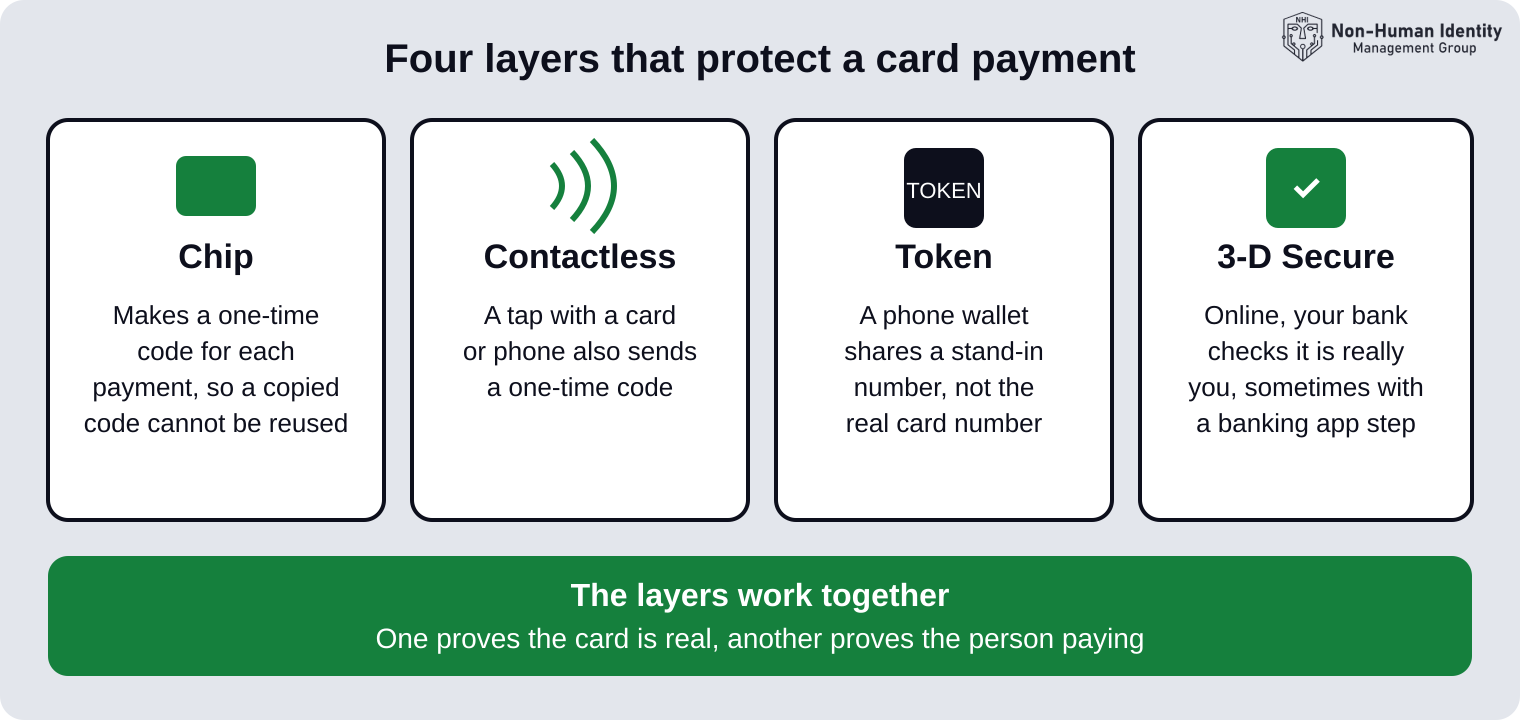
- The chip on a card makes a fresh one-time code for each payment, so a copied code cannot simply be reused.
- Contactless card and phone payments use the same kind of one-time code.
- Phone wallets swap your real card number for a stand-in number called a token.
- Online, 3-D Secure lets your bank check it is really you, sometimes with an extra step in your banking app.
What you will learn
- Explain how chip, contactless, tokens and 3-D Secure each protect a payment.
- Spot which protections are used when you pay in a shop and online.
- Check that a small shop's card set-up uses the safer options.
- Ask your payment provider the right questions.
- One-time payment code (cryptogram)
- a code the card's chip makes for a single payment, which cannot be reused.
- Stand-in card number (token)
- a replacement number that represents your card, so the real number is not shared.
- Bank check for online payments (3-D Secure)
- a step that lets your bank confirm it is really you paying online.
What is card payment security?
Think of a theatre that stamps a new, numbered ticket for every show. A photocopy of last night's ticket will not get you in tonight. The number has already been used.
Card payments work in a similar way. The chip on your card is a tiny computer. When you pay, it makes a fresh code for that one payment, called a cryptogram. Your bank checks the code. Because each code is unique and cannot be reused, a copied code is of little use for later payments.[1]
The rules for chip cards are written by an industry body called EMVCo, so the chip is often called an EMV chip. The same group writes rules for tokens and for 3-D Secure, the check used when you shop online.[2][3]
Several layers work together. The chip proves the card is real. A PIN or your phone's face or fingerprint check shows you are the cardholder. Tokens hide the real card number. 3-D Secure covers online shopping, where there is no chip to read.
Where the comparison stops working: a theatre ticket only needs to be new. A card payment also has to come from the right person. That is why the extra checks, like a PIN or a bank app step, matter too.
Why does it matter?
Each layer closes a different gap. If one is missing, criminals move to the weakest point. Online payments, where nobody sees the card, need their own checks, which is what 3-D Secure is for.[3]
If you shop with a card or phone
What could happen: someone who sees your card details uses them to shop online in your name.
Check this: turn on your bank's app alerts, and pay with a phone wallet where you can.
If you run a small shop
What could happen: an old card machine or a checkout without 3-D Secure leaves you open to fraud and disputes.
Check this: ask your payment provider whether your machine reads chip and contactless, and whether your online checkout uses 3-D Secure.
If you are learning about security
What could happen: you assume one control, like the chip, protects every kind of payment.
Check this: for each way of paying, name which layer proves the card and which proves the person.
Next: PCI DSS for Beginners
What does it look like?
Here is a made-up shop receipt and an online checkout, with the protections marked.
Example only. All values are made up.
EXAMPLE SHOP  receipt (fake)
Card:      **** **** **** 0000           (1)
Method:    CONTACTLESS (PHONE)            (2)
Verified:  DEVICE (fingerprint)           (3)
Auth code: FAKE00

Online checkout, example.com
"Your bank needs to confirm this payment.
 Open your banking app to approve."     (4)
- Only the last four digits are shown, never the full number.
- The phone sent a token and a one-time code, not your real card number.[4]
- The phone checked the person with a fingerprint, in place of a PIN on the shop's machine.[4]
- This is a 3-D Secure step. The bank asks for extra proof because it wants to be sure.[3]
Why this is risky: the layers only help if they are used. A shop that keys in full card numbers by hand, or an online checkout with no bank check, skips them.
The safer way: in shops, use chip, contactless or phone wallets. Online, use checkouts that support 3-D Secure. Approve a bank app request only when you are actually paying for something.
How does it work?
Here is what happens when you tap a phone at a shop's card machine.
- You prove it is you. The phone asks for your face, fingerprint or passcode before it pays.[4]
- The phone sends a token. It shares a stand-in number, not your real card number. The token is tied to that phone, so a stolen copy is worth much less.[2]
- It adds a one-time code. A fresh code is made for this payment only.[5]
- The machine passes it on. The shop's payment provider sends the request through the card network to your bank.[2]
- Your bank checks and decides. It matches the token to your account, checks the code and approves or declines.
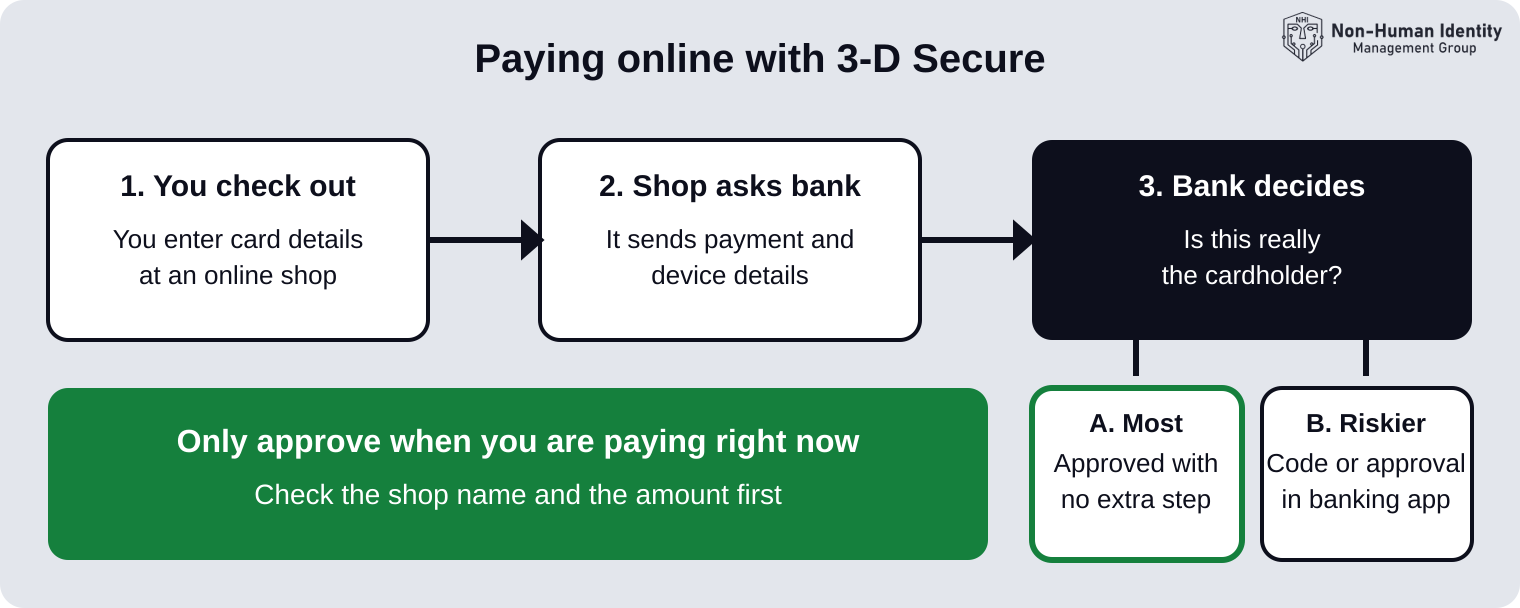
Online shopping works differently, because there is no chip to read. With 3-D Secure, the shop sends details about the payment and your device to your bank. For many payments, the bank approves them with no extra step. For riskier ones, it may ask for more proof, such as a one-time passcode or a check in your banking app.[3] In Europe, this helps meet rules on strong customer authentication, which means proof from two different kinds of evidence.[3]
Shops and providers that handle card data also follow a security rulebook called PCI DSS.[6] That rulebook has its own beginner guide, linked below.
A worked example
Gideon Delmar runs Alder Opticians, a fictional shop with two branches. Most customers pay in store, and some order contact lenses online.
Gideon's card machine is old. Staff sometimes type card numbers in by hand when a chip will not read. A visiting payments adviser points out that this skips the one-time code. Gideon thinks of the theatre ticket. Typing the number in is like letting people in with a photocopy.
Gideon asks the payment provider for a newer machine that reads chip, contactless cards and phones. Staff now offer tap or chip first. If a card will not read, they call the provider rather than typing it in.
Next, Gideon checks the online shop. The website builder's settings show 3-D Secure is supported, and Gideon makes sure it is switched on.
A week later, a customer, Reza Fairweather, orders new lenses online. Reza's banking app shows a request to approve a payment to Alder Opticians, with the amount. Reza checks the shop name and the amount. Both match the order Reza has just placed, so Reza approves. The payment goes through.
Gideon notices fewer queries about payments people did not recognise. The new set-up did not stop every problem, but each layer now does its job.
Myths and mistakes
| What people think | What is true |
|---|---|
| Contactless is less secure than chip and PIN. | Contactless also uses a one-time code for each payment.[5] Limits and occasional PIN checks help with lost cards. |
| Paying by phone shares my card number with the shop. | Phone wallets send a token, not your real card number.[4] |
| The chip protects my card online too. | Online there is no chip to read. 3-D Secure and the bank's checks do that job.[3] |
| Typing a card number in by hand is just as good. | It skips the chip's one-time code. Use chip or contactless where you can. |
| Any bank app request is safe to approve. | Approve only when you are paying for something right now, and check the shop name and amount. |
What can I do this week?
- Add your card to a phone wallet, if your bank supports it, and use it in shops.
- Turn on payment alerts in your banking app.
- If you run a shop, ask your provider whether your machine reads chip, contactless and phones.
- Check that your online checkout has 3-D Secure switched on.
- Agree a rule with staff: no keying in card numbers by hand without asking the provider first.
Checklist
- I know which protection is used for chip, contactless, phone and online payments.
- I use a phone wallet or chip where I can.
- I approve bank app requests only for payments I am making now.
- Our card machine reads chip, contactless cards and phones.
- Our online checkout uses 3-D Secure.
- Staff do not key in card numbers by hand as a habit.
- We never write down or store full card numbers.
Common questions
Is contactless payment safe?
Yes, for most people it is a safe way to pay. Each tap uses a one-time code, so a copied code is of little use later.[5] Phone wallets add a token and a face or fingerprint check. Report a lost card quickly, as with any card.
What is 3-D Secure?
3-D Secure is a check for online card payments. The shop shares payment and device details with your bank. The bank either approves quietly or asks you for extra proof, such as a code or a banking app approval.[3] See EMV 3-D Secure Guide for more.
What is a payment token?
A payment token is a stand-in number used in place of your real card number. It is tied to a device, shop or kind of payment, so a stolen token is worth much less than a stolen card number.[2] Your bank links it back to your account.
Can someone steal my card details by walking past me?
It is unlikely to be useful to them. Contactless only works very close to a reader, and each payment uses a one-time code. The bigger risks are online: fake shops, phishing messages and leaked card numbers. See Contactless Payments for Beginners.
Why does my bank sometimes ask me to approve a payment?
Your bank asks when it wants extra proof that you are the one paying. This is often part of 3-D Secure.[3] Check the shop name and amount. If you did not start the payment, decline it and contact your bank.
Where next?
Ready for the detail? Read the practitioner guide: EMV Chip Card Security. It goes further into how the one-time codes are checked, the different card authentication methods and the gaps that fraudsters still target.
Also useful:
- Mobile Wallet and Contactless Payment Security
- Network Tokenisation for Payments Guide
- Payment Fraud for Beginners
- PCI DSS for Beginners
- Card Testing Attacks for Beginners
Related NHI Mgmt Group resources: EMV 3-D Secure Guide · Payment Card Compromise Response Playbook
Key terms
- EMV
- The industry rules for chip cards, which make cards harder to copy.
- Cryptogram
- A one-time code the card or phone makes for a single payment.
- Payment token
- A stand-in number that represents your card without sharing the real number.
- NFC
- The short-range wireless link used for contactless payments.
- 3-D Secure (3DS)
- A check that lets your bank confirm it is really you paying online.
- Primary account number (PAN)
- The full long number on your card that identifies your account.
- PCI DSS
- The card industry's security rulebook for anyone who handles card data.
Sources and further reading
- EMV Contact Chip. EMVCo. https://www.emvco.com/emv-technologies/emv-contact-chip/, accessed 28 Nov 2026.
- EMV Payment Tokenisation. EMVCo. https://www.emvco.com/emv-technologies/payment-tokenisation/, accessed 28 Nov 2026.
- EMV 3-D Secure. EMVCo. https://www.emvco.com/emv-technologies/3-d-secure/, accessed 28 Nov 2026.
- EMV Mobile. EMVCo. https://www.emvco.com/emv-technologies/mobile/, accessed 28 Nov 2026.
- EMV Contactless quick reference guide. EMVCo, 2023. https://www.emvco.com/wp-content/uploads/2023/06/EMVCo_QRG_EMV-CONTACTLESS_FINAL.pdf, accessed 28 Nov 2026.
- PCI Data Security Standard (PCI DSS). PCI Security Standards Council. https://www.pcisecuritystandards.org/standards/pci-dss/, accessed 28 Nov 2026.