Domain hijacking is when someone takes control of your web address without your permission.
This guide is for small business owners, club secretaries and anyone who pays for a web address. You do not need to be technical to be a target: if your website and email use your own name, whoever controls that name controls where they go.
In short
- Most hijacks start with the account at the company you bought the name from, not with clever hacking of the internet.
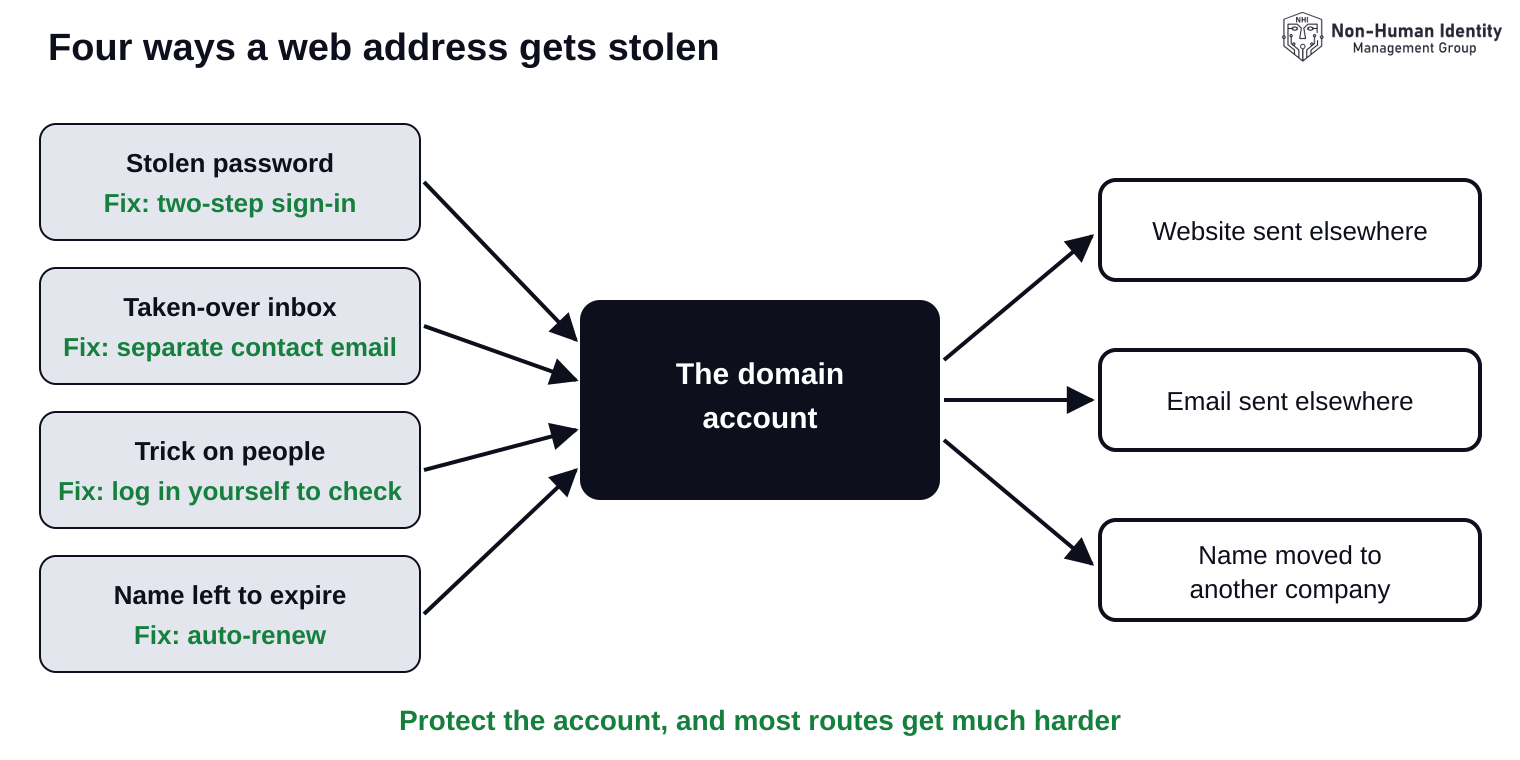
- Common routes are a stolen password, a taken-over email inbox, a trick played on support staff, or a name left to expire.
- Locks on the name, two-step sign-in and auto-renew make a hijack much harder.
- If it happens, contact the company you bought the name from straight away, with proof that the name is yours.
What you will learn
- Explain the four common ways a web address gets stolen.
- Check whether your name is locked against transfer.
- Spot warning signs such as an unexpected transfer email.
- Ask for help quickly, with the right proof, if it happens.
- Web address (domain name)
- the name people type to reach your website or send you email, such as example.com.
- Name seller (registrar)
- the company you buy and renew your web address from, where your domain account lives.
- Transfer
- moving a web address from one registrar, or one owner, to another.
What is domain hijacking?
Think of the deeds to your house. Whoever is named on them is treated as the owner. If a fraudster gets their name onto the deeds, they can act as if the house is theirs.
Your web address works in a similar way. It is held in an account at a registrar, the company that sells and renews domain names. Whoever controls that account can change who owns the name, move it to another company, or change where it points.[1]
Domain hijacking means someone takes that control without permission. They may move the name away, or keep it where it is and quietly change its settings.
Where the comparison stops working: house deeds change slowly, with solicitors and checks. A web address can change hands online in a short time if the account is not protected.
How the internet's naming system works, and other ways it is misused, is covered in DNS Security for Beginners.
Why does it matter?
Your web address sits behind your website, your email and many of your logins. Losing it can mean losing all three at once.
If you run a small business
What could happen: customers reach a fake website, and your email stops arriving or goes to a stranger.
Check this: confirm the domain account is in the business's name, with two-step sign-in turned on.
If you run a club or charity
What could happen: the name sits in a former volunteer's personal account and quietly expires.
Check this: find out whose account holds the name and when it renews.
If you are new to IT work
What could happen: a convincing email asks you to "confirm" a domain transfer, and you click.
Check this: treat any transfer or renewal email you did not expect as suspicious, and check by logging in yourself.
Next: Phishing for Beginners
What does it look like?
Here is a made-up status page for a domain. Your registrar may show one like it. Look for the warning signs.
Example only. All values are made up.
Domain:          tutors.example
Account holder:  [email protected]      (1)
Two-step login:  OFF                                (2)
Transfer lock:   OFF                                (3)
Auto-renew:      OFF  (expires in 0000 days, FAKE)  (4)
Contact email:   [email protected]                (5)
- The account is in a former helper's name. In a real screen, this line would show whose account holds the name.
- Only a password protects the account.
- Nothing is blocking a move to another registrar.
- The name will lapse unless someone remembers to pay.
- Warnings go to an inbox on the same name. If the name is lost, so are the warnings.
Why this is risky: one guessed or stolen password, or one missed renewal, could be enough to lose the name.
The safer way: put the account in the organisation's name. Turn on two-step sign-in, the transfer lock and auto-renew. Use a contact email on a different name.[1]
How does it work?
There are four common routes in. Most of them go through the account, not through the internet itself.
- A stolen password. Passwords leaked from other sites may be tried on your domain account. If the account has no second check, that may be enough.[1]
- A taken-over inbox. If someone controls the email on the account, they may reset the password or approve changes.
- A trick on people. A fake email may ask you to "confirm" your login on a lookalike page. Whatever you type there goes to the attacker.[1]
- A name left to expire. Registrars send renewal reminders, and there is a short window to renew after expiry. After that, the name can be deleted, and anyone may be able to register it.[6]
Once inside, an attacker can change where the name points, change the owner details or move the name to another registrar.[1] In 2019, attackers used stolen logins to change DNS records, the entries that say where a name points. The US cyber agency CISA ordered government bodies to act. With that control, the attackers could also get valid security certificates for the names.[7]
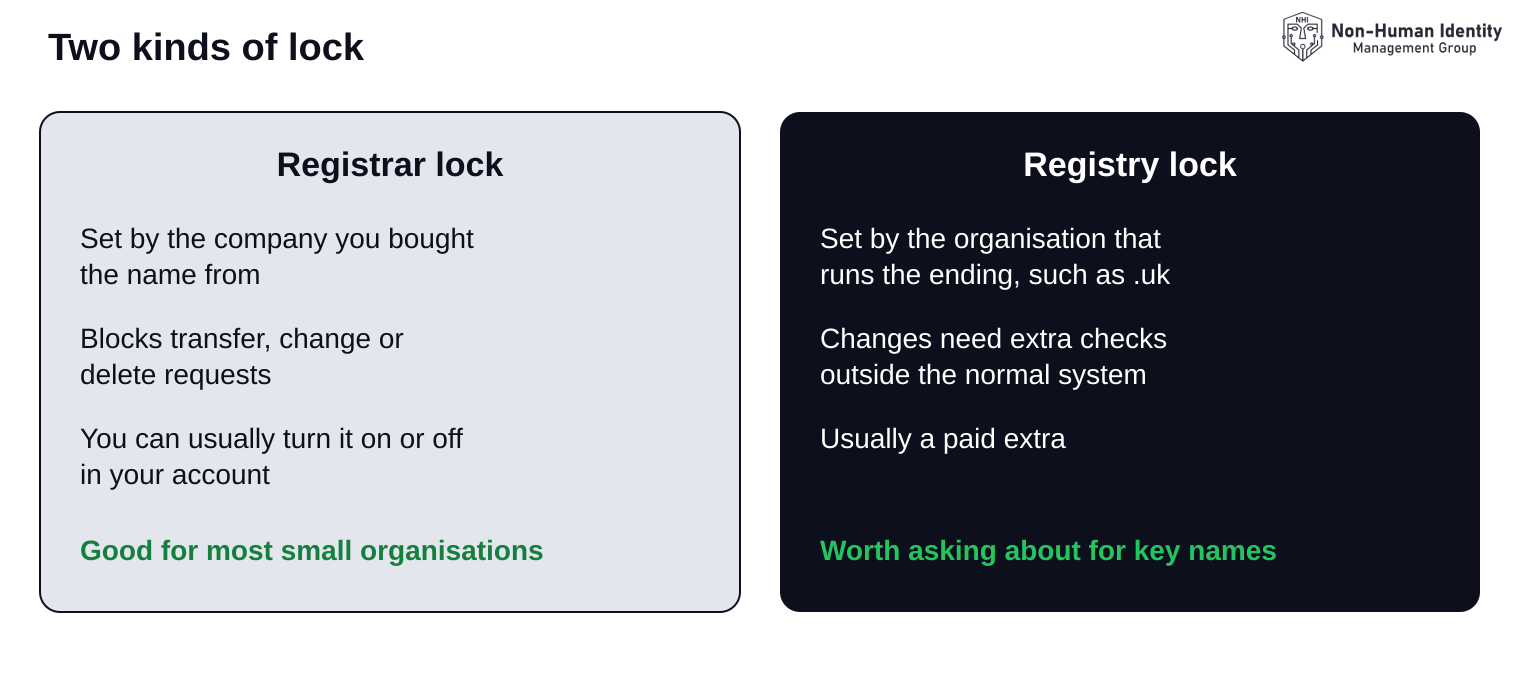
Locks add a second layer. A registrar lock, also called a transfer lock, tells the system to refuse requests to transfer, change or delete the name until you lift it.[3] It is set by your registrar. It helps, but ICANN, the body that coordinates domain names, says it is not a fail-safe.[1]
A registry lock is stronger and usually paid for. It is set by the organisation that runs the whole ending, such as .uk or .com. Changes need extra checks outside the normal automated system, so a break-in at the registrar alone may not be enough to lift it.[4]
A worked example
Hugo Rinaldi runs Birch Tutors, a made-up tutoring business with six staff. Parents book lessons through the website, and everyone uses email on the business's own name.
One morning Hugo gets an email saying a transfer of his domain has been requested. He did not ask for one. He does not click the link in the email. Instead he types the registrar's address himself and logs in.
The account shows a pending transfer and a new contact email he does not recognise. Someone has signed in with his old password, which he had also used on a site that was breached.
Hugo calls the registrar's support line, found on its own website, and reports a possible hijack. He changes the password, turns on two-step sign-in and sets the transfer lock. The registrar stops the pending transfer.
The registrar asks for proof that the name is his. Hugo sends past invoices, renewal emails and a bank statement showing payments. ICANN suggests records like these help a real owner recover a name.[2]
Last, Hugo checks that his website and email still point to the right place. He sets the name to renew automatically, and adds a contact email on a different provider.
Hugo was lucky to see the email in time. The lock and two-step sign-in mean a stolen password alone should no longer be enough to move the name.
Myths and mistakes
| What people think | What is true |
|---|---|
| Hijacking needs expert hackers. | Many cases start with a reused password or a fake email. The domain account is the usual way in.[1] |
| A transfer lock makes my name safe. | It adds a useful layer, but it is not a fail-safe. Someone inside your account may be able to switch it off.[1] |
| My web designer handles all that. | If the account is in their name, they control your name. Make sure the business is the named owner. |
| If I miss a renewal, I can just buy it back later. | There is only a short window. After that, someone else may register the name first.[6] |
What can I do this week?
- Log in to your registrar and check whose name the account is in.
- Turn on two-step sign-in and use a strong password you use nowhere else.[1]
- Turn on the transfer lock and auto-renew, and check the card on file is current.
- Change the contact email to one that does not use the same web address.[1]
- Save proof of ownership in a safe place: invoices, renewal emails and payment records.[2]
Checklist
- The domain account is in the organisation's name, not a person's or a supplier's.
- Two-step sign-in is on for the domain account.
- The account password is not used anywhere else.
- The transfer lock is on for every name we rely on.
- Auto-renew is on, and the payment card on file is current.
- The contact email does not use the same web address.
- We keep invoices and renewal emails as proof of ownership.
- We have asked whether a registry lock is available for our most important name.
Common questions
How do I check if my domain is locked?
Look it up on a public domain lookup service, often called WHOIS, or in your registrar account. A status such as "clientTransferProhibited" means the registrar lock against transfer is on.[3] If you cannot see a lock, ask your registrar how to turn it on.
What should I do first if my domain is hijacked?
Contact your registrar straight away, using contact details from its own website. Speed matters, because a stolen name may be moved again.[1] Gather proof that the name is yours. If the registrar cannot help, ICANN has a complaint process for transfers you did not allow.[1]
Is domain hijacking the same as a lookalike domain?
No. In a hijack, someone takes your real name. With a lookalike domain, someone registers a similar name, such as one with a swapped letter, to fool people. Both can send customers to fake sites, but the fixes are different.
Can the registrar refuse to move my name?
Yes, in some cases. The transfer rules list reasons a registrar may refuse, such as evidence of fraud, and cases where it must refuse, such as an open dispute.[5] This is one reason a quick report to your registrar can help stop a hijack in progress.
Where next?
Ready for the detail? Read the practitioner guide: Small Business Domain and Website Ownership Guide. It goes further into finding out who really owns your domain, securing DNS and hosting logins, and what to do when a supplier or staff member leaves.
Also useful:
- DNS Security for Beginners
- Lookalike Domains for Beginners
- Subdomain Takeover for Beginners
- Domain Registrar Compromise Playbook
Related NHI Mgmt Group resources: Authoritative DNS and Registrar Account Security Guide · DNS Hijack Playbook · Corporate Domain Registrar · Account Takeover for Beginners
Key terms
- Domain hijacking
- Taking control of someone else's web address without their permission.
- Registrar account
- The online account at the company that sells your web address, where its settings are controlled.
- Registrar lock
- A setting that makes the system refuse transfer, change or delete requests until it is lifted.
- Registry lock
- A stronger lock set at the level of the domain ending, where changes need extra checks.
- Domain expiry
- The date a web address lapses if it is not renewed.
- WHOIS
- A public lookup that shows basic details and status for a web address.
Sources and further reading
- Do You Have a Domain Name? Here's What You Need to Know, Part IV: How to Protect Your Domain Name Against Domain Hijacking or Unauthorized Transfers. ICANN blog, 26 March 2018. https://www.icann.org/en/blogs/details/do-you-have-a-domain-name-heres-what-you-need-to-know-26-3-2018-en, accessed 28 Nov 2026.
- Documentation is Key to Recovering Hijacked Domain Names. ICANN blog, 14 April 2016. https://www.icann.org/en/blogs/details/documentation-is-key-to-recovering-hijacked-domain-names-14-4-2016-en, accessed 28 Nov 2026.
- EPP Status Codes: What Do They Mean, and Why Should I Know? ICANN. https://www.icann.org/en/transfers/epp-status-codes-30jun11-en.pdf, accessed 28 Nov 2026.
- Locks: Security and abuse mitigation. Nominet (registry for .uk), registrar documentation. https://registrars.nominet.uk/dragon/locks/, accessed 28 Nov 2026.
- Transfer Policy. ICANN (2016 version; an updated version was published in February 2024). https://www.icann.org/resources/pages/transfer-policy-2016-06-01-en, accessed 28 Nov 2026.
- Expired Registration Recovery Policy. ICANN (2013 version; an updated version was published in February 2024). https://www.icann.org/resources/pages/errp-2013-02-28-en, accessed 28 Nov 2026.
- Emergency Directive 19-01: Mitigate DNS Infrastructure Tampering. Cybersecurity and Infrastructure Security Agency (CISA), January 2019. https://www.cisa.gov/news-events/directives/ed-19-01-mitigate-dns-infrastructure-tampering, accessed 28 Nov 2026.