A short-lived credential is a password or key for software that expires after a set time.
This guide is for anyone who wants to know why security teams prefer keys that expire. You do not need to write code to benefit: if your business uses cloud services or build tools, asking for short-lived credentials is one of the most useful questions you can put to your team or supplier.
In short
- A short-lived credential lasts minutes or hours, then expires by itself.
- A stolen copy is useful only until it expires, which shrinks the damage from a leak.
- The program gets a fresh one each time it needs access, so nobody has to store a lasting key.
- The thing to protect becomes who is allowed to ask for a new one.
What you will learn
- Explain the difference between a lasting key and a short-lived one.
- Spot a lasting key that could be replaced.
- Explain why expiry helps even when a key leaks.
- Ask your team where short-lived credentials are used.
- Software password (credential)
- a password, key or token a program uses to prove it may connect to a service.
- Lasting key (long-lived credential)
- a credential that works until someone changes or cancels it.
- Expiry time (time to live)
- how long a credential works before it stops by itself.
What is a short-lived credential?
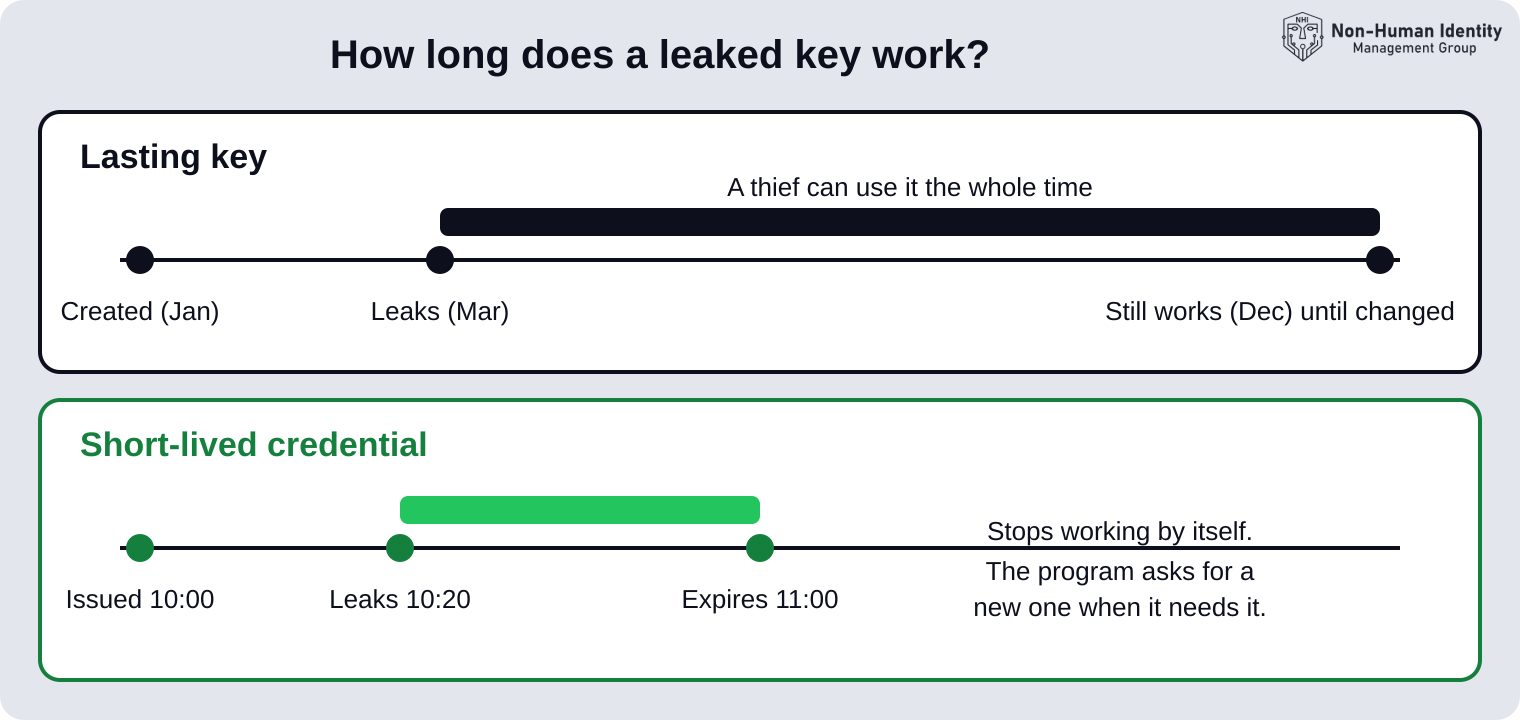
Think of a pay-and-display parking ticket. It lets you park for two hours. After that it is just a piece of paper, even if someone else picks it up.
Programs need credentials to reach other services, such as a database or a cloud account. The old way is a lasting key, typed into a settings file and used for months or years. A short-lived credential is made fresh when the program asks for it. It works for a set time, called its time to live, and then expires.
Amazon Web Services, a large cloud provider, says its temporary credentials can last from a few minutes to several hours. After they expire, the service no longer accepts them.[1]
Where the comparison stops working: you pay for a parking ticket by hand. A program gets its short-lived credential automatically, by proving what it is to a trusted service. Nobody has to buy or hand over anything.
Why does it matter?
Keys leak. They end up in code, chat messages, logs and old laptops. A lasting key that leaks keeps working until someone notices and changes it. A short-lived one expires on its own, often before anyone has a chance to use it.
If you run a small business
What could happen: a supplier leaves a lasting cloud key in old code, and a stranger runs up a bill with it.
Check this: ask your supplier which of your keys never expire, and why.
If you are learning to code
What could happen: you copy a lasting key into a test project and forget it is there.
Check this: learn how your cloud or build tool hands out temporary access, and use that from the start.
If you manage an IT team
What could happen: your team spends hours changing lasting keys after every leak scare.
Check this: list the lasting keys you rotate by hand and pick one to replace first.
What does it look like?
Here are two made-up credentials side by side. The first is a lasting key. The second is the kind a program receives when it asks for temporary access.
Example only. All values are made up.
# Lasting key in a settings file
CLOUD_KEY=EXAMPLE-LASTING-KEY-0000      (1)
created: 2023-01-01   expires: never   (2)

# Short-lived credential, handed out on request
token: EXAMPLE-TEMP-TOKEN-FAKE-0000     (3)
issued: 10:00   expires: 11:00          (4)
- In a real file, this line would contain a key that works for anyone who copies it.
- No end date. It keeps working until someone changes it.
- A temporary token, made fresh for this program when it asked.
- One hour later it expires, and the program asks for a new one.
Why this is risky: the lasting key may sit in that file, and in every copy of it, for years. If it leaks, it works for whoever finds it.
The safer way: the program proves what it is to a trusted service and gets a short-lived token when it needs one. There is no lasting key in the file to leak. Amazon notes that this means you do not have to put long-term keys inside an application.[1]
How does it work?
The details differ between tools, but the pattern is similar.
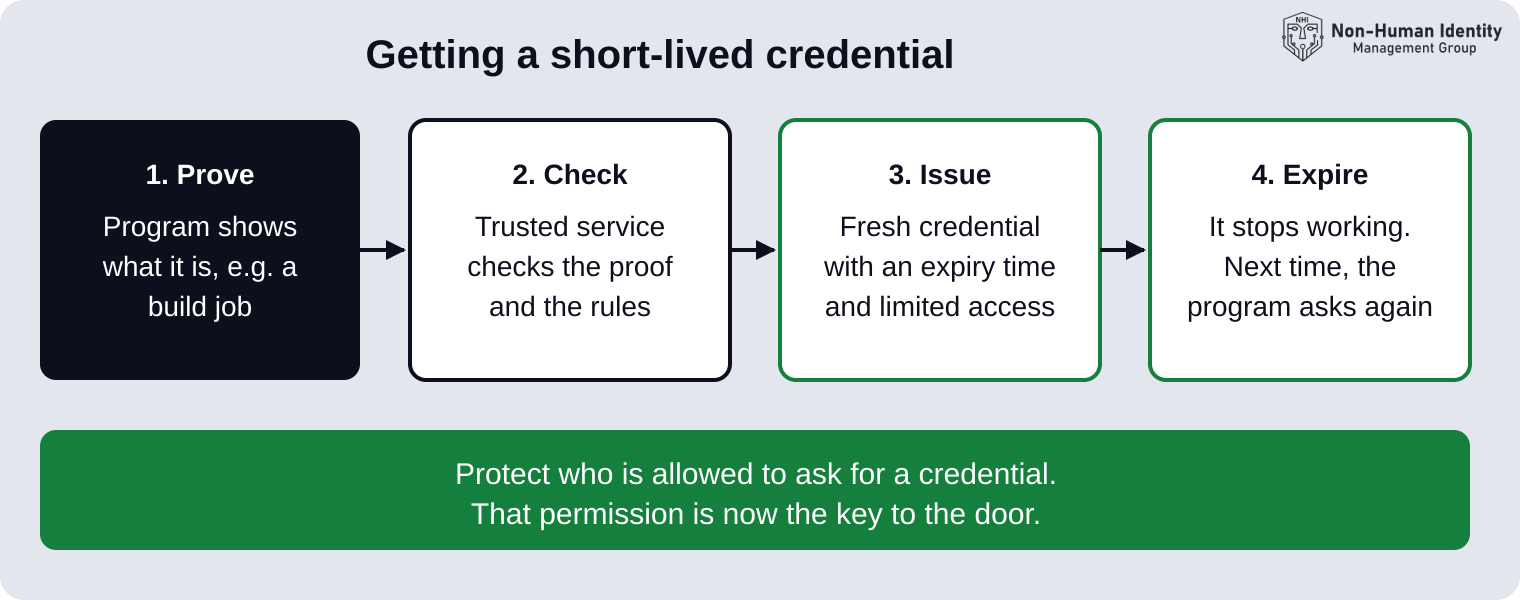
- Prove who you are. The program shows proof of what it is, for example the build job or cloud server it runs on.
- Ask for access. It asks a trusted service, such as a cloud provider or a vault (a locked store for secrets), for a credential.
- Get a fresh credential. The service makes a new one with a set expiry time and only the access it needs.[1]
- Use it. The program does its work with that credential.
- Let it expire. When the time is up, the service no longer accepts the credential. If the program still needs access, it asks again, as long as it is still allowed to.[1]
Some vaults go further and create a brand-new database password for each request. HashiCorp Vault, one such tool, gives every one of these a lease, a set lifetime. When the lease ends, Vault cancels the password. Staff can also cancel a lease early.[2] These are often called dynamic secrets.
Build tools use the same idea. GitHub, a code hosting site, lets automated build jobs swap proof of identity for a cloud token. GitHub says that token is valid for a single job and then expires, so no lasting cloud key has to be stored in GitHub.[3]
A worked example
Quinn Kowal looks after the website for a small chain of bike repair shops. Every night, a build job copies the latest site to the cloud. For years it used a lasting cloud key stored in the build tool's settings.
One morning Amara Haddad, a freelance developer who helps Quinn, sends a message. "I pasted the build settings into a public help forum by mistake. The cloud key was in there. I've taken the post down."
Quinn thinks of the parking ticket. This ticket never ran out, so whoever saw the post could still use it. He asks Amara to cancel the key at the cloud provider straight away. Then they check the cloud account's activity records. They see no unknown activity in the records available to them.
That afternoon they fix the cause. Amara sets up the build job to ask the cloud provider for a short-lived token each night instead. The cloud provider checks that the request really comes from Quinn's build job. The token works for that one job and then expires.
The build settings now hold no cloud key at all. Quinn adds one rule to his notes: if a key has no end date, ask whether it needs one.
A month later, Amara pastes some logs into a chat by mistake. They include an old token. It expired weeks ago, so there is nothing to change.
Myths and mistakes
| What people think | What is true |
|---|---|
| Short-lived credentials make leaks harmless. | They shrink the window. A stolen token can still be used until it expires, so keep access narrow too. |
| Expiry means nothing else needs protecting. | Whoever can ask for a new credential can keep getting access. Protect who is allowed to ask. |
| Short-lived is the same as rotating keys often. | Rotation replaces a lasting key on a schedule. Short-lived credentials are made fresh on request and expire by themselves.[1] |
| They are only for big companies. | Many cloud and build services offer temporary access as a built-in option.[1][3] |
| Shorter is always better. | Very short lifetimes mean more renewals. If renewal fails, the program stops. Pick a time that fits the job. |
What can I do this week?
- Ask your team or supplier which keys never expire.
- Pick one lasting key, such as a build tool's cloud key, to replace first.
- Check whether your cloud or build service offers temporary access for that job.
- Write down who is allowed to ask for new credentials.
Checklist
- We know which of our keys never expire.
- New projects use short-lived credentials where the service offers them.
- Build jobs get temporary cloud access instead of stored keys.
- Each credential has only the access its job needs.
- We know who, or what, is allowed to ask for a new credential.
- Lasting keys that remain are stored in a vault and changed on a schedule.
- Renewal failures raise an alert.
Common questions
How short is short-lived?
Usually minutes to hours. Amazon says its temporary credentials can last from a few minutes to several hours. GitHub's cloud tokens for build jobs last for a single job. The right length depends on how long the task takes and how much harm a stolen copy could do.
Do short-lived credentials need rotating?
Not in the usual sense. They expire by themselves, and the program asks for a new one when it needs it. Amazon notes you do not have to update or cancel them when they are no longer needed. What needs care is the permission to ask for them.
What if a short-lived credential is stolen?
It can be used until it expires, so act quickly. Some tools let you cancel it early, and Vault lets staff cancel a lease straight away. Then check what it was used for and whether the program that asked for it was itself taken over.
Are short-lived certificates the same idea?
Yes, the idea is the same. Website certificates are getting shorter too. Let's Encrypt, a free certificate issuer, gives 90-day certificates by default and offers six-day ones as an option.[4] Shorter lives mean renewal must be automatic.
Can every system use them?
No, not yet. Some older programs can only read a fixed password from a file. For those, keep the lasting key in a vault, give it narrow access and change it on a schedule. See the Short-Lived Credentials Migration Guide for Legacy Applications.
Where next?
Ready for the detail? Read the practitioner guide: Static vs Dynamic Secrets. It goes further into when to choose each type, how to set expiry times and how to move existing systems across.
Also useful:
- Dynamic Secrets and Ephemeral Credentials Guide
- Secrets Rotation for Beginners
- CI/CD Pipeline Identities for Beginners
- Non-Human Identities for Beginners
- NHI Foundation Level Training
Related NHI Mgmt Group resources: Workload Identity Federation Guide · Secrets Management Guide · Leaked Secret Response for Beginners
Key terms
- Short-lived credentials
- Credentials that expire after a short time, so a stolen copy is useful only briefly.
- Long-lived credential
- A credential that keeps working until someone changes or cancels it.
- TTL (time to live)
- How long a credential works before it expires.
- Dynamic secret
- A secret made on demand for one task that expires by itself after a short time.
- Lease
- The set lifetime a vault gives a secret, after which the secret is cancelled.
- OIDC federation
- A way for one system to accept another's proof of identity, often used to swap that proof for a temporary cloud token.
Sources and further reading
- Temporary security credentials in IAM. AWS Identity and Access Management User Guide, Amazon Web Services. https://docs.aws.amazon.com/IAM/latest/UserGuide/id_credentials_temp.html, accessed 28 Nov 2026.
- Lease, renew, and revoke. Vault documentation, HashiCorp. https://developer.hashicorp.com/vault/docs/concepts/lease, accessed 28 Nov 2026.
- OpenID Connect. GitHub Docs, GitHub. https://docs.github.com/en/actions/concepts/security/openid-connect, accessed 28 Nov 2026.
- FAQ. Let's Encrypt. https://letsencrypt.org/docs/faq/, accessed 28 Nov 2026.