An MFA fatigue attack floods your phone with sign-in requests until you tap Approve just to stop them.
This guide is for anyone who approves sign-ins on their phone for work or home accounts. You do not need to be technical to be targeted: if you use an app that asks "Are you trying to sign in?", this applies to you.
In short
- A sign-in request you did not start usually means someone else has your password.
- Criminals send request after request, hoping you approve one by mistake or to make it stop.
- Tap Deny, then tell your IT team or the service, and change your password.
- Number matching, passkeys and security keys make this trick much harder to pull off.
What you will learn
- Explain why repeated sign-in prompts are a warning sign.
- Spot a request you did not start.
- Know what to do in the first few minutes.
- Ask your IT team about safer sign-in methods.
- Extra sign-in check (MFA)
- a second proof, such as a tap on your phone, on top of your password.
- Phone prompt (push notification)
- a pop-up on your phone asking you to approve or deny a sign-in.
What is an MFA fatigue attack?
Think of someone ringing your doorbell again and again late at night. You did not invite anyone. But after the tenth ring, you are tempted to open the door just to make the noise stop.
Many accounts use multi-factor authentication (MFA), which means asking for a second proof as well as your password. A common second proof is a push notification, a pop-up on your phone that asks you to approve the sign-in.
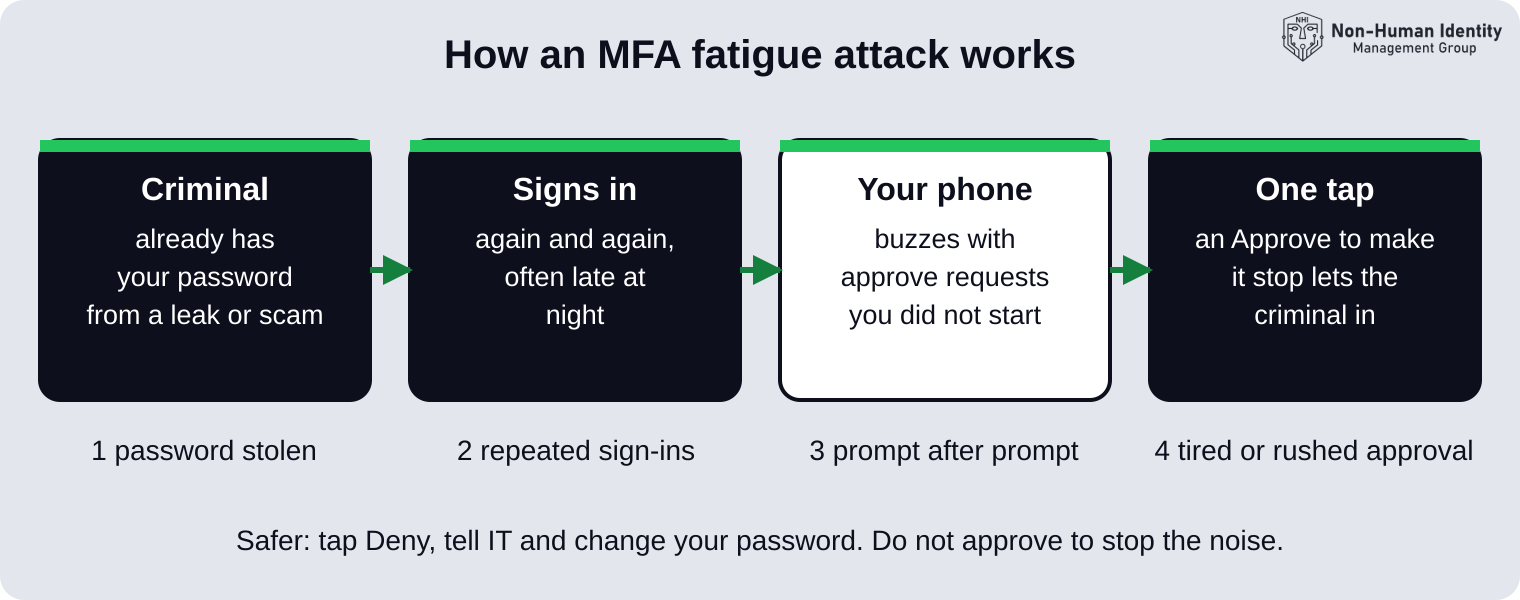
In an MFA fatigue attack, a criminal who already has your password signs in again and again. Each try sends a prompt to your phone. They hope you will approve one by mistake, out of tiredness or to stop the buzzing.[1] It is also called push bombing.
Where the comparison stops working: at your front door you can look through the spyhole. A phone prompt often shows little about who is asking, so the only safe answer to a request you did not start is Deny.
Why does it matter?
One tap can undo the protection of a second check. In 2022, Uber said an attacker got into a contractor's account this way after many approval requests.[3]
If you work in an office or from home
What could happen: you approve a late-night prompt, and a stranger signs in to your work email and files.
Check this: if you did not just sign in, tap Deny and tell IT the same day.
Next: What to do when a user approved an MFA push they did not start
If you manage a team
What could happen: staff feel silly reporting prompts, so a real attack goes unnoticed.
Check this: tell your team that reporting an odd prompt is always welcome, even if it turns out to be nothing.
If you look after a small firm's IT
What could happen: plain Approve buttons make it easy for one tired person to let an attacker in.
Check this: see whether your sign-in app can use number matching, and turn it on.
Next: Passkeys for Beginners
What does it look like?
Here is a made-up phone lock screen during an attack.
Example only. All values are made up.
02:14  ExampleAuth: Approve sign-in?  [Approve] [Deny]   (1)
02:15  ExampleAuth: Approve sign-in?  [Approve] [Deny]
02:15  ExampleAuth: Approve sign-in?  [Approve] [Deny]   (2)
02:17  Missed call: "IT Help Desk" 000 0000 0000         (3)
02:18  Text: Hi, it's IT. Please approve the prompt      (4)
       so we can finish a security update.
- A prompt in the middle of the night, when you are not signing in.
- The same request again and again, minutes apart.
- A call from someone claiming to be IT. In a real message, this name could look genuine.
- A text asking you to approve. A genuine IT team should not ask you to approve a sign-in you did not start.
Why this is risky: the prompts wear you down, and the call or text gives you a reason to tap Approve.
The safer way: tap Deny every time. Then contact IT yourself, using a number you already know, and change your password.
How does it work?
This is a simple view so you can spot it. It is not a guide to doing it.
- The criminal gets your password. It may come from a data leak, a scam email or a password you used on another site.
- They try to sign in. The password works, so the service sends a prompt to your phone.
- They keep trying. Each new try sends another prompt, sometimes late at night when you are tired.[1]
- They may add pressure. Some call or text, pretending to be IT, and ask you to approve.
- One approval lets them in. They can then read email, open files or add their own sign-in device.
Some sign-in apps now use number matching. The login screen shows a number, and you type it into your phone app. If you are not the one signing in, you have no number to type.[1][2] A criminal could still try to talk you into reading the number out, so never share it.
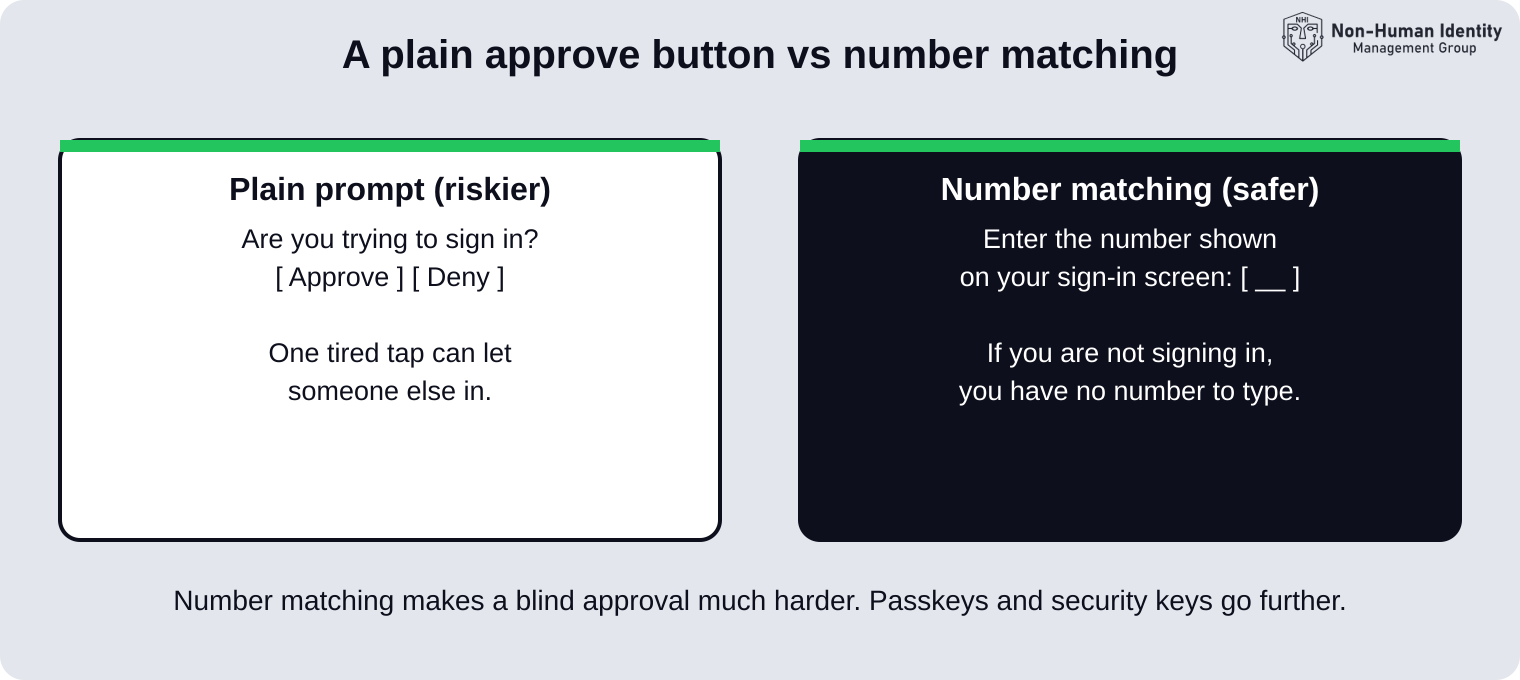
A US government cyber agency rates number matching as resistant to push bombing. It rates passkeys and security keys higher still, because they resist fake login pages too.[1]
A worked example
This story is made up to show how it can happen.
Lukas Novak is an office manager at Fjordline Shipping. On Thursday night his phone buzzes at ten past two. It is his work sign-in app, asking him to approve a sign-in.
Half asleep, he taps Deny. Two minutes later it buzzes again, then again. By the fifth prompt he is annoyed and wide awake.
Then a text arrives. It says it is from the IT help desk and asks him to approve the next prompt to finish an update. For a moment that sounds reasonable.
Lukas remembers a line from his induction: IT will never ask you to approve a sign-in you did not start. He taps Deny again and does not reply to the text.
He opens the company's real help page on his laptop and finds the out-of-hours number. The person on call confirms nobody from IT texted him. They lock his account and ask him to set a new password.
In the morning, the IT team finds sign-in attempts from an unknown location, all using his correct password. He had reused it on a shopping site that was hacked last year.
The team turns on number matching for everyone. Lukas sets a new password used only for work and stores it in a password manager. In the records available to IT, there are no successful sign-ins by the stranger.
What made the difference: Lukas saw repeated prompts as a warning sign, not a glitch, and called IT himself.
Myths and mistakes
| What people think | What is true |
|---|---|
| A prompt I did not start is just a glitch. | It often means someone has your password. Deny it and tell IT or the service. |
| Approving once to stop the buzzing is harmless. | One approval can let the criminal in. That is the whole aim of the attack.[1][3] |
| If IT calls and asks me to approve, I should. | A genuine IT team should not need you to approve a sign-in you did not start. Hang up and call IT on a number you know. |
| Having MFA means my account is safe. | MFA helps a lot, but plain Approve buttons can be abused. Number matching, passkeys and security keys are stronger.[1] |
| Once I deny the prompts, the problem is over. | The criminal may still have your password. Change it, and use a different one for each account. |
What can I do this week?
- Agree a simple rule with yourself: a prompt you did not start always gets Deny.
- Save your IT help desk number, or the service's help page, somewhere you can find it fast.
- Check that your work password is not used anywhere else. Change it if it is.
- Ask IT whether number matching or passkeys are switched on for your account.
- Use a password manager so every account has its own password.
Checklist
- I tap Deny on any sign-in prompt I did not start.
- I know how to report an odd prompt to IT or the service.
- I never approve a prompt because someone called or texted and asked me to.
- I never read out or share a number-matching code or sign-in code.
- My work password is not used on any other site.
- I know which sign-in methods my accounts use, and I have asked about stronger ones.
Common questions
Why am I getting sign-in prompts I did not ask for?
Most often, someone has your password and is trying to sign in. It can also be an old device or app trying to reconnect. Either way, tap Deny, change your password and tell your IT team or the service so they can check.
What should I do if I already tapped Approve by mistake?
Tell your IT team or the service straight away. Do not wait to see what happens. They can end the stranger's session, reset your password and check for changes. If it is a personal account, change your password and sign out of all other devices.[4]
Is number matching completely safe?
No, but it is much safer than a plain Approve button. It stops blind taps, because you need the number from the real sign-in screen. A criminal could still try to trick you into reading the number out, so never share it with anyone.[1]
Should I turn MFA off if the prompts are annoying?
No. Without MFA, the stolen password alone would let the criminal in. Keep MFA on, deny the prompts and change your password. Ask IT or the service about number matching or passkeys, which make this attack much harder.
Is an MFA fatigue attack the same as phishing?
No, but they are close cousins. Both trick a person rather than break the technology. Phishing usually steals the password first. MFA fatigue then tries to get past the second check by wearing you down.
Where next?
Ready for the detail? Read the practitioner guide: MFA Fatigue and Bypass Guide. It goes further into other ways criminals get around MFA, which sign-in methods resist which attacks, and how teams detect and respond.
Also useful:
- Multi-Factor Authentication for Beginners
- Passkeys for Beginners
- Account Takeover for Beginners
- Phishing for Beginners
- What to do when a user approved an MFA push they did not start
Related NHI Mgmt Group resources: Phishing-Resistant MFA Guide · MFA Guide · Password Managers for Beginners
Key terms
- MFA fatigue attack
- When a criminal sends repeated sign-in prompts to wear a person down until they approve one.
- Multi-factor authentication (MFA)
- Asking for two or more kinds of proof, such as a password and a code, before letting you in.
- Number matching
- A sign-in check where you type a number shown on the login screen into your phone app, instead of just tapping Approve.
- Passkey
- A way to sign in without a password, where a secret key stays on your device and the website keeps only a matching public key.
- Phishing-resistant MFA
- Sign-in checks, such as passkeys and security keys, that are built so a fake site or a tired tap cannot easily get past them.
- Tricking people, using pressure, urgency or a fake identity, into doing something risky.
Sources and further reading
- Implementing Phishing-Resistant MFA (fact sheet; push bombing, number matching). Cybersecurity and Infrastructure Security Agency (CISA), October 2022. https://www.cisa.gov/sites/default/files/publications/fact-sheet-implementing-phishing-resistant-mfa-508c.pdf, accessed 28 Nov 2026.
- How number matching works in multifactor authentication push notifications for Authenticator. Microsoft Learn (Microsoft Entra documentation). https://learn.microsoft.com/en-us/entra/identity/authentication/how-to-mfa-number-match, accessed 28 Nov 2026.
- Security update. Uber Newsroom, September 2022. https://www.uber.com/newsroom/security-update/, accessed 28 Nov 2026.
- What to do when a user approved an MFA push they did not start. NHI Mgmt Group. https://nhimg.org/what-to-do-when-an-mfa-fatigue-push-was-approved, accessed 28 Nov 2026.