An open redirect is a website flaw that lets anyone make the site forward visitors to another address.
This guide is for anyone who clicks links in emails, runs a website or is learning to build one. You do not need to write code to be affected: a link that starts with a name you trust can still end on a fake page.
In short
- Websites often forward visitors from one page to another. That is called a redirect, and it is normal.
- An open redirect happens when the site lets the link itself choose where to send people, without checking.
- Criminals use this to make a phishing link start with a trusted website's name.
- Developers fix it by only forwarding to pages on their own site, or to a short list of approved addresses.
What you will learn
- Explain what an open redirect is in one sentence.
- Spot a link that hides a second address inside it.
- Explain why checking only the start of a link is not enough.
- Ask your web developer how your site handles forwarding links.
- Forwarding (redirect)
- when a website sends your browser on from one address to another.
- Open forwarding (open redirect)
- a redirect where the link, not the website, decides where you end up.
- Extra details in a link (query string)
- the part of a web address after the question mark, which passes values to the site.
What is an open redirect?
Imagine a taxi from your town's official taxi rank. You trust it because of where you got in. But the driver takes you to whatever address is written on a card, and a stranger wrote the card.
Websites send people on to other pages all the time. When you sign in, a site often sends you back to the page you were reading. To do that, the link carries the next address inside it, in the query string (the part after the question mark).
An open redirect is when the site follows that next address without checking it. Anyone can then build a link that starts on the trusted site and ends somewhere else.[1]
The site itself has not been hacked. It is a coding mistake in how the site handles forwarding. Pages being changed by an intruder are a different problem, covered in Malicious Website Redirects for Beginners.
Where the comparison stops working: in a taxi you can see the streets go by. A redirect can happen in a split second, so you may only notice the address bar once the fake page has loaded.
Why does it matter?
People are taught to check where a link goes. An open redirect makes that check harder, because the link really does start with the trusted name.[2] Microsoft described a 2021 email campaign that used these links to reach fake sign-in pages, across at least 350 different phishing web addresses.[3]
If you get links by email or text
What could happen: you check the start of a link, see a name you trust, and land on a fake sign-in page.
Check this: look at the address bar after the page opens, before you type a password.
Next: Phishing for Beginners
If you run a business website
What could happen: criminals use your site's good name to make their scam links look safe, and your customers blame you.
Check this: ask your developer whether any page forwards visitors to an address taken from the link.
If you are learning to build websites
What could happen: your "send them back where they came from" code forwards people to any site at all.
Check this: treat every address that arrives in a link as untrusted until you have checked it.
What does it look like?
Here is a made-up link of the kind used in these scams. The shop and both addresses are invented.
Example only. All values are made up.
https://shop.example.com/go?next=https://shop-example.invalid/sign-in
|______________________|   |____________________________________|
          (1)                              (2)

The link text in the email says: "View your order"        (3)
- The start of the link: the shop's own website. This is the part most people check.
- The second address, hidden after "next=". In a real message, this part would point to a lookalike sign-in page.
- The words you click on can say anything. They do not have to match the address.
Why this is risky: the link starts with a trusted name, so people and some email filters may let it through. If the shop's site forwards to whatever follows "next=", visitors end up on the stranger's page.[3]
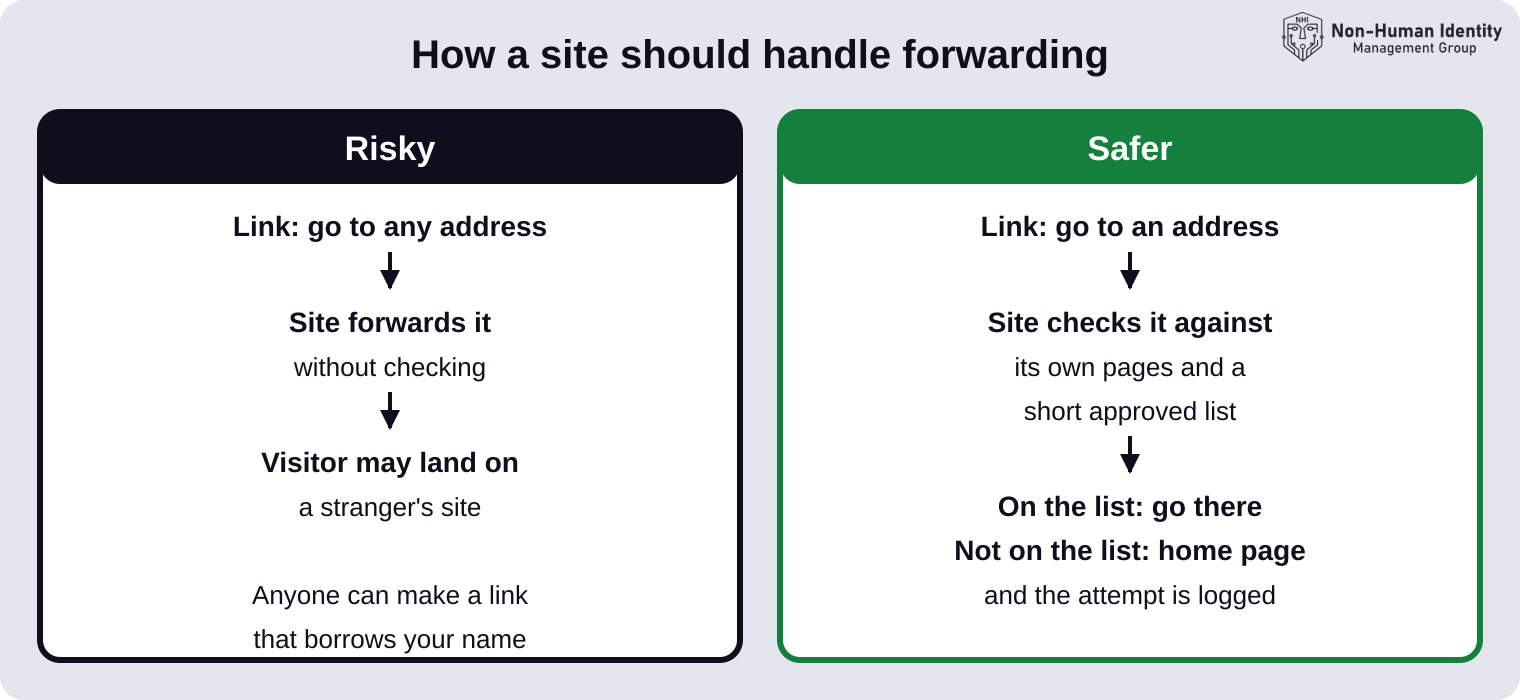
The safer way: the shop's site only forwards to its own pages, or to a short list of approved addresses. A link with any other address is sent to the home page instead.[1]
How does it work?
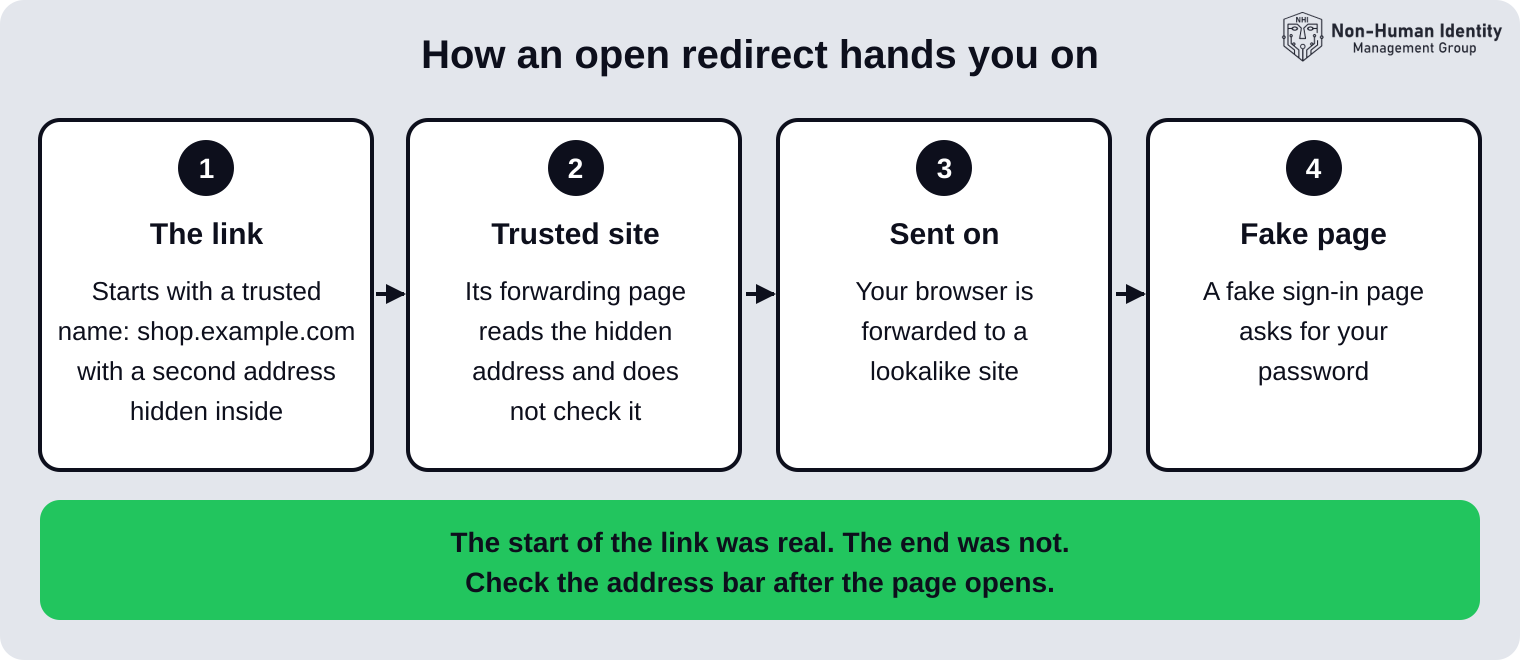
Here is the usual path, from the criminal's link to the fake page.
- The honest feature. A website has a page that forwards visitors, for example back to where they were after signing in.
- The missing check. The page takes the next address from the link and does not check where it points.[4]
- The crafted link. A criminal builds a link that starts on the trusted site and carries their own address inside it.
- The lure. They send it by email or text, often with a button such as "View document".[3]
- The hand-off. The visitor clicks, the trusted site forwards them, and they arrive at a fake page that asks for a password or pushes a download.[2]
The fix sits with whoever builds the website. Security guidance suggests avoiding forwarding based on the link where possible. Where it is needed, the site should only send people to its own pages, or swap a short code for an address it already holds.[1] Popular web toolkits include ready-made checks that refuse addresses outside the site.[4]
A worked example
Odile Corrigan runs a small online bookshop, a fictional business with five staff. Her website was built by a freelance developer, Kofi Rinaldi.
One Monday a customer, Milo Castell, emails her. "I got a message about my order. The link started with your shop's address, but it took me to a page asking for my bank sign-in. Is that you?"
Odile thinks of the taxi with a stranger's card. The car was hers, but the destination was not. She thanks Milo and asks him not to type anything into that page. She suggests he changes his password if he already did.
She forwards the message to Kofi. He looks at the link and sees a second address after the question mark. It goes through the shop's "return after sign-in" page.
Kofi changes that page so it only sends people to pages on the shop's own site. Any other address now sends the visitor to the home page instead, and the attempt is noted in the site's records. He uses the check built into the web toolkit he already uses, then tests it with a made-up outside address.
Odile posts a short notice for customers. It says the shop never asks for bank sign-in details by email, and gives a way to report odd messages.
A week later the records show a few more attempts using the old link. Each one lands on the home page. The flaw is fixed, though criminals can still send scam emails that mention the shop by name, so the notice stays up.
Myths and mistakes
| What people think | What is true |
|---|---|
| If a link starts with a trusted name, it is safe. | A trusted site with an open redirect can forward you anywhere. Check the address bar after the page opens. |
| An open redirect means the website was hacked. | It is a coding mistake in how the site forwards visitors. Nobody needs to break in to use it. |
| Forwarding is harmless because the site shows nothing bad itself. | The harm happens on the next page. The trusted name is borrowed to make a scam look real.[2] |
| Blocking a few known bad addresses fixes it. | Criminals can register new addresses. A short list of allowed places works better than a list of banned ones.[1] |
| Only sign-in pages have this problem. | Any page that forwards visitors based on the link can have it, including "go to" and "click tracking" pages.[4] |
What can I do this week?
- Check the address bar after a page opens, and before you sign in.
- Open your bank and other key sites from a saved bookmark, not from email links.
- If you run a website, ask your developer which pages send visitors on, and how each one checks the address.
- If you build websites, use your toolkit's own check so pages only send people to your site.
- Give customers an easy way to report odd messages that use your name.
Checklist
- I check the address bar before typing a password on any page I reached from a link.
- Our website only forwards visitors to its own pages or to an approved list of addresses.
- Forwarding pages that are no longer needed have been removed.
- Addresses that fail the check send visitors to a safe page, such as the home page.
- Failed forwarding attempts are recorded so someone can spot misuse.
- Developers treat any address that arrives in a link as untrusted.
- Customers know how to report a suspicious message that uses our name.
Common questions
How can I tell if a link uses an open redirect?
Look for a second web address inside the link, often after words like "next=", "url=" or "return=". That alone is not proof of a scam, because many honest sites do this. The safest habit is to check the address bar once the page has opened, before you sign in.
Is an open redirect the same as a malicious redirect?
No. An open redirect is a coding mistake that lets anyone make links that forward through a site. A malicious redirect is usually added by an intruder who has broken into the site. Both send visitors somewhere harmful, but they need different fixes.
Can an open redirect hurt me if I do not type anything?
It can. Most scams want you to type a password, but a redirect can also lead to a page that tries to start a download.[2] Keep your browser and device updated, and close pages that try to download files you did not ask for.
Who is responsible for fixing an open redirect?
The organisation that runs the website. Visitors can be careful, but only the site's developers can change how it forwards people. If you find one on a site you use, report it through the site's security or contact page.
Why do websites forward visitors at all?
Mostly for honest reasons. Sites send you back to the page you were on after signing in, move old pages to new addresses and send you to partner services. Forwarding is fine. The problem is only when the link, not the site, decides where you go.
Where next?
Ready for the detail? Read the practitioner guide: Open Redirect Guide. It goes further into how to validate forwarding addresses, the tricks used to slip past weak checks, and how open redirects can leak sign-in tokens in OAuth flows.
Also useful:
- Malicious Website Redirects for Beginners
- Lookalike Domains for Beginners
- Phishing links
- The OWASP Top 10 for Beginners
- How the Web Works for Beginners
Related NHI Mgmt Group resources: Input Validation and Output Encoding Guide · Phishing Guide · OAuth 2.0 for Beginners
Key terms
- Redirect
- When a website sends your browser on from one address to another.
- Open redirect
- A coding flaw that lets anyone make a link on a site send people elsewhere.
- Query string
- The part of a web address after the question mark, used to pass values to the site.
- Phishing
- A message that pretends to come from someone you trust, to trick you into giving away details.
- Allowlist
- A short list of approved places or things, where anything not on the list is refused.
- Lookalike domain
- A web address made to look like a trusted one, often with one letter changed or added.
Sources and further reading
- Unvalidated Redirects and Forwards Cheat Sheet. OWASP Cheat Sheet Series, OWASP Foundation. https://cheatsheetseries.owasp.org/cheatsheets/Unvalidated_Redirects_and_Forwards_Cheat_Sheet.html, accessed 28 Nov 2026.
- CWE-601: URL Redirection to Untrusted Site ('Open Redirect'). MITRE. https://cwe.mitre.org/data/definitions/601.html, accessed 28 Nov 2026.
- Widespread credential phishing campaign abuses open redirector links. Microsoft Threat Intelligence, Microsoft Security Blog, 26 August 2021. https://www.microsoft.com/en-us/security/blog/2021/08/26/widespread-credential-phishing-campaign-abuses-open-redirector-links/, accessed 28 Nov 2026.
- Prevent open redirect attacks in ASP.NET Core. Microsoft Learn, Microsoft. https://learn.microsoft.com/en-us/aspnet/core/security/preventing-open-redirects, accessed 28 Nov 2026.