Public key cryptography is a way of protecting data that uses two linked keys: one shared, one kept secret.
This guide is for students, career changers and anyone curious about how secure websites and messages work. You do not need to know any maths: if you shop, bank or chat online, you already rely on it every day.
In short
- Each person or computer gets a matched pair of keys: a public key to share and a private key to keep.
- Anyone can use your public key to lock a message that only your private key can open.
- You can use your private key to "sign" something, and anyone can check that signature with your public key.
- The whole system depends on the private key staying private, so it needs careful storage.
What you will learn
- Explain what a public key and a private key are, in one sentence each.
- Spot which key is safe to share and which is not.
- Explain how a secure website uses both kinds of key in one visit.
- Check where the private keys in your own work or studies are kept.
- Sharable key (public key)
- the half of a key pair you can give to anyone.
- Secret key (private key)
- the half of a key pair that only its owner should hold.
- Matched pair (key pair)
- a public key and a private key made together, which only work with each other.
What is public key cryptography?
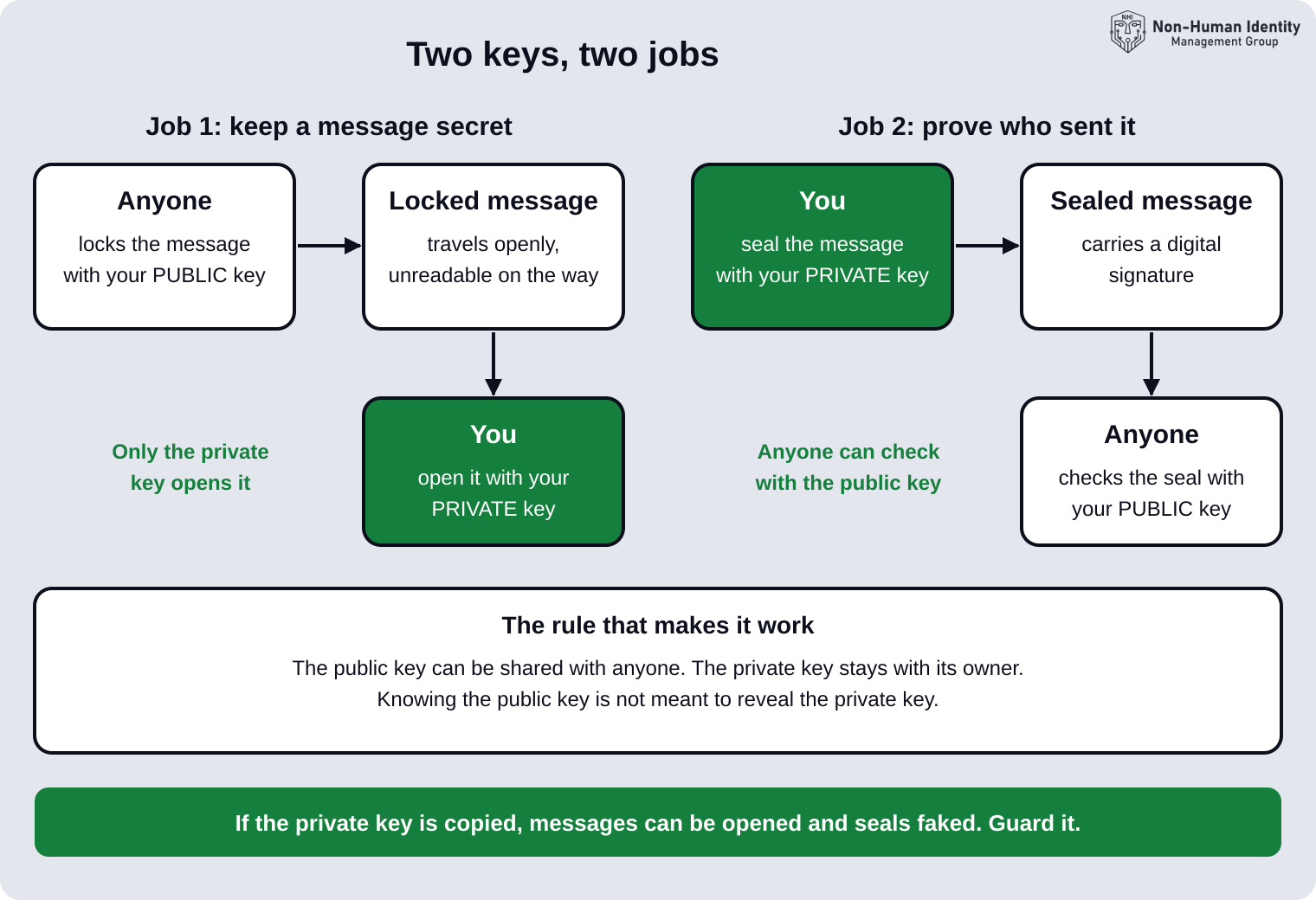
Think of a padlock you hand out to anyone, while you keep the only key that opens it. People snap your padlock shut on a box, and only you can open it.
Public key cryptography works the same way. Cryptography means using maths to keep information secret or to prove where it came from. In the public key kind, each owner has two keys made together as a pair.[1] The public key is the padlock you hand out. The private key is the key you keep.
The pair also works the other way round. You can use your private key to put a seal on a message. Anyone holding your public key can then check that the seal is yours. This seal is called a digital signature.[1]
You may also hear it called asymmetric cryptography, because the two keys are different. The older kind, symmetric cryptography, uses one shared key for both locking and unlocking.
Where the comparison stops working: a real padlock can be cut off with bolt cutters. A well-made key pair is designed so that working out the private key from the public key would take an impractical amount of computing.[1] So attackers usually go after the private key itself, not the maths.
Why does it matter?
Before this idea, two people needed to meet or use a trusted courier to share a secret key. Public key cryptography lets strangers set up a private conversation over an open network. That is what makes secure online shopping, banking and messaging practical.
If you are a student
What could happen: you mix up the two keys and send your private key to a teacher or a shared project.
Check this: before you share any key file, read its name and label. Only the public half should leave your computer.
Next: Encryption for Beginners
If you are changing career into IT
What could happen: you are asked to set up a server login with keys and leave the private key in a shared folder.
Check this: ask where your team keeps private keys and who can read them.
Next: SSH Keys for Beginners
If you run a small business
What could happen: your website's private key is copied, and someone may be able to pretend to be your site.
Check this: ask your web supplier who holds your website's private key and when it was last replaced.
What does it look like?
Keys are long strings of letters and numbers. You rarely see them, but tools often show a summary card like this made-up one.
Example only. All values are made up.
# Key pair for [email protected]
Type:         EXAMPLE-ALGORITHM-0000
Public key:   EXAMPLE-PUBLIC-KEY-0000-FAKE      (1)
Private key:  stored in keys/private.key        (2)
Protected by: passphrase                        (3)
Fingerprint:  00:00:FA:KE:00:00                 (4)
- In a real file, this line would contain the public key. It is safe to share.
- In a real file, this line would contain the place where the private key is kept. That file must not be shared.
- A passphrase (a long password) locks the private key file, so a copied file is harder to use.
- A short "fingerprint" of the public key, so people can check they have the right one.
Why this is risky: the two keys sit side by side and look alike to a newcomer. It is easy to copy the wrong one into an email or a shared folder.
The safer way: share only the public key and keep the private key file locked with a passphrase. When someone sends you their public key, check its fingerprint with them.
How does it work?
Here is the basic idea, step by step.
- Make a pair. Software creates a public key and a private key together. They are linked by maths, so they only work with each other.[1]
- Share the public half. The owner gives out the public key, for example in a certificate. A certificate is a signed document that ties a public key to a name.
- Lock with the public key. Anyone can use it to lock a message or agree a secret with the owner. Only the matching private key can finish the job.[2]
- Sign with the private key. The owner can seal a message or a file. Anyone with the public key can check the seal and see if the content changed.[1]
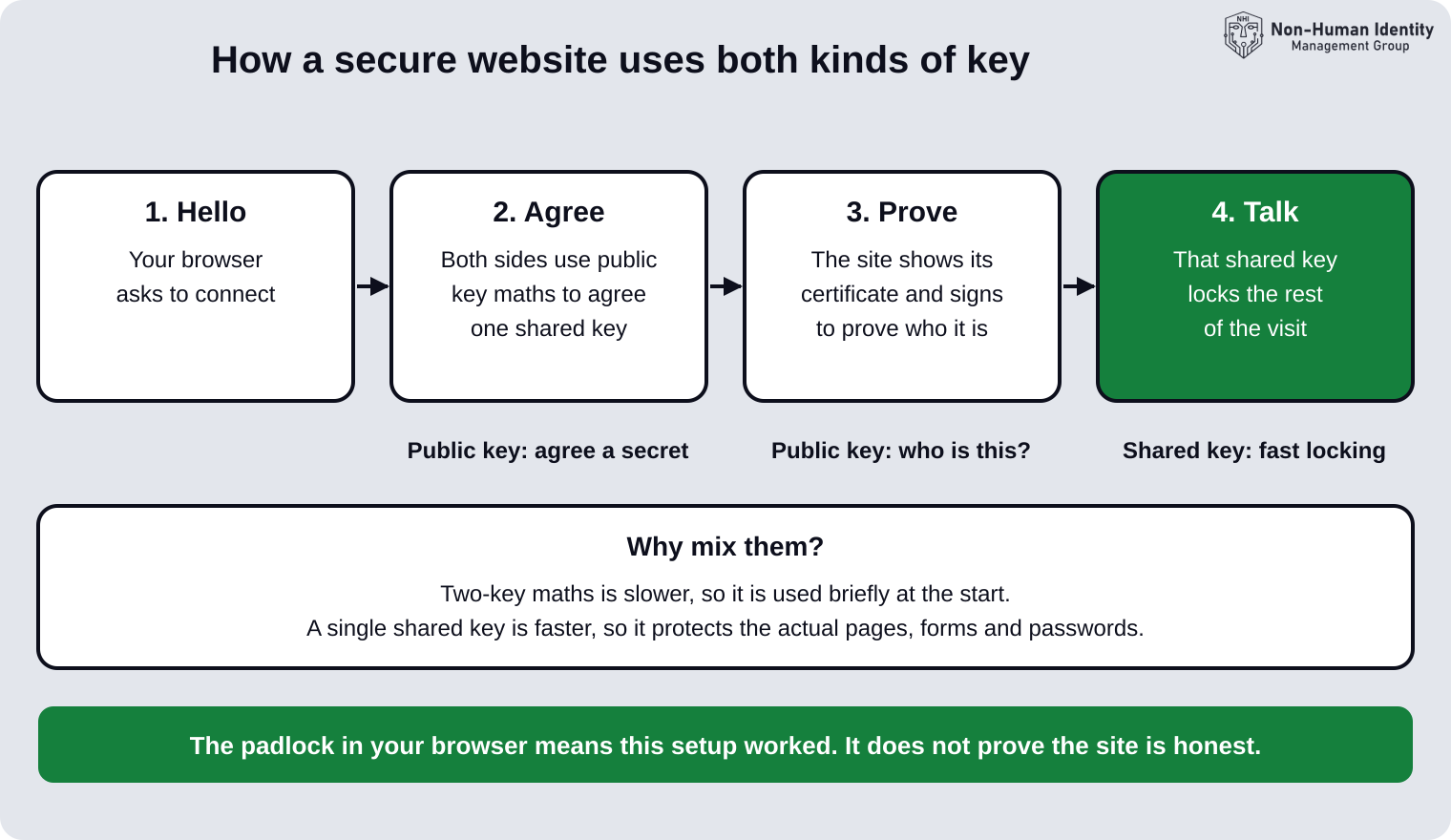
- Switch to a faster key. Two-key maths is slower. So most systems use it briefly to agree a single shared key, then use that shared key for everything else.[5]
You use this every time you visit a website that starts with https. Your browser and the site first use public key maths to agree a shared secret. The site then proves who it is with its certificate and a signature. After that, a fast shared key protects the rest of the visit.[5]
You will meet two common families of public key maths. RSA is named after its three inventors and is used both for agreeing keys and for signatures.[3] Elliptic curve cryptography (ECC) is based on a different kind of maths and can use shorter keys. US government guidance lists the curves it recommends.[4] For a beginner, the point is the same: one key to share, one key to keep.
There is a change coming. Future quantum computers could break the maths that today's public key methods rely on. In August 2024 the US standards body published its first three replacement standards and urged organisations to start moving to them.[6] The UK's national cyber security agency suggests organisations complete that move by 2035.[7] US guidance on how to make the move was finalised in October 2026.[8] The two-key idea stays. The maths underneath changes.
A worked example
Reza Lindahl is studying for his first IT job. He does a placement at Meadow Accountants, a fictional firm of eight people. His mentor is Wren Iyer, who looks after the firm's computers.
Wren asks Reza to set up a login to the firm's file server using keys, not a password. She explains it with the padlock. "The server gets your padlock. You keep the key."
Reza runs the tool, and it creates two files. One file name ends in ".pub", which he correctly guesses stands for public.
He nearly pastes the other file into the firm's chat to show Wren, but stops and asks first. Wren explains that the second file is the private key. Anyone who copies it could log in as him.
Reza sends Wren only the .pub file, and she adds it to the server. He locks his private key with a long passphrase, so a stolen copy would be harder to use.
Next, Reza tries to log in. The server checks that he holds the private key that matches the padlock it was given. His private key never leaves his laptop.
Before the end of the day, Wren shows him the firm's list of key owners. She adds his name, the date and a note to remove the key when his placement ends. Reza writes in his notes: "Share the padlock. Keep the key."
Myths and mistakes
| What people think | What is true |
|---|---|
| A public key is a security risk if people see it. | It is designed to be shared. The private key is the one to protect.[1] |
| Public key cryptography encrypts everything I send. | It is mostly used to agree a shared key and to check identity. A faster shared key usually locks the data itself.[5] |
| The padlock in my browser means the site is honest. | It means the connection is protected and the site holds a certificate for that address. A scam site can have one too. |
| A digital signature is a picture of my handwriting. | It is a maths seal made with a private key. It shows who signed and whether the content changed. |
| Quantum computers have already broken it. | Standards bodies treat it as a future risk. They published replacement standards in 2024 so the move can start early.[6] |
What can I do this week?
- Open a website you use, click the padlock and look at who its certificate was issued to.
- Find any private key files on your computer and check each is locked with a passphrase.
- If you use keys at work or on a course, ask where private keys are kept and who can read them.
- Practise explaining the padlock idea to a friend in two sentences.
Checklist
- I can explain the difference between a public key and a private key.
- I share only public keys, never private key files.
- My private keys are locked with a passphrase or kept in a secure store.
- I check a fingerprint when someone sends me their public key.
- Every key at work has a named owner and a date to review or remove it.
- I know a browser padlock shows a protected connection, not an honest website.
Common questions
Is public key cryptography the same as encryption?
It is one kind of it. Encryption means scrambling data so only the right person can read it. Public key cryptography uses two linked keys, and can also make digital signatures. Many systems use it alongside the faster one-key kind. See Encryption for Beginners.
What happens if I lose my private key?
You can no longer open messages locked to your public key or sign as yourself with that pair. Make a new pair and share the new public key. If the key may have been copied, not just lost, tell whoever trusts it so they remove the old public key.
What is the difference between RSA and ECC?
They are two families of maths that do the same jobs. RSA is older and widely used. Elliptic curve cryptography reaches similar strength with shorter keys. As a beginner you can treat them the same way: share the public key, guard the private key.
How does a certificate fit in?
A certificate is a signed document that links a public key to a name, such as a website address. A trusted organisation signs it, so your browser can check that the public key really belongs to that site. See Public Key Infrastructure for Beginners.
Do I need to worry about quantum computers now?
Not as an individual. Organisations are starting to plan, because changing every system takes years. New standards designed to resist quantum attacks were published in 2024. Keeping your devices and apps updated helps them pick up the newer methods as they arrive.
Where next?
Ready for the detail? Read the practitioner guide: Symmetric vs Asymmetric Encryption Guide. It goes further into when each type is used, key sizes and how they are combined in real protocols.
Also useful:
- Digital Signatures for Beginners
- TLS and HTTPS for Beginners
- RSA vs ECC
- Quantum Computing and Security for Beginners
- Key Management for Beginners
Related NHI Mgmt Group resources: Key Exchange and Diffie-Hellman Guide · Elliptic Curve Cryptography · Post-Quantum Cryptography Migration Guide
Key terms
- Public key
- The half of a key pair that can be shared, used to lock messages or check signatures.
- Private key
- The half of a key pair that only its owner should hold, used to open messages or make signatures.
- Asymmetric encryption
- Encryption that uses a public key and a matching private key.
- Symmetric encryption
- Encryption that uses the same shared key to lock and unlock.
- Digital signature
- A maths seal made with a private key that shows who signed and whether the content changed.
- RSA
- A widely used family of public key maths, named after its three inventors.
- Elliptic curve cryptography
- A family of public key maths that can reach similar strength with shorter keys.
- Post-quantum cryptography
- Newer methods designed to stay safe even against future quantum computers.
Sources and further reading
- Glossary: public key cryptography. Computer Security Resource Center, National Institute of Standards and Technology (NIST). https://csrc.nist.gov/glossary/term/public_key_cryptography, accessed 28 Nov 2026.
- Glossary: key establishment. Computer Security Resource Center, NIST. https://csrc.nist.gov/glossary/term/key_establishment, accessed 28 Nov 2026.
- Glossary: RSA. Computer Security Resource Center, NIST. https://csrc.nist.gov/glossary/term/rsa, accessed 28 Nov 2026.
- SP 800-186, Recommendations for Discrete Logarithm-based Cryptography: Elliptic Curve Domain Parameters. NIST, February 2023. https://csrc.nist.gov/pubs/sp/800/186/final, accessed 28 Nov 2026.
- RFC 9846, The Transport Layer Security (TLS) Protocol Version 1.3. IETF, July 2026. https://www.rfc-editor.org/rfc/rfc9846, accessed 28 Nov 2026.
- NIST Releases First 3 Finalized Post-Quantum Encryption Standards. NIST, 13 August 2024. https://www.nist.gov/news-events/news/2024/08/nist-releases-first-3-finalized-post-quantum-encryption-standards, accessed 28 Nov 2026.
- Timelines for migration to post-quantum cryptography. National Cyber Security Centre (UK), 20 March 2025. https://www.ncsc.gov.uk/guidance/pqc-migration-timelines, accessed 28 Nov 2026.
- NIST IR 8547, Transition to Post-Quantum Cryptography Standards. NIST, October 2026. https://csrc.nist.gov/pubs/ir/8547/final, accessed 28 Nov 2026.