A security data pipeline collects security records, tidies them and sends each one to the right place.
This guide is for managers, new engineers and anyone who has seen a large bill for security logs. You do not need to build a pipeline to be affected: if your organisation pays to store logs, the pipeline decides what you pay for and what your security team can see.
In short
- A pipeline sits between the systems that create logs and the tools that store and search them.
- It collects, tidies, trims and routes records, so costs can drop without losing what matters.
- Trimming the wrong records can hide an attack, so the security team must agree what is dropped.
- The pipeline's own accounts are powerful and need the same care as an admin account.
What you will learn
- Explain what a security data pipeline does in one sentence.
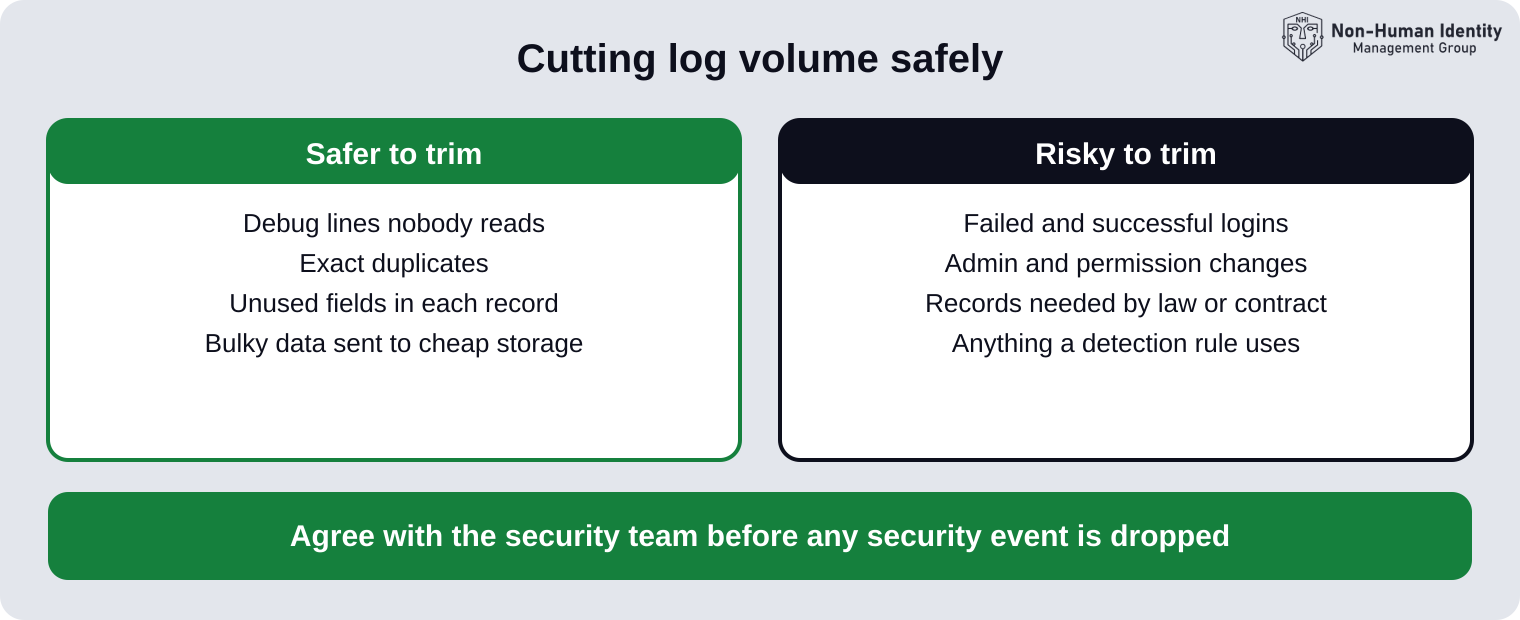
- Spot which records are safe to trim and which are not.
- Check where your records could be lost on the way.
- Ask who controls the pipeline and its accounts.
- Activity record (log)
- a line written by a system each time something happens, such as a login.
- Search and alert tool (SIEM)
- a system that gathers logs in one place and raises alerts about trouble.
- Holding area (buffer)
- a store where records wait if the next stop is slow or down.
What is a security data pipeline?
Think of a postal sorting office. Letters arrive from thousands of post boxes. The office sorts them, bins obvious junk and sends each letter to the right address.
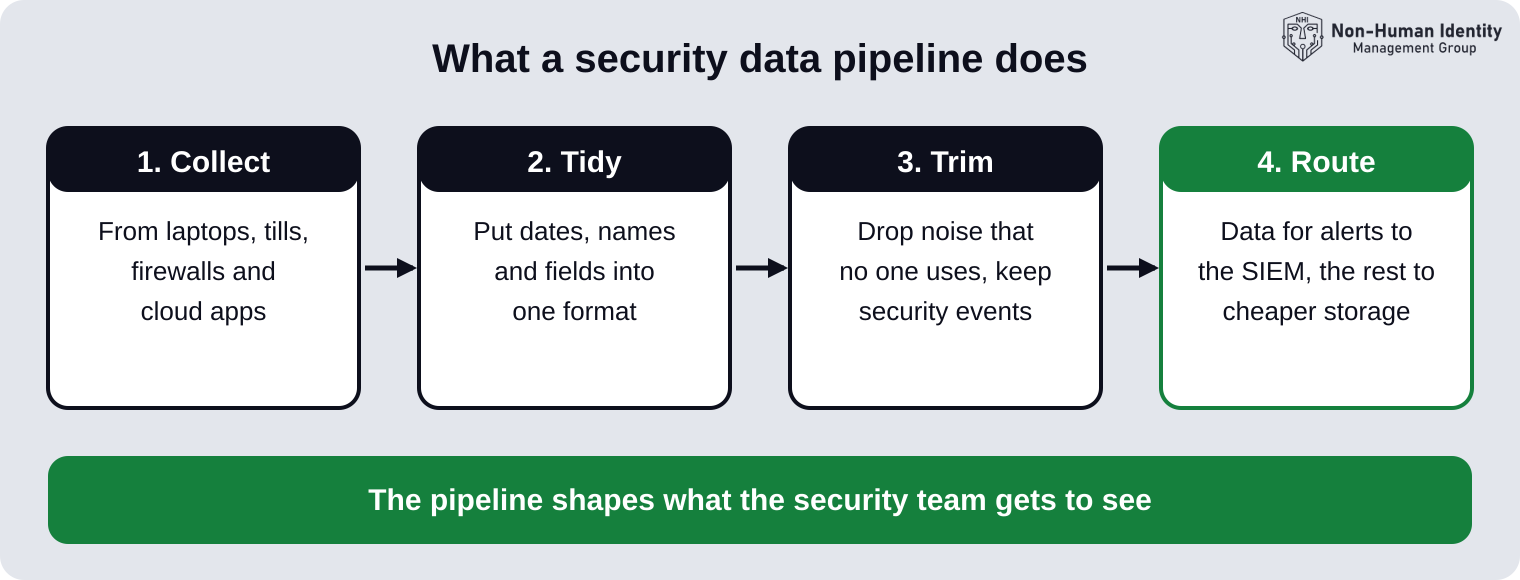
A security data pipeline does the same for logs. Laptops, tills, firewalls and cloud apps all write logs. The pipeline collects them, puts them into one tidy format and sends each one to where it is needed. Records used for alerts usually go to the SIEM. The rest can go to cheaper storage, kept in case someone needs it later.
A US government standards body describes log management as generating, sending, storing, accessing and disposing of log data.[1] The pipeline handles the sending part, and it often shapes where records are stored.
Where the comparison stops working: a sorting office is never meant to open letters or change them. A pipeline often does change records, by removing parts or adding extra details. That makes its rules part of how your security works.
Why does it matter?
Australia's cyber agency notes that most SIEM pricing is based on how much data the SIEM takes in.[7] Sending everything can be costly, and sending too little can leave blind spots. A pipeline is where that trade-off is made, record by record.
If you manage a budget
What could happen: someone cuts log volume to save money and removes the records that would show an attack.
Check this: ask who approves changes to what is dropped, and whether security signs them off.
Next: SIEM for Beginners
If you are a new engineer
What could happen: a full holding area quietly throws away records during a busy hour.
Check this: find out what each part of the pipeline does when it runs out of space.
If you work in a security team
What could happen: a detection rule stops firing because a field it relies on was renamed upstream.
Check this: test your key alerts after every pipeline change.
What does it look like?
Here is a made-up set of pipeline rules for a small chain of shops, written in plain words rather than code.
Example only. All values are made up.
Pipeline: EXAMPLE shops security logs
Collect from: tills, website, firewall, staff email
Tidy:   write every time as UTC, one date format      (1)
Drop:   website "page loaded" debug lines             (2)
Drop:   failed staff logins                           (3)
Send:   logins, admin changes, firewall blocks -> SIEM
Send:   everything else -> cheap archive, 1 year      (4)
Pipeline token: svc-pipeline / FAKE-token-0000        (5)
- One time format makes records from different systems line up.
- A sensible cut: these lines are bulky and rarely used for security.
- A risky cut: failed logins are often the first sign of password guessing.
- Cheaper storage keeps the rest, in case an investigation needs it.
- In a real file, this line would contain the pipeline's own token. It can often read and change every record.
Why this is risky: rule 3 removes evidence before anyone knows it was needed. The token in line 5 is typed straight into the rules. Anyone who reads them can copy it.
The safer way: drop only records the security team has agreed are not needed. Keep the pipeline's token in a secrets store, give it only the access it needs and change it regularly.
How does it work?
Most pipelines follow the same four steps, whichever product you use.
- Collect. Small programs called collectors or agents pick up logs from each system. One shared collector can save running several agents per machine.[2]
- Tidy. Records are put into one shared layout, called a schema. Some teams use open layouts such as OCSF, an open standard for security event data.[3]
- Trim. Rules drop records or parts of records that no one needs. Many tools can drop records that match set conditions.[4]
- Route. Each record goes to the right place: the SIEM for alerts, cheaper storage for the rest, or both.
Records can also go missing on the way. Pipelines hold records in a buffer while the next stop catches up. One open-source tool's documentation says buffering in memory only is more prone to data loss than buffering on disk.[5] When some buffer limits are reached, the oldest records can be discarded to make room for new ones.[5]
The pipeline also runs on its own accounts. These are non-human identities (NHIs). An NHI is a digital identity, or the credential behind it, that represents a machine, application, automated process, service or AI agent. It lets that software connect to other systems without a person.[6] A pipeline account can often read, change or stop every security record, so it needs the same care as an admin account.
A worked example
Wren Castell is the only security engineer at Larch Pharmacy, a fictional chain of twelve shops. The finance team has flagged the SIEM bill, which has doubled in a year.
Wren starts by looking at what is sent. Most of the volume is "page loaded" lines from the website and repeated health checks from the tills. Neither is used by any alert.
She thinks of the sorting office. Junk mail can be binned, but letters from the bank must arrive. So she writes two lists. One holds records no alert or investigation uses. The other holds records she must keep, such as logins, admin changes and firewall blocks.
Wren sets up a pipeline between the shops and the SIEM. It drops the website debug lines and sends the till health checks to cheaper storage instead of the SIEM. Logins and admin changes still go to the SIEM in full.
Before switching over, she runs her ten most important alerts against a week of test data. One no longer fires, because a field name changed in the tidy step. She fixes the name and tests again.
She also checks the holding area. It was set to memory only, so she switches it to disk for the security sources.
Last, she moves the pipeline's token into the company's secrets store and limits what it can reach. The next month the SIEM bill is lower, and her key alerts still fire in tests.
Myths and mistakes
| What people think | What is true |
|---|---|
| Cutting log volume is just a cost decision. | It is also a security decision. Every dropped record is one no alert can use later. |
| Sampling, such as keeping one record in ten, is fine for logins too. | Alerts that count events, like repeated failed logins, can miss attacks if records are sampled. |
| If the pipeline is running, no records are lost. | Full buffers can pause collection or throw away the oldest records.[5] Watch for these events. |
| The pipeline is plumbing, so its account does not matter. | Its account can often read, change or stop every security record. Protect it like an admin account. |
| Once records are tidied, the original is not needed. | We suggest keeping the original too, so mistakes in the tidy step can be corrected later. |
What can I do this week?
- Draw a simple map of where your logs go, from each source to each tool.
- List the five sources that send the most data, and ask if each one is used.
- Write down who can change what the pipeline drops.
- Find out where the pipeline's token is stored and who can see it.
Checklist
- There is a map of every log source and where its records go.
- The security team signs off any rule that drops security records.
- Logins, admin changes and other key events are never sampled.
- Buffers for security sources are stored on disk, not only in memory.
- Someone is alerted when records are dropped because a buffer is full.
- Key alerts are tested after every pipeline change.
- Pipeline tokens live in a secrets store, with only the access they need.
Common questions
Do I need a pipeline if I already have a SIEM?
Not always. Small setups can send logs straight to a SIEM. A pipeline helps when costs climb or logs come from many places. It also helps when the same records must go to more than one tool, such as a SIEM and cheaper storage.
Is a security data pipeline the same as a SIEM?
No. The pipeline moves and shapes records. The SIEM stores, searches and raises alerts on them. Think of the pipeline as the sorting office and the SIEM as the control room where people watch for trouble.
How much money can a pipeline save?
Savings vary with your data and your SIEM's pricing. They come from dropping records nobody uses and sending bulky data to cheaper storage. Ask your security team to agree the list first, so savings do not come from removing evidence.
What is a log schema?
A schema is a shared layout for records, so the same detail sits in the same named field. With one layout, a single search or alert can work across logs from many different systems. OCSF is one open example.
Can an attacker tamper with the pipeline?
Yes, it is possible. Someone with the pipeline's token or access to its rules could drop or change records to hide their tracks. That is why its accounts, rules and changes need the same protection and review as other admin tools.
Where next?
Ready for the detail? Read the practitioner guide: Security Data Pipeline Guide. It goes further into log schemas, buffering and delivery settings, safe and unsafe ways to cut volume, storage tiers and securing the pipeline's own identities.
Also useful:
- SIEM for Beginners
- Security Logging for Beginners
- Sensitive Data in Logs for Beginners
- Non-Human Identities for Beginners
Related NHI Mgmt Group resources: Securing the log pipeline (collectors, forwarders, data pipeline) itself · Security Data Pipeline Buyer's Guide · Log Retention Requirements Map
Key terms
- Log management
- Creating, sending, storing, accessing and disposing of log records.
- SIEM
- A tool that gathers logs in one place, searches them and raises alerts.
- Collector
- A small program that picks up logs from systems and passes them on.
- Normalisation
- Putting records from different systems into one shared layout.
- Enrichment
- Adding helpful details to a record, such as which team owns a device.
- OCSF
- An open standard layout for security event records.
- Data lake
- Large, lower-cost storage that keeps raw data for later search.
Sources and further reading
- SP 800-92 Rev. 1 (Initial Public Draft), Cybersecurity Log Management Planning Guide. NIST, 11 October 2023. https://csrc.nist.gov/pubs/sp/800/92/r1/ipd, accessed 28 Nov 2026.
- OpenTelemetry Collector documentation. OpenTelemetry project. https://opentelemetry.io/docs/collector/, accessed 28 Nov 2026.
- Open Cybersecurity Schema Framework (OCSF). OCSF project. https://ocsf.io/, accessed 28 Nov 2026.
- Filter Processor (README). OpenTelemetry Collector Contrib, GitHub. https://github.com/open-telemetry/opentelemetry-collector-contrib/blob/main/processor/filterprocessor/README.md, accessed 28 Nov 2026.
- Buffering and storage. Fluent Bit documentation. https://docs.fluentbit.io/manual/administration/buffering-and-storage, accessed 28 Nov 2026.
- Non-Human Identities for Beginners. NHI Mgmt Group. https://nhimg.org/what-are-non-human-identities-beginners-guide, accessed 28 Nov 2026.
- Implementing SIEM and SOAR platforms: Executive guidance. Australian Signals Directorate's Australian Cyber Security Centre with CISA and partners, 27 May 2025. https://www.cyber.gov.au/business-government/detecting-responding-to-threats/event-logging/implementing-siem-soar-platforms/executive-guidance, accessed 28 Nov 2026.