A supplier breach is a cyber attack on a company you rely on that may reach your data or systems.
This guide is for small business owners, office managers and anyone new to security work. You do not need to be technical to be affected: if an outside firm runs your bookings, payroll, IT or website, its bad day can become yours.
In short
- When a supplier is hacked, first check the news is real, using contact details you already trust.
- Then find out what the supplier holds for you: data, logins, keys and payment details.
- Change any passwords or keys the supplier uses, and warn staff about fake messages and changed bank details.
- If personal data may be involved, you may have to report it to the regulator, often within 72 hours.
What you will learn
- Explain what a supplier breach is and why it can affect you.
- Check what a hacked supplier holds or can reach for you.
- Spot the fake messages that often follow a breach.
- Ask your supplier the right questions in the first few days.
- Outside firm (supplier or third party)
- a company that provides a service to your business, such as IT support or a booking system.
- Break-in (breach)
- an attack where someone gets at data or systems they should not reach.
- Non-human identity (NHI)
- a key, token or account that lets one system connect to another without a person.
What is a supplier breach?
Think of a storage company that keeps some of your boxes. One night, thieves break into its warehouse. Your boxes might be safe, or they might be open on the floor.
A supplier breach works the same way. Many businesses hand data and access to outside firms. A dental practice may use an online booking system. A shop may pay an IT firm to look after its computers.
When one of those firms is attacked, the attacker may see your data. They may also find the passwords or keys the supplier uses to connect to your systems. Many of these are non-human identities (NHIs). An NHI is a digital identity, or the credential behind it, that represents a machine, application, automated process, service or AI agent. It lets that thing authenticate, carry out tasks and connect to other systems without a person.[4]
Where the comparison stops working: after a warehouse break-in, you can go and count your boxes. With data, a copy can be taken and the original left in place. So you often cannot tell at first what was taken.
Why does it matter?
The supplier is attacked, but the duty to protect your customers' data often stays with you. In the UK, a firm handling personal data for you must tell you about a breach without undue delay.[1] What happens next is often your job.
If you run a small business
What could happen: your customers' details leak through a supplier, and they ask you why.
Check this: keep a short list of suppliers that hold customer data, with a named contact for each.
If you handle payments or invoices
What could happen: a criminal uses stolen supplier emails to ask you to pay into a new bank account.
Check this: confirm any change of bank details by calling a number you already hold.
If you look after IT
What could happen: the supplier's stolen login is used to get into your own systems.
Check this: know which supplier accounts, keys and remote tools can reach your systems.
What does it look like?
Here is a made-up scenario card. It shows the first message from a supplier, and what a business should ask in return.
Example only. All values are made up.
From: [email protected]
Subject: Security incident affecting your account     (1)
We found unauthorised access to part of our system.   (2)
Customer names and appointment times may be affected.
Your account reference: EXAMPLE-0000                  (3)
We will update you within 48 hours.                   (4)
Please reset your login using the link below.         (5)
- Check the sender against contact details you already hold, not the ones in the message.
- Ask when it started, when it was found and whether it is still going on.
- In a real message, this line would show your account. Ask exactly which of your data was involved.
- Agree a named contact and a time for the next update.
- A link in a breach message can be a trap. Go to the supplier's site yourself instead.
Why this is risky: criminals copy breach notices. A fake one may carry a link to a fake login page.[2] A real one may still leave out what you need to know.
The safer way: confirm the notice through the supplier's official website or a contact you trust. Then work through a short list of questions with a named person.
How does it work?
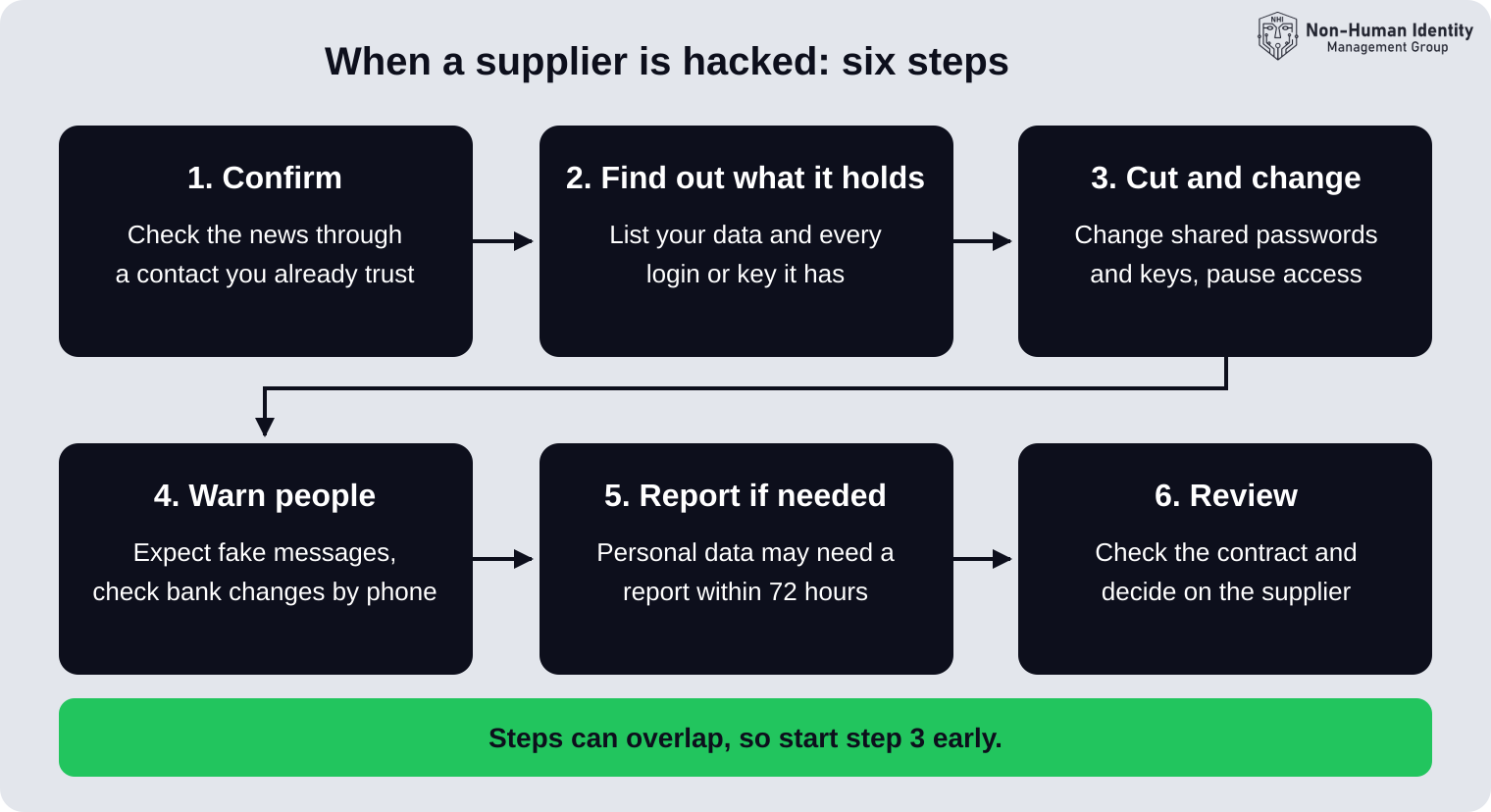
Most good responses follow the same six steps, and you do not need to finish one before you start the next.
- Confirm. Check the news is real. Contact the supplier through its official website or a contact you already hold.[2]
- Find out what it holds. List the data the supplier keeps for you and every way it connects to your systems.
- Cut and change. Change passwords and keys the supplier uses. Pause its remote access until you know more.
- Warn people. Tell staff to expect fake messages, and to check any change of bank details by calling a number you already hold.
- Report if needed. If personal data may be at risk, decide whether to report it. In the UK, a reportable breach must reach the regulator within 72 hours of you becoming aware of it.[1]
- Review. When things calm down, look at what worked. Check the contract and decide whether to keep the supplier. UK guidance suggests contracts should say how suppliers manage and report security incidents.[3]
Some steps need care. If personal data was involved, the supplier must tell you without undue delay.[1] But you still decide whether to report it to the regulator, and whether to tell the people affected. You must tell them directly when the breach is likely to put them at high risk.[1]
A breach is not only stolen data. If the supplier's system goes down and people cannot get to their data, that can count as a breach too.[1]
A worked example
Hal Marlow manages Meadow Dental, a fictional practice with nine staff. Patients book online through a booking service run by an outside firm.
On Monday morning an email arrives. It says the booking firm has been hacked and asks Hal to reset his login using a link. Hal remembers the storage company. Before he opens anything, he wants to know if the warehouse was really broken into.
He ignores the link and logs in through the firm's website. A notice there confirms the attack. He then calls Yara Tanaka, his account manager, on the number in his contract.
Yara confirms that patient names, phone numbers and appointment times may have been seen. Payment card details are held elsewhere. Hal writes down what she says and the time of the call.
Next, Hal changes the practice's login to the booking service. He asks his IT helper to replace the key that links the booking service to the practice calendar. He also tells the front desk that patients may get fake texts about appointments.
Hal reads the regulator's guidance on personal data breaches. He thinks the risk to patients is real but limited, and he records his reasons. He is not fully sure, so he reports it well inside the 72 hours.
Two weeks later, Yara sends a final report. Hal checks his contract. It says how fast the firm must tell him about a breach, but not what it must share. He notes that for renewal time.
Myths and mistakes
| What people think | What is true |
|---|---|
| It is the supplier's breach, so it is the supplier's problem. | If your customers' data is involved, you may have duties too, such as reporting to the regulator. |
| The breach email is from the supplier, so the link is safe. | Criminals copy breach notices. Go to the supplier's website yourself. |
| If no data was taken, there is nothing to do. | Stolen passwords or keys may still reach your systems. Change the ones the supplier uses. |
| We should drop the supplier straight away. | Pause risky access first, then decide calmly. You may still need the service. |
| The first update tells the whole story. | Early facts often change. Ask for updates at set times and keep notes. |
What can I do this week?
- List your five most important suppliers and what data or access each one has.
- Save a trusted contact name and number for each one, outside email.
- Find out which passwords, keys and remote tools let suppliers into your systems.
- Agree with your finance team that bank detail changes are always checked by phone.
- Read your top supplier's contract to see how fast it must tell you about a breach.
Checklist
- We keep a list of suppliers, what they hold and how they connect to us.
- Each key supplier has a trusted contact we can reach without email.
- We know how to change or cancel each supplier's passwords, keys and remote access.
- Staff know to expect fake messages after a supplier breach.
- Bank detail changes are checked using a number we already hold.
- We know who decides whether to report a breach to the regulator.
- We keep notes of what we learned, what we did and when.
- Contracts say how fast a supplier must tell us about a breach.
Common questions
How will I know if a supplier has been hacked?
Usually the supplier tells you, by email, letter or a notice on its website. Sometimes you hear first in the news. Either way, confirm it through the supplier's official website or a contact you already hold, not through links or numbers in the message.
Do I have to report a supplier's breach?
Sometimes, yes. If personal data you are responsible for is involved and there is a risk to people, you may need to report it. In the UK that report goes to the ICO, within 72 hours of becoming aware. See Data Breach Notification for Beginners.
Should I stop using the supplier?
Not straight away. First pause any risky access and change shared passwords and keys. Once you know what happened and how the supplier handled it, decide whether to stay. A supplier that tells you quickly and honestly may be a better bet than one that hides problems.
What should I ask the supplier first?
Ask what happened, when it started and whether it is still going on. Ask which of your data and which logins or keys were involved. Ask what they want you to do now, who your contact is and when the next update will come.
Why are fake messages more likely after a breach?
Criminals know people expect news from the breached firm. They may send fake alerts, fake reset links or fake requests to change bank details. Some arrive weeks after the breach was made public.[2] Check anything unusual using contact details you already trust.
Where next?
Ready for the detail? Read the practitioner guide: Third-Party Incident Response Playbook. It goes further into roles and contacts, containment steps and how to run a review after the incident.
Also useful:
- Incident Response for Beginners
- Data Breach Notification for Beginners
- Security Clauses in Supplier Contracts for Beginners
- Supply Chain Attacks for Beginners
Related NHI Mgmt Group resources: Compromised MSP Playbook · Invoice Redirection and Supplier Bank Detail Fraud Guide · Third-Party Risk Management Guide
Key terms
- Third-party access
- Access given to suppliers, contractors or partners who are not your own staff.
- Personal data breach
- A security incident that leads to personal data being lost, changed, shared or seen without permission, or made unavailable.
- Data processor
- A firm that handles personal data for you, following your instructions.
- Incident response
- The planned steps to spot, contain, investigate and recover from a security problem.
- Phishing
- Fake messages or websites that trick people into giving away passwords, money or access.
- Fourth-party risk
- Risk from your suppliers' own suppliers, which you usually have no contract with.
Sources and further reading
- Personal data breaches: a guide. Information Commissioner's Office (ICO). https://ico.org.uk/for-organisations/report-a-breach/personal-data-breach/personal-data-breaches-a-guide/, accessed 28 Nov 2026.
- Data breaches: guidance for individuals and families. National Cyber Security Centre (NCSC), 28 January 2021. https://www.ncsc.gov.uk/guidance/data-breaches, accessed 28 Nov 2026.
- Supply chain security guidance: Establish control. National Cyber Security Centre (NCSC). https://www.ncsc.gov.uk/collection/supply-chain-security/principles-supply-chain-security/ii-establish-control, accessed 28 Nov 2026.
- Non-Human Identities for Beginners. NHI Mgmt Group. https://nhimg.org/what-are-non-human-identities-beginners-guide.