UPnP is a router feature that lets home gadgets find each other and open connections without asking you.
This guide is for anyone with a home or small office network full of smart TVs, cameras, consoles and printers. You do not need to be technical to be affected: most home routers have this feature, and many have it switched on.
In short
- Device discovery lets gadgets announce themselves, so your phone can find the printer or the TV.
- UPnP can also let a gadget ask the router to open a door from the internet to itself.
- No password is needed for that request, so an infected gadget could ask too.
- Many people can switch UPnP off and open a door by hand only when something really needs it.
What you will learn
- Explain what UPnP and device discovery do in plain words.
- Spot the doors your router has opened for your gadgets.
- Check your router's UPnP setting and decide whether you need it.
- Ask a better question when a game or camera says it needs ports opened.
- Automatic door opener (UPnP)
- a feature that lets devices find each other and ask the router to open connections.
- Door rule (port forwarding)
- a router setting that sends traffic from the internet to one device inside.
- Gadget roll call (device discovery)
- gadgets announcing themselves to every device on the same network.
What is UPnP and device discovery?
Think of a bouncer at a club door. Normally the bouncer keeps strangers out. Now imagine any guest inside can say "let my friends in by the side door", and the bouncer agrees without checking with the owner.
Your router's firewall is the bouncer. UPnP, short for Universal Plug and Play, is the guest who can ask for the side door. It was designed for trusted home networks and does not ask for any password.[1]
UPnP has two jobs. First, it helps devices find each other on your network.[2] Second, on many routers, a device can use it to set up port forwarding. That is a rule that sends traffic from the internet straight to that device.
Device discovery uses two main "roll call" methods. SSDP is the part of UPnP that gadgets use to announce themselves. The other, mDNS, lets devices find each other by name on the local network only.[3] That is how your phone finds the printer.
Where the comparison stops working: a club owner can watch the side door. Most routers open these doors silently, and many people never look at the list.
Why does it matter?
Convenience and risk come together here. The US Federal Trade Commission (FTC) suggests turning UPnP off, because handy features like this can make your network less secure.[2]
If you have smart gadgets at home
What could happen: a camera opens a door to itself, and strangers on the internet can reach its sign-in page.
Check this: look at your router's list of open doors and remove any you do not recognise.
If you play games online
What could happen: you switch UPnP off and online play gets worse, so you switch it back on for everything.
Check this: open only the doors your console maker lists, by hand, for the console alone.
If you run a small office
What could happen: an infected laptop opens a door so an attacker can reach it from outside.
Check this: ask whoever set up your router whether UPnP is on, and why.
What does it look like?
Many routers show a page listing the doors that UPnP has opened. Here is a made-up one.
Example only. All values are made up.
Router settings > Advanced > UPnP
UPnP: ON                                                (1)
Doors opened by devices:
Device              Inside address   Outside port
Games-Console-0000  192.168.1.20     3074               (2)
Camera-EXAMPLE      192.168.1.31     8080               (3)
Unknown-FAKE        192.168.1.44     50000              (4)
- UPnP is switched on, so any device inside can ask for a door.
- A games console asked for a door. This is the most common reason people keep UPnP on.
- In a real screen, this line would contain a camera that can now be reached from the internet.
- A device nobody recognises has opened a door. That is worth checking straight away.
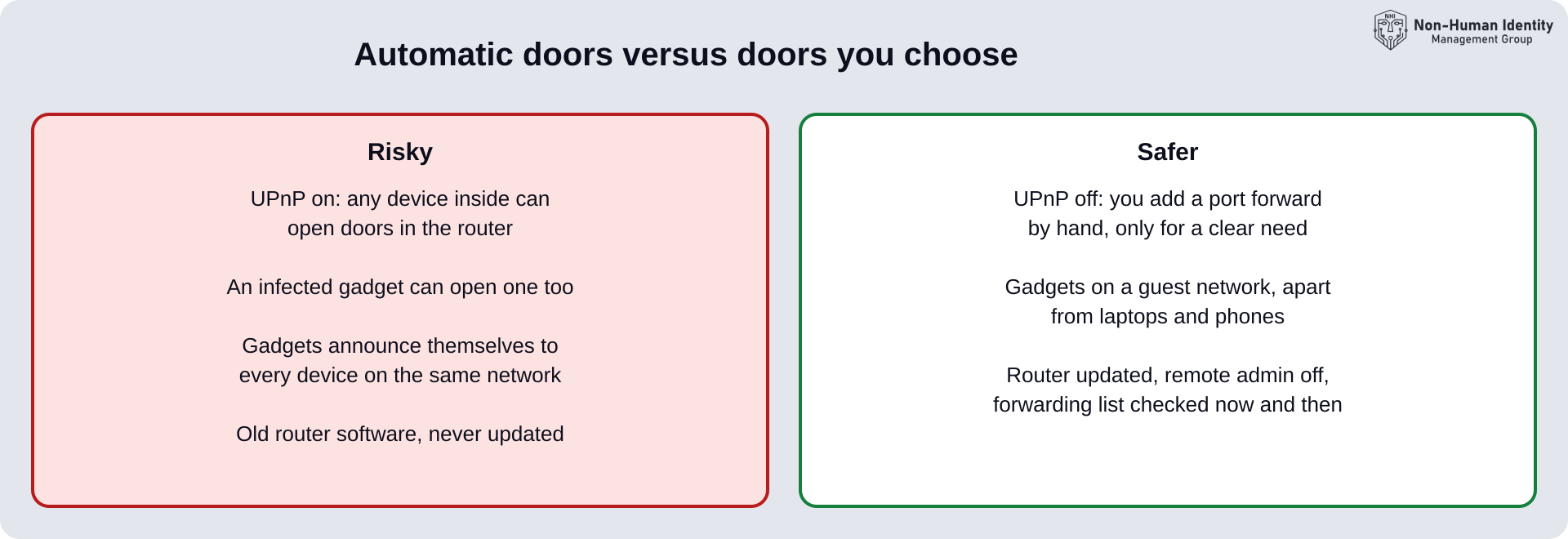
Why this is risky: nobody decided to open these doors. Any device, including an infected one, can add to the list.[1]
The safer way: switch UPnP off. If a device really needs a door, add one by hand for that device only, and write down why.
How does it work?
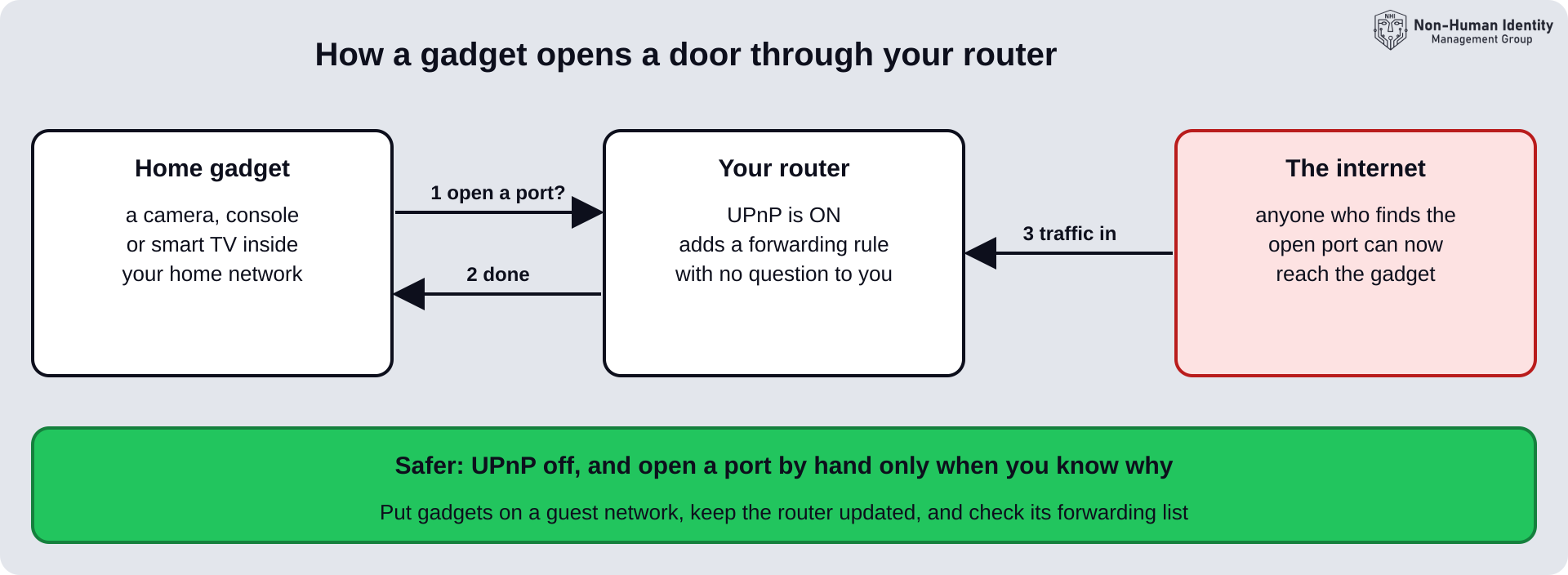
- A gadget joins. A new camera or TV connects to your home Wi-Fi for the first time.
- It announces itself. Using SSDP or mDNS, it tells every device on the network what it is. That is how the app on your phone can find it.[3]
- It asks for a door. If UPnP is on, the gadget asks the router to forward an outside port to it.
- The router agrees. The router adds the rule straight away, without checking with you first.[1]
- Traffic comes in. Anyone on the internet who finds that port can now try to reach the gadget.
Some routers have had a worse problem: UPnP answering requests from the internet side as well. In 2020, the CERT Coordination Center warned about a UPnP weakness called CallStranger. A remote attacker could use it to make devices send large amounts of data elsewhere, helping to flood other websites.[1] Its advice was to switch UPnP off on internet-facing connections and apply updates.[1]
A worked example
Zola Yeboah lives with her teenage son and works from home two days a week. Her nephew, Milo Delmar, studies networking at college and comes round for Sunday lunch.
Zola mentions that her new doorbell camera "just worked" out of the box. She could watch it on her phone from the shops straight away.
Milo asks to look at the router's settings page. Under Advanced, he finds UPnP switched on and four doors open. One is for the games console. One is for the doorbell camera. Two belong to an old smart plug and a TV box that Zola gave away last year.
Milo thinks of a bouncer letting guests open side doors. "Some of these doors were opened by gadgets you don't even own any more," he says.
They make a plan together. First, Milo checks the camera maker's help pages. The camera uses the maker's app service, so it does not need a door of its own. Second, he notes the ports the console maker lists for online play.
Then he switches UPnP off and restarts the router. The old doors disappear from the list. He adds one door by hand, for the console only.
Last, he sets up the router's guest network and moves the camera, the TV and the smart plug onto it. Zola's work laptop stays on the main network. He also checks that the router has its latest update and that remote management is off.
A week later, Zola's son reports that online games still work. The doorbell still shows up on Zola's phone. The only difference is that Zola now knows which doors are open, and why.
Myths and mistakes
| What people think | What is true |
|---|---|
| My router's firewall keeps everything out. | With UPnP on, devices inside can ask the router to let traffic in. |
| Only hackers' devices use UPnP. | Normal gadgets use it all the time. The worry is that an infected one can use it just as easily.[1] |
| Switching UPnP off breaks everything. | Most gadgets keep working. A few, such as some games, may need a door added by hand. |
| Device discovery is the same as being on the internet. | Discovery like mDNS is meant to stay on your local network.[3] It mostly matters if strangers share that network, such as on guest Wi-Fi. |
| Once set up, a router can be left alone. | Check for updates and review its door list now and then. The FTC suggests checking for newer router software.[2] |
What can I do this week?
- Sign in to your router and find the UPnP setting.
- Look at the list of doors (port forwards) it has opened, and remove any you do not recognise.
- Decide whether you need UPnP at all. If not, switch it off.
- Move smart gadgets onto a guest network, if your router has one.
- Check that the router has its latest update and that remote management is off.
Checklist
- UPnP is switched off, or kept on only for a clear reason you have written down.
- Every port forward on the router has a known device and a known reason.
- Smart gadgets sit on a guest network, away from laptops and phones.
- The router's software is up to date.
- Remote management and WPS are switched off.
- Old gadgets you no longer use have been removed from the network.
- The router's admin password has been changed from the default.
Common questions
Should I turn UPnP off?
For most homes and small offices, yes. Switching it off means devices cannot open doors in your router without you. If a game or app then struggles, add a door by hand for that one device. The FTC also suggests turning UPnP off.
Will my smart speaker or TV stop working?
Usually not. Most gadgets connect out to their maker's service, which does not need a door opened in. Casting and finding devices at home may use mDNS instead. If a gadget struggles, check the maker's help pages before switching UPnP back on.
What is the difference between UPnP and port forwarding?
Port forwarding is the door rule itself. UPnP is one way that rule gets made, automatically, by a device asking the router. You can also make a port forward by hand in the router settings, which means you decide exactly which doors open.
What are mDNS and SSDP?
They are two ways gadgets announce themselves on your network. mDNS lets devices find each other by names ending in .local. SSDP is the announcement part of UPnP. Both are meant to stay inside your local network, not reach the internet.
Is device discovery a risk on public Wi-Fi?
It can be. On a shared network, your laptop or phone may announce its name and services to strangers. Many laptops treat public networks more strictly. Choosing the public network option when you join helps limit what your device shares.
Where next?
Ready for the detail? Read the practitioner guide: mDNS, SSDP and UPnP Security. It goes further into how each protocol works, the four main risk types and how to restrict them on business networks.
Also useful:
- LLDP and CDP
- NAT and Private Addresses for Beginners
- Internet-Exposed Devices for Beginners
- IoT Security for Beginners
- Smart Home Protocols for Beginners
Related NHI Mgmt Group resources: Securing Your Home Router Guide · SOHO and SMB Router Hardening Guide · Botnets for Beginners
Key terms
- UPnP
- Universal Plug and Play: a feature that helps devices discover each other and ask the router to open connections.
- SSDP
- The part of UPnP that devices use to announce themselves and find services.
- mDNS
- Multicast DNS: a way for devices to find each other by name on a local network without a DNS server.
- Port forwarding
- A router rule that sends traffic from the internet to one device inside the network.
- NAT
- Network Address Translation: lets many devices at home share one public internet address.
- Firewall
- A filter that lets some network traffic in and keeps the rest out.
- IoT security
- Protecting connected gadgets, their passwords and the networks they join.
Sources and further reading
- Vulnerability Note VU#339275: Universal Plug and Play (UPnP) SUBSCRIBE can be abused to send traffic to arbitrary destinations (CallStranger, CVE-2020-12695). CERT Coordination Center, 8 June 2020. https://kb.cert.org/vuls/id/339275, accessed 28 Nov 2026.
- How to secure your home Wi-Fi network. Federal Trade Commission, Consumer Advice. https://consumer.ftc.gov/articles/how-secure-your-home-wi-fi-network, accessed 28 Nov 2026.
- RFC 6762: Multicast DNS. IETF, February 2013. https://www.rfc-editor.org/rfc/rfc6762, accessed 28 Nov 2026.