Vendor offboarding is removing a supplier's access and dealing with your data when the work ends.
This guide is for small business owners, office managers and people new to IT work. You do not need to be technical to be affected: when you switch IT firm, payroll service or software provider, the old one may still have a way in.
In short
- A contract ending does not switch anything off. Access stays until someone removes it.
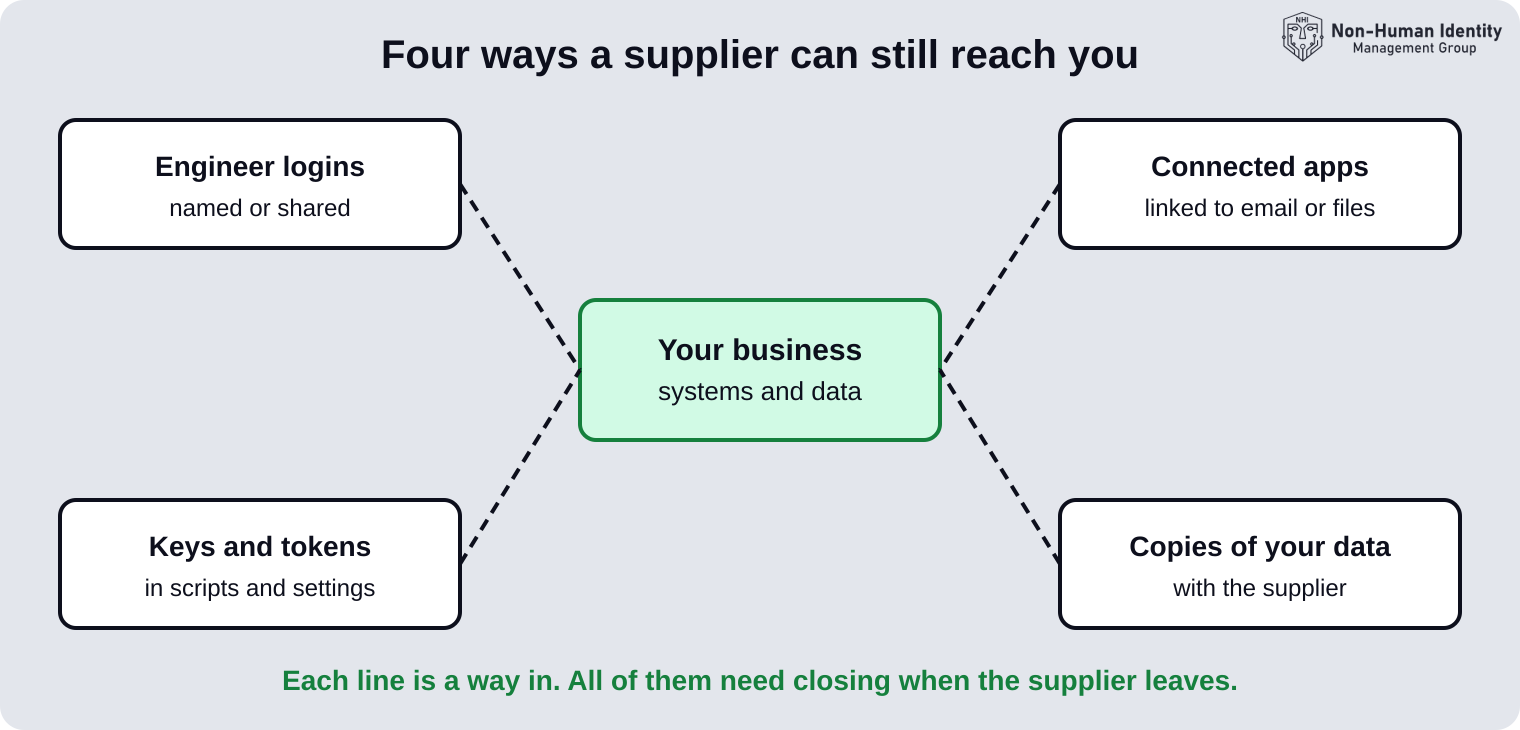
- Suppliers reach you through people's logins, connected apps, keys and copies of your data.
- List all of them, switch them off on the last day and change any passwords the supplier knew.
- Ask for your data back or deleted, and get that confirmed in writing.
What you will learn
- Explain what vendor offboarding covers, beyond ending the contract.
- Spot the access a leaving supplier often keeps by mistake.
- Check that logins, apps, keys and data are all dealt with.
- Ask a supplier the right questions about your data when you part.
- Supplier exit (vendor offboarding)
- the steps that close a supplier's access and settle your data when the work ends.
- Non-human identities (NHIs)
- accounts, keys and tokens used by apps and scripts rather than people.
- Changing a secret (rotation)
- replacing a password or key with a new one so the old copy no longer works.
What is vendor offboarding?
Think of a lodger moving out. You get the keys back and change the alarm code they knew. You also stop their post coming to your address and check that nothing of yours leaves with them.
Vendor offboarding is the same job for a supplier. A vendor is any outside firm that works for you, such as an IT firm, a cloud service or a payroll provider. When the work ends, you close every way in and deal with any of your data they hold.
Some of that access belongs to people, like an engineer's login. Some belongs to software. These are non-human identities (NHIs). An NHI is a digital identity, or the credential behind it, that represents a machine, app, automated process, service or AI agent. It lets them sign in and connect to other systems without a person.
Where the comparison stops working: a lodger has a few keys you can count. A supplier may hold dozens of logins and keys, some made years ago by people who have left.
Why does it matter?
Forgotten access is easy to miss and easy to misuse. A well-known open security project ranks poor offboarding as the top risk for non-human identities.[2]
If you run a small business
What could happen: your old IT firm can still log in months after you moved to a new one.
Check this: ask your new IT firm to list every outside account on your systems.
If you are new to IT work
What could happen: you remove a supplier's user accounts but miss a key in a script, so the old link keeps working.
Check this: search settings and scripts for keys the supplier set up.
If you look after customer data
What could happen: a former supplier keeps a copy of customer records that nobody asked it to delete.
Check this: ask the supplier to return or delete your data, and to confirm it in writing.
What does it look like?
Here is a made-up exit list for a small firm leaving its old IT supplier.
Example only. All values are made up.
Supplier exit list: EXAMPLE IT Ltd     Last day: 31 Mar
Item                     Action          Done
[email protected]    disable         yes
"admin" shared login     change password no    (1)
Backup app (connected)   remove          no    (2)
Billing script key       replace key     no    (3)
Copy of customer data    delete, confirm no    (4)
Owner: Wanda            Check records: 7 Apr
- In a real file, this line would show a shared login. The supplier's staff all knew it.
- A connected app keeps working after people's logins are removed.
- A key in a script is easy to forget because no person logs in with it.
- Data the supplier holds needs its own step: back to you, or deleted.
Why this is risky: removing the engineers' logins feels like the end, but four other ways in are still open.
The safer way: one owner works through every line on the last day, then checks the records a week later.
How does it work?
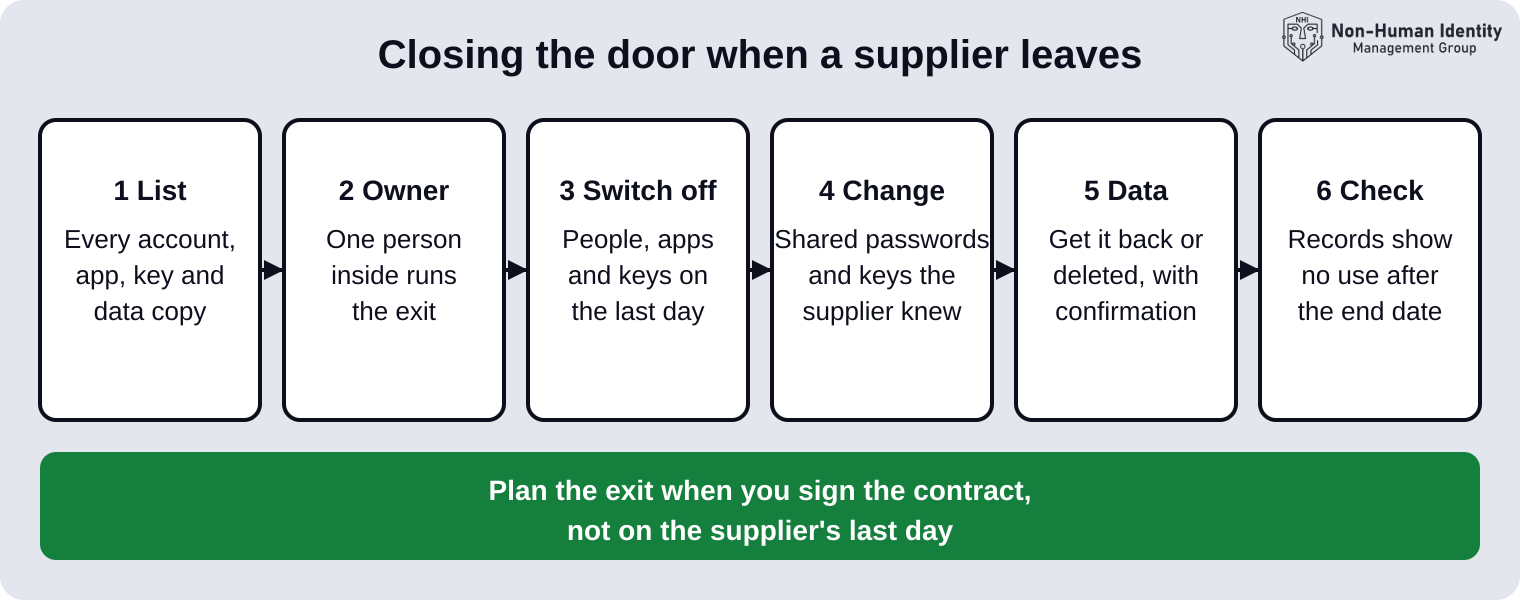
- Name an owner and list everything. One person inside the business runs the exit. They list every login, connected app, key and copy of data the supplier has.
- Switch off on the last day. Disable people's accounts and remove connected apps. Some systems let you deactivate an app first, which blocks sign-in but keeps its settings in case you need to check something.[3]
- Change what they knew. Replace any shared password or key the supplier saw or set up. Some cloud services also let you cancel sign-in sessions that are still open, so old access ends sooner.[4]
- Settle the data. Some suppliers handle personal data for you. Under UK data protection law, their contract must say they will return or delete it at the end, at your choice.[1] Ask for written confirmation.
- Check afterwards. Look at sign-in records for any use after the end date. Then close the file and keep a note of what was done.
A worked example
Wanda Marlow runs Bracken Couriers, a fictional delivery firm with twenty drivers. She is moving from her old IT supplier to a new one at the end of March.
The old supplier's engineer, Lars Yilmaz, is helpful. He sends a list of the accounts his team uses, and Wanda disables them on the last day.
She thinks of a lodger moving out. Handing back one key does not mean every key is back.
So she asks her new IT contact, Odile Sorensen, to look again. Odile finds a shared "admin" login that the old team all knew. She also finds a backup app still connected to the company's files.
A script that sends invoices uses a key Lars's team set up years ago. Nobody logs in with it, so it was not on the list.
Odile changes the shared password, removes the backup app and replaces the invoice key. Wanda writes to the old supplier and asks it to delete its copy of customer addresses. The supplier confirms in writing.
A week later, Odile checks the sign-in records. She finds no use of the old accounts after the last day in the records available to her. Wanda adds an exit section to the new supplier's contract, so the next change is easier.
Myths and mistakes
| What people think | What is true |
|---|---|
| When the contract ends, access ends. | Only if someone removes it. Logins, apps and keys need switching off on purpose. |
| Disabling the supplier's user accounts is enough. | Connected apps and keys in scripts keep working without any person logging in. |
| A friendly supplier will tidy up after itself. | It may not know what it set up years ago. Your business owns the check. |
| Our data is gone once we stop paying. | Copies can stay with the supplier and in its backups. Ask for return or deletion and get it confirmed. |
| We can plan the exit when it happens. | Exit terms are easier to agree when you sign the contract, not when you are leaving. |
What can I do this week?
- List the suppliers that have any access to your systems or data.
- Pick one supplier you no longer use and check that its access is gone.
- Look for connected apps in your email and file accounts that nobody recognises.
- Check whether your main supplier contracts say what happens to your data at the end.
Checklist
- Each supplier exit has one named owner inside the business.
- We list every login, app, key and data copy before the last day.
- People's accounts are disabled on the last day.
- Connected apps are removed or deactivated.
- Shared passwords and keys the supplier knew are changed.
- The supplier returns or deletes our data and confirms it in writing.
- Sign-in records are checked after the end date.
- New contracts include exit terms.
Common questions
Is vendor offboarding the same as cancelling the contract?
No. Cancelling the contract stops the work and the payments. Offboarding closes the technical access and settles your data. You need both, and the second does not happen on its own. Someone inside the business has to work through it.
What access do suppliers usually keep by mistake?
Shared logins, connected apps and keys in scripts are the most common. People's named accounts are usually remembered. The others are often set up once and forgotten, because nobody signs in with them each day.
Should I delete or disable the supplier's accounts?
Disable first, then delete once you are sure nothing depends on them. Disabling stops sign-in straight away but keeps the settings, which helps if a process breaks or you need to check what happened. Many systems let you restore a deleted item for a short time too.
Can a supplier keep my data in backups?
Sometimes, for a while. The UK data protection regulator accepts that backups may not be deleted at once. The data should be put beyond use and deleted as soon as practical.[1] Ask the supplier how it handles this.
When should I plan a supplier exit?
When you sign the contract. That is the best time to agree how access will be removed, how your data comes back and how deletion will be confirmed. Leaving it to the last week makes it harder to get the answers you need.
Where next?
Ready for the detail? Read the practitioner guide: Vendor Offboarding and Termination Guide. It goes further into exit triggers, the order for revoking and rotating access, data return and deletion, and the contract terms that make an exit workable.
Also useful:
- Third-Party Access Guide
- Employee Offboarding for Beginners
- OAuth Apps and Integrations for Beginners
- Non-Human Identities for Beginners
Related NHI Mgmt Group resources: Your vendor was breached · Contractor Identity Lifecycle Guide · Access Reviews for Beginners
Key terms
- Vendor offboarding
- Removing a supplier's access and getting your data back or deleted when the work ends.
- Third-party access
- Access given to suppliers, contractors or partners who are not your own staff.
- Third-party NHI
- A software account, key or agent run by an outside company that can act in your systems.
- Orphaned account
- An account that is still active but no longer has a clear owner or purpose.
- Credential rotation
- Replacing a password or key with a new value so an old copy stops working.
- Token revocation
- Cancelling a sign-in token before it would normally expire.
- Data processor
- A supplier that handles personal data on your behalf and under your instructions.
Sources and further reading
- What needs to be included in the contract? Information Commissioner's Office (UK), UK GDPR guidance on contracts between controllers and processors. https://ico.org.uk/for-organisations/uk-gdpr-guidance-and-resources/accountability-and-governance/contracts-and-liabilities-between-controllers-and-processors-multi/what-needs-to-be-included-in-the-contract/, accessed 28 Nov 2026.
- NHI1:2025 Improper Offboarding. OWASP Non-Human Identities Top 10, OWASP Foundation. https://owasp.org/www-project-non-human-identities-top-10/2025/1-improper-offboarding/, accessed 28 Nov 2026.
- Delete an enterprise application. Microsoft Entra documentation, Microsoft Learn. https://learn.microsoft.com/en-us/entra/identity/enterprise-apps/delete-application-portal, accessed 28 Nov 2026.
- Revoke IAM role temporary security credentials. AWS Identity and Access Management User Guide, Amazon Web Services. https://docs.aws.amazon.com/IAM/latest/UserGuide/id_roles_use_revoke-sessions.html, accessed 28 Nov 2026.