Cyber security for farms means keeping a farm's accounts, computers and connected machines safe from online criminals.
This guide is for farmers, farm managers, family members who do the books and anyone new to working on a rural business. You do not need any technical background. If your farm uses email, online banking or a tractor that talks to an app, this applies to you.
In short
- Most farm attacks start in the office, through email and stolen passwords, not on the tractor.
- Criminals may time attacks to planting and harvest, when a farm can least afford to stop.
- Two-step login on email and banking, plus a backup kept offline, cover a large part of the risk.
- Know which dealers and suppliers can log in to your machines, and switch that access off when it is not needed.
What you will learn
- Spot the four areas of a farm where cyber risk sits.
- Explain why harvest time makes farms a target.
- Check your email, backups and supplier access this week.
- Plan how the farm keeps going if the computers stop.
- Locking program (ransomware)
- harmful software that locks your files and demands money to unlock them.
- Trick email (phishing)
- a message that pretends to be from someone you trust, to steal a password or money.
- Second check (two-step login)
- a code or app prompt asked for after the password, so a stolen password alone is not enough.
What is cyber security for farms?
Think of walking the boundary fences before you turn the stock out. You are not expecting trouble. You are checking for the gap before something gets through it.
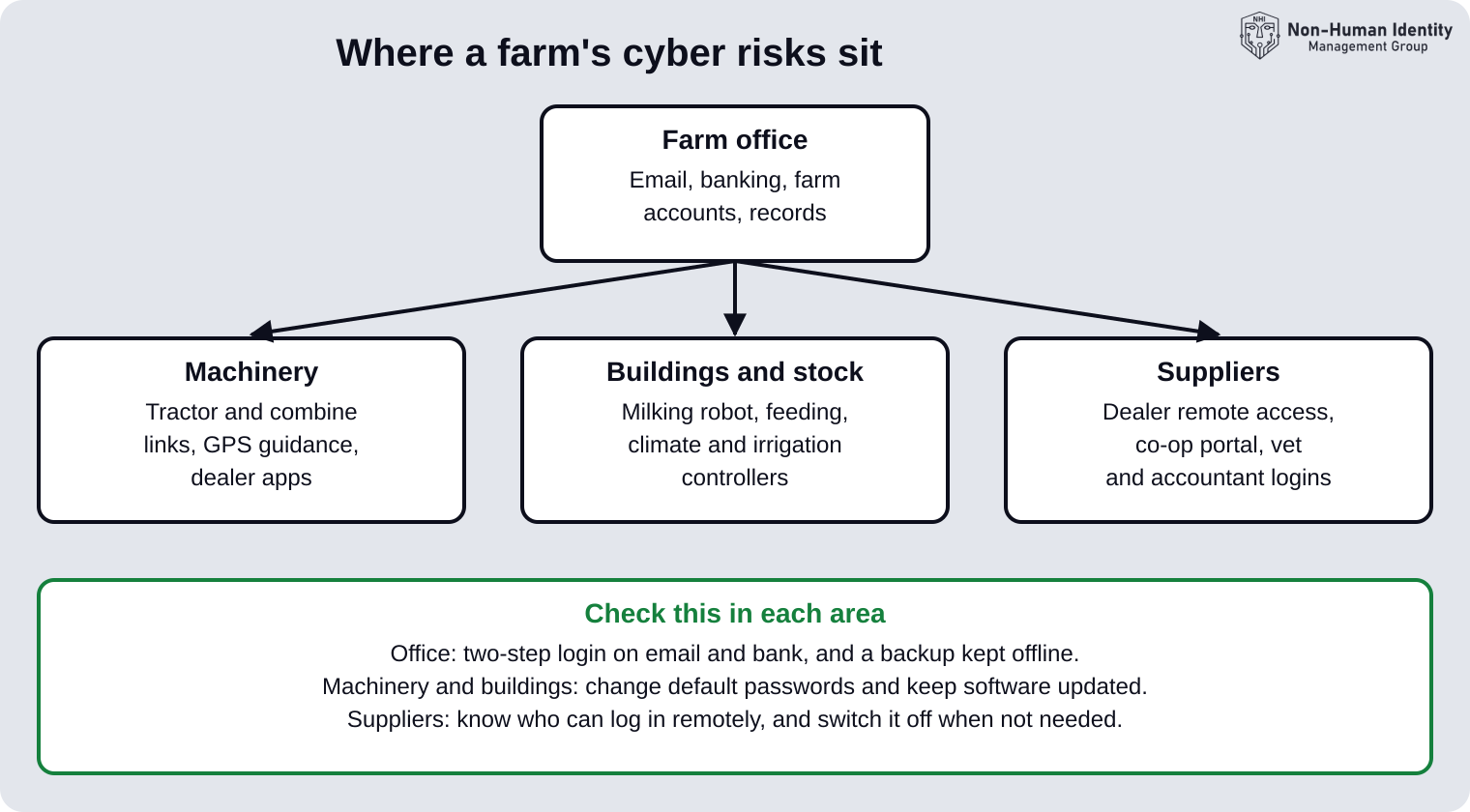
Cyber security on a farm is the same habit, applied to the farm's computers and online accounts. A modern farm runs on more of these than most people expect. There is the farm office, with email, banking and farm records. There are machines that connect to the internet, such as tractors with GPS guidance (satellite steering) and milking robots. And there are suppliers, like machinery dealers, who can often log in from far away to check or fix a machine.
Each of these is a gate. Most are closed most of the time. The job is to know where they all are and check them now and then.
Where the comparison stops working: a broken fence is easy to see on a walk. A stolen password leaves no hole in anything, so you often only find out when something goes wrong.
Why does it matter?
Farms are busy, run on tight seasons and often have nobody whose job is IT. Criminals know a farm that cannot weigh grain or pay staff at harvest may feel it has to pay them. The US FBI has warned that ransomware groups may be more likely to attack farm co-operatives during planting and harvest. It reported six grain co-operatives hit by ransomware between 15 September and 6 October 2021.[1]
If you run a family farm
What could happen: a trick email gets the farm email password, and a fake invoice is paid from the farm account.
Check this: turn on two-step login for email and online banking.
If you do the farm books
What could happen: ransomware locks the farm records, payroll and subsidy paperwork just before a deadline.
Check this: keep one backup that is unplugged from the computer and the internet.
If you look after the machines
What could happen: a controller still uses the password it came with, which anyone can look up.
Check this: change default passwords and apply updates the maker sends.
If you are new to farm or rural IT work
What could happen: nobody knows which dealers can log in to which machines, so old access stays open.
Check this: list every remote login and who it belongs to.
What does it look like?
Here is a made-up "Am I covered?" card that a farm could fill in at the kitchen table.
Example only. All values are made up.
Farm cyber check, Example Farm, filled in 01/01/2000
Farm email has two-step login ............ NO     (1)
Bank login has two-step login ............ YES
Last offline backup of farm records ...... never  (2)
Milking robot password changed? .......... not sure (3)
Dealer remote access to robot ............ always on (4)
Paper plan if computers stop ............. no     (5)
- Email is often the way in. A stolen email password can also reset other passwords.
- Without an offline copy, ransomware may lock the backup along with everything else.
- "Not sure" often means the password the machine came with is still set.
- Access that is always on is a gate left open, even when nobody is using it.
- With no paper plan, a locked computer can stop feeding records, weighing or dispatch.
Why this is risky: each "no" or "not sure" is a gate a criminal could use. Together they turn a bad day into a bad month.
The safer way: turn each line to yes, one at a time, starting with email and backups. The FBI's advice to farm co-operatives puts offline backups and a plan to keep working by hand near the top of its list.[1]
How does it work?
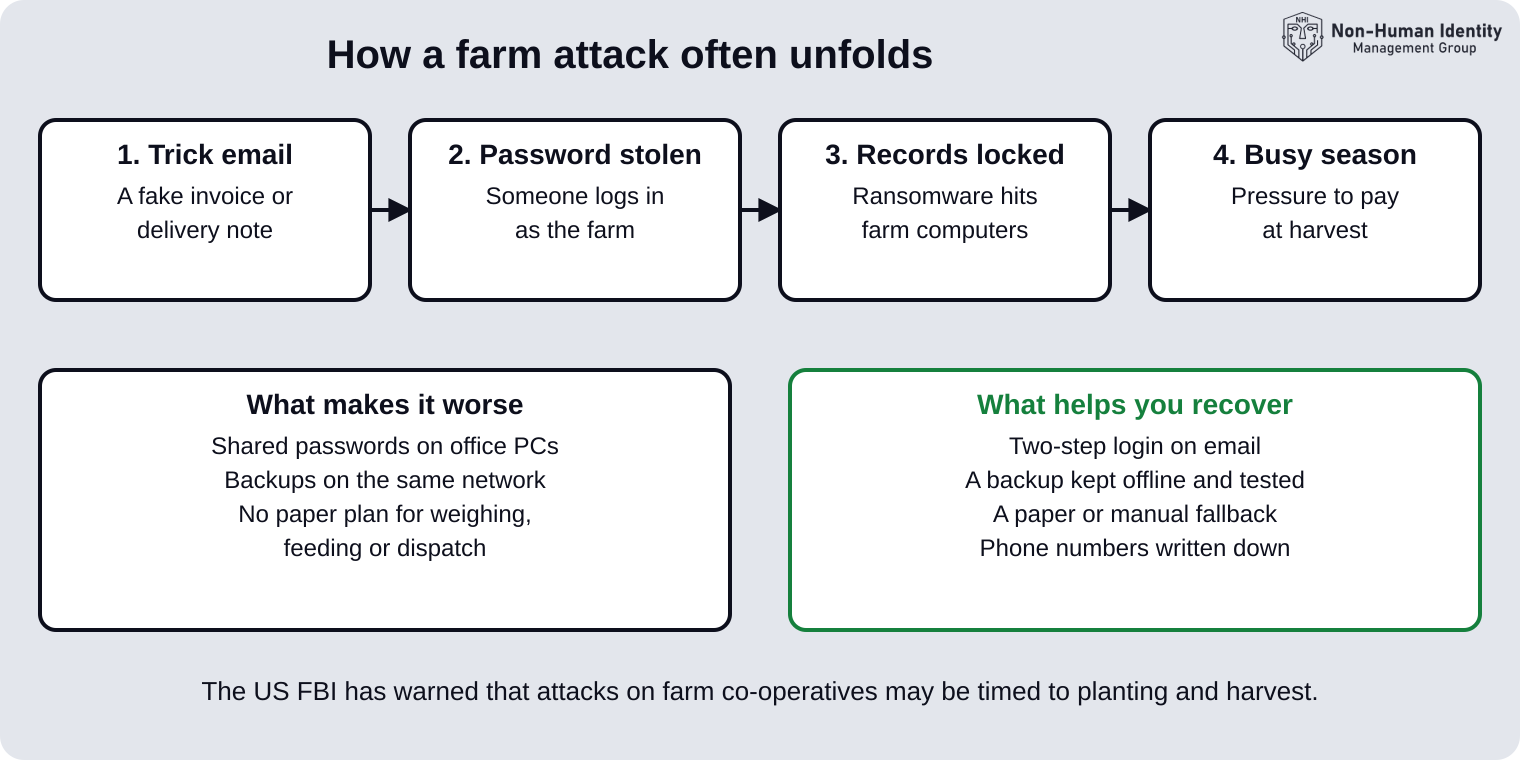
Most attacks on farms follow a familiar path. It usually starts with people and passwords, not machines.
- The bait. A trick email arrives, often dressed as an invoice, a delivery note or a message from a supplier.
- The login. Someone types their password into a fake page. The criminal now logs in as the farm.
- The spread. From one account or computer, they look for other systems, shared passwords and backups.
- The lock. They run ransomware, which locks files and computers, and ask for payment.
- The squeeze. If it happens at harvest, the pressure to pay is highest.[1]
Attacks can also come through suppliers. The FBI described a 2021 case where ransomware at a business software provider spread to several of its farm co-operative customers.[1] That is why it helps to know who can reach your systems from outside.
A worked example
Wren Rosen runs a fictional dairy farm with her brother and two staff. The farm uses a milking robot, a feed system and an online farm accounts package.
In August, an email arrives that looks like it comes from the feed merchant. It says the bank details have changed and asks for the next payment to the new account. Wren nearly pays it. Then she remembers the fence walk. The message is the gap, so she rings the merchant on the number in her old paperwork. They have not changed banks.
That evening she fills in a farm cyber card like the one above. Email has no two-step login, so she turns it on. The only backup sits on a drive that is always plugged in. So she buys a second drive and copies the records to it once a week. She stores it in the house, unplugged.
Next she calls Lars Yeboah, the technician at the dealer that services the robot. She asks who can log in to it from outside. Lars explains the dealer uses remote access to check faults. They agree to switch it on only when there is a fault. Lars will also change the robot's default password at his next visit.
Last, Wren writes a one-page paper plan. It shows how to record milk yields and feeds by hand for a week. It also lists the phone numbers she would need. It sits in a drawer, and she hopes not to need it.
Myths and mistakes
| What people think | What is true |
|---|---|
| We are too small to be a target. | Many attacks are not aimed at anyone in particular. Small businesses are as likely to face online crime as large ones.[3] |
| Hackers mainly go after tractors. | Most of the damage described by the FBI started in office computers and accounts.[1] |
| Our backup drive is plugged in, so we are covered. | Ransomware can lock a connected drive too. Keep one copy offline.[1] |
| The dealer looks after the machine's security. | The dealer may set up access, but you decide who keeps it. Ask what is switched on. |
| Security is the job of whoever is good with computers. | Everyone who uses the farm's email or machines is part of it.[3] |
What can I do this week?
- Turn on two-step login for farm email and online banking.
- Copy your farm records to a drive, then unplug it and store it safely.
- Ask your machinery dealers which machines they can log in to, and when.
- Agree a rule: any change of bank details is checked by phone on a known number.
- Write a one-page paper plan for keeping the farm running if the computers stop.
Checklist
- Email and banking use two-step login.
- Each person has their own login, with no shared office password.
- At least one backup is kept offline and has been tested by restoring a file.
- Default passwords on connected machines and controllers have been changed.
- Computers and machines get the updates their makers send.
- There is a list of every supplier who can log in remotely, and why.
- Remote access is switched off when nobody needs it.
- A paper plan covers feeding, weighing, dispatch and key phone numbers.
Common questions
Can someone hack my tractor?
It is possible, but it is not where most farm attacks start. Connected machines can have weak points, so change default passwords and install the maker's updates. For most farms, the bigger and more likely risk is a stolen email or banking password in the farm office.
Should a farm pay a ransom?
We suggest planning so you do not have to make that choice under pressure. A tested offline backup and a paper plan give you another way out. If it happens, report it to the police and your national cyber agency.
What is the single most useful thing to do first?
Turn on two-step login for farm email. Email is often how criminals get in. A stolen email password can also be used to reset other accounts. With two-step login, a stolen password alone is usually not enough.
Do I need an IT company to do this?
No, most of the first steps need no expert. Two-step login, an offline backup and a supplier list can be done by the person who runs the farm office. An IT supplier helps later, for example with updates across many computers. Choose one carefully, because they will hold keys to your systems.
Where can I get free official advice?
National cyber agencies publish free guides for small businesses. In the UK, the National Cyber Security Centre has a small business guide covering email, accounts, devices, backups and spotting attacks.[3] In the US, the Cybersecurity and Infrastructure Security Agency covers the food and farming sector.[2]
Where next?
Ready for the detail? Read the practitioner guide: Cybersecurity for Agriculture Guide. It goes further into co-operatives and processing plants, the rules that apply in different countries, and how to roll out controls without disrupting planting or harvest.
Also useful:
- Small Business Cyber Security for Beginners
- Ransomware for Beginners
- Phishing for Beginners
- Operational Technology Security for Beginners
Related NHI Mgmt Group resources: Food and Agriculture Identity Security · Ransomware Basics for Small Businesses Guide · Backups for Small Businesses
Key terms
- Ransomware
- Harmful software that locks files or computers and demands payment to unlock them.
- Phishing
- A trick message that pretends to come from someone trusted, to steal passwords or money.
- Multi-factor authentication
- Logging in with a second check, such as a code or app prompt, as well as a password.
- Offline backup
- A copy of your files kept unplugged from the computer and the internet.
- Remote access
- Logging in to a computer or machine from somewhere else, for example by a dealer fixing a fault.
- Firmware
- The built-in software that runs a machine or controller, updated by its maker.
- IoT
- Everyday machines and sensors that connect to the internet, such as smart controllers.
Sources and further reading
- Ransomware Attacks on Agricultural Cooperatives Potentially Timed to Critical Seasons. Private Industry Notification 20220420-001, Federal Bureau of Investigation, 20 April 2022. https://www.ic3.gov/CSA/2022/220420-2.pdf, accessed 28 Nov 2026.
- Food and Agriculture Sector. Cybersecurity and Infrastructure Security Agency. https://www.cisa.gov/topics/critical-infrastructure-security-and-resilience/critical-infrastructure-sectors/food-and-agriculture-sector, accessed 28 Nov 2026.
- Small Business Guide: Cyber Security. National Cyber Security Centre. https://www.ncsc.gov.uk/collection/small-business-guide, accessed 28 Nov 2026.