Defence in depth means using several separate layers of protection, so one failure does not expose everything.
This guide is for students, managers and anyone new to security who keeps hearing the phrase. It also helps if you run a team or a small business: the idea shapes how you spend a security budget.
In short
- Every security control can fail, so you do not rely on just one.
- Good layers are different from each other, so one mistake is less likely to beat them all.
- Layers cover people, processes and technology, and they include spotting and recovering from attacks, not only blocking them.
- Start with a few basics: updates, two-step sign-in, limited access and backups you have tested.
What you will learn
- Explain defence in depth in one sentence.
- Spot a "single point of failure" where one control is doing all the work.
- Check which layers protect something you care about.
- Ask what happens if a given layer fails.
- Safety measure (security control)
- anything that protects a system, such as a password check, a backup or a staff rule.
- Weak link (single point of failure)
- one part that, if it fails, lets the whole thing fail.
- Stacked protection (layered security)
- several different controls placed one behind another.
What is defence in depth?
Think of an old castle. It has a moat, then a high wall, then a locked gate, then guards inside, then a strong tower. An attacker who crosses the moat still faces the wall. Each barrier buys the defenders time.
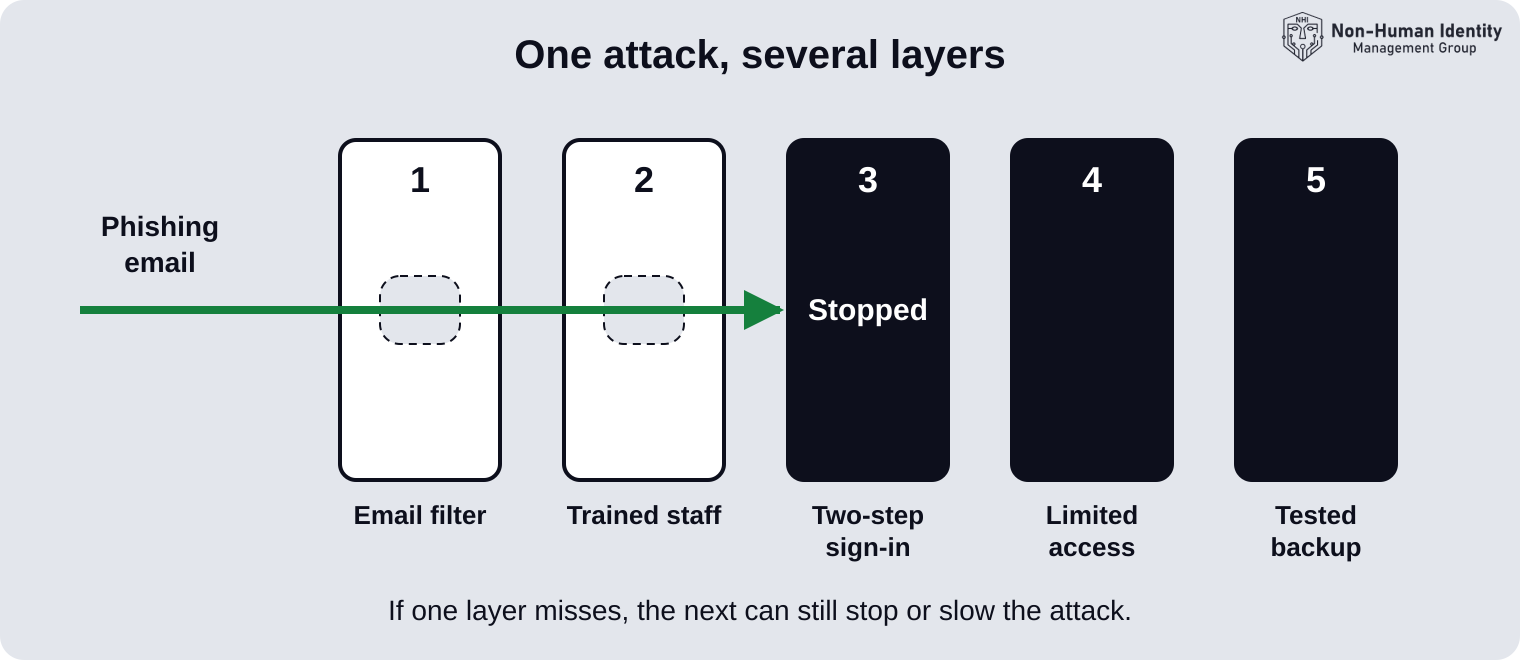
Defence in depth applies the same idea to computers and data. You put several different protections in a row. If one fails, the next one may still stop or slow the attacker.
The layers are not only technology. A US standards body describes it as a strategy that brings together people, technology and operations.[1] So staff training, approval rules and backups count as layers too.
The layers also do different jobs. Some block attacks. Some spot an attack that got through. Some help you recover afterwards.
Where the comparison stops working: a castle has one front and one gate. A business has many ways in, such as email, websites, laptops and suppliers. So the layers need to cover every way in, not just the front door.
Why does it matter?
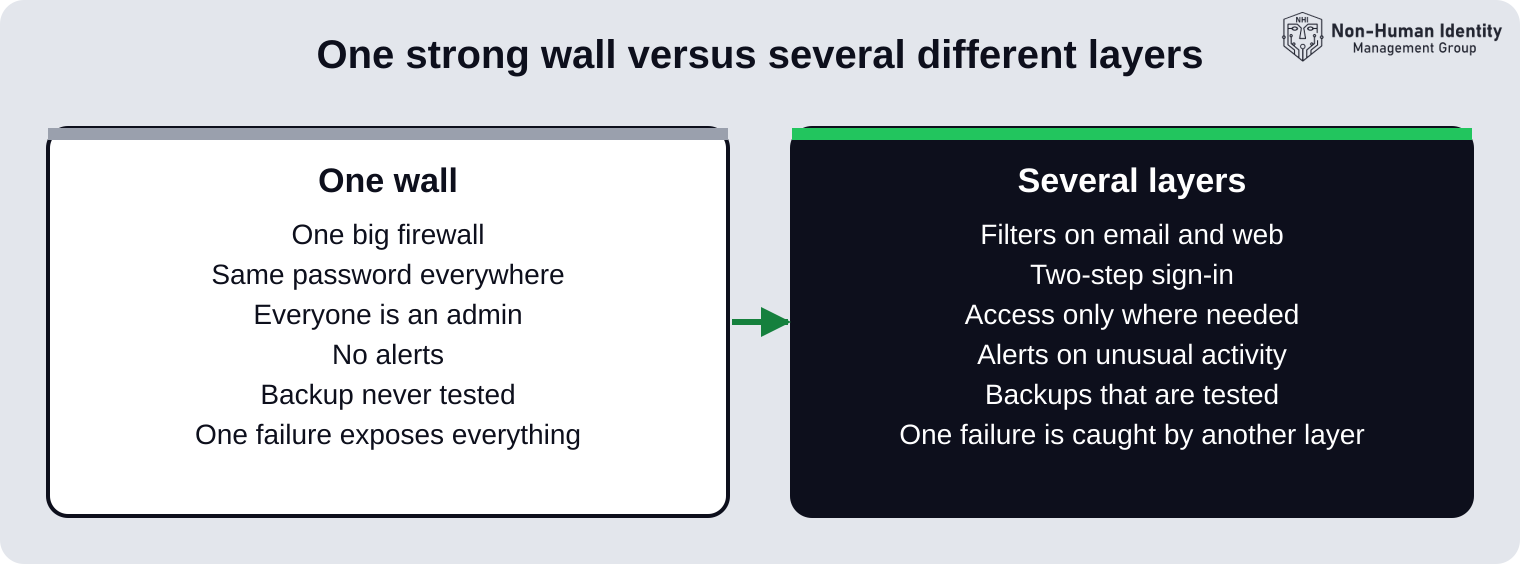
No single control is perfect. Passwords get stolen, people click links and software has flaws. Layers mean one of these is less likely to become a disaster.
If you are a student
What could happen: in an exam or interview you are asked why a firm needs more than a firewall, and you have no clear answer.
Check this: practise naming three different layers that protect one thing, such as your email.
Next: Zero Trust for Beginners
If you are a manager
What could happen: money goes on one expensive tool while backups and staff training are left behind.
Check this: for your most important system, ask your team "what stops an attack if this control fails?"
Next: Defence in Depth Guide
If you run a small business
What could happen: one stolen password opens your email, your files and your bank portal at once.
Check this: turn on two-step sign-in for email and banking, and keep a backup you have tested.
If you are new to IT work
What could happen: you switch off a "noisy" alert to save time, and quietly remove a layer.
Check this: before you turn any control off, ask what it protects and what would replace it.
What does it look like?
Here is a made-up scenario card. It lists the layers protecting one small firm's email, and one gap.
Example only. All values are made up.
Firm: Example Ltd    Asset: staff email (example.com)
Layer 1  Spam and link filter         On
Layer 2  Staff spot-the-scam training Yearly
Layer 3  Two-step sign-in             Off for 3 of 8 staff   (1)
Layer 4  Alert on new sign-in country On
Layer 5  Everyone is an admin         Yes                    (2)
Layer 6  Mailbox backup               Never tested           (3)
- For three people, a stolen password is the only thing an attacker needs.
- Any account that is taken over can change settings for everyone.
- Nobody knows if the backup would work after an attack.
Why this is risky: the list looks long, but three layers have holes. A phishing email that gets past the filter and the training could go straight through.
The safer way: turn on two-step sign-in for everyone. Give admin rights only to people who need them. Test the backup by restoring one mailbox.
How does it work?
- Pick what you are protecting. Start with one thing that matters, such as customer data, email or payments.
- List the ways in. Think about email, websites, laptops, staff and suppliers.
- Add different kinds of layer. One standards definition describes layering different security technologies, so an attack one misses may be caught by another.[1] Mix blocking, spotting and recovery.
- Assume one layer will fail. The UK's National Cyber Security Centre (NCSC) advises organisations to assume an attacker may already be inside. They should focus on spotting the attacker and limiting the damage.[2]
- Split things up. Dividing a network into sections, called segmentation, helps stop a problem in one area from spreading to others.[2]
- Check the layers now and then. Holes appear over time, so review them, especially after changes.
A well-known safety picture helps here. The psychologist James Reason described defences as slices of Swiss cheese. Each slice has holes that open and move over time. Harm happens when holes in several slices line up.[3] The model came from safety research, but it fits security well.
A worked example
This story is made up to show how it can happen.
Milo Mbeki runs Heron Bakery, a small bakery with a busy online ordering page. Last spring he spent an afternoon with his IT helper adding a few layers. They turned on two-step sign-in for every staff email account. They made sure only Milo could change bank details. They also set up a nightly backup and tested a restore.
One Monday, Dana Erikson, who runs the orders desk, gets an email that looks like it is from their flour supplier. It says an invoice is overdue and links to a sign-in page. The spam filter misses it. Dana is busy, so she types her email password into the page.
Within the hour, someone tries to sign in to Dana's account from another country. The login stops at the second step, because the attacker does not have Dana's phone. Dana gets an alert and tells Milo.
Milo changes Dana's password and checks the account. There are no new sign-ins in the records he can see. He also calls the supplier on a number he already has. They confirm they sent no such email.
What made the difference: two layers missed, the filter and Dana's attention. The next layer, two-step sign-in, held. The other layers were still there in case it had not.
Myths and mistakes
| What people think | What is true |
|---|---|
| Defence in depth means buying lots of security tools. | It means different kinds of layer. Training, approval rules and tested backups are layers too. |
| Five tools that do the same job give five layers. | Layers that work the same way can fail the same way. Mix different kinds of control. |
| If the firewall is strong, the rest matters less. | A strong wall is still one point of failure. Plan for what happens when it is bypassed. |
| Layers are only about keeping attackers out. | The NCSC advises assuming an attacker may already be inside, so spotting and limiting damage matter too.[2] |
| Once the layers are in place, the job is done. | Holes open and move over time.[3] Check the layers regularly. |
What can I do this week?
- Pick one thing you want to protect, such as your work email.
- Write down every layer that protects it today.
- For each layer, ask "what if this one fails?"
- Turn on two-step sign-in where it is missing.
- Restore one file from your backup to check it works.
Checklist
- I know which systems and data matter most.
- Each of them has more than one layer of protection.
- The layers include blocking, spotting and recovery.
- Software updates are installed promptly.
- Important accounts use two-step sign-in.
- People only have the access they need.
- Backups exist and have been tested.
- Someone reviews the layers after big changes.
Common questions
Is defence in depth the same as zero trust?
No, but they fit together. Defence in depth is about having several different layers. Zero trust is about checking every request instead of trusting anything inside the network. A zero trust design is often one way to build strong layers around who can reach what.
How many layers do I need?
There is no fixed number. What matters is that your most important things are not protected by one control alone. Start with the basics the NCSC suggests: updates, two-step sign-in, a password manager and backups.[4] Then add layers where the risk is highest.
Does more layers mean slower work?
Sometimes, a little. Two-step sign-in adds a few seconds, for example. Good design keeps the extra effort small for everyday tasks. It saves the extra checks for risky actions, such as changing bank details or giving someone admin rights.
Where should a small business start?
Start with the basics, because each one is a separate layer. The NCSC's guide for small organisations covers backups, protecting devices, securing accounts, spotting scams and securing email.[5] Get these in place for your most important data first, then build from there.
Does this apply to software accounts too?
Yes. Software has its own identities too. A non-human identity (NHI) is a digital identity, or the credential behind it, that represents a machine, app, service or AI agent. It lets that software connect to other systems without a person. NHIs need layers as well, such as limited access and alerts on unusual use.
Where next?
Ready for the detail? Read the practitioner guide: Defence in Depth Guide. It goes further into how layers are designed in practice, how they map to security frameworks, and the checks practitioners use to find gaps.
Also useful:
- Zero Trust for Beginners
- Network Segmentation for Beginners
- Least Privilege for Beginners
- Multi-Factor Authentication for Beginners
- Incident Response for Beginners
Related NHI Mgmt Group resources: Phishing for Beginners · Backup Security for Beginners · Non-Human Identities for Beginners
Key terms
- Defence in depth
- Layering separate controls so that the failure of one does not expose what you are protecting.
- Layered security
- Several different protections placed one behind another.
- Single point of failure
- One part that, if it fails, lets the whole system fail.
- Security control
- A safeguard, such as a tool, a rule or a process, that reduces a security risk.
- Network segmentation
- Dividing a network into separate sections so a problem in one does not easily spread to others.
- Swiss cheese model
- A picture of defences as cheese slices with holes, where harm happens when holes line up.
- Multi-factor authentication
- Signing in with two or more kinds of proof, such as a password and a code on your phone.
Sources and further reading
- Defense-in-depth (glossary entry, citing NIST SP 800-53 Rev. 5 and other NIST publications). NIST Computer Security Resource Center. https://csrc.nist.gov/glossary/term/defense_in_depth, accessed 28 Nov 2026.
- Disruptive cyber attacks, reducing their impact, reducing the risk: 3. Limiting the impact of a successful compromise. National Cyber Security Centre (NCSC), 1 October 2026. https://www.ncsc.gov.uk/collection/disruptive-cyber-attacks/reducing/3-limiting-compromise-impact, accessed 28 Nov 2026.
- Reason, J. Human error: models and management. BMJ 2000;320(7237):768-770. https://pmc.ncbi.nlm.nih.gov/articles/PMC1117770/, accessed 28 Nov 2026.
- Top tips for staying secure online. National Cyber Security Centre (NCSC). https://www.ncsc.gov.uk/collection/top-tips-for-staying-secure-online, accessed 28 Nov 2026.
- Small organisations guide to cyber security. National Cyber Security Centre (NCSC). https://www.ncsc.gov.uk/collection/small-business-guide, accessed 28 Nov 2026.