An ePassport chip is a small chip in your passport holding your details, digitally signed by the issuing country.
This guide is for anyone who has been asked to tap their passport on a phone to prove who they are, and for teams starting to use these checks. You do not need to know any technology to follow it: if you have opened a bank account or used a government service in an app, you may have done this already.
In short
- Many passports now have a chip that holds the details from the photo page, including your photo.
- The issuing country signs that data, so a checker can tell whether it was changed.
- Apps read the chip by tapping your phone on the passport, then compare the chip photo with a selfie.
- The chip proves the passport is genuine. The face check helps prove it is yours.
What you will learn
- Explain what the chip in your passport holds and why it is signed.
- Spot the chip symbol and know why an app asks for the photo page first.
- Explain the steps of a phone tap check in plain words.
- Check what a business should ask before it relies on chip checks.
- Tap to read (NFC)
- a short-range radio link that lets a phone read a chip held a few centimetres away.
- Tamper seal for data (digital signature)
- a code made with a secret key that shows who signed some data and that it has not changed.
What is an ePassport chip?
Think of a sealed envelope tucked inside your passport cover. Inside is a copy of your photo page. The passport office sealed it with a stamp that only it can make.
That is roughly what the chip does. It stores the details from your photo page, plus your photo. The data is readable, and the aim is not to hide it. The aim is to make any change easy to detect.[1]
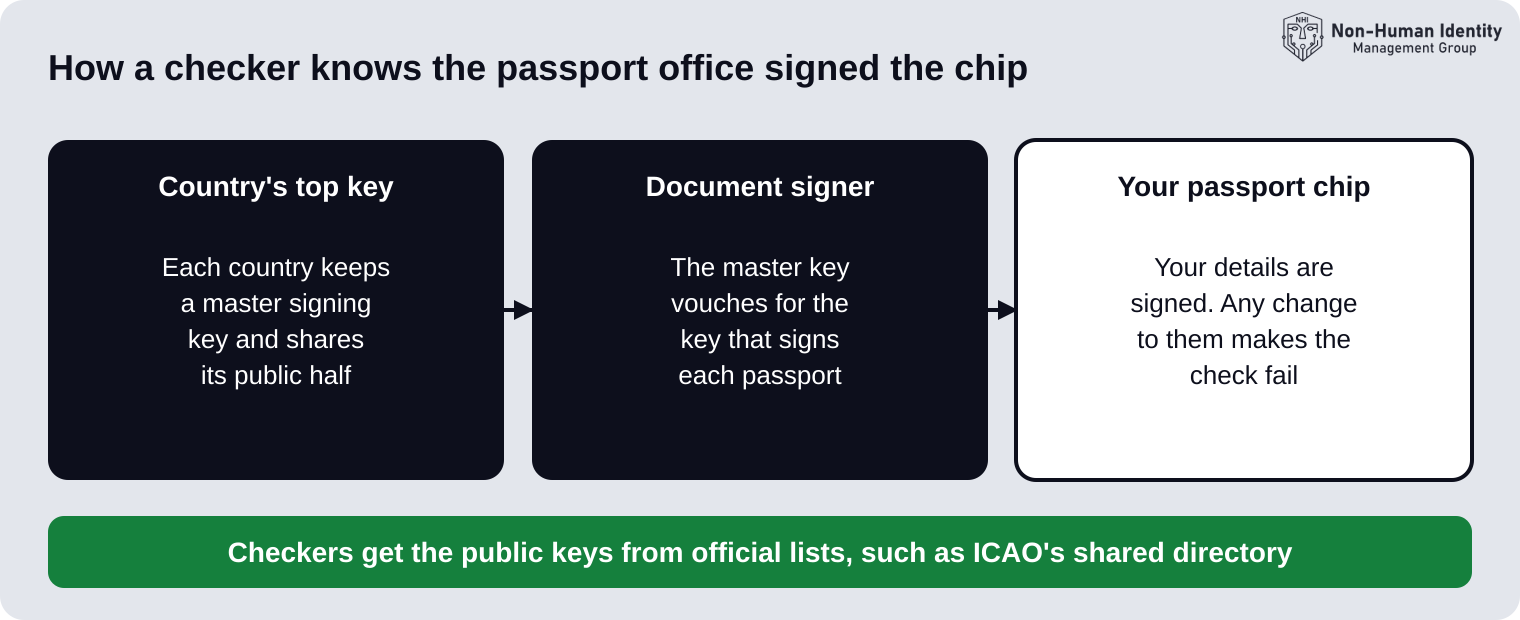
The issuing country signs the data with a digital signature (a mathematical seal made with a secret key that only the country holds). Anyone with the country's matching public key can check the seal. If even one detail has been changed, the check fails.[1]
You can usually spot an ePassport by a small chip symbol on the front cover.[4]
Where the comparison stops working: a real envelope seal breaks when opened. The chip can be read many times, and the seal only shows the data has not changed. On its own, it does not show the chip itself is the original. Extra chip checks exist for that.[3]
Why does it matter?
A photo of a passport can be edited or faked. The signed chip data is much harder to fake, which is why many banks and government apps now ask you to tap your passport.
If you are proving who you are in an app
What could happen: the scan keeps failing and you give up, or you send a photo to a lookalike app.
Check this: use only the official app from the service, take your phone case off and keep still.
If you run sign-ups for a business
What could happen: you rely on photos of ID that a fraudster has edited.
Check this: ask your supplier whether it reads the chip and checks the country's signature.
If you are new to identity or fraud work
What could happen: you treat "chip read OK" as proof of the person, not just the passport.
Check this: make sure a face check links the chip photo to the person in front of the camera.
What does it look like?
Here is a made-up result screen from an identity app after a passport tap. Real apps look different.
Example only. All values are made up.
EXAMPLE ID CHECK - result
Name on chip:        EXAMPLE, ALEX
Document number:     000000000
Chip read:           OK                      (1)
Country signature:   valid, chain OK         (2)
Chip genuine check:  passed                  (3)
Face match:          passed                  (4)
Decision:            identity checked
- The phone opened the chip and read the data over a protected link.
- The signature on the data matched the issuing country's published key.
- An extra test showed this is the original chip, not a copy.
- The selfie matched the photo stored on the chip.
Why this is risky: if a service shows "chip read OK" but skips step 2, the reading adds little over a photo. ICAO, the UN body that sets passport standards, says that without the signature check an ePassport has little advantage over a paper one.[2]
The safer way: a good check covers all four lines. It reads the chip and checks the signature. It tests the chip is genuine where the passport supports it. Then it matches the face.
How does it work?
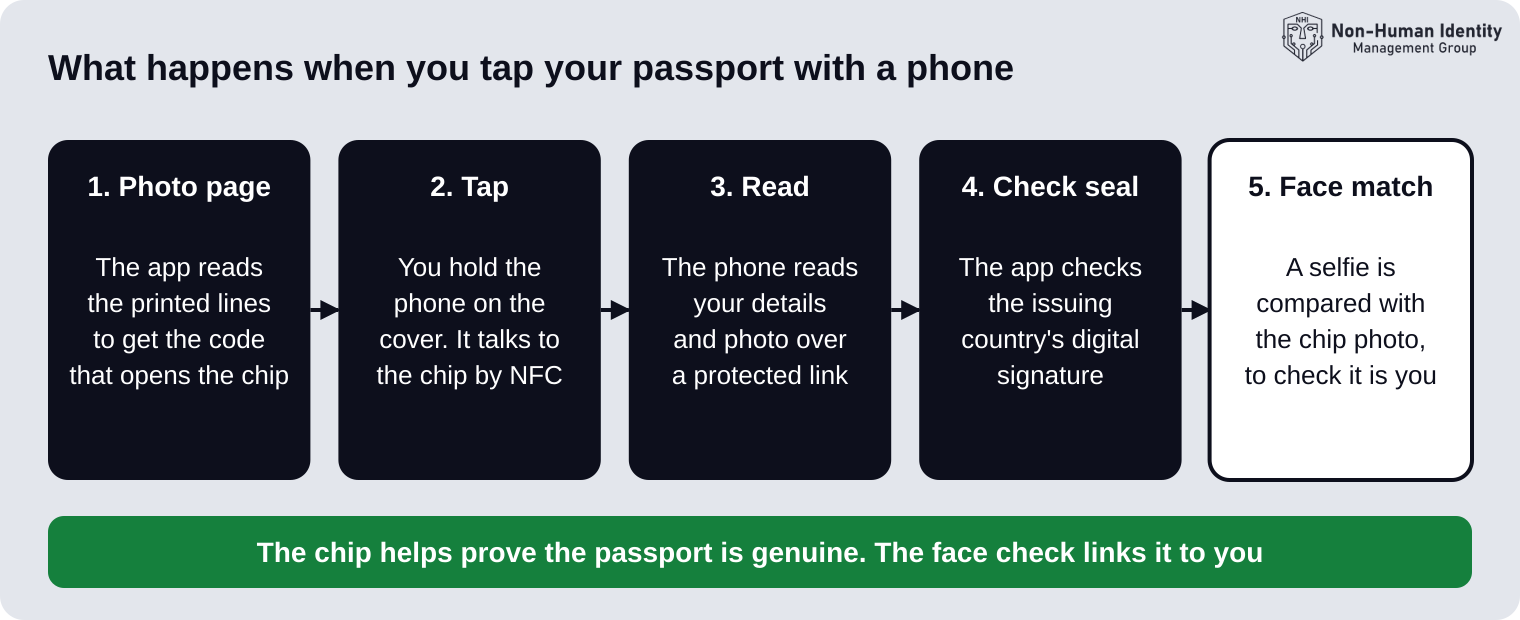
Here is what happens in a typical phone tap check, such as the one used by a UK government app.[4]
- Photo of the photo page. The app reads the printed lines at the bottom of the photo page. Details such as the passport number, date of birth and expiry date make the code that opens the chip. This helps stop strangers reading the chip from a distance.[3]
- Tap. You hold the phone flat on the passport. The phone talks to the chip using NFC (near field communication, a very short-range radio link).
- Read. The phone and chip set up a protected connection, and the phone reads your details and photo.[3]
- Check the seal. The app checks the country's signature. This step is called passive authentication.[3]
- Check the chip. Where the passport supports it, the chip answers a challenge with a secret key that stays inside it. This shows it is the original chip, not a copy.[3]
- Match the face. You take a selfie, and it is compared with the chip photo.[4]
How does the app know which signatures to trust? Each country keeps a master signing key. That key vouches for the keys that sign each passport.[1] Countries share the public halves through official channels, including a shared directory run by ICAO.[2]
A worked example
Elif Hollis is opening an account with a fictional online bank. The app asks her to prove who she is with her passport.
First, it asks for a photo of her photo page. Elif wonders why, since she is about to tap the chip anyway. The help text explains that the printed details make the code that opens the chip.
Next, she holds her phone on the passport cover. The scan fails twice. She remembers the help screen, takes off her thick phone case and keeps the phone still. The third try works.
The app then asks for a selfie. Elif thinks of the sealed envelope. The seal shows the passport office wrote the details, but it says nothing about who is holding the passport. The selfie is compared with the chip photo to close that gap.
Later, her friend Lina Yilmaz gets a text claiming to be from the same bank. It asks her to "verify your passport" through a link. Lina asks Elif, who points out that the real bank asked inside its own app, not through a link in a text. Lina deletes the message and opens the bank's app directly instead.
The chip check made Elif's sign-up quick. Knowing how it works helped Lina spot a request that did not fit.
Myths and mistakes
| What people think | What is true |
|---|---|
| The chip keeps my details secret. | The chip holds the same details as the photo page. Its seal is there to show changes, not to hide the data.[1] |
| Anyone walking past can read my passport. | The chip needs a code from the printed page before it shares data, which helps protect against skimming (reading it secretly from nearby).[3] |
| Reading the chip proves the passport is genuine. | Only if the app also checks the country's signature.[2] |
| A valid signature means it is the original chip. | The signature check alone does not stop an exact copy. An extra chip check is needed for that.[3] |
| A genuine passport proves who is using the app. | It proves the document. A face check is needed to link it to the person. |
What can I do this week?
- Look for the chip symbol on your passport cover.
- Only tap your passport in apps you opened yourself, not from links in messages.
- If a scan fails, remove your phone case and keep the phone still on the cover.
- If you run sign-ups, ask your supplier whether it checks the signature and the chip, not just reads it.
Checklist
- I know my passport has a chip if it shows the chip symbol.
- I only scan my passport in the official app of the service I am using.
- I never send passport photos in reply to a text or email link.
- Our identity checks read the chip and check the country's signature.
- Our checks test that the chip is the original, where the passport supports it.
- Our checks compare the chip photo with the person, with a liveness test.
- Our supplier keeps its list of trusted country keys up to date.
Common questions
Why does the app need a photo of my passport before I tap it?
Because the printed details open the chip. The app reads lines on the photo page, such as your passport number and dates. It uses them to make the code the chip asks for. This helps stop strangers reading your chip without seeing the page.
Why does the chip scan keep failing?
Usually because the phone is not touching the passport or moves during the scan. Phone cases and other accessories can also block it. Remove the case, lay the phone flat on the cover, keep it still and try again, following the app's help screen.
Can someone copy my passport chip?
Copying the data is possible in principle. That is why good checks go further. Some passports can prove the chip is the original by answering a challenge with a secret key that stays inside the chip. A face check then links the passport to the person.
Is tapping my passport safe?
In the official app of a service you trust, it is a common and well-designed check. The chip shares data only after the app proves it has seen your photo page. Be wary of any link in a text or email that asks you to scan or photograph your passport.
Where next?
Ready for the detail? Read the practitioner guide: ePassport NFC Verification. It goes further into the chip access methods, managing trusted country keys and building a phone check that assessors accept.
Also useful:
- Identity Proofing for Beginners
- Digital Signatures for Beginners
- Liveness Detection for Beginners
- Public Key Cryptography for Beginners
- Bluetooth, RFID and NFC Security Guide
Related NHI Mgmt Group resources: National Digital ID for Beginners · Digital Identity Wallets for Beginners
Key terms
- NFC
- A very short-range radio link that lets a phone read a nearby chip or card.
- Digital signature
- A mathematical seal that shows who signed some data and that it has not changed.
- Public key cryptography
- A method using a secret key to sign and a matching public key that anyone can use to check.
- Passive authentication (ePassports)
- In passport checks, the name for checking the issuing country's signature on the chip data.
- A trusted body whose key vouches for other keys; for passports, each country runs its own.
- Liveness check
- A test that a real person is in front of the camera, not a photo or video.
Sources and further reading
- ePassport basics. ICAO Public Key Directory programme. https://www.icao.int/Security/FAL/PKD/BVRT/Pages/Basics.aspx, accessed 28 Nov 2026.
- ICAO Public Key Directory (PKD). International Civil Aviation Organization. https://www.icao.int/icao-pkd, accessed 28 Nov 2026.
- Doc 9303 Machine Readable Travel Documents, Seventh Edition 2015, Part 11: Security Mechanisms for MRTDs (sections 4 to 6). International Civil Aviation Organization. https://www.icao.int/Security/FAL/TRIP/PublishingImages/Pages/Publications/Doc%209303%207th%20Part11.pdf, accessed 28 Nov 2026.
- Using the GOV.UK ID Check app. GOV.UK. https://www.gov.uk/guidance/using-the-govuk-id-check-app, accessed 28 Nov 2026.