An exposed database is a store of records that anyone on the internet can reach, often with no password.
This guide is for small business owners, people learning to build apps and anyone who wonders how so many customer lists leak. You do not need to run a server to be affected: if a supplier keeps your customer records in a database, its network settings decide who can knock on the door.
In short
- Search tools scan the whole internet and list databases that answer from outside.
- An open database with no password can be read, copied or wiped by anyone who finds it.
- Most exposures come from a quick set-up or a test copy that nobody closed.
- Keep databases off the open internet, turn on sign-in and keep backups that attackers cannot reach.
What you will learn
- Explain how strangers find an open database.
- Spot the set-up mistakes that leave a database exposed.
- Check, with your supplier, whether your own databases can be reached from outside.
- Explain what to do if you find someone else's open database.
- Records store (database)
- an organised store of records, such as customers or orders, that apps can search and change.
- Exposed (internet-facing)
- reachable from anywhere online, not just from your own systems.
- Device search engine (scanner)
- a service that checks internet addresses and lists the systems that reply.
What is an exposed database?
Think of a filing cabinet full of customer files. In the office it is safe enough. Now picture it left on the pavement outside, unlocked, with the drawers facing the street.
An exposed database is that cabinet. A database is where apps keep their records. Normally only the app's own server should be able to talk to it. A database is exposed when it answers requests from anywhere on the internet. It is worse when it also asks for no password at all.
Database software listens on a numbered port, which is like a numbered door on the computer. If the network lets anyone reach that door, the whole world can try it.
Where the comparison stops working: people would notice a cabinet on the pavement. An exposed database looks normal from the inside, and the app keeps working. The owner can go years without knowing.
Why does it matter?
Nobody has to guess where open databases are. Search tools such as Shodan look for devices on the internet. They note what each one says when it replies.[1] Researchers say attackers use tools like this to find open databases. They wipe the data and leave a note asking for money.[2]
If you run a small business
What could happen: your customer list is copied, or wiped and held to ransom, and you may have to tell customers and a regulator.
Check this: ask your supplier, in writing, whether any of your databases can be reached from the internet.
If you are learning to build apps
What could happen: a test server you set up "for an afternoon" stays open, with a copy of real data inside.
Check this: use made-up data for tests, and turn on sign-in even on a test database.
If you are new to cloud work
What could happen: one broad network rule, such as "allow from anywhere", opens the database door to the world.
Check this: look at the cloud network rules for every database and remove any that allow all addresses.
What does it look like?
Here is a made-up summary of what a device search engine might list for one address. It shows what a stranger can learn without logging in.
Example only. All values are made up.
Address ........... 192.0.2.10 (example range)
Open door (port) .. 27017                      (1)
Software .......... document database, v0.0    (2)
Sign-in required .. NO                         (3)
Collections ....... customers, bookings, test  (4)
Note found ........ read_me_EXAMPLE            (5)
- In a real file, this line would contain the port number the database software listens on.
- The software name and version tell a stranger which known weaknesses to try.
- No password is asked for, so anyone can read and change the data.
- The names of the data sets are on show, so it is clear the data is worth taking.
- A note left by someone who got there first. Notes like this are often ransom demands.
Why this is risky: all of this is visible to anyone, and copying or deleting the data takes moments once the door is open.
The safer way: the database is not on the list at all, because the network only lets the app's own server reach it. Sign-in is on as a second layer.
How does it work?
Exposure usually happens in a few ordinary steps.
- The quick set-up. Someone starts a database on a cloud server to test an idea, or to get a project live fast.
- The open door. A network rule or setting lets any address reach the database port. Some database software was built to run only inside trusted networks, and its makers advise against putting it on the open internet.[3]
- No lock. Sign-in is off, or a default password is still in place. Makers' checklists put "turn on access control" near the top for this reason.[4]
- Found by scanning. Device search engines and automated scripts visit every internet address and list the ones that reply.[1][5]
- Copied, wiped or both. A stranger downloads the records, or deletes them and leaves a ransom note. Researchers warn that paying may not bring the data back, because the attacker may never have kept a copy.[2]
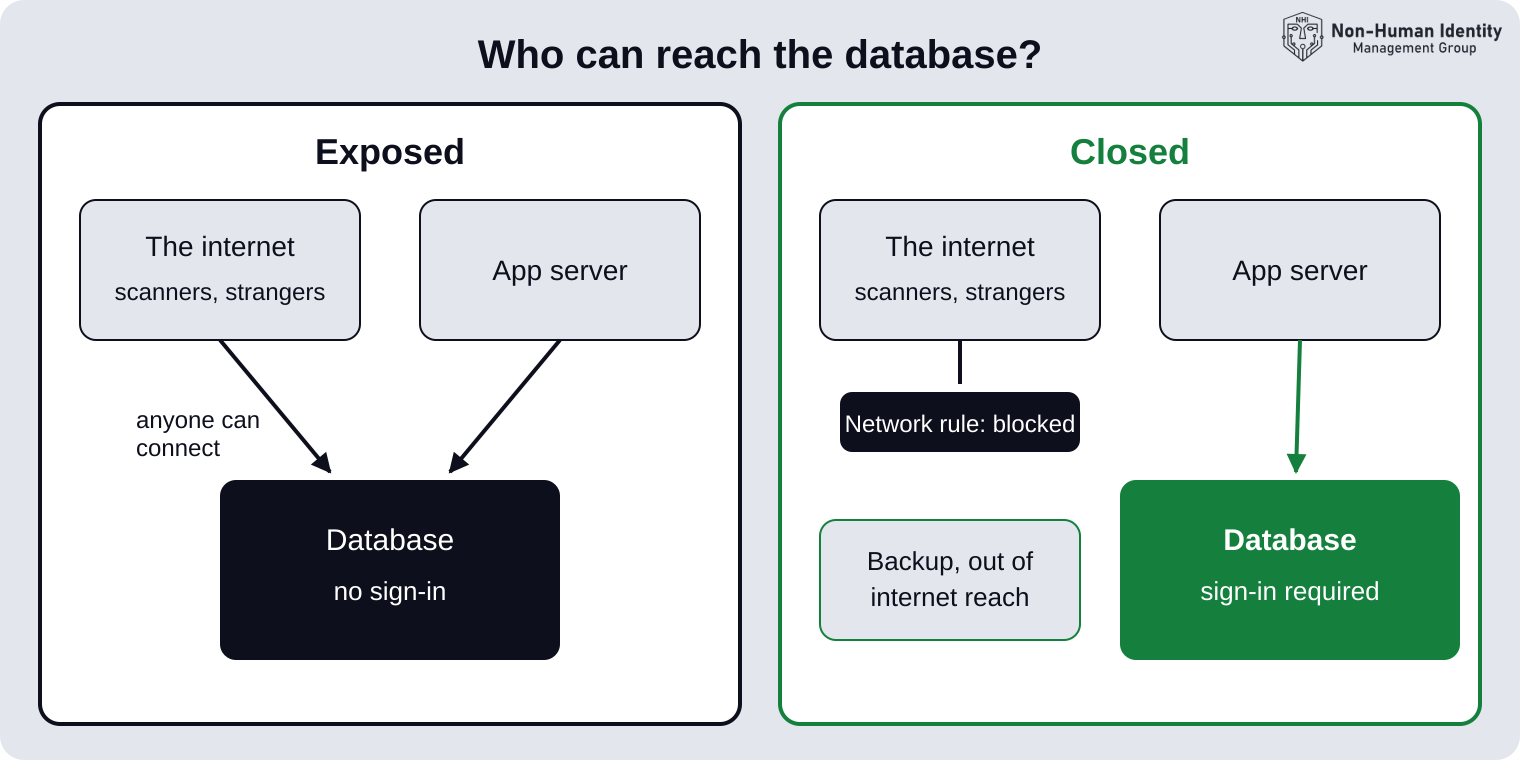
Newer versions of some database software are safer out of the box. Elasticsearch, for example, now creates a password and turns on encrypted connections the first time it starts.[6] Redis has a protected mode that only answers the local machine when no password is set.[3] These defaults help, but a person can still switch them off, and older systems may never have had them.
A worked example
This story is made up to show how it can happen.
Petra Delmar runs Thistle Tutors, a small tutoring firm. A freelance developer, Milo Kader, built its booking app last year.
Petra reads a news story about a leaked customer list and remembers the filing cabinet on the pavement. She does not know where her own records live, so she emails Milo three plain questions. Where is our database? Can anyone on the internet reach it? Does it need a password?
Milo checks. The live database is fine: only the booking app can reach it. But he finds a test copy he made months ago to try a new feature. It sits on a separate cloud server, open to any address, with sign-in switched off. It holds a copy of real parents' names and email addresses.
Milo closes the network rule first, so the door shuts straight away. Then he checks the server's records for connections from unknown addresses. He finds a few visits from scanning services, and no sign of large downloads in the records available to him.
Petra asks for advice on whether the exposure needs to be reported, and keeps a written note of what they found and did. Milo deletes the test copy and agrees to use made-up data for tests from now on.
What made the difference: Petra asked about every copy, not just the live one.
Myths and mistakes
| What people think | What is true |
|---|---|
| Nobody knows our database address, so nobody will find it. | Scanners visit every address and list what answers. Being unknown is not the same as being hidden.[1] |
| We are too small to be a target. | Automated scripts find open databases whatever the owner's size.[2] |
| It is only a test copy. | A test copy with real data is real data. Use made-up records for tests. |
| The cloud provider keeps it locked for us. | The provider runs the building. Network rules and sign-in settings are usually yours to set. |
| If the data is wiped, we can pay to get it back. | Researchers warn that paying may not restore anything. Tested backups are the real safety net.[2] |
What can I do this week?
- List every database you or your suppliers run, including test and old copies.
- Ask whether each one can be reached from the internet, and get the answer in writing.
- Check that each one asks for a sign-in and has no default passwords left.
- Ask when a backup was last restored as a test, and where the backups are kept.
- Delete test copies that hold real customer data.
Checklist
- No database can be reached from the open internet unless there is a written, reviewed reason.
- Network rules let only the app servers that need the database connect to it.
- Sign-in is on for every database, including test ones.
- Default accounts and passwords are removed or changed.
- Test databases use made-up data, and old copies are deleted.
- Backups are kept where the internet cannot reach them, and a restore has been tested.
- Someone checks, at least every few months, what your organisation has open to the internet.
Common questions
How do I know if my database is exposed?
Ask the person who runs it to check the network rules and to test from outside your network. Some teams also look themselves up in device search engines. We suggest doing this regularly, because new servers and test copies appear all the time and are easy to forget.
Is a password enough to protect an internet-facing database?
It helps, but it is one layer. A database open to the internet can be hit with guessed passwords and attacks on known weaknesses. Makers advise limiting who can reach it on the network, then adding sign-in and encryption on top.
Our database was wiped and a ransom note left. Should we pay?
Get expert help first and close the database to the internet. Researchers who studied these attacks found the data was probably never kept, so paying may not bring it back. Restore from your own backups and check whether you need to report the incident.
What if I find someone else's open database?
Do not download, change or explore the data. Tell the organisation through its published security contact, which some websites list in a file called security.txt.[7] The law on testing other people's systems varies, so read up before you look further.
Is this the same as a public cloud storage bucket?
They are close cousins. A bucket is an online folder of files, and a database is a store of records that apps search. Both leak in the same way: a setting that lets anyone in. See our guide to cloud storage buckets for the file side.
Where next?
Ready for the detail? Read the practitioner guide: Internet-Exposed Databases Guide. It goes further into finding your own exposure, hardening each database's default settings and responding to wipe-and-ransom attacks.
Also useful:
- Database Security for Beginners
- Cloud Storage Buckets for Beginners
- Attack Surface for Beginners
- Backup Security for Beginners
- Security Research and the Law for Beginners
Related NHI Mgmt Group resources: Database Security Guide · Security Misconfiguration for Beginners · Default Passwords for Beginners
Key terms
- Database
- An organised store of records that software can search and update.
- Port
- A numbered door on a computer that a particular kind of software listens on.
- Shodan
- A search engine that lists devices and services reachable on the internet.
- Firewall
- A filter that lets some network traffic in and keeps the rest out.
- Authentication
- Checking who someone or something is before letting it in, for example with a password.
- Misconfiguration
- A setting left wrong, such as a rule that lets anyone connect.
- Ransomware
- An attack that locks or removes data and demands payment to give it back.
Sources and further reading
- What is Shodan? Shodan Help Center, Shodan. https://help.shodan.io/the-basics/what-is-shodan, accessed 28 Nov 2026.
- Unsecured Elasticsearch data replaced with ransom note. Counter Threat Unit Research Team, Secureworks, published on the Sophos blog. https://www.sophos.com/en-us/blog/unsecured-elasticsearch-data-replaced-with-ransom-note, accessed 28 Nov 2026.
- Redis security. Redis documentation, Redis. https://redis.io/docs/latest/operate/oss_and_stack/management/security/, accessed 28 Nov 2026.
- Security checklist for self-managed deployments. MongoDB Manual, MongoDB. https://www.mongodb.com/docs/manual/administration/security-checklist/, accessed 28 Nov 2026.
- Cyberextortionists wipe over 12,000 MongoDB databases. Trend Micro, 20 May 2019. https://www.trendmicro.com/vinfo/de/security/news/cybercrime-and-digital-threats/cyberextortionists-wipe-over-12-000-mongodb-databases, accessed 28 Nov 2026.
- Start the Elastic Stack with security enabled automatically. Elasticsearch Guide 8.19, Elastic. https://www.elastic.co/guide/en/elasticsearch/reference/8.19/configuring-stack-security.html, accessed 28 Nov 2026.
- RFC 9116: A File Format to Aid in Security Vulnerability Disclosure. IETF, April 2022. https://www.rfc-editor.org/rfc/rfc9116, accessed 28 Nov 2026.