Hacktivism is using cyber attacks to protest or push a political or social cause.
This guide is for anyone who has seen a hacker group claim an attack in the news and wondered what it means. You do not need a technical job to use it: a council, charity, school or small firm can be pulled into a dispute it never chose.
In short
- Hacktivists attack to get attention for a cause, not mainly to make money.
- Common moves are flooding a website, changing a web page, leaking data and tampering with poorly protected equipment.
- Many attacks are simple, and some groups overstate what they did.
- Basic steps help most: website flood protection, strong passwords, nothing important left open online and a calm, fact-checked response.
What you will learn
- Explain what hacktivism is in one sentence.
- Spot when your organisation might become a target.
- Check a group's claim before you react to it.
- Ask your team or supplier the right questions.
- Online protester (hacktivist)
- a person or group that uses cyber attacks to push a cause.
- Website flood (DDoS attack)
- sending so much traffic at a website that real visitors cannot get through.
- Page vandalism (defacement)
- changing a website so it shows the attacker's message.
What is hacktivism?
Think of a street protest outside a shop. Some protesters spray a slogan on the window. Others sit in the doorway so customers cannot get in. They want people to notice their cause.
Hacktivism is the online version. The word joins "hacking" and "activism". A hacktivist might flood a website so it slows down or stops, which is called a DDoS attack (short for distributed denial of service). They might change a web page to show their slogan, or publish data they took.
Canada's national cyber security centre says hacktivists with political aims typically attack to gain attention.[1] That is the main difference from criminals, who are usually after money. Targets are often picked because of a news event, a vote, a public statement or a link to a country in a conflict.
Where the comparison stops working: a street protest happens in one place, in daylight. Online protesters can act from anywhere, hide who they are, and some groups have links to governments.
Why does it matter?
Most hacktivist attacks cause short disruption and embarrassment. A few have reached real equipment, such as small water systems with weak passwords.[2]
If you work in a council or public body
What could happen: your website is flooded after a local decision makes the news, and residents cannot pay bills or book services.
Check this: ask your web supplier whether the site has flood protection and who to call if it slows down.
If you run a small business
What could happen: a comment or a supplier link draws attention, and your home page is changed to show a slogan.
Check this: make sure website admin accounts have strong passwords and a second sign-in check.
If you look after equipment or buildings
What could happen: a control screen left open online with its factory password is found and changed by a stranger.
Check this: ask whether any control screens can be reached from the internet, and change every default password.
If you handle press or social media
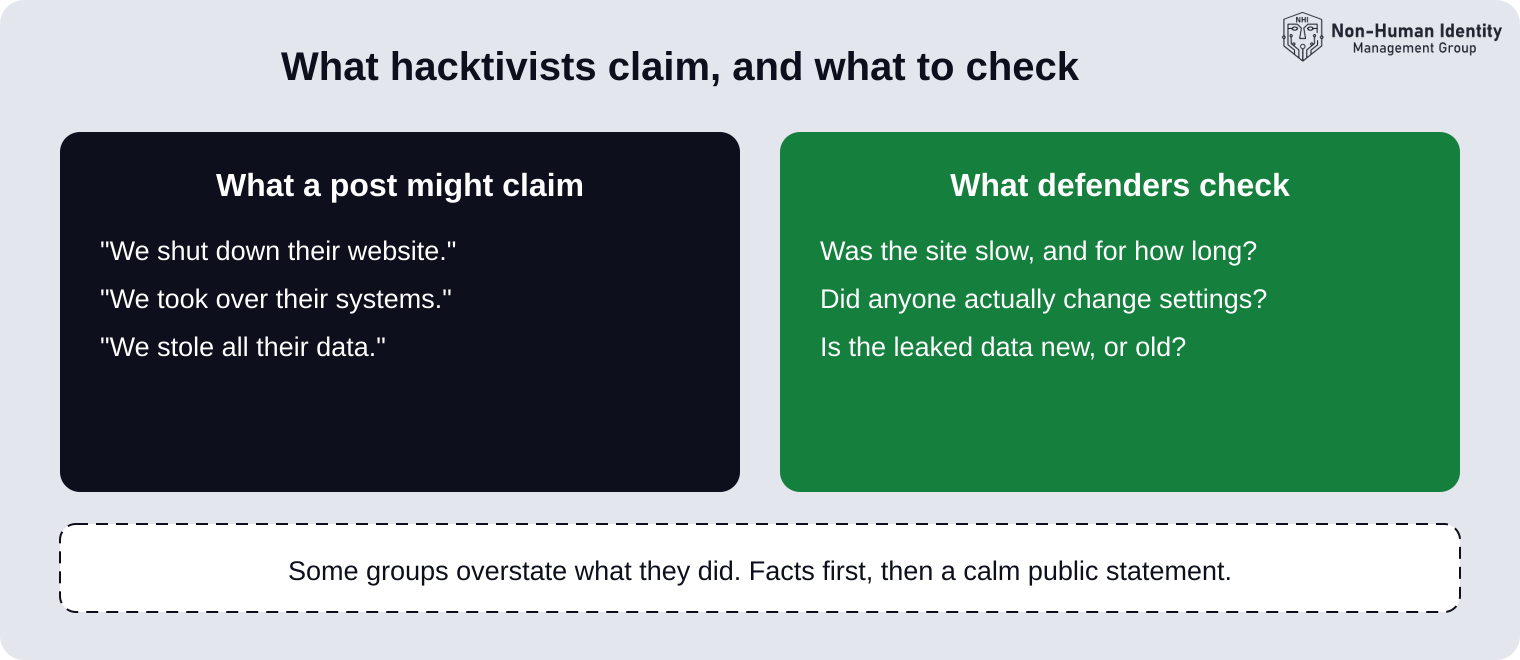
What could happen: a group posts that it "destroyed" your systems, and journalists call before you know the facts.
Check this: agree a short holding statement and who checks the facts with IT first.
What does it look like?
Hacktivist groups often announce attacks on social media. Here is a made-up post of the kind a team might be shown.
Example only. All values are made up.
@FakeProtestCrew  (EXAMPLE account)
TODAY we punished Example Council for its vote!   (1)
Their website is DOWN. www.example.invalid        (2)
We control their systems and took ALL data.       (3)
More targets tomorrow. #FakeCampaign0000           (4)
- The post links the attack to a news event. That is typical of hacktivism.
- In a real message, this line would name a site that may only have been slow for a short time.
- Big claims like this are common, and some turn out to be false or overstated.
- A hashtag helps the group spread the message and gather supporters.
Why this is risky: if you react before checking, you may spread the group's message. You may also make promises you cannot keep.
The safer way: check what actually happened with your IT team or supplier first. Then give a short, factual statement.
How does it work?
This is a high-level view for defenders. It does not describe how to attack anything.
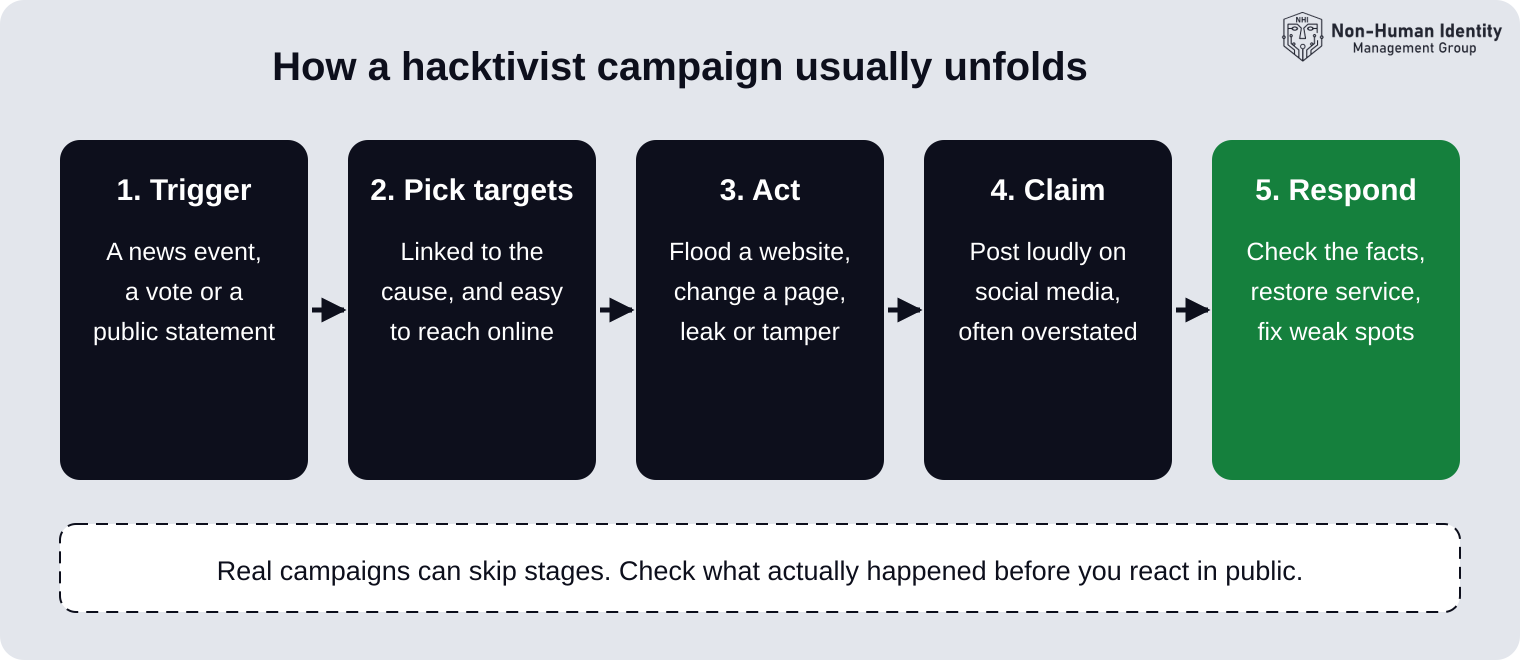
- Trigger. Something in the news angers a group, such as a war, a vote or a company decision.
- Pick targets. The group looks for organisations linked to the cause, and often for ones that are easy to reach online.
- Act. It floods a website, changes a page, leaks data or tampers with equipment left open online.
- Claim. It posts about the attack to get attention, sometimes with screenshots or big claims.
- Respond. The target checks the facts, restores service and closes the weak spot.
A joint US government fact sheet from May 2024 shows how simple some attacks are. It says pro-Russia hacktivists reached small industrial control systems that were open to the internet. They used remote access software and default passwords, which are the factory passwords a device ships with.[2]
In some cases they changed settings so that water pumps ran outside their normal limits. Most victims switched to manual control and recovered quickly. The same fact sheet says these groups have been known to exaggerate their abilities and the harm they caused.[2]
A worked example
Kemal Abara runs the website and IT for Larchfield Community Trust, a fictional charity that runs a sports centre. One Monday, the trust's chair speaks on local radio about a political dispute abroad.
By Tuesday lunchtime, the booking website is very slow. Then a post appears online from a group nobody has heard of. It says the group has "taken over" the trust and stolen "all member data".
Sana Zamora, who handles the trust's press and social media, gets a call from a local reporter. She wants to answer straight away. Instead, she tells the reporter the trust is looking into it and will update by the end of the day.
Kemal thinks of the protest outside the shop. Is this graffiti, a sit-in at the door, or someone inside the building?
He calls the web hosting company. It confirms a flood of traffic, the sit-in at the door, and turns on its flood protection. The site recovers within the afternoon. Kemal then checks the admin accounts. There are no unknown sign-ins in the records available to him, and no settings have changed.
The "stolen data" turns out to be a list of class times already on the public website.
Sana posts a short, factual update: the site was slow for a few hours, and the trust has no evidence that member data was taken. Kemal adds a second sign-in check to the admin accounts and writes down the hosting company's emergency contact. Together they add "hacktivist claim" to the trust's incident plan.
Myths and mistakes
| What people think | What is true |
|---|---|
| Only big companies and governments get targeted. | Hacktivists often pick targets that are linked to a cause and easy to reach, whatever their size. |
| If a group says it stole everything, it must be true. | Some groups overstate their attacks. Check the facts before you respond.[2] |
| Hacktivism is harmless online protest. | Most attacks cause short disruption, but some have tampered with real equipment. |
| A website flood means we were hacked. | A flood slows or blocks a site from outside. It does not by itself mean anyone got in. |
| We should reply to the group online. | Replying can spread its message. Talk to your own customers and staff instead. |
| Hacktivists are always lone volunteers. | Some groups are loose crowds of volunteers, while some have links to governments. Canada's cyber centre says Iran uses hacktivist personas to keep its own role deniable.[1] |
What can I do this week?
- Ask your web host if flood protection is on, and how to reach them fast.
- Change any default passwords on routers, cameras, building systems and control screens.
- Check that nothing that controls equipment can be reached straight from the internet.
- Turn on a second sign-in check for website and social media admin accounts.
- Agree who checks the facts and who speaks if a group claims an attack.
Checklist
- We know which of our activities could draw attention from a cause or campaign.
- Our main website has flood protection from our host or a specialist service.
- We have an emergency contact for our web host and internet provider.
- No device, screen or remote access tool still uses its factory password.
- Equipment controls are not reachable straight from the internet.
- Website and social media admin accounts use a second sign-in check.
- We keep backups of the website so we can put back a changed page.
- Our incident plan covers checking a public claim before we respond.
Common questions
Is hacktivism illegal?
In many countries, yes. The attacks themselves can be crimes, whatever the cause. Flooding a website, breaking into a system or leaking stolen data can all break computer crime laws. Peaceful online campaigning, such as petitions and posts, is a different thing and is not hacking.
How is a hacktivist different from a cyber criminal?
The main difference is the goal. A hacktivist mostly wants attention for a cause. A criminal mostly wants money. The methods can look alike, and some groups mix both, so judge an attack by what actually happened, not by the label.
Can hacktivists be working for a government?
Sometimes. Canada's cyber centre says Iran runs hacktivist personas, and the link between a group and a state can be hard to see.[1] For most organisations the response is the same: check the facts, restore service, close the weak spot and report the attack to your national authority.
What should we do if a group claims it attacked us?
Check first, speak second. Ask your IT team or supplier what actually happened. Give staff and customers a short, factual update. Avoid replying to the group, and report the attack to your national cyber security authority or the police.
Can we stop a website flood ourselves?
Usually not alone. Large floods are best handled by your web host, internet provider or a flood protection service. The UK cyber security centre advises understanding your service and defences, and creating and testing a response plan before an attack.[3]
Where next?
Ready for the detail? Read the practitioner guide: Hacktivism Guide. It goes further into named groups, how to verify a claim, flood readiness and protecting industrial equipment.
Also useful:
- Threat Actors for Beginners
- DDoS Attacks for Beginners
- Nation-State Hacking for Beginners
- APT vs Cybercrime vs Hacktivists
- Incident Response for Beginners
Related NHI Mgmt Group resources: Cyber Warfare Guide · Government Threat Actors Guide · Threat Intelligence for Beginners
Key terms
- Hacktivism
- Using cyber attacks to protest or push a political or social cause.
- Hacktivist
- A person or group that uses cyber attacks to push a political or social cause.
- DDoS attack
- An attack that floods a website or service with traffic from many places so real users cannot reach it.
- Defacement
- Changing a website without permission so it shows the attacker's message.
- Doxxing
- Publishing private details about people online to embarrass or pressure them.
- Operational technology
- Computers that control physical equipment, such as pumps, valves and building systems.
- Attribution
- Working out who is responsible for an attack.
Sources and further reading
- National Cyber Threat Assessment 2025-2026. Canadian Centre for Cyber Security, October 2024. https://www.cyber.gc.ca/en/guidance/national-cyber-threat-assessment-2025-2026, accessed 28 Nov 2026.
- Defending OT Operations Against Ongoing Pro-Russia Hacktivist Activity (fact sheet). CISA, FBI, NSA, EPA, DOE, USDA, FDA, MS-ISAC, Canadian Centre for Cyber Security and UK NCSC, 1 May 2024. https://www.cisa.gov/resources-tools/resources/defending-ot-operations-against-ongoing-pro-russia-hacktivist-activity, accessed 28 Nov 2026.
- Denial of Service (DoS) guidance. National Cyber Security Centre (UK). https://www.ncsc.gov.uk/collection/denial-service-dos-guidance-collection, accessed 28 Nov 2026.