A replay attack is when someone copies a genuine message and sends it again to trick a system.
This guide is for students, newcomers and anyone who has heard the term and wants to know what it means. You do not need to write code to be affected: payments, sign-in codes and messages between apps all rely on defences against replay.
In short
- In a replay attack, nothing is forged. A real message is simply sent again.
- Because the copy is genuine, a signature or password check alone may not catch it.
- Systems spot repeats with fresh one-time numbers, time stamps and lists of what they have already accepted.
- One-time codes and modern sign-in keys resist replay. A plain password does not.
What you will learn
- Explain what a replay attack is in one sentence.
- Explain why a valid signature does not prove a message is new.
- Spot the three common defences: nonces, time stamps and one-time use.
- Ask whether the apps you rely on check for repeats.
- Copy and resend (replay)
- sending a message that was recorded earlier, without changing it.
- Fresh number (nonce)
- a random number used once, so a reply can be matched to one request.
- Time label (timestamp)
- the time a message was made, written into the message itself.
What is a replay attack?
Think of a club door where the guard only listens for the password. Someone hides nearby and records a member saying it. Later, they play the recording to the guard, and the door opens.
A replay attack works the same way. The attacker does not need to know the secret or break any code. They record a real message, such as a sign-in or a payment request, and send it again later. US government security guidance describes it as an attack in which the attacker replays previously captured messages to pose as someone else.[1]
Where the comparison stops working: a guard might notice the recording sounds odd. A computer sees a perfect copy, bit for bit. So systems need a rule that makes old messages fail, not a sharper ear.
Why does it matter?
A replayed message can repeat an action the owner only wanted once. That could be a payment, a refund, a sign-in or an order.
Replay also affects non-human identities (NHIs). An NHI is a digital identity, or the credential behind it, that represents a machine, application, automated process, service or AI agent. Apps send each other signed messages all day, so each one needs to check that a message is new.
If you are learning about security
What could happen: you assume a valid signature means a message is safe to act on.
Check this: ask what stops the same signed message being used twice.
If you run an online shop
What could happen: a copied "payment received" or "add points" message is sent again, and your system acts twice.
Check this: ask your developer whether each message ID is only processed once.
Next: Webhooks for Beginners
If you manage sign-in for staff
What could happen: a password captured once can be used again and again.
Check this: add a second check that changes every time, such as a one-time code or a security key.
What does it look like?
Here is a made-up record from a shop's loyalty app. Another app sends it signed messages asking it to add points to a customer's account.
Example only. All values are made up.
10:02:11  msg-id=EXAMPLE-0001  add 50 points to customer 0000  signature OK
10:09:40  msg-id=EXAMPLE-0001  add 50 points to customer 0000  signature OK  (1)
10:09:41  msg-id=EXAMPLE-0001  add 50 points to customer 0000  signature OK  (2)
          sent at 10:02:11, received 7 minutes later              (3)
- In a real file, this line would show the same message arriving a second time. The signature still checks out, because nothing was changed.
- And a third time. Without a repeat check, the customer gets 150 points instead of 50.
- The time label inside the message is old. A time check would have flagged it.
Why this is risky: the app only asks "is this signature genuine?" It never asks "have I seen this before?" or "is this recent?"
The safer way: the app keeps a list of message IDs it has already handled and skips repeats. It also rejects messages whose signed time label is older than a few minutes.
How does it work?
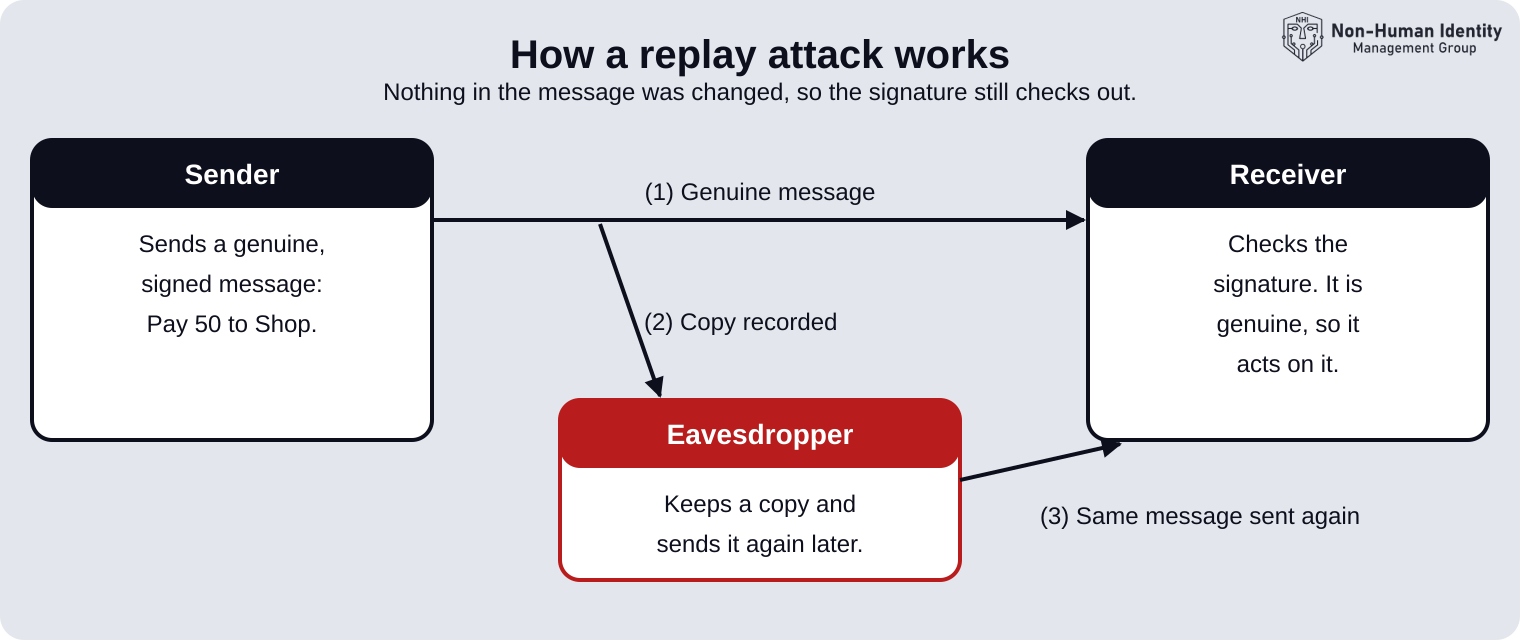
Here is how a replay attack usually happens, and where it can be stopped.
- A real message. A person or app sends a genuine message, such as a sign-in or a payment request.
- A copy. Someone who can see the message keeps a copy. This might be an eavesdropper on the network or someone with access to a log file.
- The resend. Later, they send the same message again, unchanged.
- The check. The receiver checks the message. If it only checks the signature or password, the copy passes.
- The defence. If the receiver also checks that the message is new, the copy fails.
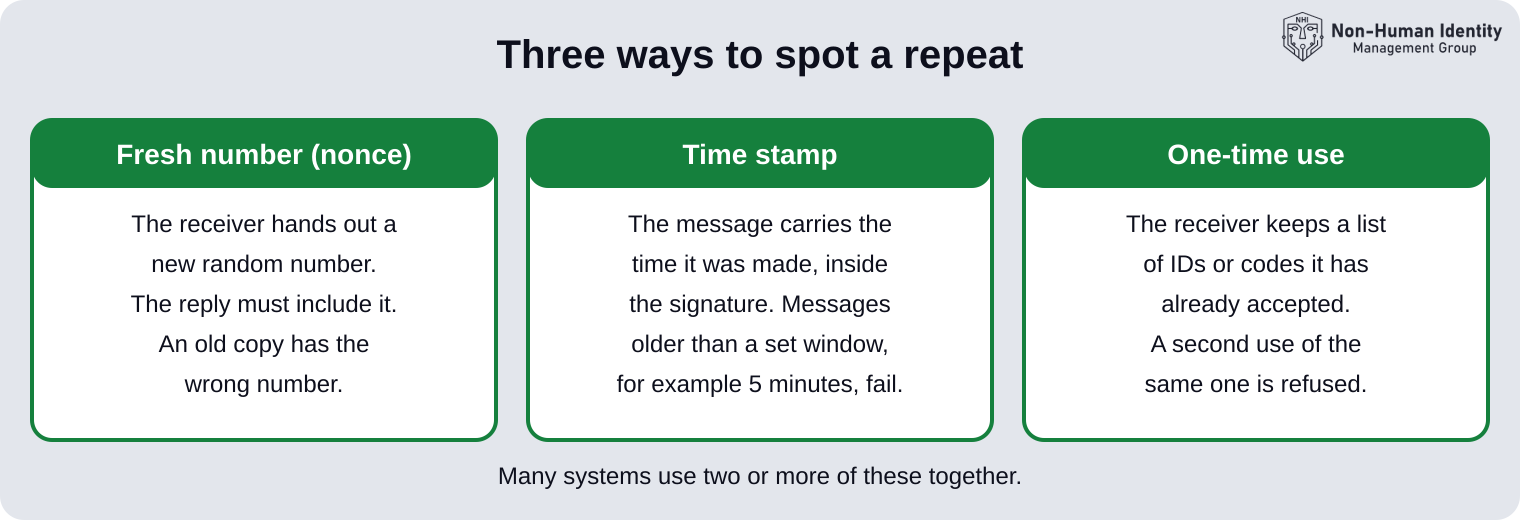
Systems use three main ways to tell a new message from an old one.
- A fresh number (nonce). The receiver hands out a new random number, and the reply must include it. An old copy carries the wrong number. US sign-in guidance asks for these numbers to be long and unique.[2]
- A time stamp. The message carries the time it was made, inside the signature, so it cannot be changed. Stripe, a payments company, does this for the messages it sends to shops' systems. Its code libraries reject messages more than 5 minutes old by default.[3] Clocks must be kept accurate for this to work.
- One-time use. The receiver remembers what it has already accepted and refuses a second use. The standard for app-based sign-in codes says a code must not be accepted again once it has been used.[4]
This is also why passwords are weak against replay. US guidance notes that a password is not replay-resistant, because the same value is sent every time. One-time codes and security keys are.[2]
Email has its own version. A signed email can be sent on to many new people, and its signature still checks out.[5] Our practitioner guide below covers this case.
A worked example
Noor Tanaka runs a small online bookshop with a loyalty scheme. Wren Osei, a freelance developer, built the app that adds points when a customer buys a book.
One Tuesday, Noor notices something odd. A customer account has 2,000 points after only three small orders.
She remembers the club door. The guard heard the right password, but from a recording. So she asks Wren to look for the same message arriving more than once.
Wren checks the records. The same signed "add points" message arrived forty times, minutes apart. Each copy had a valid signature, so the app trusted it.
Wren makes two changes. First, the app now keeps a list of message IDs it has handled and skips any repeat. Second, it rejects messages whose signed time label is more than five minutes old.
Next, Wren looks at how a copy got out. The full messages were being written into a shared log file. Wren removes them from the log and changes the signing secret, in case the log was read by someone else.
Last, Noor corrects the customer's points and adds "check for repeats" to the list she gives every new supplier. In the records available to them, they find no other accounts affected.
Myths and mistakes
| What people think | What is true |
|---|---|
| A valid signature means the message is safe. | A signature shows who made the message and that it was not changed. It does not show the message is new. |
| Encryption stops replay. | An encrypted copy can still be sent again. The receiver needs a check for repeats. |
| Replay attacks need clever hacking. | The attacker only needs a copy. A log file or a shared screenshot can be enough. |
| Time stamps alone are enough. | A copy sent within the time window may still pass. Pair time stamps with one-time IDs.[3] |
| A password is fine if it is strong. | A strong password can still be captured and reused. Add a check that changes every time.[2] |
What can I do this week?
- Ask your developer or supplier how each app spots a repeated message.
- Turn on a one-time code or security key for your main work accounts.
- Check that server clocks are set automatically, so time checks work.
- Look for full messages, codes or tokens in shared logs and remove them.
Checklist
- Every app that acts on messages checks that each message ID is used only once.
- Signed messages carry a time stamp inside the signature.
- Old messages outside a short time window are rejected.
- Server clocks are kept in sync automatically.
- Staff sign-in uses a second check that changes each time.
- Full messages, codes and tokens are kept out of shared logs.
- Suppliers can explain their replay defences in writing.
Common questions
What is the difference between a replay attack and a man-in-the-middle attack?
A replay attack sends an old message again, unchanged. A man-in-the-middle attack sits between two sides as they talk and may read or change messages live. A man in the middle can also replay messages, so the two often go together. See Man-in-the-Middle Attacks for Beginners.
What is a nonce?
A nonce is a number used once. The receiver hands out a fresh random one, and the reply must include it. A recorded reply carries an old nonce, so the receiver can tell it is a copy. The name comes from "number used once".
Do one-time codes stop replay attacks?
They help a lot. A one-time code should be accepted only once, so a copied code fails after the first use. But a code stolen and used straight away, before the real owner uses it, may still work. Phishing-resistant security keys go further.
Why does the clock matter?
Time stamps only work if both sides agree on the time. If a server's clock drifts, it may reject genuine messages or accept old ones. Stripe, for example, tells developers to keep server clocks accurate using a time service. See Network Time (NTP) for Beginners.
Can a stolen token be replayed?
Yes. Many access tokens work for whoever holds them, so a copied token can be sent again until it runs out. Short lifetimes help, and tying the token to a key the app keeps makes a copy much less useful. See Access and Refresh Tokens for Beginners.
Where next?
Ready for the detail? Read the practitioner guide: DKIM Replay Attacks Guide. It goes further into one real case of replay: how signed emails are resent at scale, why receiving systems still trust them and what senders can change.
Also useful:
- Webhook HMAC Signing vs mTLS vs IP Allowlisting
- Random Numbers in Security for Beginners
- Email Authentication for Beginners
- Kerberos for Beginners
- Non-Human Identities for Beginners
Related NHI Mgmt Group resources: How to detect adversary-in-the-middle phishing and session token replay in Entra ID · DPoP Guide · Session Cookies vs Bearer Tokens
Key terms
- Replay attack
- Sending a recorded, genuine message again to trick a system into acting on it.
- Nonce
- A random number used once, so each request and reply can be matched.
- Timestamp
- A record of when a message was made, used to reject old copies.
- Replay protection
- Checks that make a copied message fail, such as nonces, time windows and one-time IDs.
- Replay window
- The short time during which a message is still accepted.
- One-time password
- A code that works once, or for a short time, and then stops being accepted.
- DKIM replay
- Resending a genuinely signed email to new people so it looks trusted.
Sources and further reading
- Replay attack (glossary entry, from NIST SP 800-53 Rev. 5 and SP 800-63-4). NIST Computer Security Resource Center. https://csrc.nist.gov/glossary/term/replay_attack, accessed 28 Nov 2026.
- NIST SP 800-63B-4: Digital Identity Guidelines, Authentication and Authenticator Management (replay resistance; cryptographic verifiers). NIST, 2025. https://pages.nist.gov/800-63-4/sp800-63b.html, accessed 28 Nov 2026.
- Receive Stripe events in your webhook endpoint: Preventing replay attacks. Stripe Docs, Stripe. https://docs.stripe.com/webhooks, accessed 28 Nov 2026.
- RFC 6238: TOTP: Time-Based One-Time Password Algorithm. IETF, May 2011. https://www.rfc-editor.org/rfc/rfc6238.html, accessed 28 Nov 2026.
- DKIM Replay Problem Statement (Internet-Draft draft-ietf-dkim-replay-problem-00). IETF, 28 July 2023. https://www.ietf.org/archive/id/draft-ietf-dkim-replay-problem-00.html, accessed 28 Nov 2026.