Row-level security is a database rule that shows each person only the rows they are allowed to see.
This guide is for anyone who builds, buys or uses an app or report that keeps many people's data in one place. You do not need to write code to be affected: if your booking app or sales dashboard holds customer records, someone has to decide who sees which ones.
In short
- A database table holds many rows, often one per order, customer or booking.
- Row-level security adds a rule so each person gets back only their own rows, or the rows their job allows.
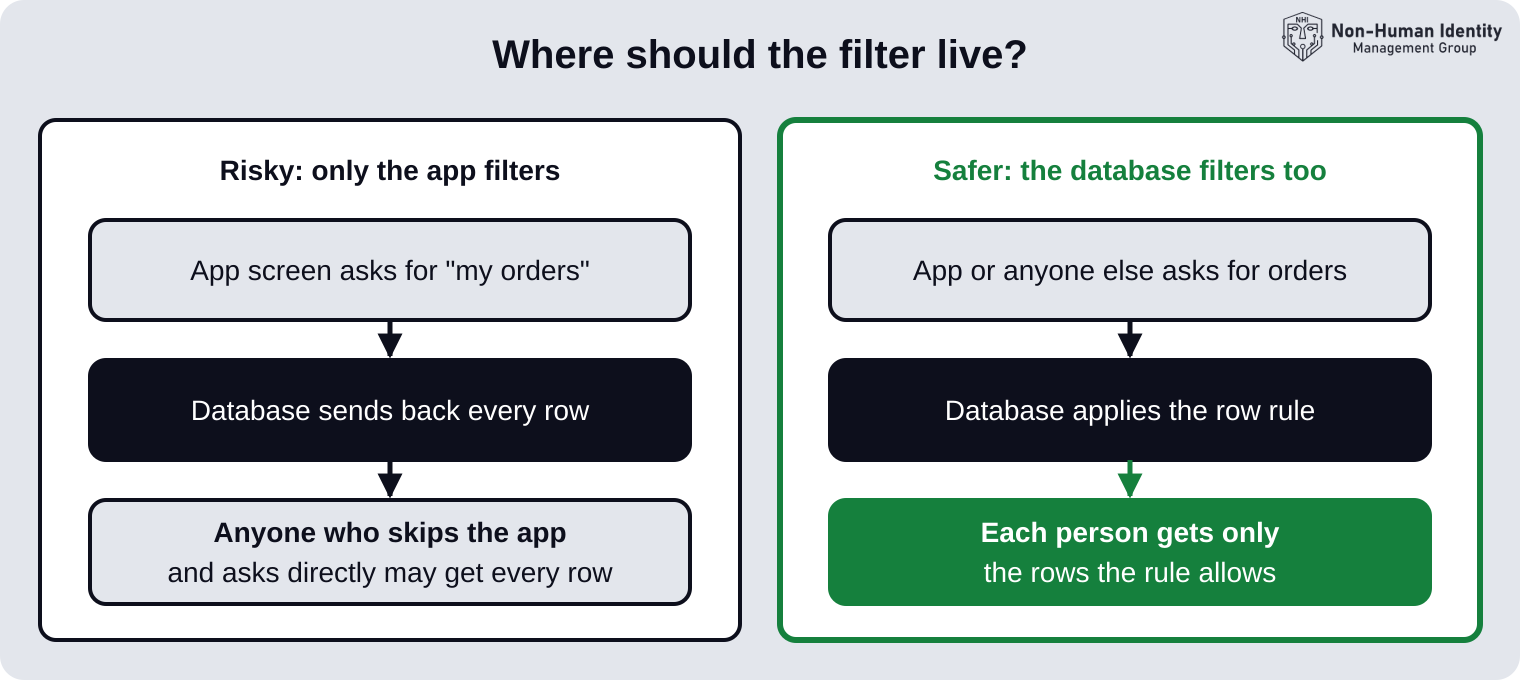
- The database applies the rule itself, so it still works if someone skips the app's screens.
- It only works if it is switched on, the rules are right, and powerful accounts that skip it are kept safe.
What you will learn
- Explain row-level security in one sentence.
- Spot a table that anyone with the app's key may be able to read in full.
- Explain why filtering only in the app is not enough.
- Ask your developer or supplier three questions about your data.
- Row
- one line in a database table, such as one order or one customer.
- Rule (policy)
- a short condition the database checks on each row before it hands the row over.
- Database
- an organised store of data that apps read from and write to.
What is row-level security?
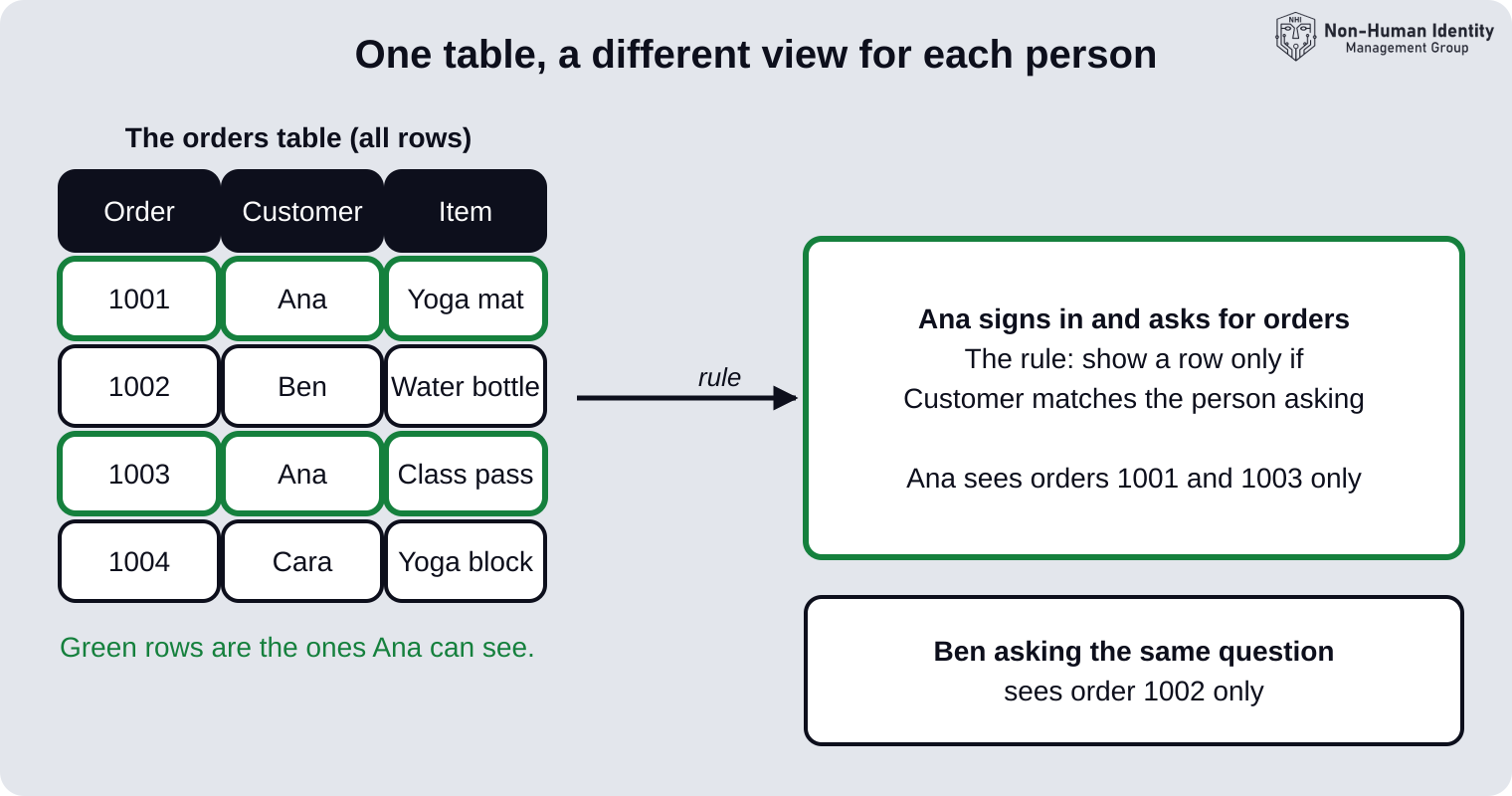
Think of the post room in a block of flats. All the letters sit in one big rack, but the clerk only hands you the letters with your name on them.
A database table is that rack. Each row is one item, such as an order, and a column says whose it is. Row-level security (often shortened to RLS) is the clerk. It is a rule, called a policy, that the database checks on every row before it hands it over.[1]
The rule can also control which rows a person may add, change or delete.[1] For example: "you may only change bookings with your own name on them".
Where the comparison stops working: a clerk can use common sense. A database follows its rule exactly. If the rule is missing or wrong, it may hand over every letter in the rack.
Why does it matter?
Many modern apps keep every customer's data in the same tables. Without a row rule, one mistake in the app can show one customer another customer's records. That kind of flaw is a form of broken access control.
If you are building your first app
What could happen: your app's public key sits in the web page. With it, a table with no row rule may be read in full.
Check this: make sure every table the app can reach has row-level security on, with a rule.
If you share reports or dashboards
What could happen: a sales report meant for one region shows every region's figures to every reader.
Check this: test the report as each kind of reader before you share it.
If you pay someone to build your software
What could happen: the app hides other customers' data on screen, but the database would hand it to anyone who asks directly.
Check this: ask where the "only your own data" rule lives: in the app, in the database, or both.
What does it look like?
Many app-building services show a settings screen for each table. Here is a made-up summary for a small yoga studio's booking app.
Example only. All values are made up.
Table:               bookings-EXAMPLE
Rows:                1,200 (all customers)
Row-level security:  OFF                        (1)
Rules:               none                       (2)
Key in the web page: EXAMPLE-PUBLIC-KEY-0000    (3)
Admin key:           FAKE-ADMIN-KEY-0000        (4)
- With this off, the database does not filter rows.
- No rule says whose rows are whose.
- In a real screen, this line would contain a public key that every visitor's browser can see.
- In a real screen, this line would contain a powerful key that skips the row rules. It belongs only on the server.
Why this is risky: take Supabase, one such service. There, a table the app can reach with no row rule is open. Any role allowed to use it can read and change it. That can include visitors who are not signed in.[2]
The safer way: turn row-level security on. Add a rule such as "a customer sees only their own bookings". Keep the admin key out of the web page.
How does it work?
Here is what happens when a customer opens "My bookings".
- The rule is switched on. Someone turns on row-level security for the table. In PostgreSQL, a popular database, rules have no effect until this is done.[1]
- The rule is written. For example: "show a row only if its customer is the person asking". In PostgreSQL, once security is on, a table with no rule shows no rows at all to normal users.[1]
- The person signs in. The app learns who they are, and passes that to the database with each request.
- The database checks each row. Rows that pass the rule come back. The rest are left out.
- Writes are checked too. If the person tries to add or change a row, the database can check that the new row also passes the rule.[1]
Powerful accounts can skip the rules. In PostgreSQL, superusers and accounts marked to bypass row security skip it, and table owners usually do too.[1] In Supabase, the secret server key works through a role that bypasses row security.[2] These keys belong to non-human identities (NHIs), such as the app's back-end service, and need the same care as any other secret.
Report tools use the same idea. In Microsoft Power BI, row-level security filters a shared report so each reader sees only their rows. It applies to people with Viewer access, not to workspace admins, members or contributors.[3]
A worked example
Kemal Tanaka runs a small, fictional yoga studio. A freelance developer, Zola Nakamura, built its booking app on a hosted database service.
A customer emails Kemal. While testing a tool from a coding course, she saw a list of other people's bookings, with names and phone numbers.
Kemal thinks of the post room. The clerk has been handing out every letter in the rack. He calls Zola.
Zola opens the database settings. The bookings table has row-level security switched off. The app's screens only showed each customer their own bookings, so nobody noticed in testing.
She switches row-level security on and adds two rules. Customers can read only their own bookings. Customers can add bookings only in their own name. Then she signs in as two test customers and checks that each sees only their own rows.
Next, she checks where the admin key is used. It is only on the server, not in the web page, so she leaves it there.
Last, she looks at the database records for unusual reads. Kemal asks a data protection adviser whether the customers need to be told, and follows that advice.
Kemal now asks for a "two test customers" check before every new release.
Myths and mistakes
| What people think | What is true |
|---|---|
| The app only shows each user their own data, so we are safe. | Screens can be skipped. Put the rule in the database as well. |
| Writing a rule is enough. | In PostgreSQL, rules have no effect until row-level security is switched on for the table.[1] |
| Row-level security applies to everyone. | Some powerful accounts and keys skip it. Keep them on the server and limit who holds them.[2] |
| In Power BI, the rule covers every colleague in the workspace. | It applies to Viewers. Workspace admins, members and contributors can see all rows.[3] |
| A rule that also lets "not signed in" through is harmless. | Supabase warns this kind of rule can return every row to visitors who are not signed in.[2] |
What can I do this week?
- Ask your developer which tables the app can reach. Ask if each one has row-level security on.
- Sign in as two different test users and check that neither can see the other's data.
- Check that admin keys are kept on the server, not in a web page or phone app.
- For shared reports, use the report tool's "test as role" option before you share.
Checklist
- Every table the app can reach has row-level security switched on.
- Every such table has rules for reading and for writing.
- Rules are tested with at least two test users.
- Keys that skip the rules stay on the server and have a named owner.
- Shared reports are tested as each kind of reader.
- New tables are checked before release, not after.
- Someone reviews the rules when the app changes.
Common questions
What is the difference between row-level and column-level security?
Row-level security decides which rows you can see, such as which orders. Column-level security decides which columns you can see, such as a phone number field. Many systems use both. Then a person sees only their own rows, and only the safe fields in them.
Do I need row-level security in Supabase?
Yes, for any table the app can reach from a browser or phone. Supabase says to switch it on for every table the app can reach. Without it, any role allowed to use the table can read and change it.[2]
Does row-level security slow the database down?
It can add some work, because the database checks a rule on each row. Simple rules on well-organised tables usually cost little. Your developer can test the speed with realistic data. We suggest keeping rules simple and easy to read, which also makes them easier to check.
Is row-level security the same as encryption?
No. Encryption scrambles data so it cannot be read without a key. Row-level security decides which rows a signed-in user or program gets back. They solve different problems, and many systems use both.
Can an AI tool that reads our database see every row?
It sees whatever its own account is allowed to see. If it connects with an admin key that skips the rules, it may read every row. Give AI tools their own limited account, so the same row rules apply to them.
Where next?
Ready for the detail? Read the practitioner guide: Row and Column Level Security Guide. It goes further into writing and testing rules across databases and report tools, hiding columns as well as rows, and the accounts that can bypass them.
Also useful:
- Dynamic Data Masking vs Row-Level Security
- Supabase Security
- Multi-Tenancy for Beginners
- Broken Access Control for Beginners
Related NHI Mgmt Group resources: Supabase Keys Security Guide · Database Security Guide · App Backend Keys for Beginners
Key terms
- Row-level security
- A database rule that shows each person only the rows they are allowed to see.
- Database table
- A grid of data in a database, made of rows and columns.
- Supabase row-level security
- Rules inside a Supabase database that decide which rows each user can see or change.
- Database role
- A named account or group inside a database that rules and permissions are given to.
- Multi-tenancy
- One app or database serving many customers, with each customer's data kept apart.
- Least privilege
- Giving each person or program only the access its job needs.
Sources and further reading
- Row Security Policies. PostgreSQL Documentation (current version), The PostgreSQL Global Development Group. https://www.postgresql.org/docs/current/ddl-rowsecurity.html, accessed 28 Nov 2026.
- Row Level Security. Supabase Docs, Supabase. https://supabase.com/docs/guides/database/postgres/row-level-security, accessed 28 Nov 2026.
- Row-level security (RLS) with Power BI. Microsoft Learn, Microsoft. https://learn.microsoft.com/en-us/fabric/security/service-admin-row-level-security, accessed 28 Nov 2026.