A security questionnaire is a list of questions a customer sends to check how a supplier protects their data.
This guide is for anyone who has been handed one of these forms and is not sure where to start. You do not need to be a security expert: many small firms get them through sales, and a clear, honest answer can help win the deal.
In short
- Customers send questionnaires to check that a supplier will look after their data before they sign.
- Answer only what is true today. A "no" with a plan is better than a "yes" you cannot prove.
- Many questions ask for proof, so keep policies, reports and screenshots ready to share.
- Save your approved answers in one place, so the next questionnaire is faster.
What you will learn
- Explain why customers send security questionnaires.
- Spot an answer that promises more than you can prove.
- Check who in your firm should answer each kind of question.
- Ask for help early when a question is outside what you know.
- Customer check (security questionnaire)
- a form of security questions a customer asks a supplier to fill in.
- Proof (evidence)
- a document, report or screenshot that shows an answer is true.
- Outside audit report
- a report from an independent checker, such as a SOC 2 report, that some customers accept instead of a long form.
What is a security questionnaire?
Think of the form a landlord asks you to fill in before you rent a flat. The landlord cannot see how you live, so they ask questions and want proof. A customer does the same before it trusts a supplier with its data.
A security questionnaire is that form for a business. A customer sends it before it buys from you, or soon after. It asks about things like passwords and backups. It asks who can see customer data, and what you do if something goes wrong.
Some customers write their own forms. Others use shared ones. For example, one cloud industry group has a list of simple yes or no questions. Cloud firms can fill it in and post it for anyone to read.[1][2]
Where the comparison stops working: a landlord's form is usually short and the same for everyone. Security questionnaires can run to hundreds of questions, and two customers rarely ask them in the same words.
Why does it matter?
When a customer gives you its data, a weak spot at your firm becomes its problem too. That is why it asks. The UK's national cyber security agency tells firms to know how their suppliers keep things safe, and to check it.[3]
If you run a small business
What could happen: a big customer pauses a contract because nobody can answer its questions in time.
Check this: name one person who owns questionnaires and keeps the answers up to date.
If you work in sales or account management
What could happen: you tick "yes" to help a deal along, and the customer later finds the answer was not true.
Check this: pass security questions to the person who runs the system before you reply.
If you are new to compliance or IT work
What could happen: you are asked to fill in a form alone, and you guess at answers you cannot check.
Check this: for each answer, write down where the proof is kept.
What does it look like?
Here are a few made-up rows from a questionnaire, with a first draft of answers.
Example only. All values are made up.
EXAMPLE Customer Ltd - Supplier security questions
Q4  Do all staff use multi-factor sign-in?
    Draft: Yes, always.                        (1)
Q9  Are backups tested at least once a year?
    Draft: Yes.  Evidence: [ none attached ]   (2)
Q12 Do you hold a security certificate?
    Draft: We are basically compliant.         (3)
Q15 Who can see customer data?
    Draft: Only the support team (6 people).   (4)
    Evidence: access list, FAKE-0000.pdf
- "Always" is a big promise. If one old account has no second sign-in step, the answer is wrong.
- A "yes" with no proof attached is likely to come back with a follow-up question.
- "Basically compliant" does not answer the question. Say whether you hold the certificate or report.
- A clear, specific answer with proof attached. This is the style to aim for.
Why this is risky: answers often become part of the contract. A promise you cannot keep can turn into a broken contract later.
The safer way: answer exactly what was asked, attach proof where you can, and explain any gap with a date to fix it.
How does it work?
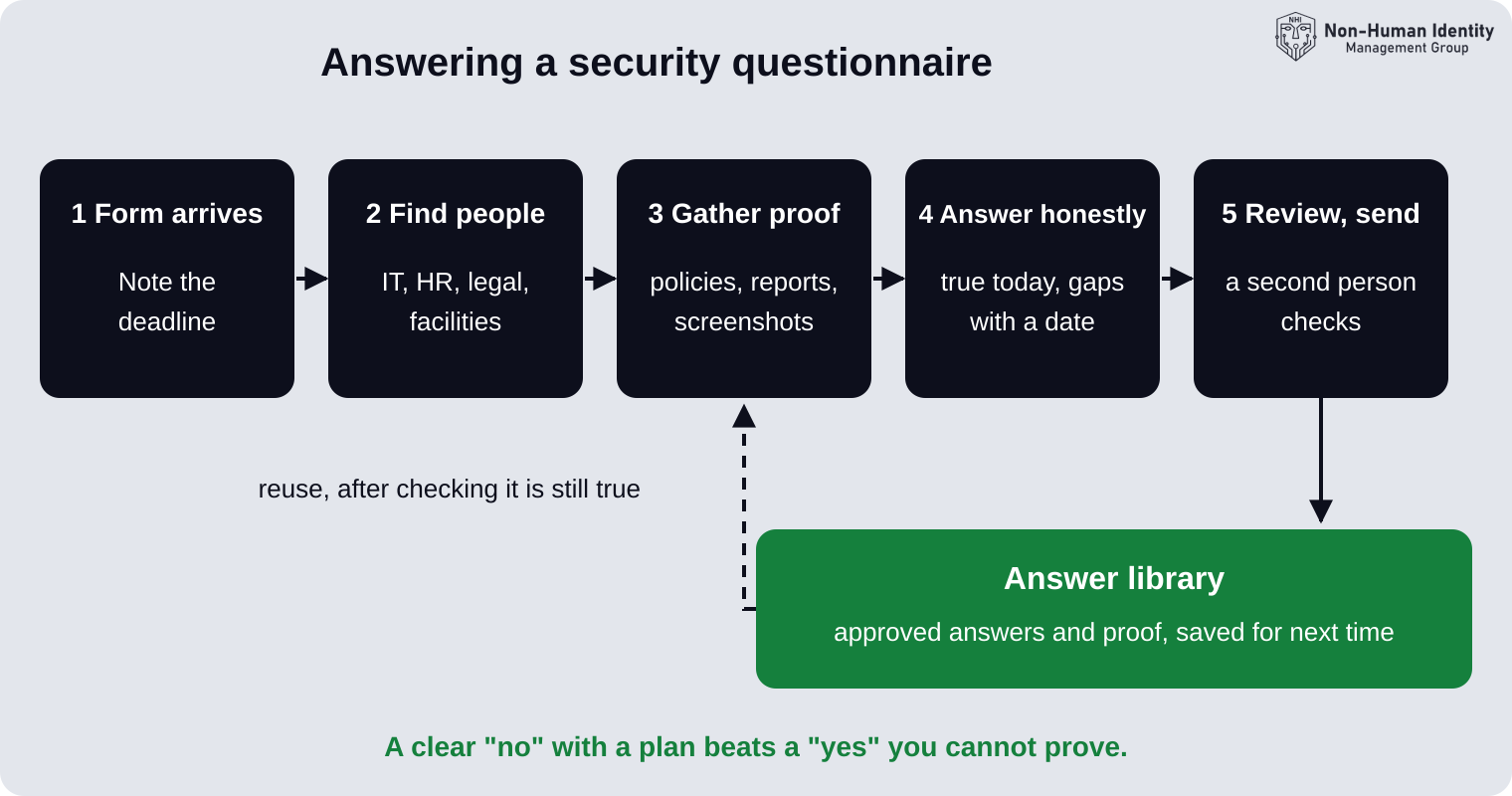
Most questionnaires follow the same path, from the moment one lands in your inbox to the day you send it back.
- The form arrives. It may be a spreadsheet, an online portal or a common shared form. Note the deadline.
- Find the right people. Split the questions by topic: IT, staff, buildings, legal. Each topic needs someone who knows the facts.
- Gather proof. Collect the policy, report or screenshot that backs up each answer.
- Answer honestly. Say what is true today. Where there is a gap, say so and give a plan with a date.
- Review and send. A second person checks the answers before they go. Then save them in your answer library for next time.
Some customers accept an outside audit report instead of a long form. A SOC 2 report, for example, is written by an independent accountant and describes a supplier's controls.[4] If you have one, offer it early.
A worked example
This story is made up to show how it can happen.
Mateo Ruiz is the office manager at Mondragón Tools, a small firm in Spain that makes parts for factory machines. A large customer wants to move its orders onto Mondragón's online ordering system. First, it sends a spreadsheet with 140 security questions and a two-week deadline.
Mateo's first thought is to answer them all himself that afternoon. He starts typing "yes" to most rows. Then he reaches a question about testing backups and realises he has no idea.
He stops and splits the sheet into tabs: IT, staff, buildings and contracts. He sends the IT tab to the firm's outside IT supplier and the staff questions to the HR lead. He keeps the buildings tab for himself.
The IT supplier comes back with mixed news. Every office account uses a second sign-in step, but two old accounts in the warehouse do not. Backups run every night, yet nobody has tried to restore one this year.
Mateo does not hide either gap. He writes: "Two accounts lack a second sign-in step. These will be fixed by 15 January." For backups, he books a test restore and sends the result a week later.
The customer's reviewer thanks him for the clear answers and signs the contract. Mateo saves every approved answer, with its proof, in a shared folder for next time.
What made the difference: Mateo asked the people who knew the facts, and told the truth about the gaps.
Myths and mistakes
| What people think | What is true |
|---|---|
| Saying "no" to any question will lose the deal. | Many reviewers expect some gaps. A clear "no" with a plan and a date is often accepted. |
| One person can answer everything. | Questions cover IT, people, buildings and contracts. Ask the person who knows each area. |
| Copying last year's answers is fine. | Things change. Check each saved answer is still true before reusing it. |
| "N/A" is a safe answer when unsure. | Use it only when a question truly does not apply, and say why in one line. |
| A certificate answers every question. | It helps, but customers may still ask about things outside its scope. Read what it covers. |
What can I do this week?
- Find the last questionnaire your firm answered and save it in one shared folder.
- Make a short list of who owns IT, staff, buildings and contract questions.
- Gather your key policies and any audit reports or certificates into the same folder.
- Pick three questions you could not answer with confidence today, and agree a fix for each.
Checklist
- One person owns questionnaires and their deadlines.
- Each topic has a named expert who checks the answers.
- Every "yes" can be backed by proof we are happy to share.
- Gaps are stated honestly, with a plan and a date.
- A second person reviews answers before they are sent.
- Approved answers and proof are saved for reuse.
- Saved answers are checked before each reuse.
Common questions
Do I have to answer every question?
Usually you should answer each one, even if the answer is "no" or "not applicable". Blank rows tend to come back as follow-up questions and slow the deal down. If a question is unclear, ask the customer what they mean before you guess.
Can I share our policies with the customer?
Often yes, but check first. Some documents describe how your systems are set up, which you may want to keep private. Many firms share a short summary, or share the full document only after both sides sign a confidentiality agreement.
What if we do not have a security certificate?
That is common for small firms, as certificates and audit reports take time and money. Say so plainly, then describe what you do have in place, with proof. Some customers accept that, and others may ask for a plan. Do not imply you hold a certificate that you do not.
Is it safe to use AI tools to draft answers?
They can speed up the first draft, but the answers still need checking by someone who knows the facts. A tool may write a confident answer that is not true for your firm. Avoid pasting customer forms into tools your firm has not approved.
Where next?
Ready for the detail? Read the practitioner guide: Security Questionnaires Guide. It covers the main shared questionnaire formats, building an answer process for a growing supplier, and how customers decide which suppliers need the deepest checks.
Also useful:
- Third Party Risk Management for Beginners
- SOC 2 for Beginners
- ISO 27001 for Beginners
- Cyber Essentials for Beginners
Related NHI Mgmt Group resources: Third Party Risk for Small Organisations · SOC 2 Guide · Third-party NHI due diligence questions drawn from real breaches
Key terms
- Due diligence
- The checks a customer makes before approving a supplier, such as questionnaires, certificates and contracts.
- Vendor risk management
- How an organisation checks and manages the risks that come from its suppliers.
- Third-party risk management
- Checking suppliers before, during and after a contract, based on the risk they bring.
- SOC 2
- An independent audit report that shows how a service provider protects customer data.
- ISO 27001
- An international standard for running security in an organisation, which a firm can be certified against.
- Multi-factor authentication
- Signing in with two or more kinds of proof, such as a password and a code.
Sources and further reading
- Cloud Controls Matrix and CAIQ. Cloud Security Alliance. https://cloudsecurityalliance.org/research/cloud-controls-matrix, accessed 28 Nov 2026.
- STAR levels (Level 1 self-assessment and the STAR Registry). Cloud Security Alliance. https://cloudsecurityalliance.org/star/levels, accessed 28 Nov 2026.
- Assessing supply chain security. National Cyber Security Centre (NCSC). https://www.ncsc.gov.uk/collection/supply-chain-security/assessing-supply-chain-security, accessed 28 Nov 2026.
- System and Organization Controls: SOC suite of services. AICPA and CIMA. https://www.aicpa-cima.com/resources/landing/system-and-organization-controls-soc-suite-of-services, accessed 28 Nov 2026.