A NOC engineer watches an organisation's networks and systems around the clock and fixes problems before users notice.
This guide is for students, career changers and anyone curious about the people behind the big screens in a control room. You do not need a technical job to be affected: if your work depends on email, Wi-Fi or an online shop staying up, a NOC is often keeping it running.
In short
- NOC stands for network operations centre: the team that keeps networks and services up and running.
- NOC engineers watch alerts, check what is wrong, follow set steps to fix it and pass harder problems on.
- Many NOCs run in shifts, so evening, night and weekend work is common.
- Many people start from IT support or a help desk, and the role can lead on to network or security jobs.
What you will learn
- Explain what a NOC engineer does in one sentence.
- Describe how an alert is handled from start to finish.
- Spot the difference between a NOC and a security operations centre (SOC).
- Choose a first step if you want to work towards the role.
- Control room (NOC)
- a network operations centre, the team that keeps networks and services running.
- Warning message (alert)
- an automatic message from a tool saying something looks wrong.
- Step-by-step guide (runbook)
- written steps for handling one known problem.
What is a NOC engineer?
Think of a motorway control centre. Staff watch cameras and sensors along the road. When a lane is blocked, they change the signs and send help. A NOC engineer does this for an organisation's computer networks.
A network operations centre, or NOC (said "knock"), is the team that keeps networks and online services working. Tools called monitoring systems check devices and services all the time. When something looks wrong, the tool sends an alert, a warning message.
The NOC engineer reads the alert and works out what is happening. They fix common problems using a runbook, a set of written steps. They pass harder problems to the right specialist team. A US careers handbook describes similar work for network administrators: they find and fix problems when alerted by a user or an automated monitoring system.[1]
Where the comparison stops working: a motorway has one road you can see. A network has many hidden paths, cloud services and suppliers. And a problem is not always an accident. Sometimes it is a sign of an attack, which is why the NOC works closely with the security team.
Why does it matter?
When a network goes down, shops cannot take payments and staff cannot work. A NOC aims to spot trouble early and get services back quickly.
If you work on a help desk
What could happen: you already log faults and follow set steps every day, but you may not see that as NOC experience.
Check this: note each time you handled an outage or followed a runbook. These count when you apply.
If you are a student
What could happen: job adverts ask for network knowledge you have not met in class yet.
Check this: learn how data moves across a network before you study any monitoring tool.
If you manage an IT team
What could happen: the NOC fixes a strange outage but never tells the security team, and an attack goes unnoticed.
Check this: ask whether NOC runbooks say when to call the security team.
What does it look like?
Much of the job happens on a screen of alerts and tickets. Here is a made-up alert ticket.
Example only. All values are made up.
ALERT  NOC-0000 (EXAMPLE)
Raised:    02:14, by monitoring tool
Device:    depot-router-07.example.invalid
Problem:   link down                            (1)
Impact:    depot tills and scanners offline     (2)
Priority:  (blank)                              (3)
Runbook:   RB-NET-FAKE-12, check power and line (4)
Notes:     admin login from unknown place 02:10 (5)
- The tool has noticed a network link has stopped working.
- Who is affected. In a real file, this line would help decide how urgent the problem is.
- No priority set yet, so the engineer must judge it.
- The runbook gives the first steps to try.
- A login just before the outage, from an unknown place. This may be nothing, or a sign of trouble.
Why this is risky: if the engineer only restarts the router and closes the ticket, the odd login could be missed.
The safer way: the engineer fixes the link, sets a priority and passes the login note to the security team to check.
How does it work?
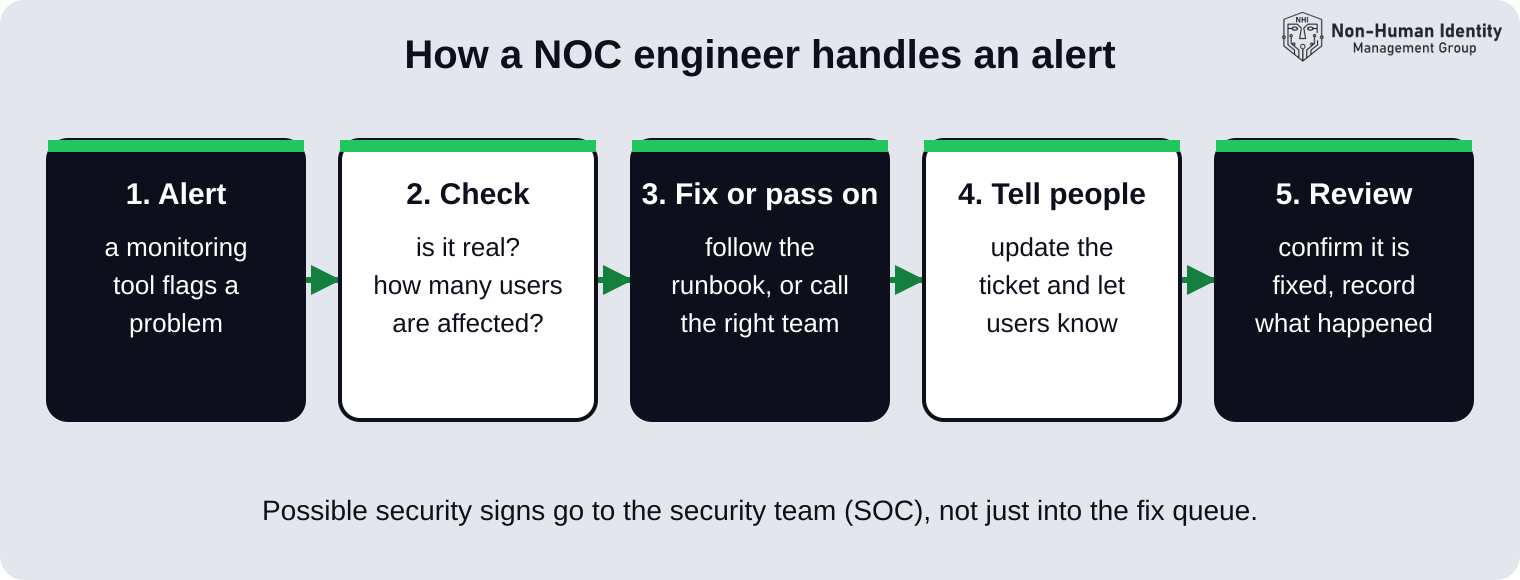
Most alerts follow the same basic path, whatever the tool or the time of day.
- An alert arrives. A monitoring tool spots something wrong, such as a device that has stopped responding to checks.
- Check it. The engineer confirms the problem is real and works out how many people are affected.
- Fix it or pass it on. They follow the runbook. If that does not work, they call the right specialist team.
- Keep people informed. They update the ticket and tell users when the service is back.
- Review. They confirm the fix held and record what happened, so the next shift knows.
A NOC and a SOC, a security operations centre, often sit side by side. The NOC asks "is it working?". The SOC asks "is it safe?". Some problems need both teams, so clear hand-offs matter.
Skills and tools
You do not need all of these on day one. Many people build them up on the job.
- How networks work. How data moves between devices, Wi-Fi, the internet and cloud services.
- Monitoring tools. Dashboards that show which devices and services are healthy, and which are raising alerts.
- Ticketing. Logging each problem, what was done and who has it now.
- Calm problem-solving. Working through a problem step by step, often at night and under time pressure.
- Clear writing. Short updates and shift handover notes that the next person can act on.
- Some scripting. Short scripts to check many devices at once help, but are not always required at the start.
A worked example
This is a made-up day in the life. Yara Bergmann is a NOC engineer at Wren Removals, a UK moving firm with depots across the country. She is on the night shift.
Yara starts at 10pm by reading the handover note from the day shift. One depot had slow Wi-Fi earlier, and a supplier is patching a server at midnight. She sets a reminder to watch it.
At 2am, an alert appears. A depot router has gone offline. The tills and parcel scanners there have stopped working. Yara follows the runbook. She checks whether the power is on and whether the internet line is up. The line is down, so she raises a fault with the line provider.
While she waits, she notices something in the notes. Someone logged in to that router four minutes before it went offline, from a place the firm does not use. Yara does not try to investigate it herself. She passes the details to the security team on call.
By 4am the line is back. Yara checks that the tills work and updates the ticket. The security team later says the login was a supplier engineer using a new laptop. They ask the supplier to register it.
At 6am Yara writes her handover note for the day shift. Most of her night was careful checking, clear notes and knowing when to call someone else.
Myths and mistakes
| What people think | What is true |
|---|---|
| A NOC and a SOC are the same thing. | They overlap. The NOC keeps services running. The SOC looks for attacks. Many problems need both. |
| NOC work is just watching screens. | Watching is only the start. Most of the job is checking, fixing, passing on and writing clear notes. |
| If the service is back, the job is done. | The cause still matters. A strange outage can be an early sign of an attack, so unusual details are shared. |
| You need a degree to get in. | Not always. Many people start on a help desk or in IT support and learn on the job. |
| Every alert is urgent. | Many alerts are minor or false. Part of the skill is deciding which ones matter most. |
What can I do this week?
- Read three NOC engineer job adverts and list the skills they share.
- Take a free introductory course on how computer networks work.
- Write a short handover note about something you did today, as if someone else must carry on.
- Find out whether your workplace or college has an IT team that runs in shifts, and ask what they do at night.
Checklist
- I can explain what a NOC engineer does in one sentence.
- I know what an alert, a runbook and a ticket are.
- I can describe the five steps of handling an alert.
- I know how a NOC differs from a SOC.
- I understand that shift work is common in this role.
- I know at least one route in that fits my background.
- I know where to find the practitioner guide for more detail.
Common questions
Is a NOC engineer an entry-level job?
Often, yes. It is one of the first tech jobs many people move into after a help desk. Junior staff mostly follow runbooks and pass problems on. With time, they take on harder faults, write runbooks and train new staff.
Do NOC engineers work nights?
Many do. Networks need watching all day, every day, so many NOCs run shifts. A US careers handbook notes that network administrators may work evenings, nights and weekends to monitor, maintain or update networks.[1] Shift patterns vary by employer.
Do I need a degree?
Not always. The same US handbook says network admins typically need a degree. But it adds that some employers accept a shorter college course.[1] Many NOC hires come from support roles, with training and certificates added along the way.
Is a NOC engineer a security job?
Partly. The main aim is to keep services running, not to hunt attackers. But NOC staff often see early signs of trouble. They also look after key devices. So good security habits and a clear link to the security team are part of the job.
Where can the role lead?
Common next steps are network engineer, systems admin, cloud engineer or security analyst. Some people move to the SOC. There, knowing how the network usually behaves helps them spot odd activity. Others go on to lead NOC shifts or teams.
Where next?
Ready for the detail? Read the practitioner guide: NOC Security Guide. It goes further into protecting the NOC's own access to network devices, how the NOC and SOC split the work, and what to do if a network device may be compromised.
Also useful:
- Network Security Engineer for Beginners
- Uptime Monitoring for Beginners
- On-Call for Beginners
- Shift Handovers for Beginners
- IT to Cyber Security Career Guide
Related NHI Mgmt Group resources: Cybersecurity Careers Guide · Network Security for Beginners · Alert Fatigue for Beginners
Key terms
- Network operations centre (NOC)
- The team that keeps network services stable, available and working as expected.
- Monitoring
- Collecting and checking signals from systems, so known problems are spotted.
- Runbook
- Step-by-step instructions for one known task or type of problem.
- SOC
- A security operations centre, the team that watches for, checks and responds to security events.
- Escalation policy
- Rules for who is told next, and in what order, when an alert is not handled in time.
- Alert fatigue
- When a team gets so many low-value alerts that important ones become harder to notice.
Sources and further reading
- Network and Computer Systems Administrators. Occupational Outlook Handbook, US Bureau of Labor Statistics. https://www.bls.gov/ooh/computer-and-information-technology/network-and-computer-systems-administrators.htm, accessed 28 Nov 2026.