Buying a security product means choosing a tool that protects your business, then making sure it works.
This guide is for small business owners, managers and anyone asked to "find us a security tool". You do not need a technical background. If a salesperson has ever told you their product will keep you safe, this guide will help you ask better questions.
In short
- Start with the problem you need to solve, not with a product someone wants to sell you.
- Check what you already own. Modern computers come with some protection built in and switched on.
- Ask suppliers plain questions about sign-in, records, updates and what happens when you leave.
- Try the tool on a small scale first, and give someone the job of looking after it.
What you will learn
- Explain what buying a security product involves, step by step.
- Spot sales claims that need checking.
- Ask a supplier five useful questions before you sign.
- Check that a tool you bought is switched on and doing its job.
- Seller of the tool (vendor)
- the company that makes or sells a product.
- Trial run (proof of concept)
- a short test of a tool on your own systems before you buy it.
- Safe out of the box (secure by default)
- a product whose safest settings are already on when you start using it.
What is buying a security product?
Think of buying a smoke alarm. It only helps if it is fitted in the right room, switched on and loud enough for someone to hear. A smoke alarm still in its box protects nobody.
Security products work the same way. A security product is any tool you pay for to protect your business. Examples are tools that block harmful software, back up your files, check sign-ins or watch for strange activity.
Buying one well has three parts. First, decide what problem you are solving. Second, choose a tool that solves it and is itself built safely. Third, set it up, check it works and keep checking.
Where the comparison stops working: a smoke alarm does one job and beeps loudly when it fails. Security tools can be complex, can overlap with tools you already have and can stop working quietly, with no beep.
Why does it matter?
Money spent on the wrong tool is money not spent on the right one. A badly set up tool can also give a false sense of safety. Government security agencies in six countries have published joint advice saying buyers should look at security, not just price and features, when they choose technology.[1]
If you run a small business
What could happen: you pay for a tool that repeats protection your computers already have, while a real gap stays open.
Check this: list what you already pay for before you buy anything new.
If you are a manager asked to choose a tool
What could happen: the team buys the product with the best demo, and nobody owns it after launch day.
Check this: name one person who will look after the tool before you sign.
If you are new to IT work
What could happen: you are handed a tool to run, but its alerts go to an inbox nobody reads.
Check this: find out where the tool sends its warnings and who acts on them.
Next: Antivirus for Beginners
What does it look like?
Here is a made-up shortlist card that a small business might fill in while it compares two tools.
Example only. All values are made up.
PROBLEM: staff laptops have no backup             (1)
WE ALREADY HAVE: built-in antivirus on all laptops (2)
TOOL A (EXAMPLE Backup Co)
  Sign-in check (MFA) included: yes, no extra cost  (3)
  Activity records kept: 6 months                   (4)
  Get our data back if we leave: yes, in writing     (5)
  Trial on 2 laptops: booked for FAKE-date
TOOL B (Sample Vault Ltd)
  Claim on website: "stops 100% of attacks"         (6)
- The problem comes first, in one plain line.
- In a real file, this line would list the tools the business already has.
- A second check at sign-in, such as a code on your phone, protects the tool's own account.
- Records of who did what help you spot and look into problems later.
- Leaving a supplier should not mean losing your files.
- A claim like this needs evidence. Ask the seller how they measured it.
Why this is risky: if you buy on a bold claim alone, you find the gaps after you have paid. A trial and written answers show them sooner.
The safer way: write the problem down. Ask every seller the same questions and get the answers in writing. Then test the tool on a few machines first.
How does it work?
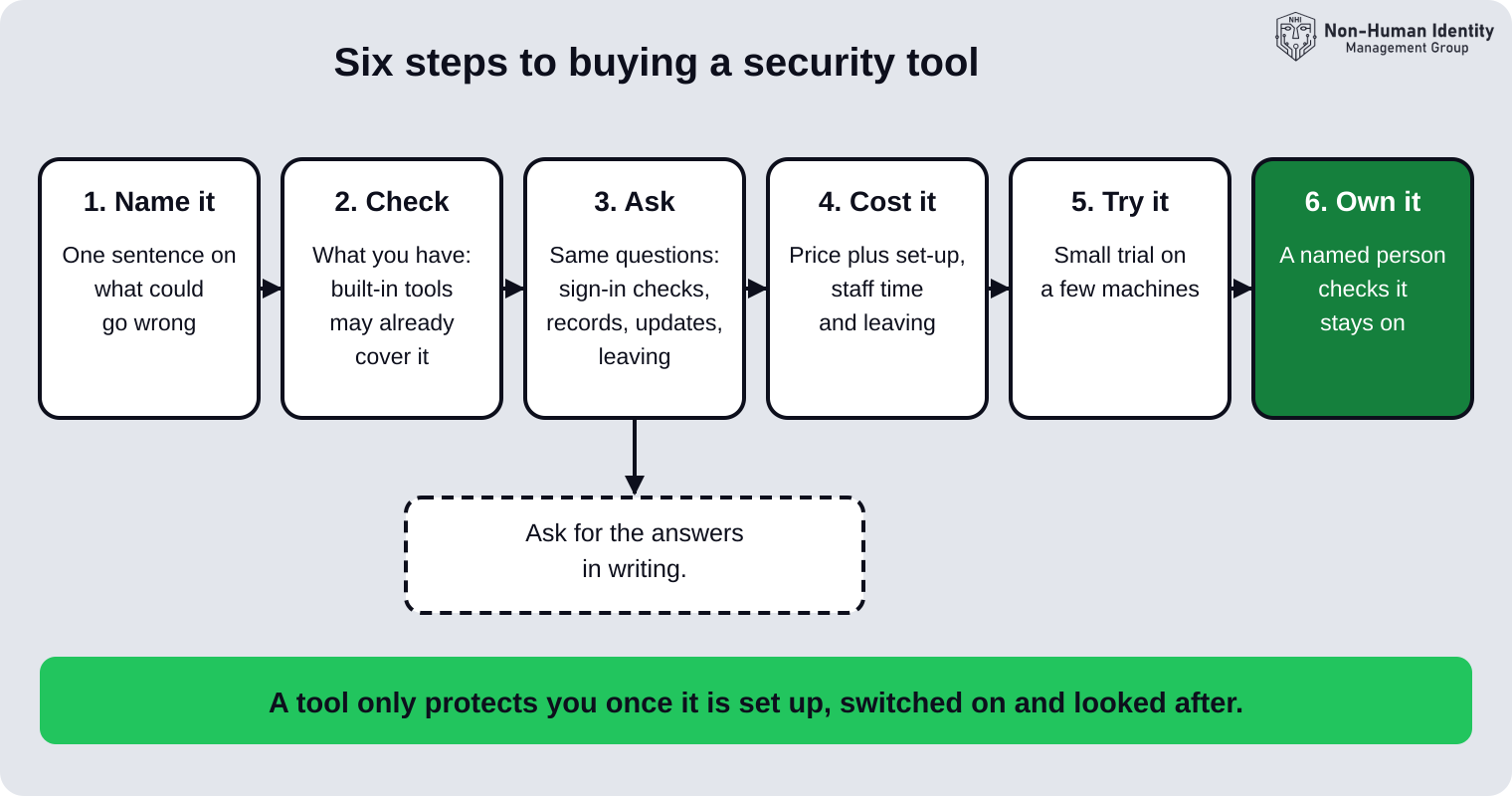
A sensible purchase usually follows these steps.
- Name the problem. Write one sentence on what could go wrong and what you want the tool to fix.
- Check what you have. Modern computers come with antivirus and a firewall built in and switched on. A firewall is a filter that blocks unwanted network traffic. Check both are still on.[3]
- Ask the same questions of each seller. For example: is a second sign-in check included at no extra cost, are security records included, and how are updates delivered?[2]
- Count the full cost. Look past the price. Include set-up time, staff time to run it and the cost of leaving later.[1]
- Try before you commit. Run a small trial on your own systems, with realistic but non-sensitive data.
- Own it after launch. Name a person, check the tool is switched on, and review it at least once a year.
Some schemes can help you judge a supplier. In the UK, Cyber Essentials is a government-backed certificate showing that an organisation has five basic security controls in place. The Plus level adds independent technical testing.[4] A certificate tells you about the supplier's own basics. It does not prove that their product suits your problem.
A worked example
Noor Jensen runs Linden Pharmacy, a fictional chemist with two shops and nine staff. A salesperson calls with a new tool that "uses AI to stop every attack". The price is high, and the offer ends on Friday.
Noor remembers the smoke alarm. A shiny alarm is no use in the wrong room. So she asks herself what problem she is trying to solve.
She asks Darius Iyer, the local IT helper who looks after the shop computers, to list what they already have. Darius finds built-in antivirus switched on for every laptop. He also finds that nobody backs up the prescription notes kept on one shared computer. That is the real gap.
Noor looks at two backup tools. She asks each seller the same questions. Is a second sign-in check included? Are activity records kept? Can she get her files back if she leaves? One seller answers all three in writing. The other sends a brochure.
Darius runs a two-week trial of the first tool on the shared computer, using a folder of made-up files. He then deletes a test file and restores it. It comes back.
Noor buys the backup tool, not the AI tool. She asks Darius to check every month that backups are still running, and she adds a yearly review to her diary.
The Friday deadline passes. Noor does not miss it.
Myths and mistakes
| What people think | What is true |
|---|---|
| The more expensive tool is the safer one. | Price does not show fit. A cheaper tool that solves your real problem and is looked after can do more good. |
| Once installed, the tool protects us. | Tools need to be switched on, set up and watched. Someone has to read the warnings. |
| A bold claim on the website is probably true. | Claims are marketing until shown. Ask how the seller measured it, and run your own trial. |
| We need a separate product for every risk. | Many risks are covered by things you already have, such as built-in antivirus, updates and good sign-in settings.[3] |
| A security tool is safe by nature. | A security tool is software too. It needs updates, a protected sign-in and a plan for when you leave.[1] |
What can I do this week?
- Write down the one security problem that worries you most, in one sentence.
- List the security tools and services you already pay for or get built in.
- Check that built-in antivirus and firewalls are switched on for each computer.
- Prepare five questions to ask every seller, and ask for written answers.
- Name one person who will own each security tool you have.
Checklist
- The problem the tool must solve is written down in plain words.
- We have checked what we already own before buying.
- Every seller was asked the same questions, and the answers are in writing.
- The tool offers a second sign-in check and keeps activity records.
- We know how updates are delivered and whether they cost extra.
- We know how to get our data back and close the account if we leave.
- We ran a small trial on our own systems before rolling out.
- A named person owns the tool, reads its warnings and reviews it each year.
Common questions
Do I need to buy antivirus for my business laptops?
Often not as a first step. Modern Windows and Apple computers include antivirus and a firewall that are switched on by default, according to the UK National Cyber Security Centre.[3] Check they are still on, keep devices updated, and buy extra tools only when you have a gap they fill.
How do I know if a seller's claims are true?
Ask for evidence and test it yourself. Ask how a claim was measured, ask for answers in writing and speak to a current customer of a similar size. Then run a short trial on your own systems, so you see how the tool behaves with your setup.
What questions should I ask a security seller?
Start with five. Is a second sign-in check included at no extra cost? Are activity records included, and for how long? How are updates delivered? Who can see our data, and where is it kept? How do we get our data back if we leave?
Is a free trial worth doing?
Yes, if you plan it. Decide before the trial what success looks like, such as restoring a deleted file or blocking a test alert. Use made-up or low-risk data, and remove the tool and any access it was given if you decide not to buy.
Should I choose a supplier with a security certificate?
It helps, but it is not the whole answer. A certificate such as Cyber Essentials shows a supplier has some basic controls in place. It does not show that their product fits your problem, so still ask your questions and run a trial.
Where next?
Ready for the detail? Read the practitioner guide: Security Vendor Evaluation and RFP Guide. It goes further into writing scored requirements, running a formal tender and designing a proof of concept that tests real risk.
Also useful:
- Buying Software Securely for Beginners
- Third Party Risk Management for Beginners
- Cyber Essentials for Beginners
- Managed Service Providers for Beginners
Related NHI Mgmt Group resources: Security for Procurement Teams Guide · EDR vs Antivirus · Backup Security for Beginners
Key terms
- Vendor
- The company that makes or sells a product or service.
- Proof of concept
- A short, controlled test of a tool on your own systems, to check it does what the seller says.
- Secure by default
- A product whose safest settings are already switched on, so you do not have to find them.
- Total cost of ownership
- The full cost of a tool over its life, including set-up, running, support and leaving, not just the price.
- Multi-factor authentication
- A sign-in that needs two or more separate checks, so a stolen password alone is less likely to get in.
- Security log
- A record of sign-ins, changes and other events that helps you spot and look into problems.
- Shelfware
- Software that has been paid for but is not set up or used.
Sources and further reading
- Choosing Secure and Verifiable Technologies. Australian Signals Directorate's Australian Cyber Security Centre, with CISA, the Canadian Centre for Cyber Security, the UK NCSC, NCSC New Zealand and South Korean partners, first published 9 May 2024, updated 5 December 2024. https://www.cyber.gov.au/business-government/secure-design/secure-by-design/choosing-secure-and-verifiable-technologies, accessed 28 Nov 2026.
- Secure by Demand Guide: How Software Customers Can Drive a Secure Technology Ecosystem. Cybersecurity and Infrastructure Security Agency and FBI. https://www.cisa.gov/resources-tools/resources/secure-demand-guide, accessed 28 Nov 2026.
- Protecting your devices. Small organisations guide to cyber security, National Cyber Security Centre (UK), published 9 April 2026. https://www.ncsc.gov.uk/collection/small-organisations-guide-to-cyber-security/protecting-your-devices, accessed 28 Nov 2026.
- Cyber Essentials overview. National Cyber Security Centre (UK). https://www.ncsc.gov.uk/cyberessentials/overview, accessed 28 Nov 2026.