Buying software securely means checking its safety before you sign, while you use it and when you leave.
This guide is for people who buy or approve software at work, such as office managers, buyers in a purchasing team and small business owners. You do not need to be technical. Most of the work is asking clear questions at the right moment and writing the answers down.
In short
- Security checks belong at every step of a purchase, not only before you sign.
- Before you buy, know what data the software will hold and who will use it.
- Ask for safe settings, sign-in checks, activity records and updates as part of the deal.
- When you stop using it, get your data back, close the accounts and ask for the rest to be deleted.
What you will learn
- Explain the six steps of buying software and the security check at each one.
- Spot the questions to ask a supplier before you sign.
- Check that new software is set up safely on day one.
- Plan how to leave a supplier without losing or leaking data.
- Supplier checks (due diligence)
- the questions and evidence you gather about a supplier before you agree to buy.
- Safe out of the box (secure by default)
- software whose safest settings are already on when you start using it.
- Being stuck with a supplier (vendor lock-in)
- when leaving is so hard or costly that you stay even if you want to go.
What is buying software securely?
Think of buying a used car. You check its history and take a test drive before you pay. You read the warranty, get it serviced while you own it, and hand over the keys and paperwork when you sell it.
Buying software works the same way. Software here means any program or online service your organisation pays for, from accounts packages to booking systems. Online services you use through a web browser are often called SaaS, short for software as a service.
Each step of the purchase has its own security check. You check before you choose, you write the promises into the contract, you set it up safely, you keep it updated, and you leave cleanly.
Where the comparison stops working: a car stays on your drive. Online software, and often your data, sit on the supplier's computers. So you depend on the supplier's care long after you have paid.
Why does it matter?
Software often holds your customers' details, your money or your staff records. If it is weak, or set up badly, those can be exposed. Security agencies in six countries advise buyers to ask about security when they choose technology. They also advise planning how to leave before you buy.[1]
If you buy for a purchasing team
What could happen: a contract is signed on price alone, with nothing in writing about security or getting data back.
Check this: add a short set of security questions to every software purchase.
If you run a small business
What could happen: a booking app goes live with one shared login and no second sign-in check.
Check this: give each person their own login and turn on the second check before go-live.
If you manage a team
What could happen: staff sign up for tools on their own, and nobody knows where the data has gone.
Check this: agree one simple way for staff to request new software.
What does it look like?
Here is a made-up purchase record for a new booking system, with a security line for each step.
Example only. All values are made up.
SOFTWARE: EXAMPLE Bookings (examplebookings.example.com)
1 NEED:     customer names, phone numbers, appointments  (1)
2 CHOOSE:   asked 6 security questions, answers saved     (2)
3 CONTRACT: data returned within 30 days if we leave      (3)
4 SET UP:   own login per person, second check ON         (4)
5 USE:      updates automatic, users reviewed each quarter
6 LEAVE:    export, close accounts, deletion confirmation (5)
- Knowing which data it will hold tells you how careful to be.
- In a real file, this line would link to the supplier's written answers.
- A promise you need later should be written into the contract.
- Safe settings are switched on before anyone starts using it.
- Leaving is planned on day one, not when the contract ends.
Why this is risky: many purchases only cover step 2. Steps 4 to 6 are then nobody's job, so shared logins, missed updates and forgotten accounts can build up.
The safer way: keep one short record like this for each piece of software. Give each step an owner and a date.
How does it work?
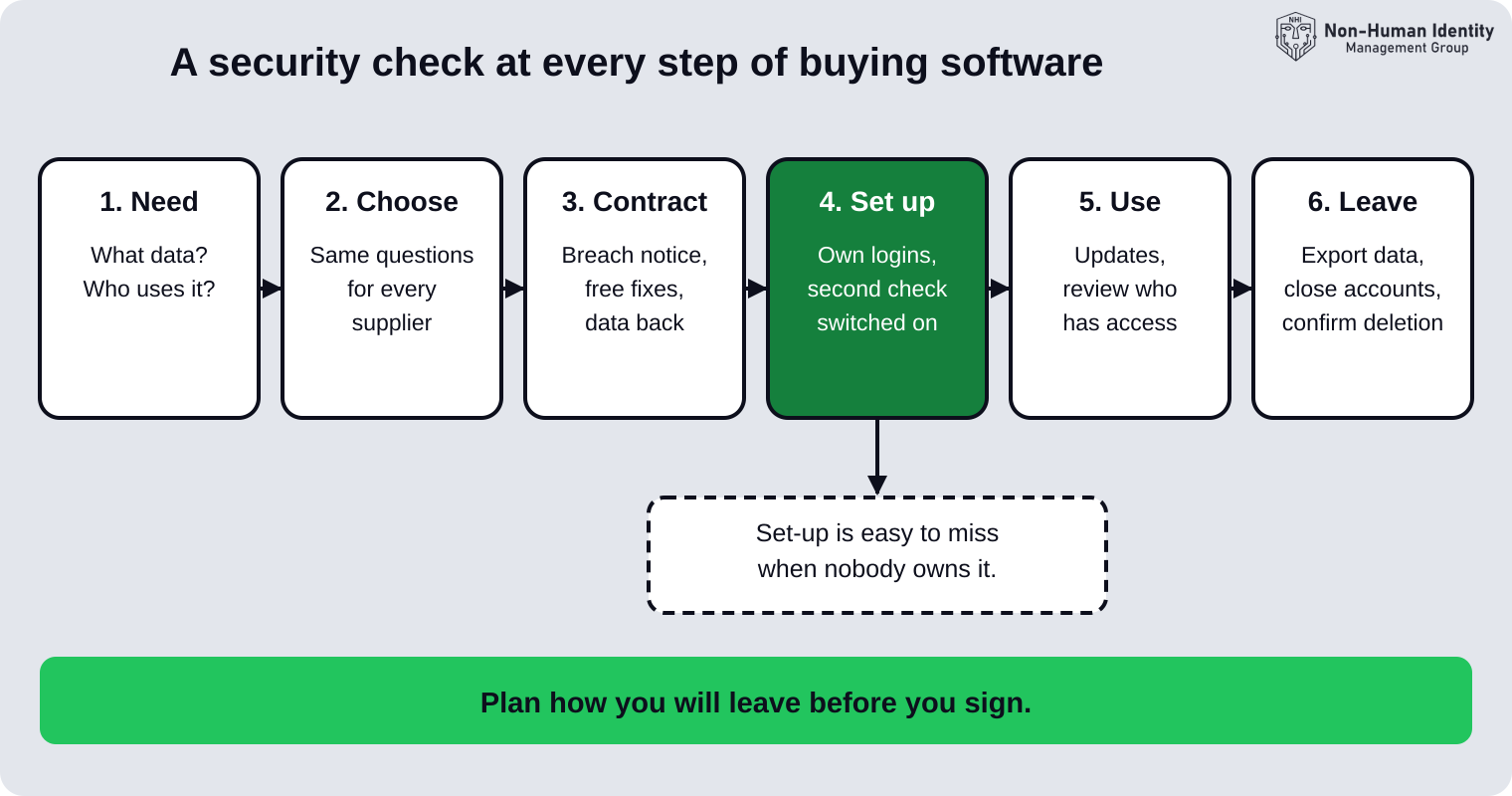
Here are the six steps, and the security check at each one.
- Need. Write down what the software is for, what data it will hold and who will use it. More sensitive data calls for more checks.
- Choose. Ask each supplier the same questions. For example: is a second sign-in check included at no extra cost, are activity records included, and how are security updates delivered?[2]
- Contract. Put the important promises in writing. These include telling you about a breach, free security fixes and returning your data when you leave.[1]
- Set up. Turn on the second sign-in check, give each person their own login and only the access they need, and change any default passwords.
- Use. Keep it updated, check who still has access, and ask the supplier for security updates over time.[3]
- Leave. Take your data out, close every account and connection, and ask the supplier to confirm what has been deleted.[1]
Some suppliers make this easier. In the UK, the government published a voluntary Software Security Code of Practice in May 2025, with 14 principles for software suppliers.[4] Customers can ask a supplier for a short statement showing how it meets the code, and use it in contract talks.[3]
A worked example
Orla Achterberg is the office manager at Elm Opticians, a fictional practice with three branches. Staff want an online booking system, so customers can book eye tests from their phones.
Orla remembers the used car. She wants to see the history before she pays, not after. So she starts by writing down what the system will hold: names, phone numbers, dates of birth and appointment notes.
She sends the same six questions to two suppliers. Dario Yilmaz, the sales lead at one of them, replies in writing. A second sign-in check is included at no extra cost. Activity records are kept. Updates are automatic. Data can be exported in a common file type at any time.
Orla asks for two promises in the contract. The supplier will tell her about a breach affecting her data, and will return her data within 30 days if she leaves.
On set-up day, she gives each member of staff their own login. She turns on the second sign-in check and removes the trial accounts.
Every three months she checks the list of users. When a receptionist leaves, she closes his account that week.
A year later Orla reviews the contract. She knows exactly how she would leave, because she wrote it down on day one.
Myths and mistakes
| What people think | What is true |
|---|---|
| Security is checked once, before we sign. | Each step has its own check. Set-up, daily use and leaving matter as much as the choice. |
| Online software is the supplier's problem. | The supplier runs the service. You still control who logs in, what settings are on and what data goes in. |
| A free trial needs no checks. | Trials often hold real data. Use made-up data, and close the trial accounts when you finish. |
| We can sort out leaving when the time comes. | Getting data back and having it deleted is easier when the contract already says how.[1] |
| Security features always cost extra. | Some suppliers include a second sign-in check and activity records at no extra cost. Ask, and compare.[2] |
What can I do this week?
- List the software your organisation pays for and who owns each one.
- Write six standard security questions to send with every new purchase.
- Check that the second sign-in check is on for your most important system.
- Remove accounts for people who have left.
- For one key system, write down how you would get your data back if you left.
Checklist
- We know what data each piece of software holds and who uses it.
- Every supplier is asked the same security questions, and the answers are kept.
- Contracts cover breach notice, security fixes and returning data.
- Each person has their own login, with a second sign-in check switched on.
- Default passwords and trial accounts are removed at set-up.
- Updates are applied, and the user list is reviewed regularly.
- Each piece of software has a named owner inside the organisation.
- We have a written exit plan: export the data, close accounts and confirm deletion.
Common questions
What security questions should I ask before buying software?
Start with six. Is a second sign-in check included? Are activity records included? How are security updates delivered? Where is our data kept, and who can see it? Will you tell us about a breach? How do we get our data back if we leave?
Is software as a service safer than software we install ourselves?
Not automatically. With SaaS, the supplier looks after the computers and many updates, which can help. You still choose the settings, decide who can log in and decide what data goes in. Both kinds need the same checks at each step.
Who in my organisation should check software security?
Usually more than one person. The buyer asks the questions, the person who owns the software sets it up and reviews access, and someone with security knowledge reviews higher-risk purchases. In a small business, one careful person can cover all three with a short checklist.
What happens to our data when we cancel?
Your contract decides, so check it before you sign. A good contract says how you get your data back, in what format and how quickly. It should also say when the supplier will delete its copies and how it will confirm that.
Do I need to check free software too?
Yes. Free tools can still hold your data and connect to your other systems. Ask the same questions, read the terms on how your data is used, and keep a record of who signed up and why. See Buying AI Tools Safely for Beginners for an example.
Where next?
Ready for the detail? Read the practitioner guide: Security for Procurement Teams Guide. It goes further into sorting purchases by risk, the contract clauses to hold or trade, and how to run security checks across a whole purchasing process.
Also useful:
- Buying AI Tools Safely for Beginners
- Buying Security Products for Beginners
- Vendor Offboarding for Beginners
- Single Sign-On for Beginners
- Cyber Due Diligence for Beginners
Related NHI Mgmt Group resources: Security Vendor Evaluation and RFP Guide · Cloud Marketplace Purchasing Security · Software End of Life for Beginners
Key terms
- Due diligence
- The checks you complete on a supplier before you agree to use them.
- Secure by default
- Software whose safest settings are already switched on, so you do not have to find them.
- Software as a service (SaaS)
- Software you use over the internet, run on the supplier's computers rather than your own.
- Multi-factor authentication
- A sign-in that needs two or more separate checks, so a stolen password alone is less likely to get in.
- Vendor lock-in
- When leaving a supplier is so hard or costly that you stay even if you want to go.
- End of life
- The point when a supplier stops giving a product security fixes and support.
- Free trial
- A short period of free use before you pay, which can still hold your data and accounts.
Sources and further reading
- Choosing Secure and Verifiable Technologies. Australian Signals Directorate's Australian Cyber Security Centre, with CISA, the Canadian Centre for Cyber Security, the UK NCSC, NCSC New Zealand and South Korean partners, first published 9 May 2024, updated 5 December 2024. https://www.cyber.gov.au/business-government/secure-design/secure-by-design/choosing-secure-and-verifiable-technologies, accessed 28 Nov 2026.
- Secure by Demand Guide: How Software Customers Can Drive a Secure Technology Ecosystem. Cybersecurity and Infrastructure Security Agency and FBI. https://www.cisa.gov/resources-tools/resources/secure-demand-guide, accessed 28 Nov 2026.
- Software Security Code of Practice: for software customers. National Cyber Security Centre (UK). https://www.ncsc.gov.uk/section/software-security-code-of-practice/software-customers, accessed 28 Nov 2026.
- Software Security Code of Practice. UK Government, Department for Science, Innovation and Technology, 7 May 2025, updated 15 January 2026. https://www.gov.uk/government/publications/software-security-code-of-practice, accessed 28 Nov 2026.