Cyber security for veterinary practices means keeping client records, payments and practice systems safe from online criminals.
This guide is for practice owners, practice managers, receptionists, nurses and anyone new to working in a vet practice. You do not need a technical background. If your practice books appointments on a computer or takes card payments, this applies to you.
In short
- The practice management system, the software that holds bookings, records and bills, is the heart of the practice, so its logins need the most care.
- Shared logins at reception and in consulting rooms are a common weak spot, so give each person their own.
- Fake emails asking to change bank details, or posing as suppliers, are a common way practices lose money.
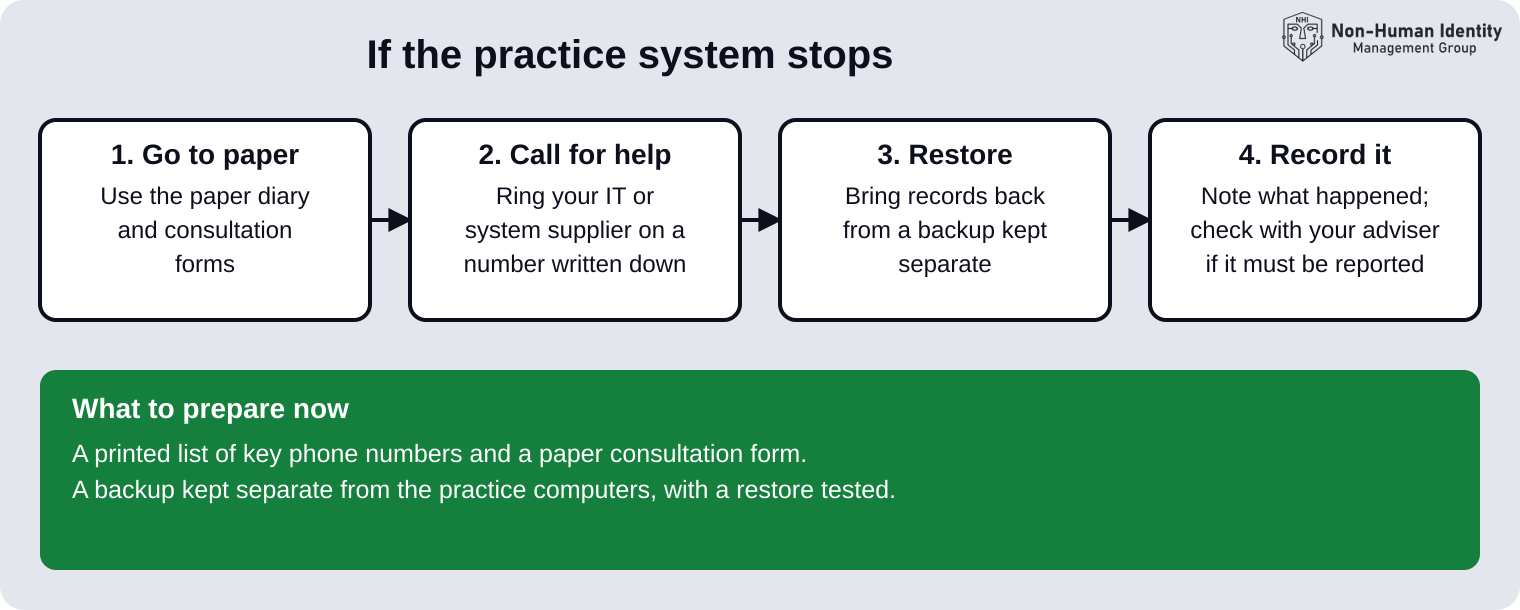
- A tested backup and a paper plan let you keep treating animals if the computers stop.
What you will learn
- Explain why vet practices are a target for online criminals.
- Spot the weak spots at the front desk and in the consulting room.
- Check who can log in to your practice system, including suppliers.
- Plan how the practice keeps working if the computers go down.
- Practice system (practice management system)
- the software that holds appointments, clinical notes, client details and bills.
- Locking program (ransomware)
- harmful software that locks files and computers and demands money to unlock them.
- Second check (two-step login)
- a code or app prompt asked for after the password, so a stolen password alone is not enough.
What is cyber security for veterinary practices?
Think of the controlled drugs cabinet. It is locked, only named staff hold a key, and every use goes in the register. Cyber security asks for the same habits around the practice's computers and records.
A modern practice runs on a few key systems. The practice management system holds the diary, the clinical notes and the bills. There is email, a card terminal, and often an online booking or reminder service. There may also be connected kit, such as digital x-ray machines, that a supplier looks after from far away. That is called remote access: logging in to a computer from somewhere else.
Each of these needs its own lock, a list of who holds the key, and a record of who used it.
Where the comparison stops working: an empty space in the drugs cabinet is easy to spot. A copied password leaves nothing missing, so you may only find out when something goes wrong.
Why does it matter?
Most consultations end in a payment, and the practice holds names, addresses and phone numbers for every client. If the practice system stops, staff may not see the day's appointments or an animal's history. The UK's National Cyber Security Centre says one in two small businesses suffers a cyber incident each year.[1]
If you own or manage the practice
What could happen: ransomware locks the practice system, and nobody can see bookings or records for days.
Check this: ask your supplier how backups work and when a restore was last tested.
Next: Ransomware for Beginners
If you work on reception
What could happen: one shared "Reception" login means nobody can tell who opened or changed a client record.
Check this: ask whether the system lets each person log in with their own account.
If you look after the accounts
What could happen: an email that seems to come from a drug wholesaler asks you to pay a bill to new bank details.
Check this: phone the supplier on a number you already had before changing any bank details.
If you are new to practice IT
What could happen: an x-ray supplier still has remote access that is always on, and nobody remembers agreeing to it.
Check this: list every supplier who can log in from outside, and why.
What does it look like?
Here is a made-up "Are we covered?" card a practice manager could fill in at a team meeting.
Example only. All values are made up.
Practice cyber check, Example Vets, filled in 01/01/2000
Practice email has two-step login ......... NO        (1)
Reception login .......................... shared     (2)
Locum accounts switched off after shift .. not sure   (3)
X-ray supplier remote access ............. always on  (4)
Last test restore of practice system ..... never      (5)
Paper diary and forms if systems stop .... no         (6)
- Email is often the way in. A stolen email password can also reset other passwords.
- With one shared login, nobody can tell who looked at or changed a record.
- Old locum accounts are logins that nobody is watching.
- Access that is always on is a door left open, even when nobody is using it.
- A backup that has never been restored may not work when you need it.
- Without a paper plan, a locked computer can stop consultations.
- Cyber Essentials. National Cyber Security Centre. https://www.ncsc.gov.uk/cyberessentials/overview, accessed 28 Nov 2026.
Why this is risky: each "no" or "not sure" is a gap a criminal could use. Together they can turn a bad day into a bad week.
The safer way: turn each line into a "yes", one at a time. Start with email, named logins and backups.
How does it work?
Many attacks on small practices follow a familiar path. Most start with a person and a password, not clever software.
- The bait. A trick email arrives, dressed as a supplier invoice, a pet insurer or a message from the practice system.
- The login. Someone types their password into a fake page, and the criminal now has it.
- The look around. The criminal reads emails and looks for shared passwords, supplier access and backups.
- The payoff. They either send fake bank details to the practice, or run ransomware and ask for payment.
- Cyber Essentials. National Cyber Security Centre. https://www.ncsc.gov.uk/cyberessentials/overview, accessed 28 Nov 2026.
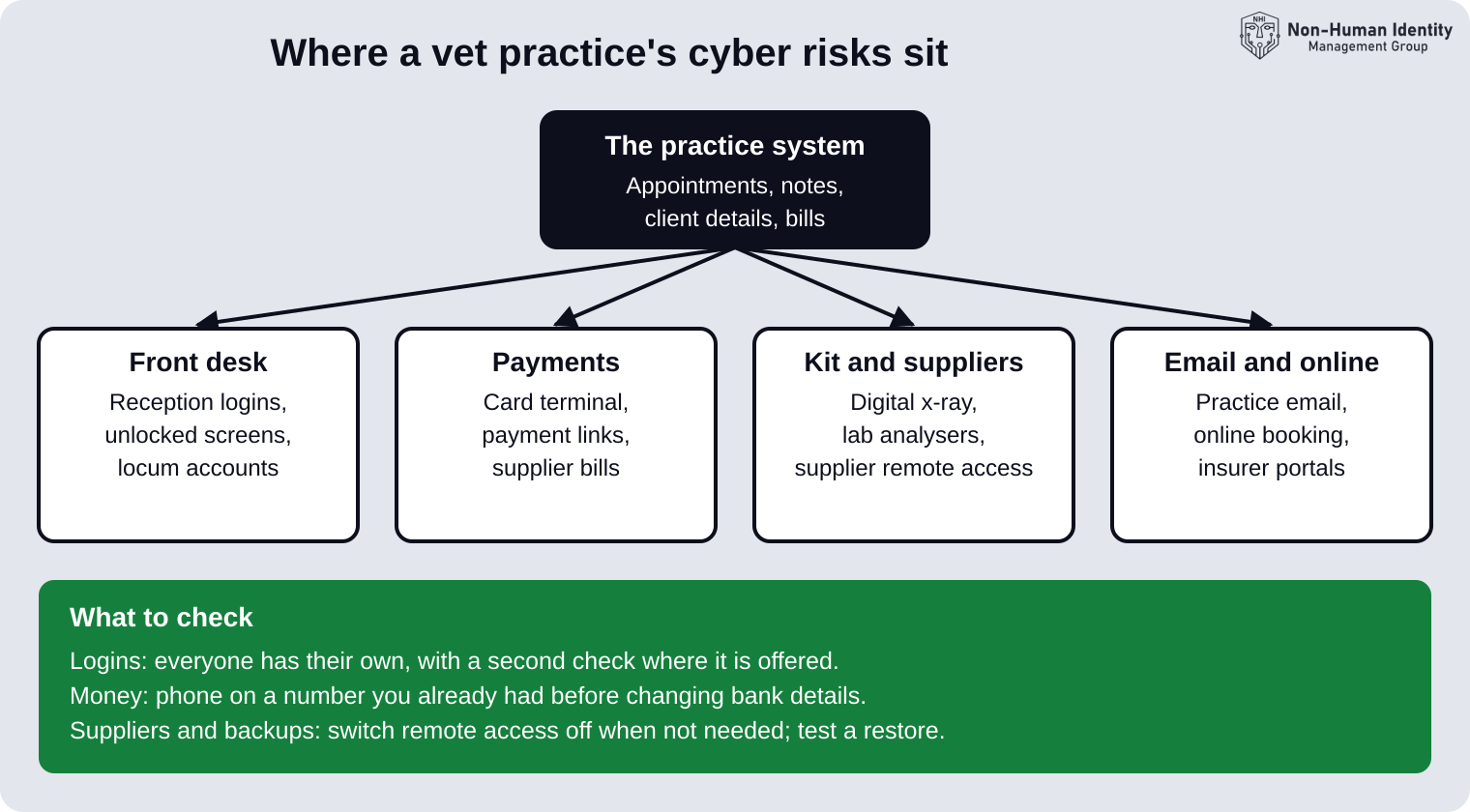
Clinical records also carry professional duties. The Royal College of Veterinary Surgeons' guidance says records should be kept secure and confidential, whether on paper or on a computer.[2] It also says changes should not remove or hide the original entry.[2] Named logins help with both, because the system can show who made each change.
A worked example
Lina Strand manages a fictional small animal practice with two vets, four nurses and a busy reception desk. Locums cover holidays.
One Tuesday, an email arrives that looks like it comes from the practice's drug wholesaler. It says their bank has changed and the month's bill should go to a new account. Lina remembers the drugs cabinet: nothing leaves without a check. So she rings the wholesaler on the number in her own records. They have not changed banks, and they thank her for the warning.
That week, she fills in a practice cyber card like the one above. Reception uses one shared login, so she asks the system supplier about named accounts. The supplier explains the system can switch users quickly, so staff log in as themselves. She turns on two-step login for the practice email.
Next she calls Hugo Marlow, the practice's IT supplier. She asks who can log in from outside. Hugo finds the x-ray supplier's remote access is always on. They agree it will be switched on only when the supplier needs to fix a fault. Hugo also restores a sample of last week's records from backup, to prove it works.
Last, Lina prints a paper diary page, a consultation form and a list of key phone numbers. They sit in a folder at reception. She hopes nobody needs them.
Myths and mistakes
| What people think | What is true |
|---|---|
| We are too small for anyone to bother with. | Many attacks are not aimed at anyone in particular. Small businesses face online crime too.[1] |
| Our system is in the cloud, so the supplier handles security. | The supplier runs the servers. You still decide who can log in and what they can do. |
| A shared reception login saves time. | It hides who did what, and it stays open when someone leaves. Many systems offer quick user switching. |
| Ransomware that only locks records is not a data breach. | The UK data regulator counts losing access to personal data as a breach where it seriously affects people.[3] |
| Animal records are not personal data, so they need no care. | Records usually hold the owner's name, address and phone number, which are personal data. Professional rules also expect them to be kept confidential.[2] |
What can I do this week?
- Turn on two-step login for practice email and the practice system, if it is offered.
- Ask your system supplier whether each person can have their own login.
- List every supplier who can log in from outside, and switch off access that is not needed.
- Agree that any bank detail change is checked by phone on a number you already had.
- Print a paper diary page, a consultation form and key phone numbers.
Checklist
- Every vet, nurse, receptionist and locum has their own login.
- Locum and leaver accounts are switched off when the work ends.
- Two-step login is on for email and every system that offers it.
- Screens in consulting rooms lock when left alone.
- Supplier bank changes are checked by phone before any payment.
- Card numbers are never written down or taken by email.
- Supplier remote access is switched on only when needed.
- A backup is kept separate and a restore has been tested.
- A paper plan sits at reception in case the systems stop.
Common questions
Where should a small vet practice start?
Start with email and the practice system. Turn on two-step login, give each person their own account, and check that backups work. Those steps cover common ways in. Then look at supplier access and write a short paper plan for when the computers stop.
Are veterinary records covered by data protection law?
Client details usually are. Records hold the owner's name, address and phone number, which are personal data. The vets' professional body also expects records to be kept secure and confidential. That applies on paper and on a computer.
What should we do if ransomware locks our system?
Switch to your paper plan, disconnect affected computers if your IT supplier advises it, and call your supplier. Record what happened. If client data was affected, you may need to report it to the data regulator within 72 hours of finding out.[3]
Why does it matter who uses which login?
Named logins show who opened or changed a record. That helps keep records accurate and confidential. It also means you can switch off one person's access when they leave, without changing a password the whole team shares.
Do we need a cyber security certificate?
It is not usually required, but it can help. Cyber Essentials is a UK scheme the government recommends for firms of all sizes. It covers protection against common attacks, and it helps show clients you take security seriously.[4]
Where next?
Ready for the detail? Read the practitioner guide: Cyber Security for Veterinary Practices Guide. It goes further into professional record rules, supplier and group IT risk, and protecting connected diagnostic equipment.
Also useful:
- Small Business Cyber Security for Beginners
- Phishing for Beginners
- Backup Security for Beginners
- UK GDPR for Beginners
Related NHI Mgmt Group resources: Choosing an IT Support Provider or MSP Securely · Ransomware Basics for Small Businesses Guide · Backups for Small Businesses
Key terms
- Ransomware
- Harmful software that locks files or computers and demands payment to unlock them.
- Phishing
- A trick message that pretends to come from someone trusted, to steal passwords or money.
- Multi-factor authentication
- Logging in with a second check, such as a code or app prompt, as well as a password.
- One login used by several people, so nobody can tell who did what.
- Remote access
- Logging in to a computer or machine from somewhere else, for example by a supplier fixing a fault.
- Offline backup
- A copy of your files kept apart from the main computers, so an attack on them is less likely to reach it.
- Personal data
- Information that can identify a person, such as a client's name, address or phone number.
Sources and further reading
- Small organisations guide to cyber security. National Cyber Security Centre. https://www.ncsc.gov.uk/collection/small-business-guide, accessed 28 Nov 2026.
- Clinical and client records (supporting guidance to the Code of Professional Conduct for Veterinary Surgeons). Royal College of Veterinary Surgeons. https://www.rcvs.org.uk/setting-standards/advice-and-guidance/code-of-professional-conduct-for-veterinary-surgeons/supporting-guidance/clinical-and-client-records/, accessed 28 Nov 2026.
- Personal data breaches: a guide. Information Commissioner's Office. https://ico.org.uk/for-organisations/report-a-breach/personal-data-breach/personal-data-breaches-a-guide/, accessed 28 Nov 2026.
- Cyber Essentials. National Cyber Security Centre. https://www.ncsc.gov.uk/cyberessentials/overview, accessed 28 Nov 2026.