A forgotten cloud account is a cloud account still open and running that nobody looks after any more.
This guide is for anyone in a business that has tried a cloud service, or has staff or suppliers who set one up. You do not need to be technical to be affected: an account opened years ago can still hold your data and still send you bills.
In short
- Cloud accounts are easy to open for a trial or a project, and easy to forget when it ends.
- A forgotten account can still hold data, keys that let software connect, and running services that cost money.
- Bills, card statements and old sign-in emails are the best clues for finding them.
- Give each account a named owner. Close the ones you do not need, after backing up and checking what depends on them.
What you will learn
- Explain what a forgotten cloud account is and how one comes about.
- Spot the clues that your business has one.
- Check what to look at before you close an account.
- Ask staff and suppliers which cloud accounts they set up for you.
- Cloud space you rent (cloud account)
- the top-level container a cloud provider uses to hold your services, data and bills.
- Master sign-in (root account)
- the first, all-powerful account created with a cloud account, tied to an email address.
What is a forgotten cloud account?
Think of a storage unit you rented for a house move years ago. The rent still leaves your bank each month. Nobody remembers what is inside, or who else has a key.
A cloud account is your rented space at a cloud provider, such as an AWS account, an Azure subscription or a Google Cloud project. Inside it sit services, stored data and the keys that let programs connect. Programs that connect this way use non-human identities (NHIs), such as access keys and service accounts.
An account becomes forgotten when its job ends but nobody closes it. The person who opened it may have left. The sign-in email may go to an inbox nobody reads.
Where the comparison stops working: a storage unit sits in one place behind a padlock. A cloud account can be reached from anywhere on the internet by anyone holding a working password or key.
Why does it matter?
Nobody watches a forgotten account, so a problem there can go unnoticed for a long time. Old keys, old data and unpatched services all stay in place.
If you run a small business
What could happen: you keep paying for a test account that a past supplier set up, and it still holds customer files.
Check this: look through card statements for cloud provider charges you cannot explain.
Next: Shadow IT for Beginners
If you manage people who leave
What could happen: a leaver's cloud account stays open, with their email as the only way to sign in.
Check this: add "which cloud accounts did you open?" to your leaver checklist.
If you are new to cloud work
What could happen: a web address still points at a service you deleted, and someone else claims it.
Check this: when you remove a service, remove the web addresses that point at it too.
What does it look like?
Forgotten accounts often show up first as a line on a bill. Here is a made-up note from a finance review.
Example only. All values are made up.
Card statement review, EXAMPLE Ltd
Cloud provider charge ...... 41.20 (monthly)        (1)
Account name ............... "marketing-trial-FAKE" (2)
Sign-in email .............. [email protected]      (3)
Opened ..................... 2021 by a contractor   (4)
Owner today ................ unknown                (5)
- A small, steady charge that nobody has queried.
- A name that suggests a short trial, not a service still in use.
- In a real file, this line would show an address that may belong to a person who has left.
- Set up by someone outside the business.
- Nobody can say who is responsible for it now.
Why this is risky: if the sign-in email belongs to a leaver, the business may not be able to get into its own account. Nobody has checked the data or keys inside for years.
The safer way: name an owner today, recover the sign-in using an address the business controls, then decide whether to keep or close it.
How does it work?
Here is how a cloud account usually goes from useful to forgotten, and back under control.
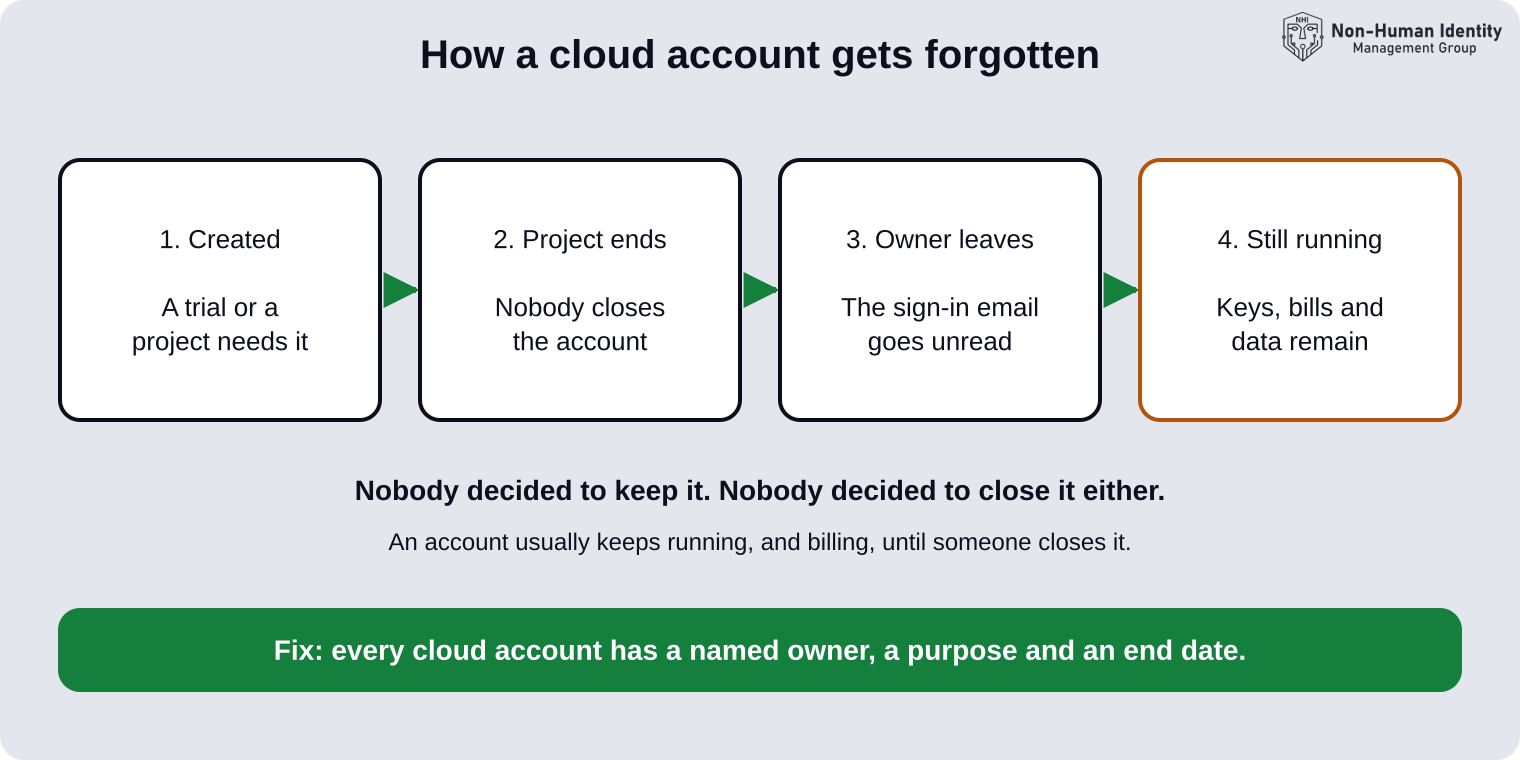
- It is opened. Someone needs a quick trial or a project space, and signs up with a work email and a card.
- The job ends. The project finishes, but closing the account is nobody's task.
- The owner moves on. The person leaves. The master sign-in, called the root account, is tied to their email.[1]
- It keeps running. Services, stored data and keys stay in place, and the bill keeps coming.
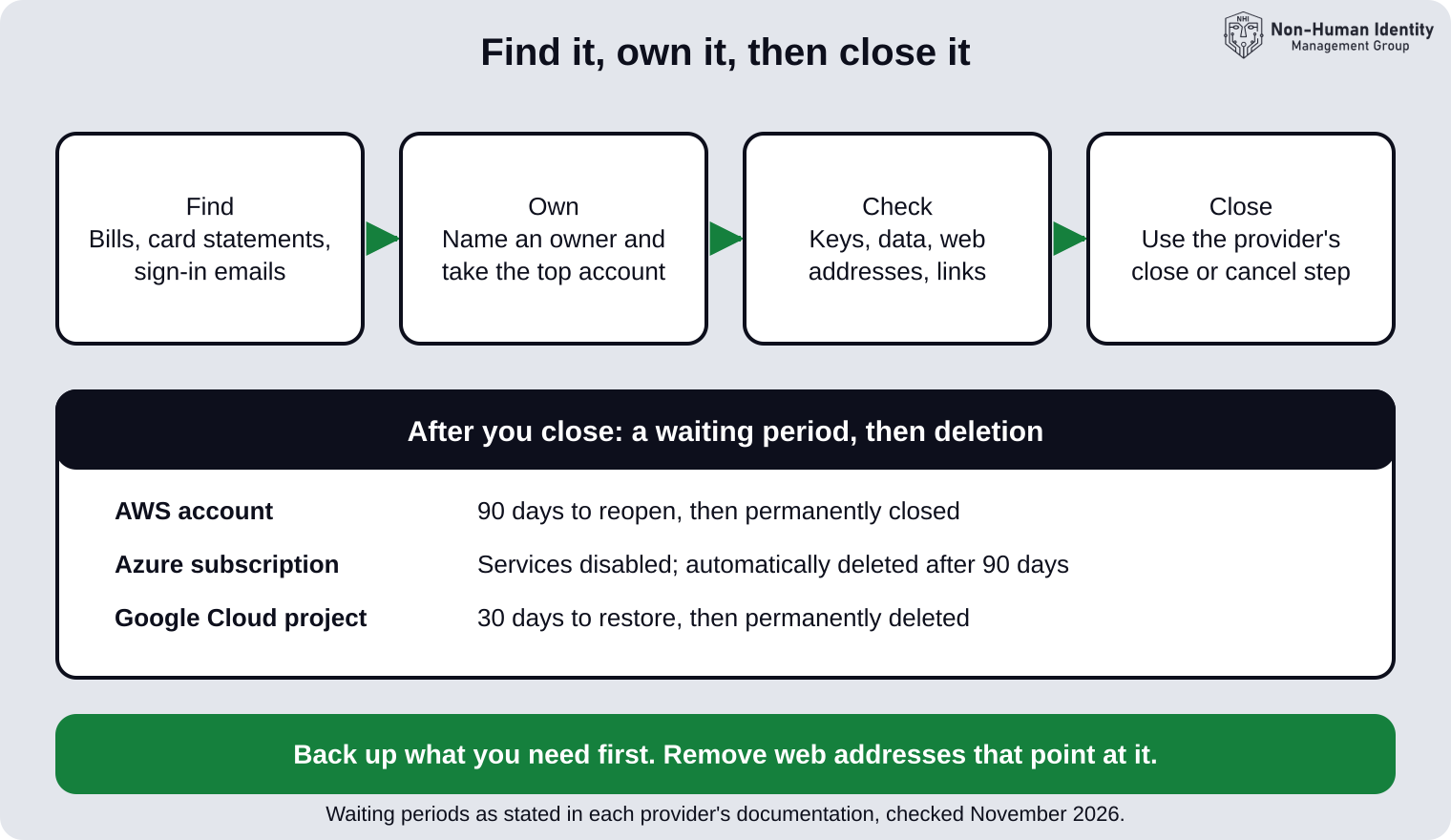
- Someone finds it. A bill, a provider email or a security tool turns it up.
- It is owned or closed. A named person takes charge, checks what depends on it, then keeps it or closes it.
Closing is not instant. Each big provider keeps a closed account for a while, so a mistake can be undone. AWS lets you reopen a closed account for 90 days.[2] Microsoft disables a cancelled Azure subscription straight away and deletes it automatically after 90 days.[3] Google Cloud lets project owners restore a shut-down project for 30 days.[4] After that, the data is gone, so back up anything you need first.
One more thing to check before closing: web addresses. Your website name may still point at a cloud service you deleted. If so, someone else may be able to set up a service with the same name and take over that address.[5]
A worked example
Calla Castell runs a small, fictional design studio. Wren Kowal joined last month to look after its IT.
Wren starts by reading a year of card statements. She spots a monthly charge from a cloud provider that nobody can explain. The account name says "client-demo".
Calla remembers. A freelancer set it up three years ago to show a client a website preview. The project ended, and the freelancer moved on.
Wren thinks of the rented storage unit. First, find out who has the key. The master sign-in uses the freelancer's own email address. Calla contacts the freelancer, who helps move the sign-in to an address the studio controls. Wren turns on a second sign-in check for it.
Next, Wren looks inside. She finds an old copy of the client's website and a folder of draft images. She also finds an access key that a program once used to upload files. She deletes the key. She checks the sign-in records the provider offers and sees no activity she cannot explain in the records available to her.
Wren checks the studio's web addresses too. A "demo" address still points at the account. She removes it.
Calla agrees the files are not needed. Wren saves one copy, then closes the account and notes the date the waiting period ends.
Finally, they write a short rule. Every new cloud account needs Calla's approval, a studio email address and an end date.
Myths and mistakes
| What people think | What is true |
|---|---|
| If nobody uses an account, it is harmless. | Unused accounts can still hold data and working keys, and nobody is watching them. |
| Deleting the services closes the account. | The account stays open until someone uses the provider's close or cancel step. |
| Closing an account deletes everything at once. | Providers keep closed accounts for a set period first, which gives you time to undo a mistake.[2] |
| A small monthly charge is not worth chasing. | A small charge is often the only clue that an account exists. |
| Once the account is gone, we are done. | Web addresses that pointed at it need removing too.[5] |
What can I do this week?
Knowing what you have comes first. The UK's National Cyber Security Centre advises recording who is responsible for each asset and what it is used for.[6]
- Search card statements and invoices for cloud provider charges.
- Ask staff and suppliers which cloud accounts they opened for the business.
- For each account, write down an owner, a purpose and a sign-in email the business controls.
- Add a cloud accounts question to your leaver and supplier exit checklists.
Checklist
- We have a list of every cloud account the business pays for or uses.
- Each account has a named owner who still works with us.
- Each master sign-in uses an email address the business controls, with a second sign-in check.
- Accounts we do not need are backed up where necessary, then closed.
- Keys inside closed or unused accounts are deleted.
- Web addresses pointing at removed services are deleted.
- New cloud accounts need approval, a business email and an end date.
- Leavers and suppliers are asked which cloud accounts they opened.
Common questions
How do I find cloud accounts I have forgotten about?
Start with money and email. Card statements, invoices and expense claims show who pays a cloud provider. Old sign-in and billing emails show which addresses were used. Then ask staff and past suppliers directly. Larger firms can also use tools that list accounts under one company structure.
Can I just stop paying for a cloud account?
That is risky. An unpaid account may be suspended, but your data and keys can stay inside it, and you may still owe charges. Use the provider's proper close or cancel step instead, after backing up what you need. Each provider explains what happens to the bill afterwards.
What if the account is in a former employee's name?
Contact the provider's support and explain that the business owns it. Proof such as invoices and payment records helps. If the person is happy to help, they can move the sign-in to a business email. Plan for this in future by using business addresses for every account.
Should I keep or close a forgotten account?
Close it unless someone can name a current purpose for it. If you keep it, give it a named owner, a business sign-in email and a second sign-in check. Either way, check for data, keys and web addresses before you decide, and write the decision down.
Where next?
Ready for the detail? Read the practitioner guide: Cloud Account and Resource Decommissioning. It goes further into what each provider does on closure, what survives outside the account, and how to prove nothing is left behind.
Also useful:
- How to find forgotten AWS accounts, Azure subscriptions and Google Cloud projects
- Cloud Root Accounts for Beginners
- Orphaned and Dormant Accounts for Beginners
- Asset Inventory for Beginners
Related NHI Mgmt Group resources: Non-Human Identities for Beginners · Vendor Offboarding for Beginners · Cloud Security for Beginners
Key terms
- Cloud account
- The top-level container a cloud provider uses to hold your resources, such as an AWS account, an Azure subscription or a Google Cloud project.
- Root account (cloud)
- The first sign-in created with a cloud account, with full control over everything in it.
- Shadow IT
- Apps and services used without the organisation's approval or knowledge.
- Decommissioning
- The planned retirement of an account, identity or system and its access when it is no longer needed.
- Asset inventory
- A kept-up-to-date list of the systems, accounts and services an organisation needs to look after.
- Dangling web address (dangling DNS)
- A web address that still points at a cloud service that has been deleted.
Sources and further reading
- AWS account root user. AWS Identity and Access Management User Guide, Amazon Web Services. https://docs.aws.amazon.com/IAM/latest/UserGuide/id_root-user.html, accessed 28 Nov 2026.
- Close an AWS account. AWS Account Management Reference Guide, Amazon Web Services. https://docs.aws.amazon.com/accounts/latest/reference/manage-acct-closing.html, accessed 28 Nov 2026.
- Cancel and delete your Azure subscription. Microsoft Learn, Microsoft. https://learn.microsoft.com/en-us/azure/cost-management-billing/manage/cancel-azure-subscription, accessed 28 Nov 2026.
- Shut down and restore projects. Google Cloud Resource Manager documentation, Google. https://docs.cloud.google.com/resource-manager/docs/delete-restore-projects, accessed 28 Nov 2026.
- Prevent dangling DNS entries and avoid subdomain takeover. Microsoft Learn, Microsoft. https://learn.microsoft.com/en-us/azure/security/fundamentals/subdomain-takeover, accessed 28 Nov 2026.
- Asset management, 10 Steps to Cyber Security. National Cyber Security Centre (UK), 11 May 2021. https://www.ncsc.gov.uk/collection/10-steps/asset-management, accessed 28 Nov 2026.