A memory leak bug lets an outsider read pieces of a computer's working memory that should stay private.
This guide is for students, newcomers to IT and anyone who has seen names like Heartbleed or CitrixBleed in the news. You do not need to write code to be affected: if your organisation uses a remote access gateway, a website or a database, a flaw like this could expose the passwords and sign-in tokens it holds.
In short
- A bleed flaw makes a server send back more of its memory than it should, and that memory can hold passwords, keys and session tokens.
- A stolen session token can let an attacker skip the password and the extra sign-in check, because the check has already happened.
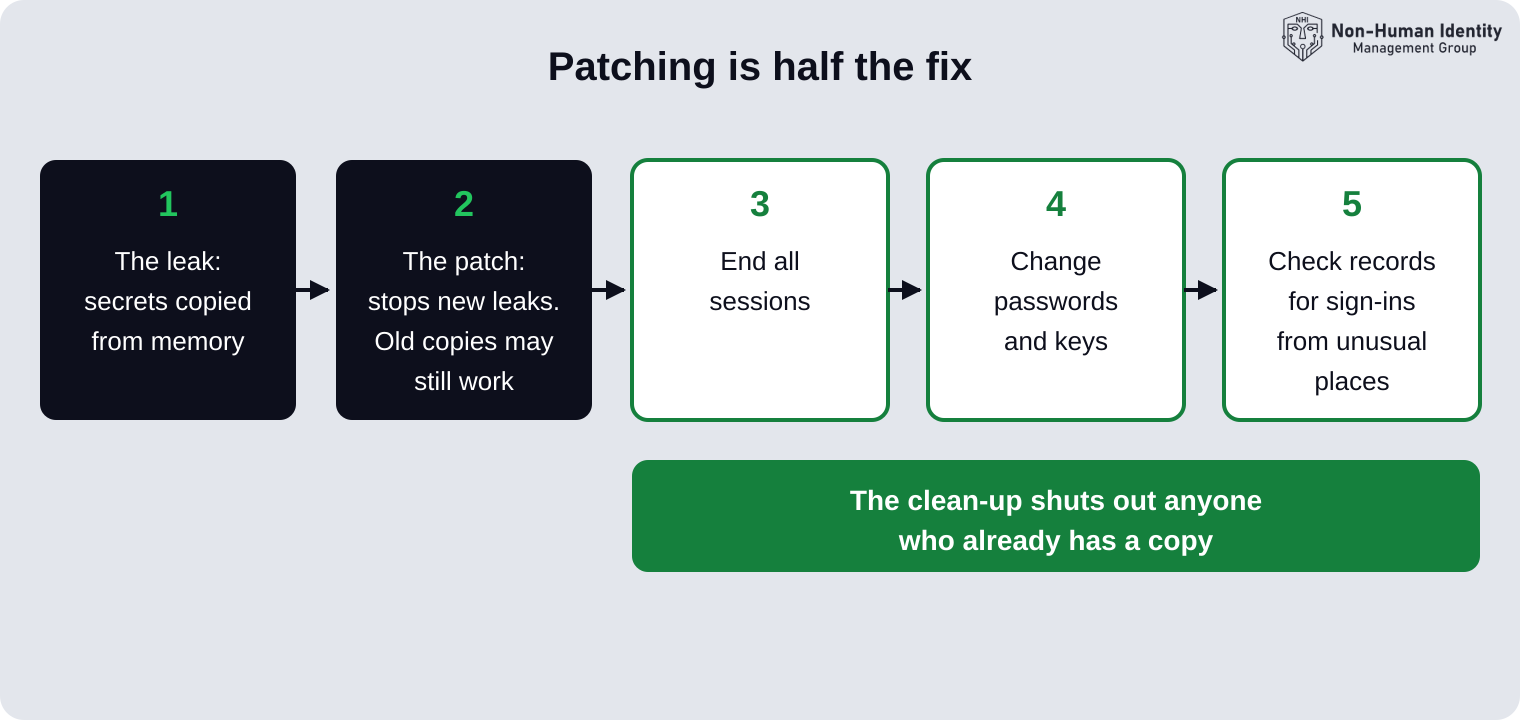
- Installing the fix stops new leaks, but anything already stolen may still work.
- So after patching, end all open sessions and change any passwords and keys the server held.
What you will learn
- Explain what a bleed flaw is in one sentence.
- Name three famous examples and what each one leaked.
- Explain why patching alone does not finish the job.
- Check that your team ends sessions and changes secrets after a bleed fix.
- Working memory
- the short-term space where a computer keeps whatever it is busy with right now.
- Sign-in pass (session token)
- a code a website gives you after you sign in, so it knows it is still you.
- Bleed flaw (memory disclosure)
- a bug that lets someone read memory they should not see.
What is a memory leak bug?
Think of asking a shop assistant for your receipt. They grab a handful from the drawer and give you yours, plus a few other customers' receipts by mistake. You never broke in. You just got more than you asked for.
A memory leak bug works the same way. Every server keeps a working memory, a short-term space for whatever it is handling. That space can hold other people's passwords, the codes that keep them signed in, and secret keys the server uses. A bleed flaw tricks the server into handing back extra memory along with its normal reply.
Security news often calls these flaws "bleeds", because private data bleeds out a little at a time. The more formal name is memory disclosure.
One word of warning. Programmers also say "memory leak" for a different bug, where a program forgets to free up memory and slowly runs out of space. That kind makes things slow or crash. This guide is about the security kind, where secrets leak out.
Where the comparison stops working: you would probably notice a pile of strangers' receipts. A server sends leaked memory quietly, and the people whose data leaked may never find out.
Why does it matter?
The most valuable thing in a server's memory is often a sign-in pass. If an attacker copies one, they may be able to act as that person without a password or a code from their phone. The flaw itself may leave little sign that it was used.
If you look after IT for a small office
What could happen: you patch the remote access box, but an attacker keeps using a session they copied before the fix.
Check this: after any bleed fix, end every open session, not just the new ones.
If you are studying security
What could happen: you learn the patch is the fix, and miss the clean-up that matters just as much.
Check this: for each famous bleed, ask what leaked and what had to be replaced.
If your apps use a database
What could happen: the database leaks the passwords and keys your apps use to connect to it.
Check this: know which passwords and keys pass through each server, so you can change them fast.
What does it look like?
Here is a made-up scrap of leaked server memory. Real leaks are messier, with secrets mixed into junk.
Example only. All values are made up.
..reply: OK..##..%%..
Cookie: session=FAKE-SESSION-0000-EXAMPLE      (1)
[email protected]..##..            (2)
db_password=FAKE-dbpass-0000..%%..             (3)
api_key=EXAMPLE-KEY-0000-FAKE..##..            (4)
- In a real file, this line would contain someone's sign-in pass.
- An email address from another person's request.
- In a real file, this line would contain the password an app uses to reach its database.
- A software key. Whoever holds it may be able to act as the app.
Why this is risky: the attacker did not need to sign in. They asked the server a crafted question and it answered with secrets. Some of those secrets belong to people, and some belong to software, the non-human identities (NHIs) that apps use to connect to each other.
The safer way: install the fix quickly. Then end every open session. Change the passwords and keys that could have been in memory. Once that is done, anything already copied should no longer give access.
How does it work?
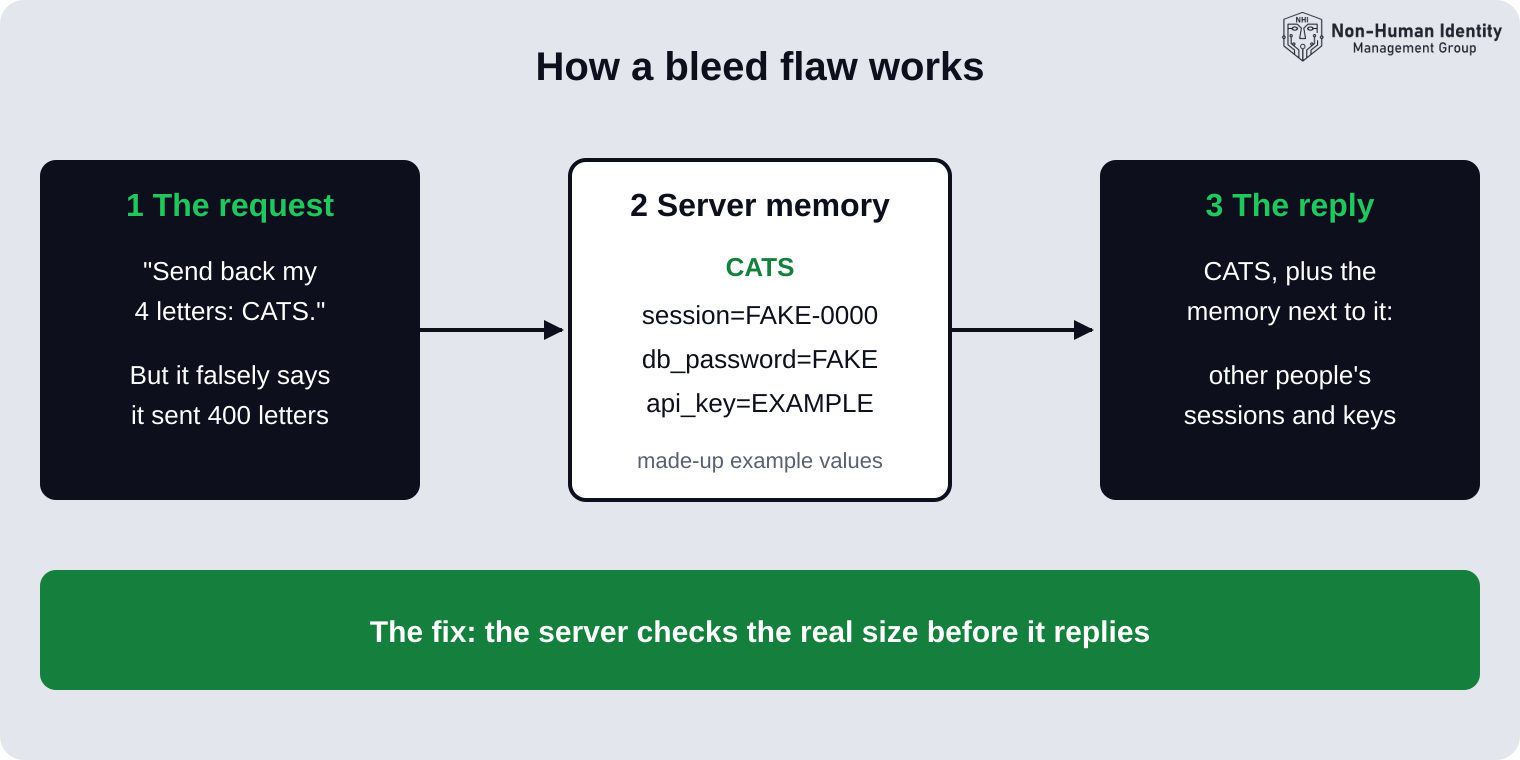
The details differ for each flaw, but most bleeds follow the same pattern.
- The server is busy. It holds recent requests, passwords, sign-in passes and keys in its working memory.
- A crafted request arrives. The attacker sends a message that is slightly wrong, for example one that claims to be bigger than it is.
- The server over-reads. It trusts the message and copies back more memory than it should. Citrix described its 2025 flaw as weak checking of input that leads to a memory over-read.[2]
- The attacker repeats it. Each reply leaks a different scrap, so they ask again and again and sift for secrets.[6]
- The attacker uses what they find. A copied sign-in pass can open a session that has already passed the password and extra checks.[3]
Here are the best-known bleeds.
Heartbleed (2014). A flaw in OpenSSL, a free toolkit that protects many websites' padlock connections, let anyone read the memory of affected servers. That memory could hold secret keys, user names and passwords, and messages. Its finders said using it did not leave anything unusual in the logs. Recovery meant patching, replacing keys, changing passwords and treating session cookies as stolen.[1]
CitrixBleed (2023). Citrix NetScaler is a gateway many firms use for remote access. Citrix published a fix on 10 October 2023.[7] Researchers at Mandiant found that a crafted request made it return memory holding a valid session cookie. With that cookie, an attacker could get in without the username, password or second sign-in check.[3] Comcast said attackers reached some Xfinity systems between 16 and 19 October 2023, before its systems were fully mitigated.[4] Read our CitrixBleed 2023 page for the full story.
CitrixBleed 2 (2025). A similar flaw in the same gateways was fixed on 17 June 2025. After upgrading, Citrix told customers to end all active sessions.[2]
MongoBleed (2025). MongoDB is a popular database. The company found a flaw internally in December 2025, patched its cloud service and published the issue on 19 December.[5] Researchers said attackers did not need to sign in, and the leaked memory could include passwords and software keys.[6] A working attack became public on 26 December 2025, and attacks were reported soon after.[8] Read our MongoBleed page for more.
A worked example
Mira Tanaka looks after IT for a fictional accountancy firm with thirty staff. Staff work from home through a remote access gateway. Milo Jensen, an outside support engineer, helps with the gateway.
One Wednesday Milo sends a message. "The gateway maker has published a fix for a memory flaw. It is being called a bleed. I can install it tonight."
Mira remembers the shop receipts. If strangers already have copies, taking the drawer away does not get them back. So she asks Milo for a plan with three parts, not one.
First, Milo installs the fix that evening. Second, once it is in place, he ends every open session on the gateway, following the maker's advice. Everyone has to sign in again the next morning, with their password and phone code. Pia Osei in the finance team grumbles, but it takes her a minute.
Third, Mira lists the passwords and keys the gateway uses to talk to other systems, such as the link to the staff directory. These are non-human identities, and their secrets could have been in memory too. Milo changes each one.
Last, Milo checks the gateway records for sign-ins from unusual places in the past weeks. He finds no suspicious sessions in the records available to him.
Mira writes the three steps into the firm's patch plan, so the next bleed gets the same treatment.
Myths and mistakes
| What people think | What is true |
|---|---|
| Once the patch is on, we are safe. | The patch stops new leaks. Sessions and secrets copied before it may still work until you end or change them.[1] |
| We have strong passwords and phone codes, so a leak cannot hurt us. | A copied session cookie can skip both, because the checks already happened.[3] |
| Our logs show nothing, so nobody used it. | Some bleeds leave little or no trace in normal logs.[1] Clean up anyway. |
| A memory leak just means a slow program. | That is one meaning. In security news it usually means private memory leaking out. |
| Only people's passwords are at risk. | Software keys and database passwords sit in memory too. Change those as well.[6] |
What can I do this week?
- List the systems you run that face the internet, such as gateways, websites and databases.
- Check that each one gets security updates and who installs them.
- Find out how to end all open sessions on each system, before you need to.
- Write down which passwords and keys each system holds, and who can change them.
- Add "end sessions and change secrets" to your patch plan for any memory flaw.
Checklist
- Internet-facing systems are listed, with an owner for each.
- Security updates for those systems are installed quickly.
- After a bleed fix, every open session is ended.
- Passwords, keys and tokens that the system held are changed.
- Sign-in records are checked for sessions from unusual places.
- Databases and admin pages are not open to the whole internet.
- The clean-up steps are written into the patch plan.
Common questions
Is a memory leak bug the same as a buffer overflow?
No, but they are cousins. Both come from software handling memory badly. A buffer overflow usually writes past the edge of a space and may let an attacker run their own code. A bleed reads past the edge and hands back secrets. See Buffer Overflows for Beginners.
Why do I have to sign in again after a fix?
Because ending every session is part of the fix. If an attacker copied a sign-in pass before the patch, that pass could still work. Ending all sessions cancels old passes, so everyone, including any attacker, has to sign in from scratch with a password and second check.
Can I tell if a bleed was used against us?
Not always. Some bleeds leave little sign in normal logs. You can look for sessions used from unusual places or devices, but a clean record is not proof. That is why the safe step is to end sessions and change secrets anyway, whatever the logs show.
Why are software keys at risk, not just people's passwords?
Servers keep the keys and passwords apps use to connect to each other in memory while they work. These belong to non-human identities. A bleed can leak them just like a person's details, so they need changing too. See Non-Human Identities for Beginners.
How do these flaws get fixed in the long run?
Mostly by better checks in the code and safer programming languages. Many bleeds come from code that trusts a size it was given. Languages that check memory limits for you make this mistake much harder to write. See Memory-Safe Languages for Beginners.
Where next?
Ready for the detail? Read our analysis: CitrixBleed 2: How a NetScaler Memory Leak Handed Attackers Live Session Tokens. It goes further into the affected versions, how attackers used the stolen sessions and the full clean-up steps.[2]
Also useful:
- Session Hijacking and Cookie Theft Guide
- Session Token Theft Response Playbook
- Famous Vulnerabilities for Beginners
- Memory Corruption Vulnerabilities Guide
Related NHI Mgmt Group resources: Patch Management for Beginners · Leaked Secret Response for Beginners · Non-Human Identities for Beginners
Key terms
- Memory disclosure
- The unintended exposure of data held in memory to someone who should not see it.
- Out-of-bounds read
- Reading memory past the edge of the space a program meant to use, which can expose secrets nearby.
- Session token
- A short-lived code that proves someone has already signed in, so they do not have to sign in again.
- Session hijacking
- Taking over a signed-in session by using a stolen session token, with no need for the password.
- Session revocation
- Ending open sessions on purpose, so their tokens stop working straight away.
- Patch
- A software update that fixes bugs or closes security weak spots.
- Secret
- A password, key, token or certificate that software uses to prove it may act.
Sources and further reading
- The Heartbleed Bug. Synopsys (Codenomicon). https://heartbleed.com/, accessed 28 Nov 2026.
- NetScaler ADC and NetScaler Gateway security bulletin covering CVE-2025-5777 (CTX693420). Citrix (Cloud Software Group), 17 June 2025. https://support.citrix.com/external/article/693420/netscaler-adc-and-netscaler-gateway-secu.html, accessed 28 Nov 2026.
- Session hijacking analysis of Citrix CVE-2023-4966. Mandiant, Google Cloud, 31 October 2023. https://cloud.google.com/blog/topics/threat-intelligence/session-hijacking-citrix-cve-2023-4966/, accessed 28 Nov 2026.
- Xfinity notice of data security incident. Comcast Cable Communications (Xfinity). https://assets.comcast.com/assets/dotcom/learn/-Data-Incident.pdf, accessed 28 Nov 2026.
- MongoDB Server security update, December 2025. MongoDB, 29 December 2025. https://www.mongodb.com/company/blog/news/mongodb-server-security-update-december-2025, accessed 28 Nov 2026.
- CVE-2025-14847: all you need to know about MongoBleed. Akamai Security Research. https://www.akamai.com/blog/security-research/cve-2025-14847-all-you-need-to-know-about-mongobleed, accessed 28 Nov 2026.
- NetScaler ADC and NetScaler Gateway security bulletin covering CVE-2023-4966 (CTX579459). Citrix (Cloud Software Group), 10 October 2023. https://support.citrix.com/external/article/579459/netscaler-adc-and-netscaler-gateway-secu.html, accessed 28 Nov 2026.
- MongoBleed (CVE-2025-14847) exploited in the wild, research blog. Wiz Research. https://www.wiz.io/blog/mongobleed-cve-2025-14847-exploited-in-the-wild-mongodb, accessed 28 Nov 2026.