OpenSSL is a free toolkit for checking, creating and testing the keys and certificates behind secure connections.
This guide is for students, new IT staff and curious learners who keep seeing OpenSSL commands in tutorials. You do not need to be a programmer: a few read-only commands can tell you a lot about a website's padlock.
In short
- OpenSSL is both a code library that other software builds on and a command-line tool you type into.
- Learners mostly use it to read a certificate, test a secure connection and make a practice key.
- Its test connection tool keeps going after certificate errors, so read the warnings it prints.
- Private keys you create are secrets. Keep them out of shared folders, chats and code.
What you will learn
- Explain what OpenSSL is in one sentence.
- Read who a certificate belongs to, who signed it and when it expires.
- Spot the difference between what a server sends and what has been checked.
- Handle a practice private key safely.
- Website ID card (certificate)
- a small file that says who a website is, signed by an organisation that vouches for it.
- Secret half of a key pair (private key)
- the part of a key pair that must stay with its owner and never be shared.
- Text window for commands (command line)
- a window where you type instructions to the computer instead of clicking.
What is OpenSSL?
Think of a locksmith's toolkit. It holds tools to inspect a lock, test a key and cut a new one. OpenSSL is that kind of toolkit for the locks on secure internet connections.
The project calls OpenSSL a toolkit for cryptography and secure communication. Cryptography is the maths of keeping data secret.[4] It comes in two forms. One is a library, a block of ready-made code that other programs use to protect their connections. The other is the openssl command, which you type into a command line.
The command has many smaller tools inside it. Each one has a name, such as x509 for certificates, s_client for test connections and genpkey for making keys.[1]
Where the comparison stops working: a locksmith needs years of training to use every tool. With OpenSSL, a handful of read-only commands covers most of what a learner needs. They are not meant to change the server you look at.
Why does it matter?
Many websites, apps and devices rely on the OpenSSL library to protect their connections. Learning the command gives you a direct way to see what those connections are made of.
If you are studying for a security course
What could happen: labs and exams ask you to read a certificate, and the screen of text looks like noise.
Check this: practise reading the subject, issuer and dates lines first.
If you are new to a help desk or IT team
What could happen: a user reports a browser warning and you cannot tell if the certificate has expired.
Check this: look at the expiry date the server is really sending.
If you are building a home lab
What could happen: a practice private key ends up in a shared project, and people copy it into real systems.
Check this: keep practice keys in a folder only you can read, and label them as test only.
What does it look like?
Here is the kind of short summary OpenSSL prints when you ask it for the main facts about a certificate. The site and the organisations are made up.
Example only. All values are made up.
subject=CN = shop.example.com                       (1)
issuer=C = XX, O = Example Trust CA, CN = Example CA 1   (2)
notBefore=Mar  1 00:00:00 2026 GMT                  (3)
notAfter=May 30 23:59:59 2026 GMT                   (4)
- Who the certificate is for. In a real file, this line would contain the website's name.
- Who signed it. In a real file, this line would name the certificate authority that vouches for the site.
- The first day the certificate is valid.
- The last day it is valid. After this, browsers are likely to show a warning.
Why this is risky: a glance at the padlock tells you little. You can miss that a certificate is about to expire. You can also miss that it belongs to a different name. These four lines show both.[3]
The safer way: check the name and the end date whenever a site gives a warning. Keep expiry dates in a shared calendar or tracking tool.
How does it work?
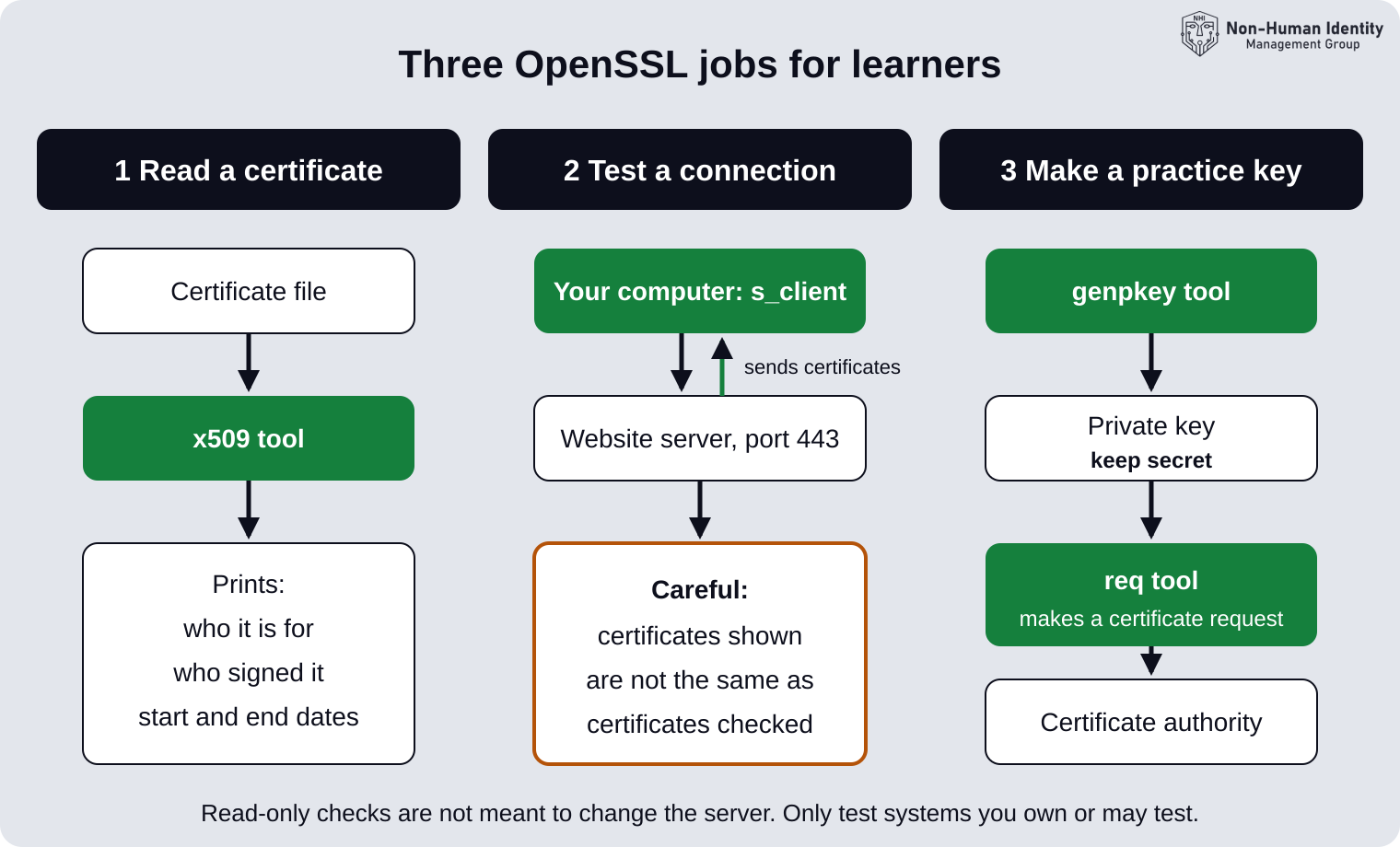
Most learners use three tools inside OpenSSL. Here is what each one does, in the order you are likely to meet them.
- Read a certificate. The
x509tool prints certificate details. With-nooutit hides the coded file itself. Options such as-subject,-issuerand-datespick which facts to show.-textprints everything, including the public key.[3] - Test a connection. The
s_clienttool connects to a server the way a browser would and shows what happens. The OpenSSL manual calls it a very useful diagnostic tool.[2] You give it the address with-connect, for exampleshop.example.com:443. - Name the site you want. One server can host many websites. The
-servernameoption tells it which site you mean, so you get the right certificate.[2] - See what was sent.
-showcertslists every certificate the server sends. The manual warns this is not a verified chain: it shows what was sent, not what was checked.[2] - Make a practice key. The
genpkeytool creates private keys, andreqcreates a certificate request (a form you send to a certificate authority).[1]
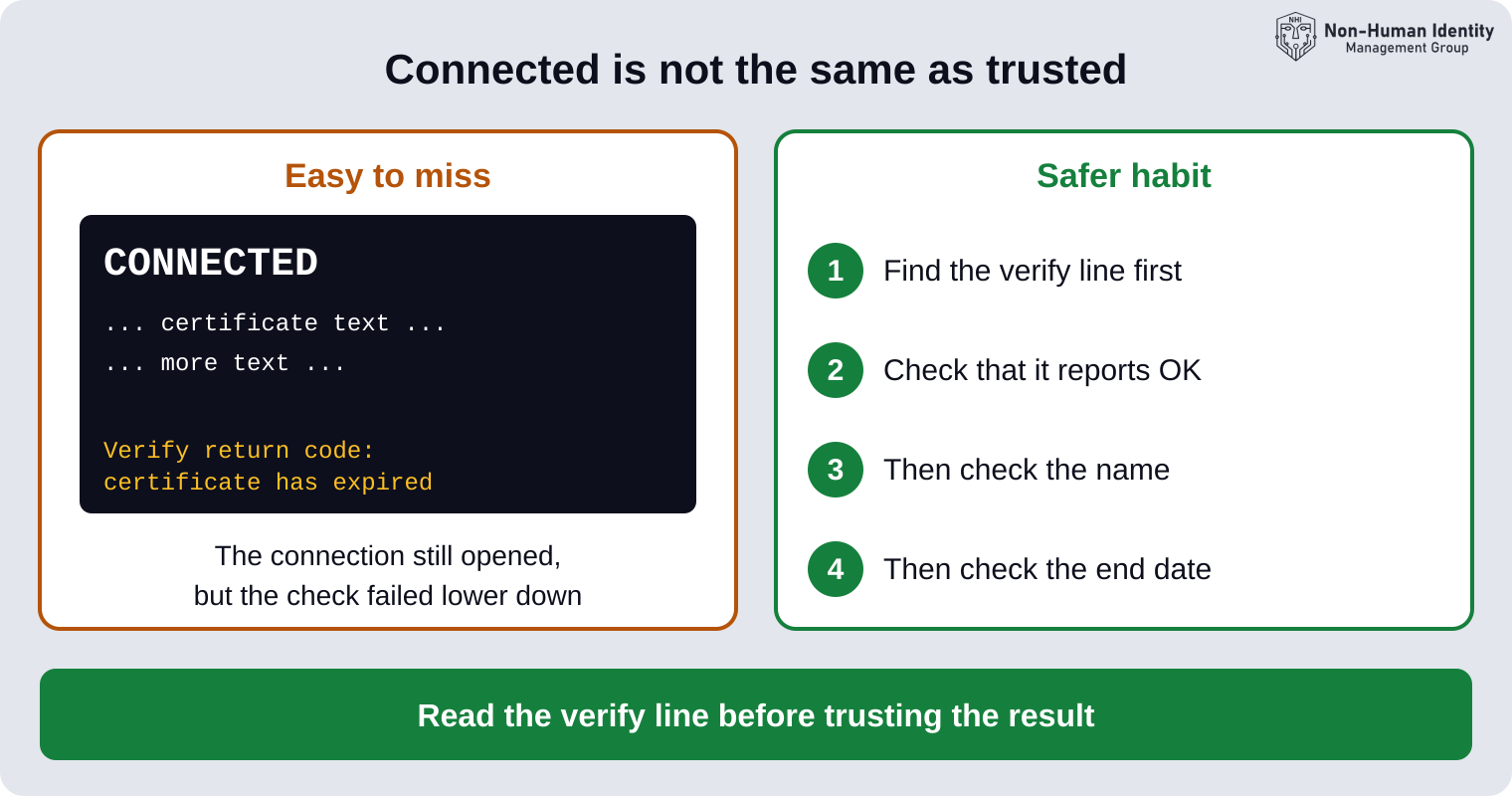
One point surprises many learners. s_client is built for troubleshooting, so it carries on even when a certificate fails its checks. The manual says normal applications should not do this, because it leaves them open to someone listening in the middle.[2] So a connection that "works" in s_client may still show a verify error in its output. Read that line.
A worked example
Vida Mbeki is in her first month on the IT help desk at a fictional college. On Monday morning, three students email to say the college's course booking site shows a browser warning.
Vida's team lead, Zane Achterberg, suggests she start with the facts, not guesses. She opens a command line on her work laptop and runs s_client against the booking site's address, adding -servername with the site's name.
The screen fills with text. Near the top, she sees the word "connected", and for a moment she thinks the site is fine. Then she remembers the locksmith's toolkit. Opening a lock is not the same as checking the key is genuine. She scrolls down and finds the verify line. It reports that the certificate has expired.
To be sure, she saves the certificate the server sent and reads it with x509, asking only for the subject, issuer and dates. The name matches the booking site. The end date was last Saturday.
Vida writes a short ticket for the web team: the site name, the end date and the exact error. She does not try to fix the server herself, because she has no access to it and it is not her job.
The web team renews the certificate within the hour. Vida checks again, and the verify line now reports OK. Zane asks her to add the new end date to the team's renewal calendar, so the warning does not catch them out next time.
Myths and mistakes
| What people think | What is true |
|---|---|
| If s_client says connected, the certificate is fine. | It keeps going after certificate errors. Check the verify line in the output.[2] |
| -showcerts shows a checked, trusted chain. | It shows what the server sent, in the order sent. It is not a verified chain.[2] |
| OpenSSL is only for experts. | A few read-only commands, such as reading a certificate's dates, are a good first step for learners. |
| A practice key is harmless, so it can go anywhere. | Practice keys get copied into real systems. Treat every private key as a secret. |
| OpenSSL and SSL are the same thing. | SSL is an old connection protocol. OpenSSL is a toolkit that also supports its successor, TLS.[2] |
What can I do this week?
- Check whether OpenSSL is on your computer, or ask your IT team for a lab machine that has it.
- Read the subject, issuer and dates of one certificate from a site you use.
- Run one test connection and find the verify line in the output.
- Make a practice key in a private folder, and delete it when you finish the exercise.
- Read the official OpenSSL manual page for one tool you used.
Checklist
- I can explain the difference between the OpenSSL library and the openssl command.
- I can read who a certificate is for, who signed it and when it expires.
- I use -servername when I test a site that may share a server with others.
- I read the verify line before trusting any test connection.
- I know -showcerts shows what was sent, not what was checked.
- I keep private keys out of shared folders, chats, tickets and code.
- I only test systems I own or have permission to test.
Common questions
Is OpenSSL safe to use?
Yes, for reading certificates and testing connections, as long as you keep it updated. The project publishes a list of known vulnerabilities and the releases that fix them.[4] Install it from your operating system's normal updates or the official project, not from a random download site.
Do I need permission to test a website with OpenSSL?
For a simple look at a public site's certificate, you are doing what a browser does. We suggest you still only run repeated or in-depth tests on systems you own or have written permission to test. Scanning other people's systems can break their rules or the law.
What is the difference between OpenSSL and a TLS scanner?
OpenSSL gives you single tools you drive yourself, one command at a time. A TLS scanner runs many checks in one go and writes a report. Learning OpenSSL first helps you understand what the scanner's report means.
Why does OpenSSL show a different certificate from my browser?
Often because the server hosts several sites. It did not know which one you meant. Add -servername with the site's name and try again. Some work networks check secure traffic. They can swap in their own certificate.
Can I use OpenSSL to make a certificate for my website?
You can make a key and a certificate request, and you can make a self-signed certificate for a lab. For a public website, browsers expect a certificate from a trusted certificate authority. Free automatic services exist for this.
Where next?
Ready for the detail? Read the practitioner guide: OpenSSL for Security Teams. It goes further into diagnosing chain and name errors, safe deployment and the hardening value of OpenSSL checks.
Also useful:
- testssl.sh and SSLyze Guide
- TLS and HTTPS for Beginners
- Public Key Infrastructure for Beginners
- Linux Command Line for Security for Beginners
Related NHI Mgmt Group resources: Machine Identities and Certificates for Beginners · Public Key Cryptography for Beginners · Free Automatic TLS Certificates for Beginners
Key terms
- OpenSSL
- A free toolkit and code library for cryptography and secure connections.
- TLS
- The method that protects data travelling between your device and a website.
- Digital certificate
- A signed file that links a name, such as a website, to a public key.
- An organisation trusted to check and sign certificates.
- Private key
- The secret half of a key pair, kept only by its owner.
- Certificate signing request
- A form, made with your key, that asks a certificate authority for a certificate.
- SNI
- The part of a connection that tells a shared server which website you want.
Sources and further reading
- openssl: OpenSSL command line program (OpenSSL 3.0 manual). OpenSSL Project. https://docs.openssl.org/3.0/man1/openssl/, accessed 28 Nov 2026.
- openssl-s_client: SSL/TLS client program (OpenSSL 3.0 manual). OpenSSL Project. https://docs.openssl.org/3.0/man1/openssl-s_client/, accessed 28 Nov 2026.
- openssl-x509: certificate display and signing command (OpenSSL 3.0 manual). OpenSSL Project. https://docs.openssl.org/3.0/man1/openssl-x509/, accessed 28 Nov 2026.
- OpenSSL Library home page. OpenSSL Foundation and OpenSSL Corporation. https://openssl-library.org/, accessed 28 Nov 2026.